ERROR: Component xyz is not part of any NgModule or the module has not been imported into your module.
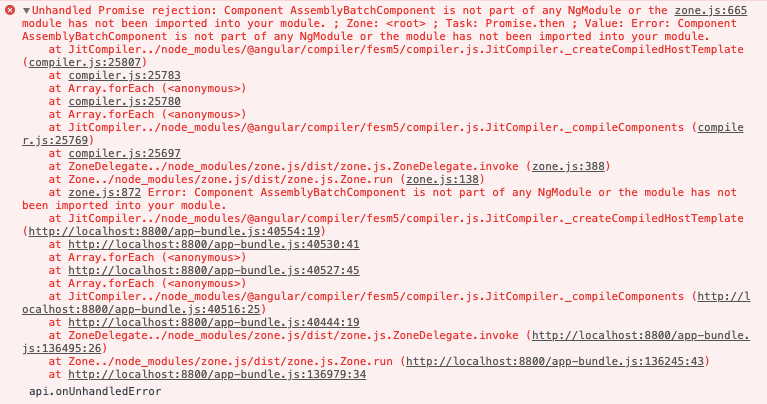
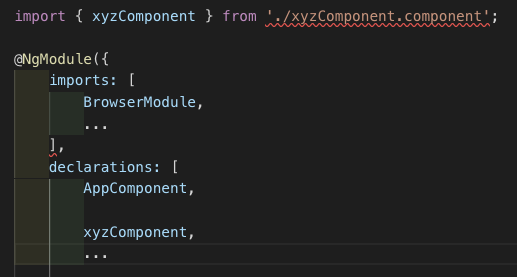
I got this error and the solution is simple. Just add the component to your app.module.ts under @NgModule’s “declarations” section:
Summary
The website provides a solution for an Angular error related to a component not being declared in any NgModule or not having the module imported.
Abstract
The undefined website addresses a common Angular development error where a component is not recognized by the Angular module system. The error message indicates that the component named 'xyz' is either not declared in any NgModule or the module containing it has not been imported into the application's main module (app.module.ts). The article offers a straightforward fix: developers should add the problematic component to the 'declarations' array within the @NgModule decorator of their app.module.ts file. Visual support is provided with screenshots showing both the error message and the correct configuration in the app.module.ts file.
Opinions
I got this error and the solution is simple. Just add the component to your app.module.ts under @NgModule’s “declarations” section:
 Karolina Kozmana
By rejecting alcohol, you reject something very human, an extra limb that we have collectively grown to deal with reality and with each…
 Alexander Nguyen
1-page. Well-formatted.
 Sufyan Maan, M.Eng
Think before you speak. Read before you think. — Fran Lebowitz


