avatarNicklas Millard

Free AI web copilot to create summaries, insights and extended knowledge, download it at here

6337

Abstract

e46">Would you give anyone in your organization or team super admin privileges to the test or production database?</p><p id="654a">Grant permissions to the app’s database user based on the principal of least privilege. The app should only have the bare minimum of permissions to perform its work.</p><p id="86f5"><b>👍 Run migration scripts from a different DB user than the app is using</b></p><p id="122e">This advice is related to separation of duties. The application should not be in charge of creating the database and its tables. The application should simply perform actions on those objects.</p><h2 id="e7db">Domain Models</h2><p id="2110"><b>👍 Persistence ignorance</b></p><p id="e9da">Focus on modeling your domain. Try as much as possible to not think about which ORM you are using.</p><p id="585c">However, be pragmatic.</p><p id="7074">Sometimes it’s simply too much of a hassle to make things work when acting like persistence doesn’t exist. Consider your use cases and how flexible and modular you want your code to be.</p><p id="9f64"><b>🚨 Avoid data annotations</b></p><p id="ad38">Avoid attributes such as <code>[Table], [Column], [Key], [ForeignKey]</code> etc.</p><p id="4cd6">Use a separate data layer project that takes a dependency on the Domain project and wires up all the models using <code>IEntityTypeConfiguration<T></code>.</p><figure id="adf2"><img src="https://cdn-images-1.readmedium.com/v2/resize:fit:800/1*le452rJ95W7tEM3JaZT17g.png"><figcaption></figcaption></figure><p id="a6b4"><b>👍 Keep IDs private</b></p><p id="6955">Rarely you’d want to expose IDs for anything else than convenience.</p><p id="72de">Exposing the IDs in urls like <code>api/author/1</code> may lead to annoyances, such as if an MS SQL server has crashed or restarted, the next ID may be <code>1001</code>. I’ve had clients commenting this, insisting it was a bug that had to be solved.</p><p id="7156">If you try to generate a migration with a class that has a private id field, EF core will complain because it’s not able to find an ID to use as primary key. This is easily fixed using type configuration as shown below.</p><figure id="63c6"><img src="https://cdn-images-1.readmedium.com/v2/resize:fit:800/1*WFF4xStofArbNKqvN4Hk_A.png"><figcaption></figcaption></figure><p id="7e2e">Instead of querying using IDs, you’d use another property that is unique, or, a combination of properties.</p><p id="762a">Without being certain, Medium articles seems to use a mix of Author handle, article name and a random string.</p><p id="039b"><code>nmillard/entityframework-core-dont-get-burnt-in-production-335ddfcfdfda</code></p><p id="ac33">If you’d have to expose IDs publicly, try use something else than an integer.</p><p id="46cb"><b>👍 Generate IDs yourself</b></p><p id="9521">Don’t let third-party software like a database generate your domain IDs. You should be in full control of generating them. They’re simply too important.</p><p id="2a71">I’ve usually went with one of two ways to deal with this: 1) let the domain model generate the ID itself, such as assigning a GUID on instantiation, or 2) use an ID factory, and pass the generated ID to the model’s constructor.</p><p id="98c8"><b>🚨 Avoid foreign key properties in domain models</b></p><figure id="903e"><img src="https://cdn-images-1.readmedium.com/v2/resize:fit:800/1*nhkXG8bJOOabSYYg03SNZg.png"><figcaption></figcaption></figure><p id="07b9"><b>👍 Use shadow properties when EF can’t generate a foreign key column — </b><i>Added 1st April 2020</i></p><p id="f368"><b>🚨 Avoid public default constructors</b></p><p id="fc83">Don’t make public default constructors just to make EF Core happy, instead, make the the default constructor private.</p><p id="16d5">It is also possible to have parameterized constructors, if not even a private one is good enough. However, you should be aware of this behaviour:</p><ul><li>Parameter and property types and names must match — but parameter names can be camel-cased (likeThis)</li><li>Navigation properties cannot be set</li></ul><figure id="3a18"><img src="https://cdn-images-1.readmedium.com/v2/resize:fit:800/1*QJmQ_urdFfJLk43D2w55hg.png"><figcaption></figcaption></figure><p id="23c5">Notice the model above has no default public constructor. EF Core matches the constructor argument with the auto-property.</p><p id="45d9"><b>👍 Remove unnecessary setters for properties and fields</b></p><p id="1360">Use a data layer project to let EF Core know how to populate properties and fields without setters.</p><p id="43c4">This is done using classes that implement<code>IEntityTypeConfiguration<T>.</code></p><p id="45d8">I’m using an example of an owned type that will be used as value object — that’s why you’ll see all the additional methods and operator overrides to check for equality.</p><p id="c007">I’m using a value object example because that’s when you’d usually want to get rid of all setters — even internal or private ones.</p><figure id="b35c"><img src="https://cdn-images-1.readmedium.com/v2/resize:fit:800/1*nyv77tRLTlVslFO_cXNRPA.png"><figcaption></figcaption></figure><p id="3faf"><b>👍 Make collections readonly</b></p><p id="2458">Use private fields for collections and expose them using immutable collections, such as IReadOnlyCollection<t> or IReadOnlyList<t>. Then let EF core know how to populate the private collection when retrieved thru configuring it’s metadata navigation property, as shown below.</t></t></p><figure id="27d1"><img src="https://cdn-images-1.readmedium.com/v2/resize:fit:800/1*jBeycKbxbGoBXcAigapTJw.png"><figcaption></figcaption></figure><p id="0c12">By only allowing addition and removal of books thru calling Author’s methods, you’ve centralized the logic.</p><p id="7e1a"><b>👍 Use owned types</b></p><p id="995e">An owned type is a type that will only ever appear on navigation properties of other types.</p><p id="d72b">Owned types are often not entities per se, but rather types that depend on some other type to exist or value objects. These should ideally not have an id.</p><figure id="de7f"><img src="https://cdn-images-1.readmedium.com/v2/resize:fit:800/1*c89e3bp-TSH9UweDeouKgQ.png"><figcaption></figcaption></figure><p id="f7c2">Even though RecommendationScore does not a primary key in the POCO, one will be generated for it in the database. It tak

Options

es the primary key of the Author, because, as we have configured it, Author can only have one RecommendationScore.</p><h2 id="f4b9">dotnet ef CLI</h2><p id="774c"><b>🚨 Don’t use Visual Studio helper commands</b></p><p id="9f9d">In my opinion, Visual Studio is hiding too much of what’s going on when you’re working with .NET, including EF Core.</p><p id="9676">Getting used to magic hinders your abilities to troubleshoot and confines you to VS.</p><p id="e1a5"><b>👍 Use the <code>dotnet ef</code> command line interface</b></p><p id="d865">Install <code>dotnet ef</code> to execute the EF core commands. <code>dotnet tool install --gobal dotnet-ef</code></p><p id="c84f">In your data layer project, install Microsoft.EntityFrameworkCore.Design. This package is used by the EF CLI in order to perform migrations, update database, etc. <code>dotnet add package Microsoft.EntityFrameworkCore.Design</code></p><p id="621b">When using the CLI, you’re gaining some valuable, transferable skills. You’ll have an easier time setting up Code as Infrastructure, DevOps pipelines, debugging, etc.</p><p id="a65e">Remember, only Visual Studio is aware of its own magic. When you start building pipelines, you can no longer rely on Visual Studio commands. Commands like <code>Update-Database</code> are simply not possible.</p><h2 id="7c7b">Migrations</h2><p id="e958">Really, migration deserve its own article, but I’ll try poke at the monster here anyway.</p><p id="0cd9"><b>👍 Create concise, manageable migrations</b></p><p id="5ee9">Run the <code>ef migrations</code> command everytime you make updates to your model or model configuration.</p><div id="dc48"><pre>dotnet ef migrations <span class="hljs-built_in">add</span> MigrationName</pre></div><p id="b97b">Try keep the migrations manageable by not bundling unrelated model updates into the same migration.</p><p id="648e"><b>👍 Check if migration code is correct</b></p><p id="0e44">Always open the newly created migrations and read through the auto-generated code.</p><p id="9a82">Quite often I find that I need to tweak my model configuration, because EF Core may not register a relationship correctly.</p><p id="e1d5"><b>🚨 Don’t run <code>dotnet ef database update</code></b></p><p id="08c5">Never run the database update command against anything else than your own local database.</p><p id="7e59"><b>👍 Use idempotent scripts to create and update the database</b></p><p id="09e5">Idempotent scripts ensure that only statements that hasn’t run will be executed. When creating an idempotent database script, you can without worry execute the whole script multiple times.</p><div id="b513"><pre>dotnet ef migrations <span class="hljs-keyword">script</span> -v
-o ./scripts/idempotent.sql
<span class="hljs-comment">--idempotent</span></pre></div><p id="93f9">The command above will generate a script using all your existing migrations, and add IF conditions to check if a migration has already been executed.</p><p id="3dd5">Keep the script in source control, at a sensible location. Then pick up and execute the script during your deployment process.</p><p id="a94e"><b>👍 Create migrations for seed data</b></p><p id="99db">By having your seed data placed in migrations, the data will automatically be part of the idempotent script.</p><p id="897c">Doing this you’ll save yourself a lot of headache related to for example running subsequent scripts in order.</p><p id="1b8e"><b>👍 Document the migrations workflow</b></p><p id="1f34">It’s easy to forget all the steps required to re-create or update your database. Document the workflow, and save the documentation markdown file in the data layer project root.</p><p id="4602"><b>For easy copying into your own .md file</b></p><div id="951f"><pre><span class="hljs-comment">## Intro</span> All commands must be executed <span class="hljs-built_in">from</span> <span class="hljs-keyword">the</span> root <span class="hljs-keyword">of</span> <span class="hljs-keyword">the</span> data layer project.</pre></div><div id="ebcf"><pre><span class="hljs-number">1</span>. cd <span class="hljs-keyword">to</span> root of <span class="hljs-keyword">data</span> layer project</pre></div><div id="6c36"><pre>### <span class="hljs-keyword">Add</span> <span class="hljs-built_in">new</span> migration dotnet ef migrations <span class="hljs-keyword">add</span> <MigrationName> -s ../<span class="hljs-type">Path</span>/<span class="hljs-keyword">To</span>/StartupProj</pre></div><div id="fcd4"><pre><span class="hljs-tag"><<span class="hljs-name">MigrationName</span>></span> ← name of the migration, without <span class="hljs-tag"><></span></pre></div><div id="5ad9"><pre><span class="hljs-comment">### Remove most recent migration</span> dotnet ef migrations <span class="hljs-built_in">remove</span> -s <span class="hljs-built_in">..</span>/Path/<span class="hljs-keyword">To</span>/StartupProj</pre></div><div id="7928"><pre>### <span class="hljs-keyword">Update</span> <span class="hljs-keyword">local</span>(!) <span class="hljs-keyword">database</span> dotnet ef <span class="hljs-keyword">database</span> <span class="hljs-keyword">update</span> -s ../<span class="hljs-type">Path</span>/<span class="hljs-keyword">To</span>/StartupProj</pre></div><div id="d1a9"><pre>^ this must <span class="hljs-keyword">only</span> ever be used <span class="hljs-keyword">to</span> <span class="hljs-keyword">update</span> your own <span class="hljs-keyword">local</span> <span class="hljs-keyword">database</span></pre></div><div id="3b03"><pre><span class="hljs-comment">### Generate idempotent script</span> dotnet ef migrations script -v -i
-o .<span class="hljs-regexp">/scripts/i</span>dempotent.sql
-s ..<span class="hljs-regexp">/Path/</span>To/StartupProj</pre></div><div id="1b15"><pre><span class="hljs-comment">## Switches</span> -v ← verbose console output -o ← <span class="hljs-built_in">path to</span> <span class="hljs-keyword">where</span> generated <span class="hljs-keyword">script</span> <span class="hljs-built_in">file</span> <span class="hljs-keyword">is</span> placed -i ← makes <span class="hljs-keyword">the</span> <span class="hljs-keyword">script</span> idempotent -s ← Path <span class="hljs-keyword">to</span> startup project (e.g. ASP.NET web app .csproj)</pre></div></article></body>

LIST OF HOW TOs

Get Better at EntityFramework Core — Best Practices

Here’s a list of best practices you should use today
Show me the code (github)

I’ll keep updating this article as I find new practices.

EntityFramework is a super easy to use ORM library for .NET developers. Though, despite its ease of use, and plug-and-play functionality, getting it right is honestly quite difficult.

Table of Contents

  • Solution and Project Structure
  • Security
  • Domain Models
  • dotnet ef CLI
  • Migrations

Solution and Project Structure

👍 Separate layers into different projects

The solution structure below is one that I often find the most useful.
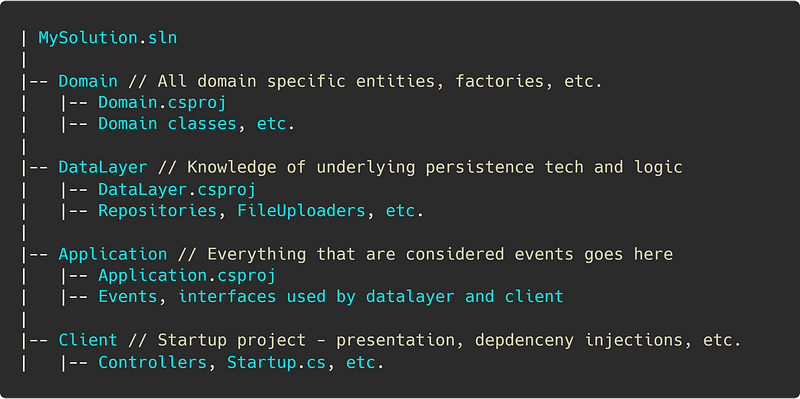
It allows you to cleanly separate the responsibilities of the application.

👍 Only the DataLayer project should have a dependency on EntityFramework — Updated 21st April 2020

Persistence implementation details should only be known to the data layer.

The data layer must implement interfaces defined in other projects, and concrete implementations of those classes should be registered with your dependency container of choice.

👍 Keep the DbContext class internal to the DataLayer project

Create an IServiceCollection extension method in the DataLayer that clients can use. The method should register the DbContext with the dependency injection framework.

The client should not know, or care, about persistence.
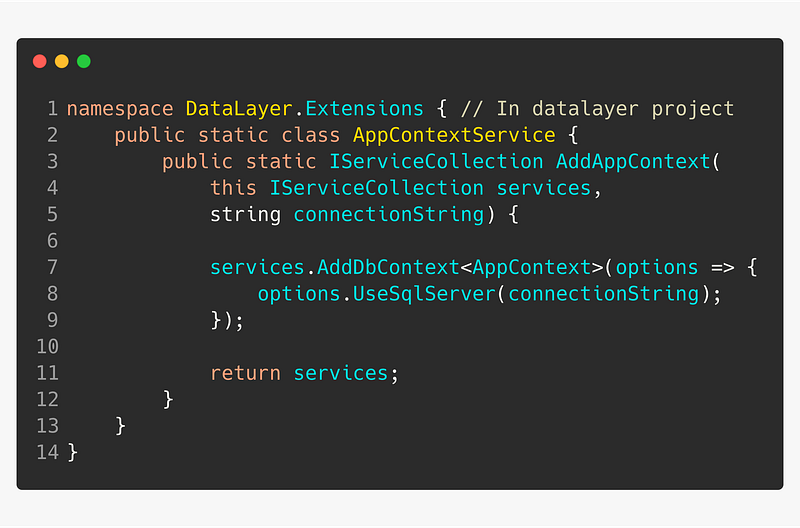
IServiceCollection extension

Use the IServiceCollection in the Startup class of the client project.
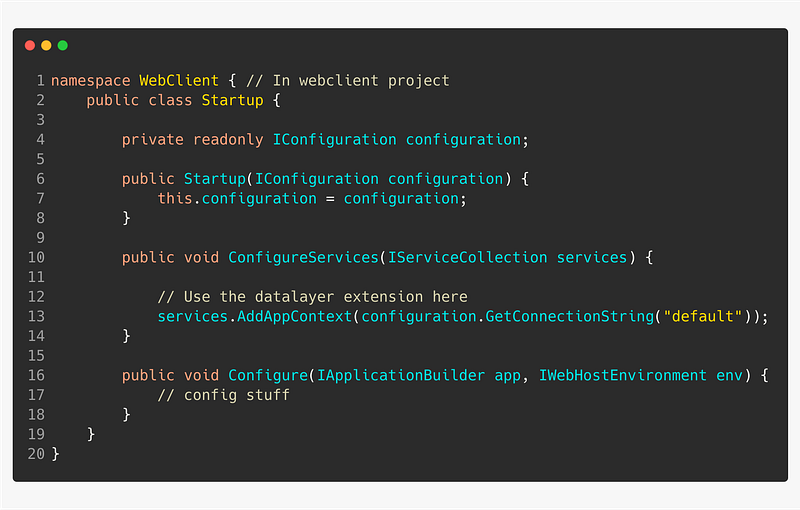
Using AppDbContext in Startup.cs

Encapsulating the database context ensures that the client won’t have direct access to making database calls, in addition, the client project won’t have an unnecessary dependency on EntityFrameworkCore.

👍 Use Type Configuration over OnModelCreating()

When creating the DbContext, it’s easy to just configure domain models directly inside the OnModelCreating(Modelbuilder builder) method. But this approach will quickly become chaotic.

Instead, only use OnModelCreating to scan for types that perform entity configurations.
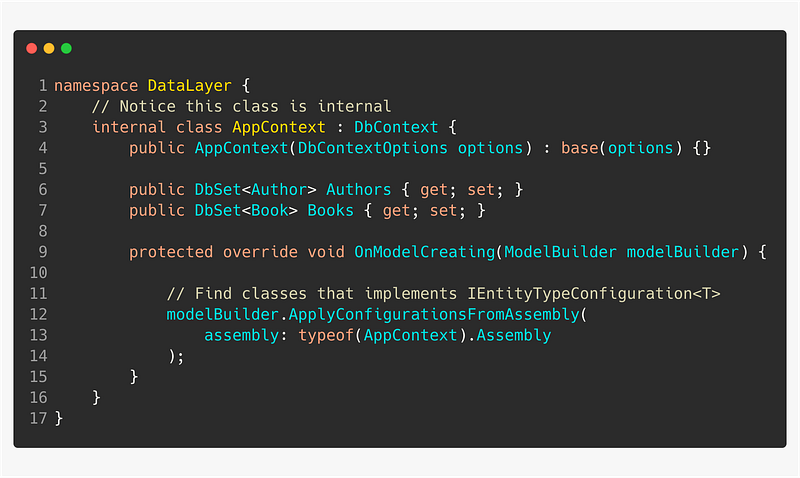
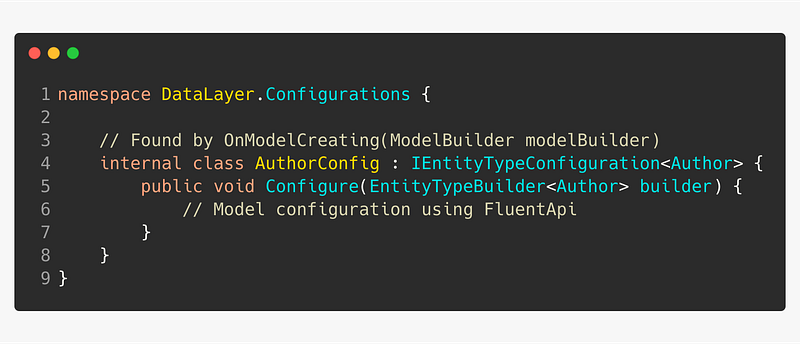
Then create separate, dedicated classes for configuring the different types you’ve added to DbSet.

Inside Configure(builder)` you’d write up all the database specific model configurations using FluentApi.

Security

👍 For local development, store secrets using “dotnet user-secrets”

Avoid checking in your ConnectionString at all cost by using the built-in .NET secrets manager.

Note that you may need to add this nuget package: Microsoft.Extensions.Configuration.UserSecrets to your project.

User secrets are stored at:

Windows %APPDATA%\Microsoft\UserSecrets\\secrets.json

Mac ~/.microsoft/usersecrets//secrets.json

Follow the steps below to add user secrets

  1. In your AppSettings, add the ConnectionString property. It may look like the snippet below — it’s important that the value is empty.
# appsettings.json
{
  "ConnectionStrings": {
    "default": ""
  },
  // Some other properties
}

2. Change directory to your client project using the terminl. E.g. the root of your ASP.NET web app.

cd To/Path/Of/Startup/Root

3. Initialize the user secrets, and set the ConnectionString

dotnet user-secrets init

dotnet user-secrets set "ConnectionStrings:default" "connection_string"

👍 For production, store secrets in a KeyVault or Environment variables

The best solution is to store secrets in a KeyVault, such as Azure KeyVault. But, it may also be sufficient to just store them as environment variables, or in an AppSettings.json file located on the web server itself.

👍 Create a separate database login and user for the app

View the application as any other regular user of the database.

In case of someone mistakenly checking in the db user and password into source control, it’s less costly to just disable the app’s db user and create a new one, than having your server administrator (sa) login and dbo user compromised.

🚨 The app’s DB user must not have unnecessary permissions

Would you give anyone in your organization or team super admin privileges to the test or production database?

Grant permissions to the app’s database user based on the principal of least privilege. The app should only have the bare minimum of permissions to perform its work.

👍 Run migration scripts from a different DB user than the app is using

This advice is related to separation of duties. The application should not be in charge of creating the database and its tables. The application should simply perform actions on those objects.

Domain Models

👍 Persistence ignorance

Focus on modeling your domain. Try as much as possible to not think about which ORM you are using.

However, be pragmatic.

Sometimes it’s simply too much of a hassle to make things work when acting like persistence doesn’t exist. Consider your use cases and how flexible and modular you want your code to be.

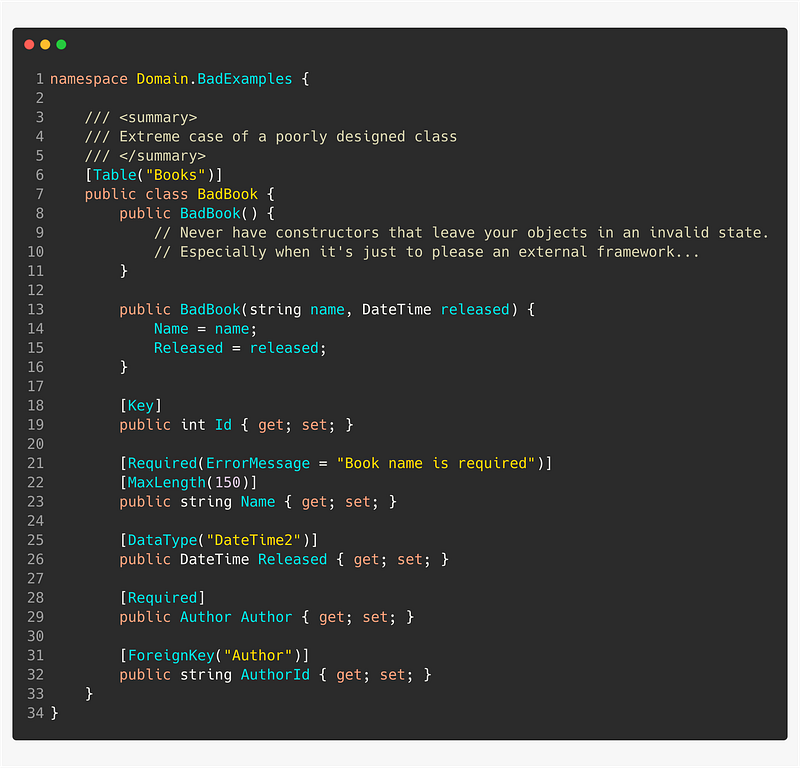
🚨 Avoid data annotations

Avoid attributes such as [Table], [Column], [Key], [ForeignKey] etc.

Use a separate data layer project that takes a dependency on the Domain project and wires up all the models using IEntityTypeConfiguration<T>.
👍 Keep IDs private

Rarely you’d want to expose IDs for anything else than convenience.

Exposing the IDs in urls like api/author/1 may lead to annoyances, such as if an MS SQL server has crashed or restarted, the next ID may be 1001. I’ve had clients commenting this, insisting it was a bug that had to be solved.

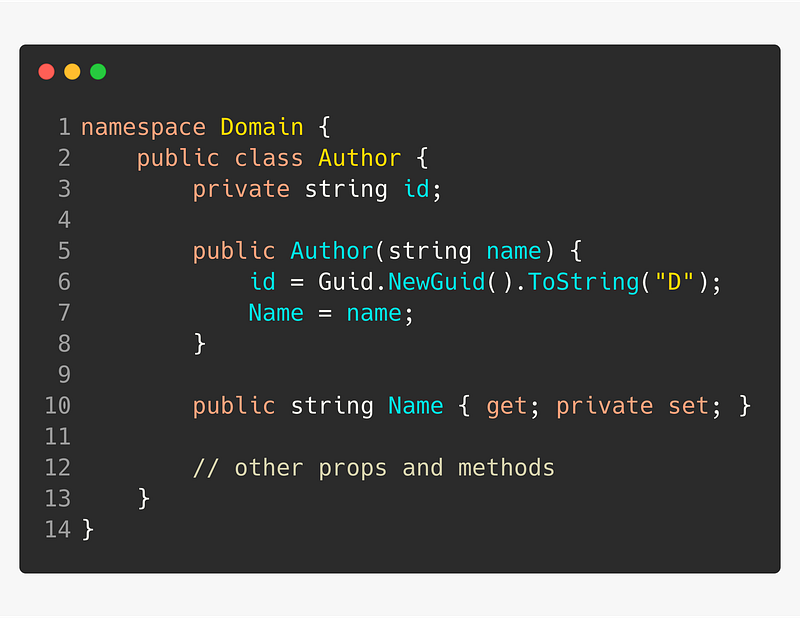
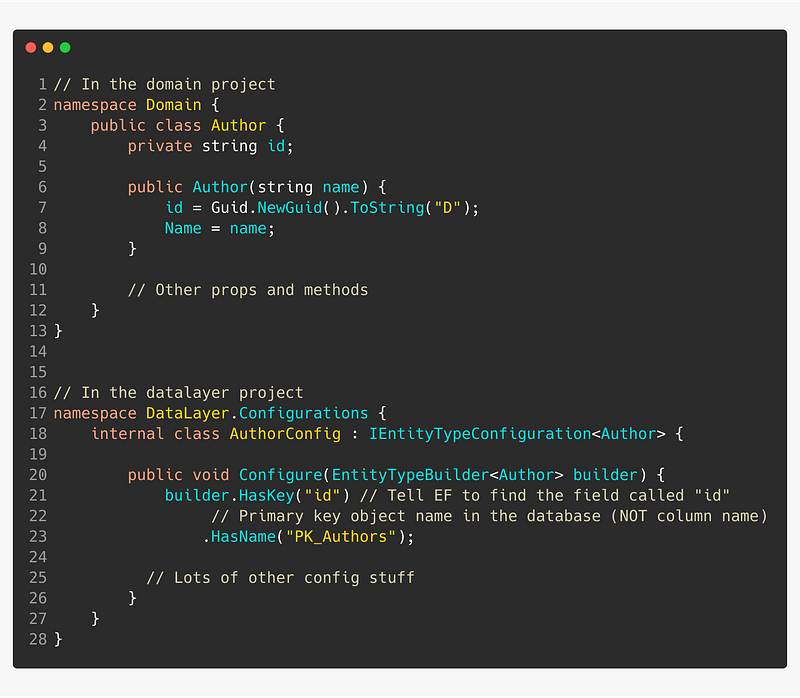
If you try to generate a migration with a class that has a private id field, EF core will complain because it’s not able to find an ID to use as primary key. This is easily fixed using type configuration as shown below.
Instead of querying using IDs, you’d use another property that is unique, or, a combination of properties.

Without being certain, Medium articles seems to use a mix of Author handle, article name and a random string.

nmillard/entityframework-core-dont-get-burnt-in-production-335ddfcfdfda

If you’d have to expose IDs publicly, try use something else than an integer.

👍 Generate IDs yourself

Don’t let third-party software like a database generate your domain IDs. You should be in full control of generating them. They’re simply too important.

I’ve usually went with one of two ways to deal with this: 1) let the domain model generate the ID itself, such as assigning a GUID on instantiation, or 2) use an ID factory, and pass the generated ID to the model’s constructor.

🚨 Avoid foreign key properties in domain models
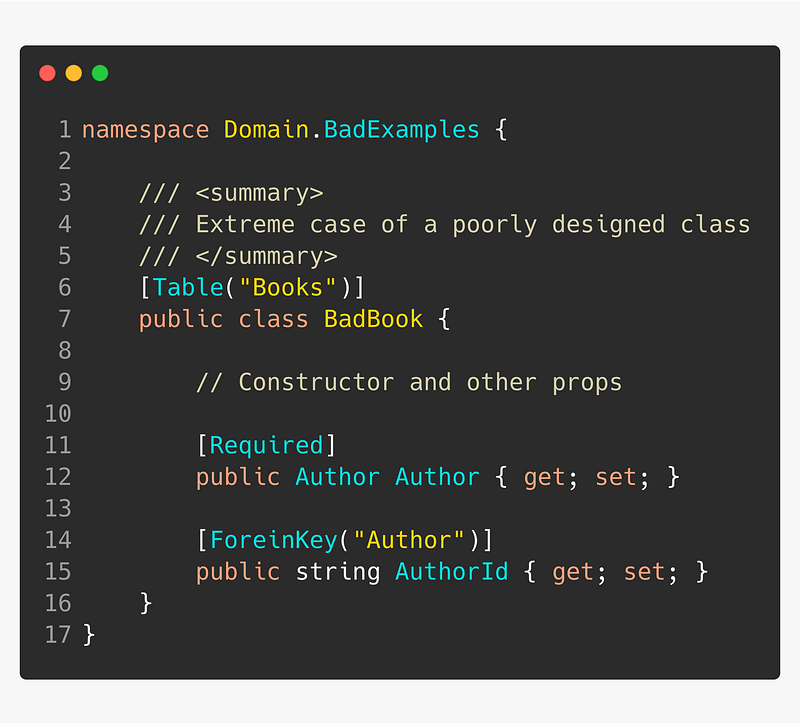
👍 Use shadow properties when EF can’t generate a foreign key column — Added 1st April 2020

🚨 Avoid public default constructors

Don’t make public default constructors just to make EF Core happy, instead, make the the default constructor private.

It is also possible to have parameterized constructors, if not even a private one is good enough. However, you should be aware of this behaviour:

  • Parameter and property types and names must match — but parameter names can be camel-cased (likeThis)
  • Navigation properties cannot be set

Notice the model above has no default public constructor. EF Core matches the constructor argument with the auto-property.

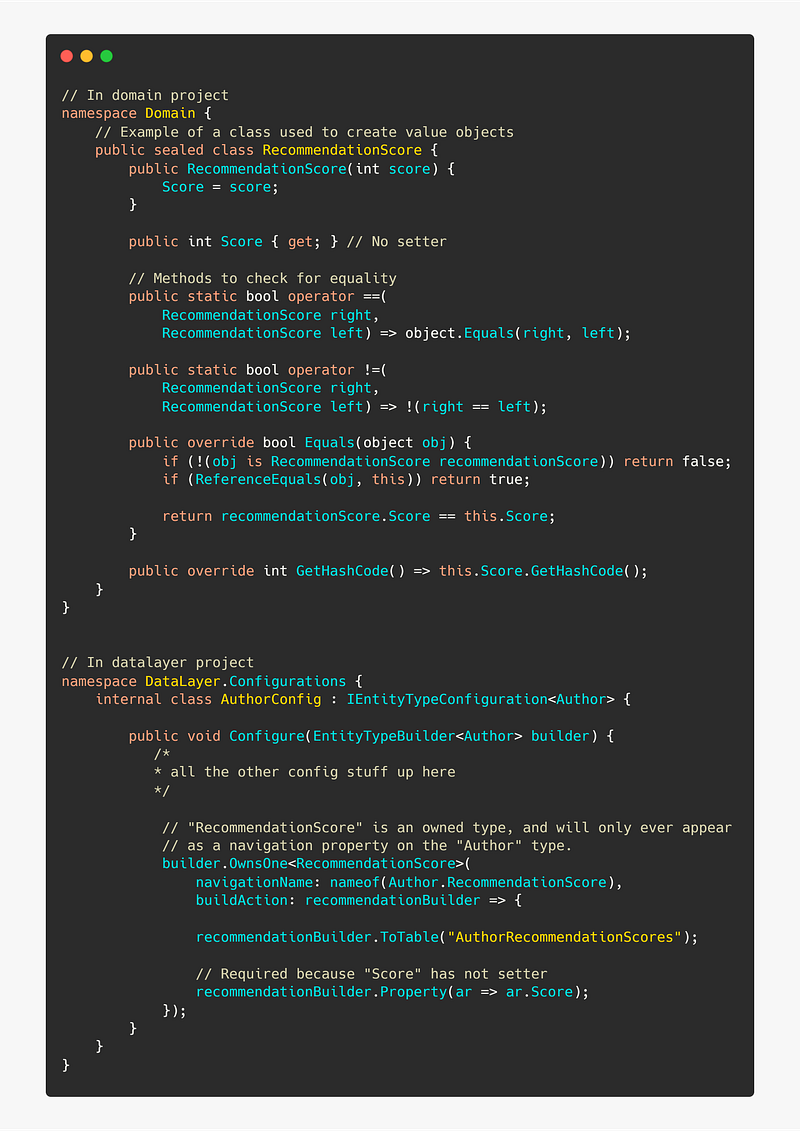
👍 Remove unnecessary setters for properties and fields

Use a data layer project to let EF Core know how to populate properties and fields without setters.

This is done using classes that implementIEntityTypeConfiguration<T>.

I’m using an example of an owned type that will be used as value object — that’s why you’ll see all the additional methods and operator overrides to check for equality.

I’m using a value object example because that’s when you’d usually want to get rid of all setters — even internal or private ones.
👍 Make collections readonly

Use private fields for collections and expose them using immutable collections, such as IReadOnlyCollection or IReadOnlyList. Then let EF core know how to populate the private collection when retrieved thru configuring it’s metadata navigation property, as shown below.
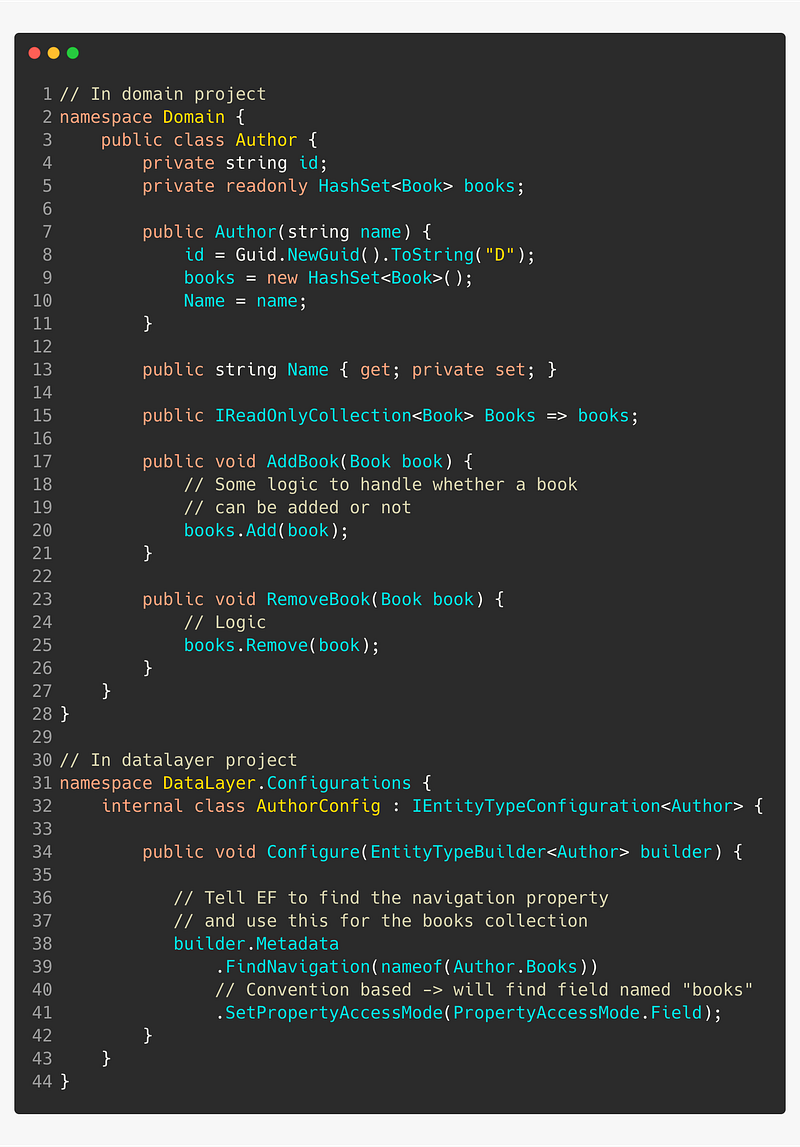
By only allowing addition and removal of books thru calling Author’s methods, you’ve centralized the logic.

👍 Use owned types

An owned type is a type that will only ever appear on navigation properties of other types.

Owned types are often not entities per se, but rather types that depend on some other type to exist or value objects. These should ideally not have an id.
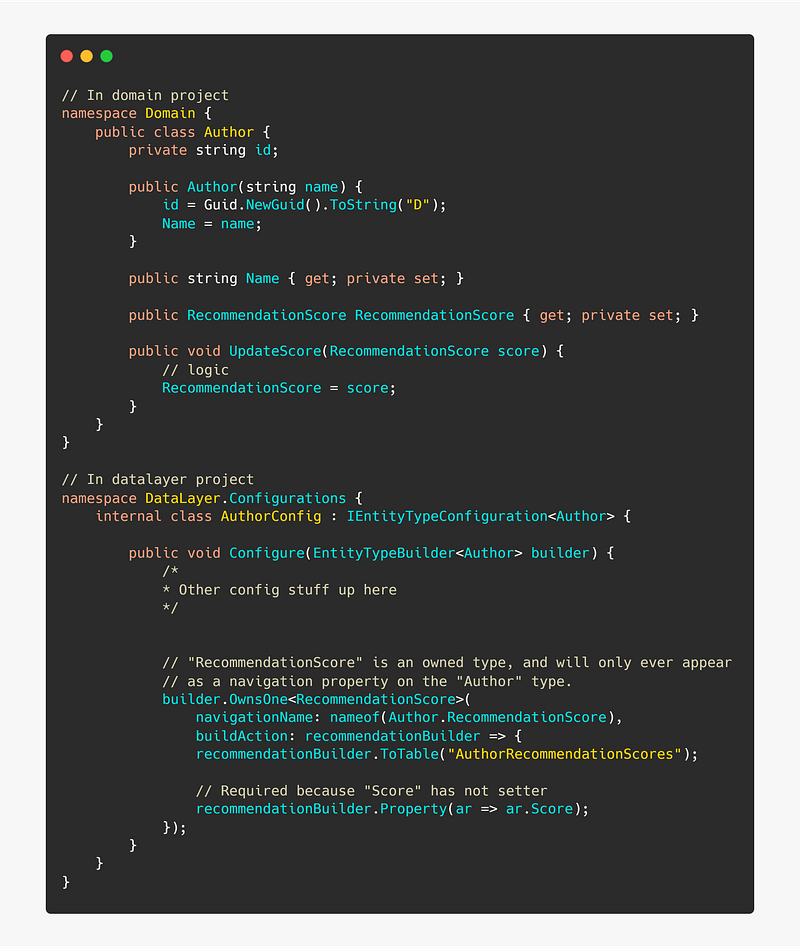
Even though RecommendationScore does not a primary key in the POCO, one will be generated for it in the database. It takes the primary key of the Author, because, as we have configured it, Author can only have one RecommendationScore.

dotnet ef CLI

🚨 Don’t use Visual Studio helper commands

In my opinion, Visual Studio is hiding too much of what’s going on when you’re working with .NET, including EF Core.

Getting used to magic hinders your abilities to troubleshoot and confines you to VS.

👍 Use the dotnet ef command line interface

Install dotnet ef to execute the EF core commands. dotnet tool install --gobal dotnet-ef

In your data layer project, install Microsoft.EntityFrameworkCore.Design. This package is used by the EF CLI in order to perform migrations, update database, etc. dotnet add package Microsoft.EntityFrameworkCore.Design

When using the CLI, you’re gaining some valuable, transferable skills. You’ll have an easier time setting up Code as Infrastructure, DevOps pipelines, debugging, etc.

Remember, only Visual Studio is aware of its own magic. When you start building pipelines, you can no longer rely on Visual Studio commands. Commands like Update-Database are simply not possible.

Migrations

Really, migration deserve its own article, but I’ll try poke at the monster here anyway.

👍 Create concise, manageable migrations

Run the ef migrations command everytime you make updates to your model or model configuration.

dotnet ef migrations add MigrationName

Try keep the migrations manageable by not bundling unrelated model updates into the same migration.

👍 Check if migration code is correct

Always open the newly created migrations and read through the auto-generated code.

Quite often I find that I need to tweak my model configuration, because EF Core may not register a relationship correctly.

🚨 Don’t run dotnet ef database update

Never run the database update command against anything else than your own local database.

👍 Use idempotent scripts to create and update the database

Idempotent scripts ensure that only statements that hasn’t run will be executed. When creating an idempotent database script, you can without worry execute the whole script multiple times.

dotnet ef migrations script -v \
-o ./scripts/idempotent.sql \
--idempotent

The command above will generate a script using all your existing migrations, and add IF conditions to check if a migration has already been executed.

Keep the script in source control, at a sensible location. Then pick up and execute the script during your deployment process.

👍 Create migrations for seed data

By having your seed data placed in migrations, the data will automatically be part of the idempotent script.

Doing this you’ll save yourself a lot of headache related to for example running subsequent scripts in order.

👍 Document the migrations workflow

It’s easy to forget all the steps required to re-create or update your database. Document the workflow, and save the documentation markdown file in the data layer project root.

For easy copying into your own .md file

## Intro
All commands must be executed from the root of the data layer project.
1. cd to root of data layer project
### Add new migration
dotnet ef migrations add <MigrationName> -s ../Path/To/StartupProj
<MigrationName>   ← name of the migration, without <>
### Remove most recent migration
dotnet ef migrations remove -s ../Path/To/StartupProj
### Update local(!) database
dotnet ef database update -s ../Path/To/StartupProj
^ this must only ever be used to update your own local database
### Generate idempotent script
dotnet ef migrations script -v -i \
-o ./scripts/idempotent.sql \
-s ../Path/To/StartupProj
## Switches
-v   ← verbose console output
-o   ← path to where generated script file is placed
-i   ← makes the script idempotent
-s   ← Path to startup project (e.g. ASP.NET web app .csproj)
Software Development
Database
Programming
Technology
Software Engineering
Recommended from ReadMedium