
Enjoy Truly Free To Commercialize Your AI Products With This Language Model
Discover the Latest Features of Databricks’ Dolly 2.0
We are experiencing an explosion of new instruction-based language models fine-tuned from LLaMA and other open LLMs, which have been made available to the open-source community. While these models have somehow proven (or self-claimed) to perform well, a challenging question is whether they are commercially viable, given their “open-source” designation.
Actually, most of them cannot be used for commercials according to what I mentioned in the last article. The term "open-source" may not have the same meaning when it comes to AI language models. Some models are partially open-sourced like those derived from LLaMA, and datasets used for training are sometimes confidential like those generated by GPT-3 or 4.
Here comes Dolly 2.0, the second iteration of Databricks’ Pythia-based model. It was released shortly after Dolly 1.0, which received a lot of attention from the community. However, Databricks realized that there was a need for a model that was suitable for both research and commercial use but Dolly 1.0 is not that one. As a result, they made some significant changes in Dolly 2.0 to address this issue.
Open model and datasets
There are several significant improvements from Dolly 1.0 to 2.0. One of the most significant changes in Dolly 2.0 is the use of the 12 billion parameters Pythia model by Eleuther AI, replacing the GPT-J model used in Dolly 1.0. While Pythia is not as good as LLaMA, Databricks has fine-tuned it to get good results. Another significant change is that Databricks has made its own dataset instead of using generated outputs from ChatGPT or GPT-3 like other open models. They realized that using such outputs is not legitimate for commercial use.
Creating the Dolly 2.0 dataset was a significant contribution by Databricks. It required a lot of work, as they pointed out in their blog post. They made use of 5,000 employees at Databricks to create the dataset. To get people to do a lot of labeling, they turned it into company motivation.
Let’s examine the tasks that employees were asked to label. There are seven key tasks, beginning with open Q&A, which involves general question answering. The second task is closed Q&A, where the answer is contained within a portion of text from Wikipedia or similar sources. The other tasks include extracting and summarizing information from Wikipedia, brainstorming, classification, and creative writing. Each task is interesting, and additional tasks could be added to this dataset in the future I guess. The dataset called databricks-dolly-15k is available on the HuggingFace, making it easy to use. The dataset contains examples of various questions and answers that can be utilized.
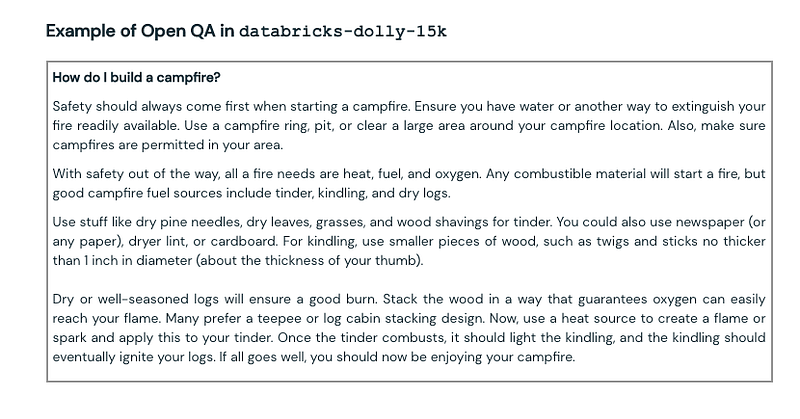
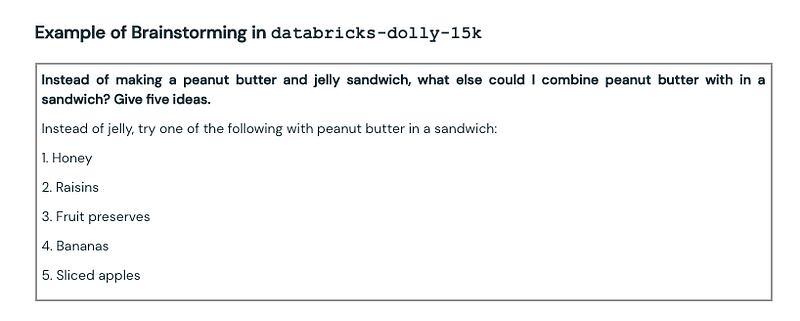
They used the InstructGPT paper by OpenAI, which had a dataset of 13,000 demonstrations, as a reference. They aimed to create a dataset with roughly the same number of tasks but found that generating 13,000 questions was a lot harder than it seemed. Every answer had to be original, and they couldn’t copy anything from the web. That’s why Databricks made their dataset by using 5,000 people to create it, as opposed to the 40 people used by OpenAI. This ensures that their dataset has a higher degree of diversity, as they have a wider range of labelers from different backgrounds and countries. This is significant as it helps to prevent any biases that may be present in the dataset.
Run Dolly 2.0 on Colab
It’s enough for the introduction, let’s make a run of Dolly models.
From Databricks’ HuggingFace page, we know that Dolly 2.0 is available in three versions: databricks/dolly-v2–3b, databricks/dolly-v2–7b, databricks/dolly-v2–12b. While the larger model is much more impressive, it requires a significant amount of RAM to load onto a GPU, making it more suited to high-end computing systems. The smaller models, on the other hand, are more suitable for those using free Colab.
A Google machine learning expert called Sam Witteveen has provided a pre-configured notebook based on the usage guide Databricks provides on Huggingface that can be used for us to load and test the Dolly 2.0 models. You can find:
databricks/dolly-v2–3b: https://colab.research.google.com/drive/1WxeWpGSEsPE6Y1YWQ21IyqttfDTJU2na?usp=sharing
databricks/dolly-v2–7b: https://colab.research.google.com/drive/1vICkU3gE_eLkVzCn-rQX34F8aiA7fuoy?usp=sharing
databricks/dolly-v2–12b: https://colab.research.google.com/drive/1vICkU3gE_eLkVzCn-rQX34F8aiA7fuoy?usp=sharing
Once you open the notebook, it’s better to copy it to your own Google Drive.
Dolly-v2–12b
What sets Dolly apart from other models is its unique pipeline. It uses its own pipeline to wrap its prompt into a specific format, which allows for customized pre-processing and post-processing of the generated text.
The prompt format is defined below:
INSTRUCTION_KEY = "### Instruction:"
RESPONSE_KEY = "### Response:"
END_KEY = "### End"
INTRO_BLURB = (
    "Below is an instruction that describes a task. Write a response that appropriately completes the request."
)

# This is the prompt that is used for generating responses using an already trained model.  It ends with the response
# key, where the job of the model is to provide the completion that follows it (i.e. the response itself).
PROMPT_FOR_GENERATION_FORMAT = """{intro}
{instruction_key}
{instruction}
{response_key}
""".format(
    intro=INTRO_BLURB,
    instruction_key=INSTRUCTION_KEY,
    instruction="{instruction}",
    response_key=RESPONSE_KEY,
)
To generate the generate_text method which will handle the prompt for conversation, you must use InstructionTextGenerationPipeline() to load the pre-trained model and tokenizer.
# from instruct_pipeline import InstructionTextGenerationPipeline
from transformers import AutoModelForCausalLM, AutoTokenizer

tokenizer = AutoTokenizer.from_pretrained("databricks/dolly-v2-12b", padding_side="left")
model = AutoModelForCausalLM.from_pretrained("databricks/dolly-v2-12b",
                                             load_in_8bit=True,
                                             device_map="auto")

generate_text = InstructionTextGenerationPipeline(model=model, tokenizer=tokenizer)
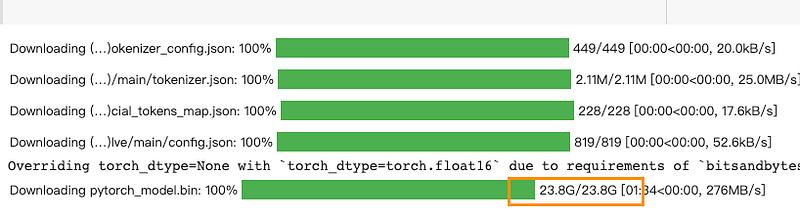
Please be noted that even though the model is loaded as 8-bit, it’s probably not runnable on a free Colab account with T4 GPU. You will find the saved output from the original notebook shows there are 24GB RAM and 13.6GB GPU RAM consumed:
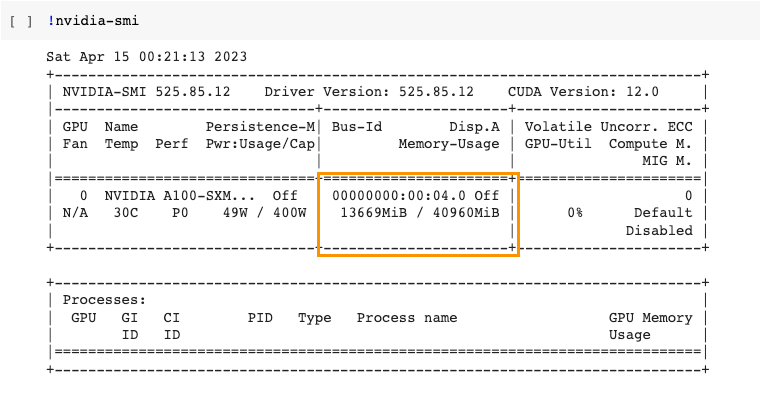
You can now input your prompt to test once the model is well-loaded. Considering the limitations of the model derived from Pythia, such as the fact that the 12-billion version was trained on only 300 billion tokens compared to the 1 trillion tokens used by LLaMa models. The overall performance of generation speed and text completion is so far acceptable.
output = generate_text('What are the difference between Llamas, Alpacas and Koalas?')
print(wrap_text_preserve_newlines(output))
Llamas and alpacas are both types ofllamas, but are different species. They both share the common name llama
because they are related, but they are not closely related to koalas.
Alpacas are larger than llamas and have long floppy ears, but are similar in other ways. They are herded for
wool and also used for riding, as they are very willing and quite tall.
CPU times: user 19.5 s, sys: 435 ms, total: 19.9 s
Wall time: 21.8 sCall the generate_text and replace the prompt string by yourself.
Dolly-v2–3b
It’s also possible to run the model on the free version of Colab by loading its 3-billion version. To achieve that, load the model directly by calling pipeline():
import torch
from transformers import pipeline

generate_text = pipeline(model="databricks/dolly-v2-3b",
                         torch_dtype=torch.bfloat16,
                         trust_remote_code=True,
                         device_map="auto"
                         )
You will surprisedly find that the consumption of GPU has quite decreased:
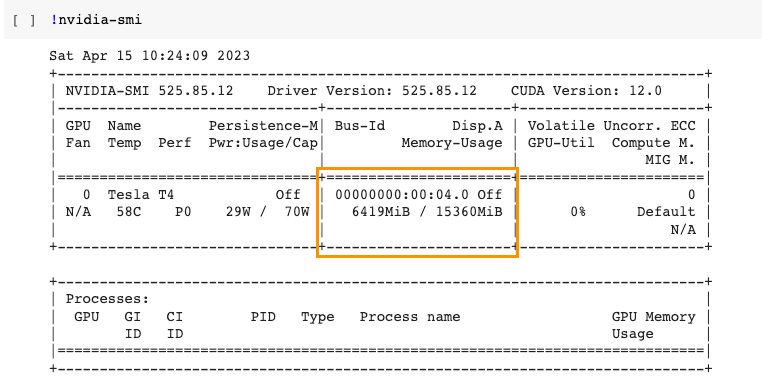
That means even if you have an old GPU or have a server with low cost, it’s quite possible to start your AI business from here.
However, please also be noted that due to the parameter size limitation of this model version, the generated text will be obviously a little weak. You will find the difference by simply comparing the answer to the same question with the 12b version.
output = generate_text('What are the difference between Llamas, Alpacas and Koalas?')
print(wrap_text_preserve_newlines(output))
Llamas are primarily grazers, grazing on grasses. Alpacas are browsers, going after woody plants for their
seeds. Koalas are hunter-gatherers, preferring the likes of eucalyptus over grasses.
CPU times: user 12.5 s, sys: 0 ns, total: 12.5 s
Wall time: 12.6 sConclusion
Dolly 2.0 is a significant improvement over its initial version, Dolly 1, and some other open models as well, the most exciting in that it can be used for not only research but also commercial purposes. With its continuous labeling tasks, Dolly series models can generate high-quality outputs for various applications, making it a valuable tool for users who want to build their own AI business without huge investments.
Thanks for reading.
- If you enjoy reading this article, please consider joining the Medium membership and you will have unlimited access to the most valuable resources of AI, data science, and Python development on the Internet. If you would like to support me as a technical writer for my continuous delivery, please kindly use my referral link and that will let me earn a little commission without any extra cost to you.🫰
- If you have any questions or requests, please find me on Twitter (Now X) and Discord where you can have my active support on development and deployment.✍️
- If you would like to have exclusive support from my services, joining the membership of my Ko-fi will be a good choice. ☕️🥤
Level Up Coding
Thanks for being a part of our community! Before you go:
- 👏 Clap for the story and follow the author 👉
- 📰 View more content in the Level Up Coding publication
- 💰 Free coding interview course ⇒ View Course
- 🔔 Follow us: Twitter | LinkedIn | Newsletter
🚀👉 Join the Level Up talent collective and find an amazing job