
Enhancing Google’s T5 Model: An Example of Reinforcement Learning Feedback via Proximal Policy Optimization
A step-by-step guide for tweaking the FLAN-T5 model for text2text generation via the PPO feedback loop using the combination of linguistic acceptability and sentiment neutrality scores, and making it live through Hugging Face

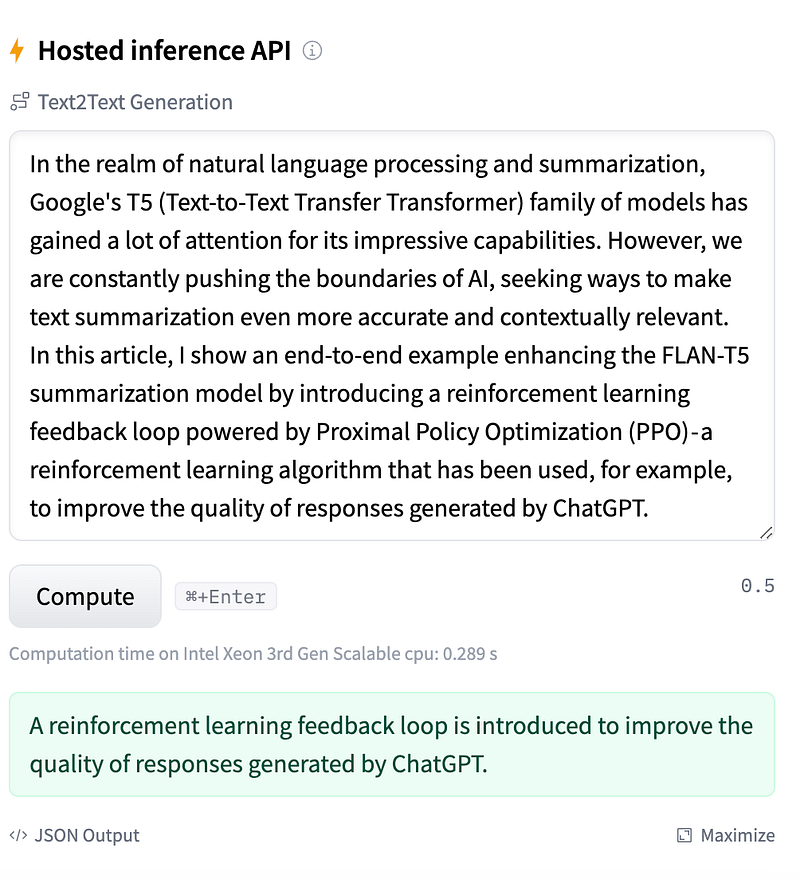
In the realm of natural language processing and summarization, Google’s T5 (Text-to-Text Transfer Transformer) family of models has gained a lot of attention for its impressive capabilities. However, we are constantly pushing the boundaries of AI, seeking ways to make text summarization even more accurate and contextually relevant. In this article, I show an end-to-end example enhancing the FLAN-T5 summarization model by introducing a reinforcement learning feedback loop powered by Proximal Policy Optimization (PPO) — a reinforcement learning algorithm that has been used, for example, to improve the quality of responses generated by ChatGPT.
The example presented here is mainly based on the notebook from Sinan Ozdemir, with a few minor changes. All end-to-end code for selecting the data, training the model, and sending it to the HuggingFace repo is also available here. Below, I describe the most important steps.
Create reward pipeline
To create a contextually meaningful reward score, two of the following properties of the resulting text have been evaluated.
First, there is a linguistic acceptability score — here, larger scores mean more grammatically correct sentences:
# Importing necessary libraries and modules
cola_tokenizer = AutoTokenizer.from_pretrained("textattack/roberta-base-CoLA")  # Load the tokenizer for RoBERTa model
cola_model = AutoModelForSequenceClassification.from_pretrained("textattack/roberta-base-CoLA")  # Load the pre-trained RoBERTa model

# Creating a text classification pipeline using the loaded model and tokenizer
cola_pipeline = pipeline('text-classification', model=cola_model, tokenizer=cola_tokenizer)

# Define a function to get CoLA scores for a list of input texts
def get_cola_scores(texts):
    scores = []  # Initialize an empty list to store scores

    # Use the pipeline to generate scores for the input texts
    # Set function_to_apply to 'none' to get logits, which can be negative (desired)
    # Set top_k to None to include all possible labels
    results = cola_pipeline(texts, function_to_apply='none', top_k=None)

    # Iterate through the results
    for result in results:
        for label in result:
            if label['label'] == 'LABEL_1':  # Check if the label corresponds to 'LABEL_1' (good grammar)
                scores.append(label['score'])  # Append the score to the scores list

    return scores  # Return the list of scores for 'LABEL_1'
Then, there is a sentiment neutrality score — here, a larger score means the text is more neutral (as opposed to positive/negative sentiment):
# Create a sentiment analysis pipeline using the 'cardiffnlp/twitter-roberta-base-sentiment' model.
sentiment_pipeline = pipeline('text-classification', 'cardiffnlp/twitter-roberta-base-sentiment')

# Define a function to extract neutral sentiment scores from a list of texts.
def get_neutral_scores(texts):
    scores = []  # Initialize an empty list to store the neutral sentiment scores.

    # Perform sentiment analysis on the input texts, requesting raw logits as results.
    results = sentiment_pipeline(texts, function_to_apply='none', top_k=None)

    # Iterate through the results for each input text.
    for result in results:
        # Iterate through the labels and their corresponding scores in the result.
        for label in result:
            # Check if the label corresponds to neutral sentiment ('LABEL_1').
            if label['label'] == 'LABEL_1':
                # Append the neutral sentiment score to the 'scores' list.
                scores.append(label['score'])

    # Return the list of neutral sentiment scores.
    return scores
To obtain the total reward, the linguistic acceptability score has been summed up with a 0.5 sentiment neutrality score, thus giving more weight to grammatically correct output sentences.
Train the model using PPO
Below is the sample code for model training based on the dataset (with 1,000 training examples):
# Loop through training epochs

for epoch in tqdm(range(N_EPOCHS)):
    avg_rewards = []
    # Iterate through batches in the data loader
    for batch in tqdm(ppo_trainer.dataloader):
        # Create a dictionary to store game data for this batch
        game_data = dict()

        # Prepend the 'summarize:' token to each text in the batch
        game_data["query"] = ['summarize: ' + b for b in batch["text"]]

        # Generate responses from the updated t5 model
        input_tensors = [_.squeeze() for _ in batch["input_ids"]]
        response_tensors = []
        for query in input_tensors:
            # Generate a response using PPO with specified generation parameters
            response = ppo_trainer.generate(query.squeeze(), **generation_kwargs)
            response_tensors.append(response.squeeze())

        # Decode the response tensors to obtain the generated text
        game_data["response"] = [t5_tokenizer.decode(r.squeeze(), skip_special_tokens=False) for r in response_tensors]

        # Calculate and store clean responses (without special tokens)
        game_data["clean_response"] = [t5_tokenizer.decode(r.squeeze(), skip_special_tokens=True) for r in response_tensors]

        # Calculate cola_scores and neutral_scores
        game_data['cola_scores'] = get_cola_scores(game_data["clean_response"])
        game_data['neutral_scores'] = get_neutral_scores(game_data["clean_response"])

        # Calculate rewards based on neutral_scores
        rewards = game_data['neutral_scores']

        # Combine cola_scores and neutral_scores into a single reward score
        transposed_lists = zip(game_data['cola_scores'], game_data['neutral_scores'])
        rewards = [1 * values[0] + 0.5 * values[1] for values in transposed_lists]
        rewards = [torch.tensor([_]) for _ in rewards]

        # Calculate batch average reward before the PPO training
        avg_reward = np.mean([r.cpu().numpy() for r in rewards])
        print(f"Average reward for the batch is {avg_reward:.4f}")

        # Append batch reward to avg rewards
        avg_rewards.append(avg_reward)

        # Run Proximal Policy Optimization (PPO) training
        stats = ppo_trainer.step(input_tensors, response_tensors, rewards)

        # Calculate and log the mean reward for this batch
        stats['env/reward'] = np.mean([r.cpu().numpy() for r in rewards])

        # Log training statistics, game data, and rewards
        ppo_trainer.log_stats(stats, game_data, rewards)
    # Print average reward at the end of each run
    print(f">>>>> Average reward for epoch {epoch} is: {np.mean(avg_rewards):.4f}" )
The training process for 5 epochs takes about 4 hours using NVIDIA TESLA P100 GPU available for Kaggle users and increases the average reward from 1.66 (average value during epoch 0) to 1.84 (average value during epoch 4).
Send the final model to Huggingface
After saving the model locally, it is made available through the HuggingFace portal:
# Import the necessary module to interact with the Hugging Face Hub.
from huggingface_hub import notebook_login

# Perform a login to the Hugging Face Hub.
notebook_login()

# Import the HfApi class from the huggingface_hub library.
from huggingface_hub import HfApi

# Create an instance of the HfApi class.
api = HfApi()

# Define the repository ID by combining the username "dima806" with the saved model name.
repo_id = f"dima806/{SAVED_MODEL}"

try:
    # Attempt to create a new repository on the Hugging Face Model Hub using the specified repo_id.
    api.create_repo(repo_id)

    # If the repository creation is successful, print a message indicating that the repository was created.
    print(f"Repo {repo_id} created")
except:
    # If an exception is raised, print a message indicating that the repository already exists.
    print(f"Repo {repo_id} already exists")

# Uploading a folder to the Hugging Face Model Hub
api.upload_folder(
    folder_path=SAVED_MODEL,  # The path to the folder to be uploaded
    path_in_repo=".",  # The path where the folder will be stored in the repository
    repo_id=repo_id,  # The ID of the repository where the folder will be uploaded
    repo_type="model"  # The type of the repository (in this case, a model repository)
)
It can then be invoked either via HuggingFace hosted inference API:
or it can be used directly from the Transformers library, either as a pipeline:
# Use a pipeline as a high-level helper
from transformers import pipeline

pipe = pipeline("text2text-generation", model="dima806/flan-t5-small-with-ppo")
or as a directly loaded model:
# Load model directly
from transformers import AutoTokenizer, AutoModelForSeq2SeqLM

tokenizer = AutoTokenizer.from_pretrained("dima806/flan-t5-small-with-ppo")
model = AutoModelForSeq2SeqLM.from_pretrained("dima806/flan-t5-small-with-ppo")
I hope these results will be useful for you. In case of questions/comments, do not hesitate to write in the comments below.


