The Power of LangChain’s Question Answer Framework
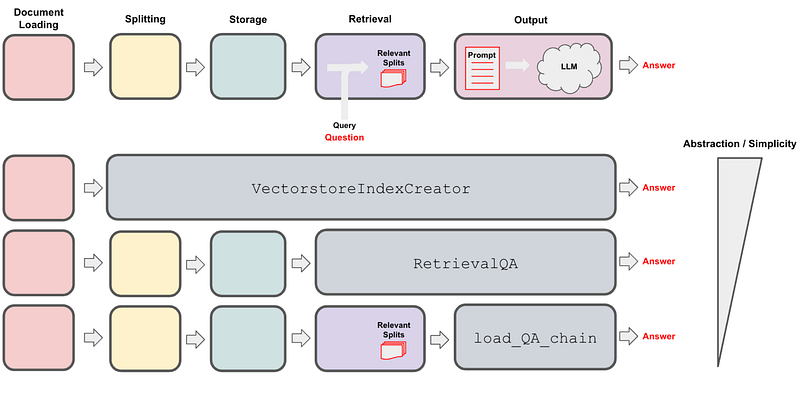
LangChain introduces three types of question-answer methods. It is imperative to understand how these methods work in order to create and implement our customized and complex question-answer applications. These three methods are, VectorstoreIndexCreator, RetrievalQA, and load_qa_chain, as shown above. We can choose the one that best suits our needs and application.
In this article, I will provide a detailed discussion of each method. You can access the comprehensive Jupyter notebook through the following GitHub repository link. If you wish to follow this article sequentially, you’ll need to generate an OPENAI_API_KEY at https://openai.com/ and include it in your notebook. Additionally, the sample document can be found in the same GitHub link. All the required libraries are as follow:
import os
from langchain.indexes import VectorstoreIndexCreator
from langchain.indexes import VectorstoreIndexCreator
from langchain.document_loaders import TextLoader
from langchain.text_splitter import CharacterTextSplitter
from langchain.text_splitter import RecursiveCharacterTextSplitter
from langchain.embeddings import OpenAIEmbeddings
from langchain.vectorstores import Chroma
from langchain.chains import RetrievalQA
from langchain.chat_models import ChatOpenAI
from langchain.chains.question_answering import load_qa_chain
from langchain.chains import ConversationalRetrievalChain
from langchain.memory import ConversationBufferMemory
import time

OPENAI_API_KEY='your/api/key'
os.environ["OPENAI_API_KEY"] = OPENAI_API_KEY
Within the LangChain framework, the standard steps for creating a question-answer application from documents (typically text, although audio or video documents are also applicable) are as follows: loading documents -> Splitting documents -> create embedding vectors from chuncks -> store embedded vectors in the vector database -> retrieve relevent documents from the storage -> pass relevent documents to llm -> llm generates the final answer. The three distinct methods employ these steps with slight variations, resulting in their unique characteristics, and the diverse approaches to handling the steps render them valuable in various scenarios.
1. load_qa_chain
The load_qa_chain method follows these steps: loading documents -> documents processed by chain type (ex., stuff) -> llm model -> answer
The load_qa_chain function is available within the LangChain framework and serves the purpose of loading a particular chain designed for question-answering tasks. The selection of the chain can be tailored using the chain_type parameter. Here is the code snippet that executes the load_qa_chain:
loader = TextLoader('chatbot_for_survey.txt', encoding='utf8')
data = loader.load()
llm = ChatOpenAI(temperature=0, openai_api_key=OPENAI_API_KEY)
question = "What are the requirements for this program?"
chain = load_qa_chain(llm, chain_type='stuff')
result = chain.run(input_documents=data, question=question)
# alternatively we can run this chain with the following command
#answer=chain({"input_documents": data, "question": question},return_only_outputs=True)
#print(answer['output_text'])
print(result)
The load_qa_chain function requires two essential parameters: llm and chain_type. The llm parameter represents an instance of a large language model (LLM) that will be utilized for the question-answering task. On the other hand, chain_type is a string used to specify the desired type of chain for the task. Additionally, there are optional parameters available, including return_map_steps, question_prompt, and combine_prompt. The document chains 'stuff', 'refine', 'map-reduce', and 'map-rerank' refer to different strategies for handling documents (or retrieved documents) before passing them to a language learning model (LLM). Let’s briefly discuss about various chain types.
1. Stuff: This approach involves concatenating all the retrieved documents together. This method is simple and fast, and can be useful if the LLM can process long pieces of text effectively.
*Advantages*: Simple, fast, all document data is preserved and sent to the LLM.
*Disadvantages*: Can lead to overly long prompts if many documents are retrieved. Information from earlier documents might be “drowned out” by later ones if the LLM has limited attention span.
2. Refine: Involves reducing the information from the retrieved documents before passing them to the LLM. This may involve summarizing the documents or extracting key information.
-*Advantages*: Can make the input to the LLM more manageable and focused on the essential information. Useful when dealing with large or complex documents.
*Disadvantages*: The refinement process may miss important details or introduce biases. It might also take extra computation time or sophisticated algorithms to refine the documents effectively.
3. Map-Reduce: This is a two-step process. The “map” stage applies a transformation to each document independently, and the “reduce” stage combines these transformed documents into a single input for the LLM.
-*Advantages*: Can handle large number of documents effectively. Map-reduce operations can often be done in parallel, allowing for efficient processing of large datasets.
*Disadvantages*: The transformation and combination steps might lose important information or introduce biases. The ‘reduce’ step could be complex depending on how the results of the ‘map’ operation need to be combined.
4. Map-Rerank: Similar to map-reduce, but involves reranking the documents based on some criteria after the ‘map’ step. The top-ranked documents are then combined and sent to the LLM.
*Advantages*: Allows prioritizing certain documents over others, which can be useful when the quality or relevance of the documents varies. The reranking criteria can be customised according to specific requirements.
*Disadvantages*: Determining the appropriate reranking criteria can be challenging. Like with map-reduce, important information might be lost during the process. Only a subset of documents (those that rank highly) are passed on to the LLM, which might cause a loss of valuable information.
Initially the document chain prepares the input documents for the llm. Ultimately, the llm generates the final response based on the prompt provided by the document chain. It’s important to note that the optimal choice of chain type relies on the particular application and the strengths and limitations of the specific LLM in use. To determine the most suitable option for your situation, it’s recommended to experiment with various chain types and assess their performance on the task.
2. RetrivalQA
Here are the steps for RetrivalQA: loading documents -> splitting documents -> store documents in the db-> document retrieval -> top-n documents -> llm model -> answer. Here is the complete code snippet for utilizing RetrievalQA:
loader = TextLoader('chatbot_for_survey.txt', encoding='utf8')
data = loader.load()
text_splitter = RecursiveCharacterTextSplitter(chunk_size = 100, chunk_overlap = 0, length_function = len)
data = text_splitter.split_documents(data)
llm = ChatOpenAI(temperature=0, openai_api_key=OPENAI_API_KEY)
vectorstore = Chroma.from_documents(documents=data, embedding=OpenAIEmbeddings())
# embedding_function = SentenceTransformerEmbeddings(model_name="all-MiniLM-L6-v2")
# retriever = Chroma.from_documents(docs, embedding_function)
retriever = vectorstore.as_retriever(search_type='similarity', search_kwargs={'k': 3})
qa_chain = RetrievalQA.from_chain_type(llm,retriever=retriever, chain_type='stuff')
response=qa_chain({"query": question})
result = response['result']
print(result)
The first two lines handle the document loading process. There are several supported loader types in LangChain. The following two lines are for splitting documents. Here, we’re using RecursiveCharacterTextSplitter to split the documents. A detailed article explaining its functioning is available here. LangChain offers alternative methods for document splitting as well. The subsequent step involves creating embedding vectors and storing them in the vector database. For embedding , we utilize the default model within the OpenAIEmbeddings() method. The default model in this instance is ‘text-embedding-ada-002’, which is a widely employed embedding model. Once the embeddings have been created, they are typically indexed for fast similarity search. One such indexing method provided by langchain is Chroma, which is based on Annoy. Chroma constructs a similarity search index from documents represented as embeddings.
Now, let’s discuss about retrievers. A retriever is a component which, given a query string, returns the most relevant documents from a source. search_type=similarity indicates that we want to retrieve documents based on the semantic similarity to the query. Other search types, as given in the source code, could include ‘mmr’ (Maximum Marginal Relevance) which returns more diverse results or ‘similarity_score_threshold’ which returns results above a certain relevance score. search_kwargs={‘k’:’3'} is an additional keyword arguments to pass to the search function. In this context, ‘k’ corresponds to the number of relevant documents to retrieve. Once the retriever has been established, the get_relevant_documents(query) method can be employed to retrieve the most relevant documents for the provided query.
retriever = vectorstore.as_retriever(search_type='similarity', search_kwargs={'k': 3})
relevant_docs = retriever.get_relevant_documents(query)
print(relevant_docs)

# or alternatively we can use this method as well to retrieve the relevent documents

vectorstore.similarity_search(question, k=3)
Another crucial aspect of this method is RetrievalQA.from_chain_type, which constructs a sequence of operations for information retrieval and question-answering. The two important parameters to be provided to this function are llm and retriever.
- llm: This denotes the language model employed to formulate answers based on the retrieved documents. - retriever: This signifies a previously defined retriever (which could be a document retriever or a general information retriever).
It’s noteworthy to mention that an additional parameter called ‘chain_type’ is available, facilitating the consolidation of all retrieved documents before being forwarded to the llm. The default chain type is ‘stuff’, but other alternatives like ‘refine’, ‘map_reduce’, and ‘map_rerank’ have been previously discussed.
Here’s an overview of how RetrievalQA works:
1. You initiate the RetrievalQA by chaining it with a language model (LLM) and a retriever. The LLM can be any model that has been designed for question-answering tasks. The retriever, on the other hand, is responsible for searching and retrieving relevant documents based on a given query.
2. After initializing the RetrievalQA, it’s time to utilize it. When a question is asked, Langchain first uses the retriever to find documents that could contain relevant information.
3. These relevant documents are then passed to the LLM. The LLM is responsible for generating an answer based on the context of these documents.
If we intend to augment the count of relevant documents when utilizing the retriever, we should implement this:
vectorstore.as_retriever(search='similarity', search_kwarg={'k':4}).get_relevant_documents(question)
# to me above line of code only giving me 4 relevent documents, but it want to see the actual number use this;
vectorstore.similarity_search(question, k=8)
3. VectorstoreIndexCreator
Here are the steps for this method: create index from documents > answer
With the help of the high-level class VectorstoreIndexCreator, it becomes possible to construct an entire QA chain with just three lines of code. Under the hood, this class encapsulates all the aforementioned steps (create chunk, embedding, and storage of embedded vectors).
loader = TextLoader('chatbot_for_survey.txt', encoding='utf8')
index = VectorstoreIndexCreator().from_loaders([loader])
answer=index.query(question)
print(answer)
If we want to develop a slightly more complex application and desire to modify some of the default parameters, it’s always beneficial to understand the inner workings of this class. The source code for this class can be located here, and this is where the parameters are defined within the class.
class VectorstoreIndexCreator(BaseModel):
    vectorstore_cls: Type[VectorStore] = Chroma
    embedding: Embeddings = Field(default_factory=OpenAIEmbeddings)
    text_splitter: TextSplitter = Field(default_factory=_get_default_text_splitter)
    vectorstore_kwargs: dict = Field(default_factory=dict)
By default, this class employs Chrom as the chosen vector database. As for embedding, OpenAIEmbeddings() is the default setup that this class adopts. When it comes to splitting documents into chunks, RecursiveCharacterTextSplitter() is utilized (obtained from the _get_default_text_splitter method). Upon executing the query method, RetrievalQA chain is employed to retrieve vectors from the vector db.
class VectorStoreIndexWrapper(BaseModel):
    def query(
        self, question: str, llm: Optional[BaseLanguageModel] = None, **kwargs: Any
    ) -> str:
        """Query the vectorstore."""
        llm = llm or OpenAI(temperature=0)
        chain = RetrievalQA.from_chain_type(
            llm, retriever=self.vectorstore.as_retriever(), **kwargs
        )
        return chain.run(question)
Now, we can change the default parameters and crete new index as:
index = VectorstoreIndexCreator(
    # split the documents into chunks
    text_splitter=CharacterTextSplitter(chunk_size=1000, chunk_overlap=0),
    # select which embeddings we want to use
    embedding=OpenAIEmbeddings(),
    # use Chroma as the vectorestore to index and search embeddings
    vectorstore_cls=Chroma
).from_loaders([loader])
index.query(llm=llm, question=question, chain_type="stuff")
print(index.query(question))
Memory Based Conversation
The conversations we discussed earlier are stateless, indicating that whenever we pose a question to the QA chain, it won’t retain any memory of our previous interactions, and each conversation begins anew. If we aim to incorporate our ongoing conversation into memory, we can use ConversationalRetrievalChain.
ConversationalRetrievalChain: This is used to conduct a conversation by employing the capabilities of the language model and retaining the memory of the conversation. It’s initialized with the language model (llm) and the memory previously defined, along with a retrieval model which we are supposed to have already defined as vectorstore.
loader = TextLoader('chatbot_for_survey.txt', encoding='utf8')
data = loader.load()
text_splitter = RecursiveCharacterTextSplitter(chunk_size=250, chunk_overlap=0, length_function = len,)
documents = text_splitter.split_documents(data)
embeddings = OpenAIEmbeddings()
vectorstore = Chroma.from_documents(documents, embeddings)
llm = ChatOpenAI(model_name="gpt-3.5-turbo", temperature=0)
memory = ConversationBufferMemory(memory_key="chat_history", return_messages=True)
#memory = ConversationBufferMemory(memory_key="chat_history")
qa = ConversationalRetrievalChain.from_llm(llm, vectorstore.as_retriever(), memory=memory)
result=qa({"question":question})
print(result)
print(result['answer'])
ConversationBufferMemory: It is a component of LangChain’s memory system. This entails a straightforward memory format that maintains a list of chat messages within a buffer and feeds them into the prompt template. The ‘return_message=True’ argument is configured to enable the return of the previous message. This configuration does not restrict the number of stored interactions. If our conversation becomes too long, we must include the entire history along with the new question for the llm model to produce a new response. However, there could be an issue due to the token limit of the language model (llm). In such a scenario, truncating the history at a certain point becomes necessary.
ConversationBufferWindowMemory: This will allows us to truncate the chat history by using a sliding window approach. It only keeps the last ‘k’ interactions, where ‘k’ is a specified parameter. This can be useful for keeping a smaller memory size and preventing it from growing too large. Please be aware that changing these settings may affect the performance of your language model, especially if previous steps in the conversation contain important context for understanding the current conversation step.
llm = ChatOpenAI(model_name="gpt-3.5-turbo", temperature=0)
memory=ConversationBufferWindowMemory( k=3, memory_key="chat_history", return_messages=True)
qa = ConversationalRetrievalChain.from_llm(llm, vectorstore.as_retriever(), memory=memory)
result=qa({"question":question})
print(result)
#print(result['answer'])
Previously, we employed LangChain libraries to establish a memory object and subsequently utilized this memory object as a parameter within ConversationalRetrievalChain. Alternatively, we can also retain the history within ConversationalRetrievalChain, as depicted in the code snippet below. Initially, the chat_history is initialized as an empty list, and for each conversation, both the question and answer are appended to this list. Upon posing a new query, this chat_history is integrated into the prompt. With slight adjustments to the code, it’s feasible to truncate the chat history, thereby preventing potential issues arising from an excessive number of tokens for the llm.
def ask_with_memory(question, chat_history=[], k=3):
    # initiating chain with out memory object here
    qa = ConversationalRetrievalChain.from_llm(llm, vectorstore.as_retriever()) # make sure vectorstore and llm are defined aboved
    result = qa({'question': question, 'chat_history': chat_history})
    chat_history.append((question, result['answer']))
    chat_history=chat_history[-k:]
    return result, chat_history

# define a set of question based on your document
questions=['what is document about', 'what are the requrement']

chat_history = []
for question in questions:
    result, chat_history = ask_with_memory(question, chat_history)
    print(result['answer'])
    print(len(chat_history))
    print('\n')
Hope you find this article useful. Thank you for reading!
Useful links:
- Langchain tools: Document Loader, Vector Stores, Embedding Models, Chat Models, LLMs, Callbacks, Tools, Toolkits, Message Histories
- Text Splitter
- recursivecharactertextsplitter: very popular text splitter, detail explanations
- Chroma: Open source vector database
- OpenAI Embedding: various openai embedding models example
- collectivai: To ask langchain related questions in chatbot format


