
Spring Boot | Kafka Connect
Enhancing a MySQL-KafkaConnect-Elasticsearch Setup with Spring Boot Applications
Implementing MovieAPI and MovieSearch to interact with the streaming of changes from MySQL to Elasticsearch using Kafka Connect
In this article, we will implement two Spring Boot applications: Movie API and Movie Search. Our first application connects to MySQL and exposes an API that enables us to manage movies — create, retrieve, update, and delete (CRUD). The second app connects to Elasticsearch, delivering a user-friendly interface (UI) for searching movies.
These two applications form integral parts of our MySQL-Kafka Connect-Elasticsearch setup, which we’ve explained in detail in the article below:
To get started, ensure that you have your MySQL-Kafka Connect-Elasticsearch setup up and running.
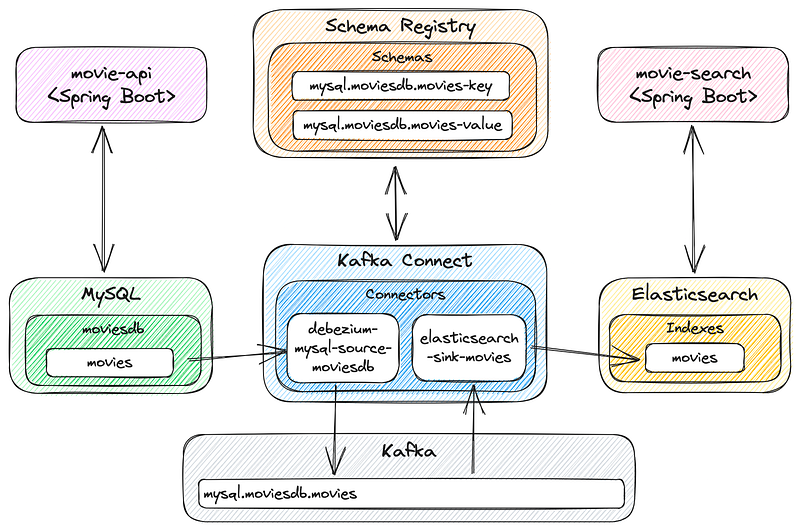
This is the project overview, now including Movie API and Movie Search applications:
So, let’s get started!
Prerequisites
If you would like to follow along, you must have Java 17+ installed on your machine.
Creating Movie API Spring Boot app
Let’s create a Spring Boot application using Spring Initializr.
The application name will be movie-api and the dependencies needed are: Spring Web, Spring Data JPA, MySQL Driver, Validation, and Lombok.
We will use the Spring Boot version 3.2.4 and Java 17. Here is the link that contains all the setup mentioned previously.
Click the GENERATE button to download a zip file. Unzip the file to a preferred folder (I will unzip it inside the kafka-connect-mysql-to-elasticsearch folder, created while configuring the MySQL — Kafka Connect — Elasticsearch setup). Then, open the movie-api project in your IDE.
Create some packages
In order to keep our code organized, let’s create the following packages inside com.example.movieapi root package: controller, mapper, model, repository, and service.
Create the Model classes
In model package, let’s create the Movie entity classes with the content below:
package com.example.movieapi.model;

import jakarta.persistence.Entity;
import jakarta.persistence.Id;
import jakarta.persistence.Table;
import lombok.Data;

@Data
@Entity
@Table(name = "movies")
public class Movie {

    @Id
    private String imdbId;

    private String title;
    private Integer year;
    private String actors;
    private String poster;
}
The Movie is an entity class used to represent the movies table in the MySQL database.
Create the Repository class
In repository package, let’s create the MovieRepository class with the content below:
package com.example.movieapi.repository;

import com.example.movieapi.model.Movie;
import org.springframework.data.jpa.repository.JpaRepository;

public interface MovieRepository extends JpaRepository<Movie, String> {
}
The MovieRepository class is an interface that extends the JpaRepository interface. It serves as a repository for managing Movie entities. By extending JpaRepository<Movie, String>, it inherits several methods for performing common database operations, such as saving, updating, deleting, and querying Movie entities.
Create the Service classes
In service package, let’s create the MovieService interface with the content below:
package com.example.movieapi.service;

import com.example.movieapi.model.Movie;

import java.util.List;

public interface MovieService {

    List<Movie> getMovies();

    Movie validateAndGetMovies(String imdbId);

    Movie saveMovie(Movie movie);

    void deleteMovie(Movie movie);
}
Also, in service package, let’s create the implementation of the MovieService interface:
package com.example.movieapi.service;

import com.example.movieapi.model.Movie;
import com.example.movieapi.repository.MovieRepository;
import lombok.RequiredArgsConstructor;
import org.springframework.stereotype.Service;

import java.util.List;

@RequiredArgsConstructor
@Service
public class MovieServiceImpl implements MovieService {

    private final MovieRepository movieRepository;

    @Override
    public List<Movie> getMovies() {
        return movieRepository.findAll();
    }

    @Override
    public Movie validateAndGetMovies(String imdbId) {
        return movieRepository.findById(imdbId)
                .orElseThrow(() -> new RuntimeException("Movie with id '%s' not found".formatted(imdbId)));
    }

    @Override
    public Movie saveMovie(Movie movie) {
        return movieRepository.save(movie);
    }

    @Override
    public void deleteMovie(Movie movie) {
        movieRepository.delete(movie);
    }
}
The MovieService interface and MovieServiceImpl class are part of the service layer. They provide methods for managing movies, including retrieving all movies, validating and getting a movie by imdbId, saving a movie, and deleting a movie. The MovieServiceImpl uses an instance of MovieRepository to interact with the database.
Create the DTO classes
In controller package, let’s create two DTO (Data Transfer Object) records, CreateMovieRequest and UpdateMovieRequest.
Starting CreateMovieRequest record, create it with the content below:
package com.example.movieapi.controller;

import jakarta.validation.constraints.NotBlank;
import jakarta.validation.constraints.NotNull;

public record CreateMovieRequest(
        @NotBlank String imdbId,
        @NotBlank String title,
        @NotNull Integer year,
        @NotBlank String actors,
        @NotBlank String poster) {
}
Then, let’s create the UpdateMovieRequest record with the following content:
package com.example.movieapi.controller;

public record UpdateMovieRequest(String title, Integer year, String actors, String poster) {
}
Both records are used in the controller class (that will be implemented in the next steps). They define the expected structure of data in the request bodies for creating and updating movie, respectively.
Create the Mapper classes
In mapper package, let’s create the MovieMapper interface with the content below:
package com.example.movieapi.mapper;

import com.example.movieapi.controller.CreateMovieRequest;
import com.example.movieapi.controller.UpdateMovieRequest;
import com.example.movieapi.model.Movie;

public interface MovieMapper {

    Movie toMovie(CreateMovieRequest createMovieRequest);

    void updateMovieFromUpdateMovieRequest(Movie movie, UpdateMovieRequest updateMovieRequest);
}
Also, in mapper package, let’s create the implementation of the MovieMapper interface:
package com.example.movieapi.mapper;

import com.example.movieapi.controller.CreateMovieRequest;
import com.example.movieapi.controller.UpdateMovieRequest;
import com.example.movieapi.model.Movie;
import org.springframework.stereotype.Service;

@Service
public class MovieMapperImpl implements MovieMapper {

    @Override
    public Movie toMovie(CreateMovieRequest createMovieRequest) {
        if (createMovieRequest == null) {
            return null;
        }
        Movie movie = new Movie();
        movie.setImdbId(createMovieRequest.imdbId());
        movie.setTitle(createMovieRequest.title());
        movie.setYear(createMovieRequest.year());
        movie.setActors(createMovieRequest.actors());
        movie.setPoster(createMovieRequest.poster());
        return movie;
    }

    @Override
    public void updateMovieFromUpdateMovieRequest(Movie movie, UpdateMovieRequest updateMovieRequest) {
        if (updateMovieRequest == null) {
            return;
        }
        if (updateMovieRequest.title() != null) {
            movie.setTitle(updateMovieRequest.title());
        }
        if (updateMovieRequest.year() != null) {
            movie.setYear(updateMovieRequest.year());
        }
        if (updateMovieRequest.actors() != null) {
            movie.setActors(updateMovieRequest.actors());
        }
        if (updateMovieRequest.poster() != null) {
            movie.setPoster(updateMovieRequest.poster());
        }
    }
}
The MovieMapper interface and MovieMapperImpl class are responsible to perform some mapping from the DTO classes CreateMovieRequest and UpdateMovieRequest to the Movie entity class.
Create the Controller class
In controller package, let’s create the MovieController class with the content below:
package com.example.movieapi.controller;

import com.example.movieapi.mapper.MovieMapper;
import com.example.movieapi.model.Movie;
import com.example.movieapi.service.MovieService;
import jakarta.validation.Valid;
import lombok.RequiredArgsConstructor;
import org.springframework.http.HttpStatus;
import org.springframework.web.bind.annotation.DeleteMapping;
import org.springframework.web.bind.annotation.GetMapping;
import org.springframework.web.bind.annotation.PatchMapping;
import org.springframework.web.bind.annotation.PathVariable;
import org.springframework.web.bind.annotation.PostMapping;
import org.springframework.web.bind.annotation.RequestBody;
import org.springframework.web.bind.annotation.RequestMapping;
import org.springframework.web.bind.annotation.ResponseStatus;
import org.springframework.web.bind.annotation.RestController;

import java.util.List;

@RequiredArgsConstructor
@RestController
@RequestMapping("/api/movies")
public class MovieController {

    private final MovieService movieService;
    private final MovieMapper movieMapper;

    @GetMapping
    public List<Movie> getMovies() {
        return movieService.getMovies();
    }

    @ResponseStatus(HttpStatus.CREATED)
    @PostMapping
    public Movie createMovie(@Valid @RequestBody CreateMovieRequest createMovieRequest) {
        return movieService.saveMovie(movieMapper.toMovie(createMovieRequest));
    }

    @PatchMapping("/{imdbId}")
    public Movie updateMovie(@PathVariable String imdbId, @RequestBody UpdateMovieRequest updateMovieRequest) {
        Movie movie = movieService.validateAndGetMovies(imdbId);
        movieMapper.updateMovieFromUpdateMovieRequest(movie, updateMovieRequest);
        return movieService.saveMovie(movie);
    }

    @DeleteMapping("/{imdbId}")
    public void deleteMovie(@PathVariable String imdbId) {
        Movie movie = movieService.validateAndGetMovies(imdbId);
        movieService.deleteMovie(movie);
    }
}
The MovieController is responsible to handle HTTP requests for movie records. It provides endpoints to get, create, update, and delete movies using movieService and movieMapper.
Update the application.properties
Let’s update the application.properties by adding the new properties highlighted in bold:
spring.application.name=movie-api

server.port=9080

spring.datasource.url=jdbc:mysql://localhost:3306/moviesdb?characterEncoding=UTF-8&serverTimezone=UTC&useSSL=false
spring.datasource.username=root
spring.datasource.password=secret
A shorter explanation of the new properties:
server.port: Sets the application’s port for incoming requests;spring.datasource.url,spring.datasource.username,spring.datasource.password: Configures the MySQL database connection properties.
Creating Movie Search Spring Boot app
Let’s create a Spring Boot application using Spring Initializr.
The application name will be movie-search and the dependencies needed are: Spring Web, Spring Data Elasticsearch (Access+Driver), Thymeleaf, and Lombok.
We will use the Spring Boot version 3.2.4 and Java 17. Here is the link that contains all the setup mentioned previously.
Click the GENERATE button to download a zip file. Unzip the file to a preferred folder (I will unzip it inside the kafka-connect-mysql-to-elasticsearch folder, created while configuring the MySQL — Kafka Connect — Elasticsearch setup). Then, open the movie-search project in your IDE.
Create some packages
In order to keep our code organized, let’s create the following packages inside com.example.moviesearch root package: controller, model, and service.
Create the Model classes
In model package, let’s create the Movie record with the content below:
package com.example.moviesearch.model;

import com.fasterxml.jackson.annotation.JsonProperty;

public record Movie(
        @JsonProperty("imdb_id") String imdbId,
        String title,
        Integer year,
        String actors,
        String poster,
        @JsonProperty("created_at") Long createdAt,
        @JsonProperty("updated_at") Long updatedAt) {
}
The Movie record is used as the expected class type for the Elasticsearch search response.
Create the Service classes
In service package, let’s create the MovieService interface with the content below:
package com.example.moviesearch.service;

import com.example.moviesearch.model.Movie;

import java.util.List;

public interface MovieService {

    List<Movie> searchMovies();

    List<Movie> searchMovies(String title);
}
Also, in service package, let’s create the implementation of the MovieService interface:
package com.example.moviesearch.service;

import co.elastic.clients.elasticsearch.ElasticsearchClient;
import co.elastic.clients.elasticsearch.core.SearchRequest;
import co.elastic.clients.elasticsearch.core.SearchResponse;
import co.elastic.clients.elasticsearch.core.search.Hit;
import com.example.moviesearch.model.Movie;
import lombok.RequiredArgsConstructor;
import org.springframework.beans.factory.annotation.Value;
import org.springframework.stereotype.Service;

import java.util.List;

@RequiredArgsConstructor
@Service
public class MovieServiceImpl implements MovieService {

    private final ElasticsearchClient client;

    @Value("${elasticsearch.indexes.movies}")
    private String moviesIndex;

    @Override
    public List<Movie> searchMovies() {
        return searchMovies(
                SearchRequest.of(
                        searchRequestBuilder -> searchRequestBuilder.index(moviesIndex)));
    }

    @Override
    public List<Movie> searchMovies(String title) {
        return searchMovies(
                SearchRequest.of(
                        searchRequestBuilder -> searchRequestBuilder
                                .index(moviesIndex)
                                .query(queryBuilder -> queryBuilder
                                        .term(termQueryBuilder -> termQueryBuilder
                                                .field("title").value(title)))));
    }

    private List<Movie> searchMovies(SearchRequest searchRequest) {
        try {
            SearchResponse<Movie> searchResponse = client.search(searchRequest, Movie.class);
            List<Hit<Movie>> hits = searchResponse.hits().hits();
            return hits.stream().map(Hit::source).toList();
        } catch (Exception e) {
            throw new RuntimeException(
                    "An exception occurred while searching movies. %s".formatted(e.getMessage()));
        }
    }
}
The MovieService interface and the MovieServiceImpl class belong to the service layer. They offer functions to find all movies (when no title is given) and to find movies with a specific title. The MovieServiceImpl uses an instance of ElasticsearchClient to interact with Elasticsearch.
Create the Search Request DTO and the Controller classes
In the controller package, we will create two classes: SearchRequest and MovieController.
Let’s first create the SearchRequest record with the content below:
package com.example.moviesearch.controller;

import lombok.Data;

@Data
public class SearchRequest {

    private String text;
}
Then, let’s create the MovieController class with the content below:
package com.example.moviesearch.controller;

import com.example.moviesearch.model.Movie;
import com.example.moviesearch.service.MovieService;
import lombok.RequiredArgsConstructor;
import org.springframework.stereotype.Controller;
import org.springframework.ui.Model;
import org.springframework.util.StringUtils;
import org.springframework.web.bind.annotation.GetMapping;
import org.springframework.web.bind.annotation.ModelAttribute;
import org.springframework.web.bind.annotation.PostMapping;
import org.springframework.web.servlet.mvc.support.RedirectAttributes;

import java.util.List;

@RequiredArgsConstructor
@Controller
public class MovieController {

    private final MovieService movieService;

    @GetMapping("/")
    public String getHome() {
        return "redirect:/movies";
    }

    @GetMapping("/movies")
    public String getMovies(Model model) {
        model.addAttribute("searchRequest", new SearchRequest());
        model.addAttribute("movies", movieService.searchMovies());
        return "movies";
    }

    @PostMapping("/movies/search")
    public String searchMovies(@ModelAttribute SearchRequest searchRequest,
                               Model model,
                               RedirectAttributes redirectAttributes) {
        if (!StringUtils.hasText(searchRequest.getText())) {
            return "redirect:/movies";
        }
        List<Movie> movies = movieService.searchMovies(searchRequest.getText());
        if (movies.isEmpty()) {
            redirectAttributes.addFlashAttribute("message",
                    "No movies with title containing '%s' were found!".formatted(searchRequest.getText()));
            return "redirect:/movies";
        }
        model.addAttribute("movies", movies);
        return "movies";
    }
}
The SearchRequest class has a single field text for holding the search text entered by the user.
The MovieController class is a Spring Controller responsible for handling HTTP requests related to movies:
getHome(): Redirects the root URL ("/") to the "/movies" endpoint;getMovies(): Handles a GET request to "/movies." It populates the model with aSearchRequestobject and a list of movies retrieved usingmovieService.searchMovies(). It returns the "movies" view;searchMovies(): Handles a POST request to "/movies/search." It takes aSearchRequestobject from the form submission, searches for movies based on the search text, and populates the model with the search results. If no search text is provided, it redirects to the "/movies" endpoint. If no matching movies are found, it adds a message and redirects to the "/movies" endpoint.
Update the application.properties
Let’s update the application.properties by adding the new properties highlighted in bold:
spring.application.name=movies-search

spring.data.elasticsearch.cluster-nodes=localhost:9300
spring.data.elasticsearch.client.reactive.endpoints=localhost:9200

spring.elasticsearch.uris=http://localhost:9200

elasticsearch.indexes.movies=movies
A brief explanation of the new properties:
spring.data.elasticsearch.cluster-nodes: Specifies the cluster nodes for Elasticsearch;spring.data.elasticsearch.client.reactive.endpoints: Defines the reactive endpoints for the Elasticsearch client;spring.elasticsearch.uris: Provides the Elasticsearch URIs;elasticsearch.indexes.movies: Set the name of the movies index in Elasticsearch.
Create the movies.html file
In resources/templates folder, create the movies.html file with the following content:
<!DOCTYPE html>
<html lang="en" xmlns:th="http://www.thymeleaf.org">
<head>
    <meta charset="UTF-8">
    <title>movie-search</title>
    <link rel="stylesheet" href="https://cdnjs.cloudflare.com/ajax/libs/semantic-ui/2.5.0/semantic.min.css">
</head>

<body>

<header>
    <div class="ui stackable massive menu">
        <div class="header item">movie-search</div>
        <form th:action="@{/movies/search}" th:object="${searchRequest}" method="post">
            <div class="ui category search item">
                <div class="ui icon input">
                    <input class="prompt" type="text" autocomplete="off" th:field="*{text}" placeholder="Search movies by title...">
                    <i class="search icon"></i>
                </div>
            </div>
        </form>
    </div>
</header>

<main>
    <div class="ui floating positive message" th:if="${message}" style="cursor:pointer">
        <div class="ui center aligned header" th:text="${message}"></div>
    </div>

    <div class="ui container">
        <div class="ui four stackable doubling centered cards" style="margin-top:10px">
            <div class="ui centered card" th:each="movie:${movies}">
                <div class="image">
                    <img th:src="@{${movie.poster}}">
                </div>
                <div class="content">
                    <div class="ui center aligned header" th:text="${movie.title}">Title</div>
                    <div class="meta" th:text="${movie.imdbId}">ImdbId</div>
                    <div class="description" th:text="${movie.actors}">Actors</div>
                </div>
                <div class="extra content">
                    <span th:text="${movie.year}">Year</span>
                </div>
            </div>
        </div>
    </div>
</main>

<script src="https://cdnjs.cloudflare.com/ajax/libs/jquery/3.6.3/jquery.min.js"></script>
<script src="https://cdnjs.cloudflare.com/ajax/libs/semantic-ui/2.5.0/semantic.min.js"></script>
<script>
$(function () {
    $('.message').on('click', function() {
        $(this).closest('.message').transition('fade')
    })
})
</script>

</body>
</html>
This HTML template is used for the front-end of a movie search web application. It integrates Thymeleaf expressions for dynamic content, displays movies’ details in cards, and enhances user experience with interactive elements using jQuery and Semantic UI.
Starting the Spring Boot Apps
Note: At this point the MySQL — Kafka Connect — Elasticsearch setup must be running.
Start Movie API
In a terminal and inside the movie-api root folder, run the following command:
./mvnw clean spring-boot:run
Start Movie Search
In another terminal and inside the movie-search root folder, run the command below:
./mvnw clean spring-boot:run
Demonstration
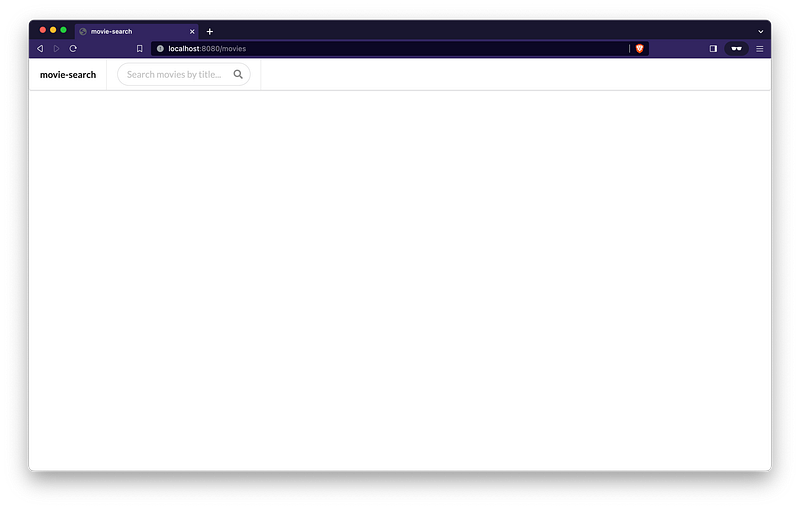
Let’s first check the movies we have using Movie Search UI. For it, access http://localhost:8080. We should see:
We can also retrieve all movies using Movie API endpoints. Go to a terminal and run the cURL command below:
curl -i localhost:9080/api/movies
We should get:
HTTP/1.1 200
...
[]
Now, let’s create a movie using Movie API. For it, in a terminal, run the following cURL command:
curl -i -X POST localhost:9080/api/movies \
   -H 'Content-Type: application/json' \
   -d '{"imdbId": "tt9783600", "title": "Spiderhead", "year": 2023, "actors": "Chris Hemsworth, Miles Teller, Jurnee Smollett", "poster": "https://m.media-amazon.com/images/M/MV5BNDVkZTc4OTktNTAyOC00MzQxLThiZjMtM2M3MTlmYzFjY2FkXkEyXkFqcGdeQXVyMTkxNjUyNQ@@._V1_SX300.jpg"}'
We should get a 201 Created as a response.
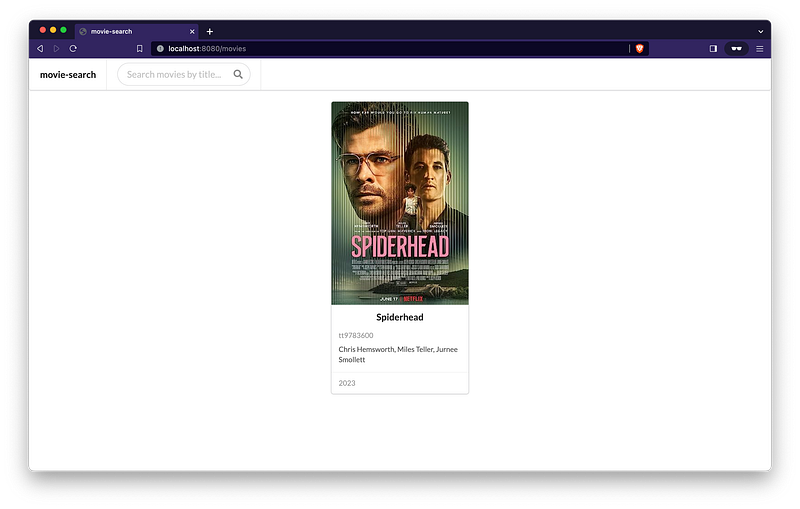
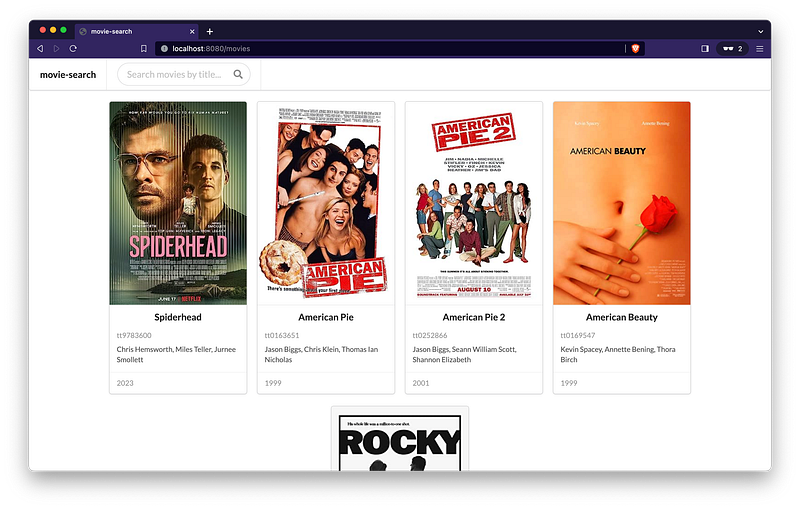
Let’s go back to Movie Search UI and refresh the page. We should see:
Nice! Let’s add more movies.
I have prepared the following set of cURL commands. Run them in a terminal:
curl -i -X POST localhost:9080/api/movies \
   -H 'Content-Type: application/json' \
   -d '{"imdbId": "tt0163651", "title": "American Pie", "year": 1999, "actors": "Jason Biggs, Chris Klein, Thomas Ian Nicholas", "poster": "https://m.media-amazon.com/images/M/MV5BMTg3ODY5ODI1NF5BMl5BanBnXkFtZTgwMTkxNTYxMTE@._V1_SX300.jpg"}'

curl -i -X POST localhost:9080/api/movies \
   -H 'Content-Type: application/json' \
   -d '{"imdbId": "tt0252866", "title": "American Pie 2", "year": 2001, "actors": "Jason Biggs, Seann William Scott, Shannon Elizabeth", "poster": "https://m.media-amazon.com/images/M/MV5BOTEyYjhiMjYtNjU3YS00NmQ4LTlhNTEtYTczNWY3MGJmNzE2XkEyXkFqcGdeQXVyMTQxNzMzNDI@._V1_SX300.jpg"}'

curl -i -X POST localhost:9080/api/movies \
   -H 'Content-Type: application/json' \
   -d '{"imdbId": "tt0169547", "title": "American Beauty", "year": 1999, "actors": "Kevin Spacey, Annette Bening, Thora Birch", "poster": "https://m.media-amazon.com/images/M/MV5BNTBmZWJkNjctNDhiNC00MGE2LWEwOTctZTk5OGVhMWMyNmVhXkEyXkFqcGdeQXVyMTMxODk2OTU@._V1_SX300.jpg"}'

curl -i -X POST localhost:9080/api/movies \
   -H 'Content-Type: application/json' \
-d '{"imdbId": "tt0075148", "title": "Rocky", "year": 1976, "actors": "Sylvester Stallone, Talia Shire, Burt Young", "poster": "https://m.media-amazon.com/images/M/MV5BNTBkMjg2MjYtYTZjOS00ODQ0LTg0MDEtM2FiNmJmOGU1NGEwXkEyXkFqcGdeQXVyMjUzOTY1NTc@._V1_SX300.jpg"}'Note: If you want to add movies you’re a fan of, I suggest visiting the OMDb API website to find the movie information.
Let’s go back again to Movie Search UI and refresh the page. We should see the following:
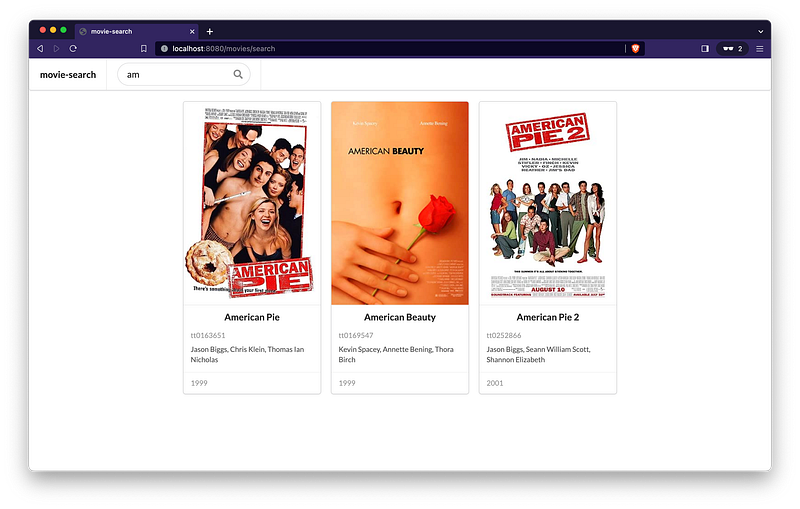
Now, in Movie Search UI, let’s search for movies that start with “am” by tipping it in the search field:
What about search for “pie”:
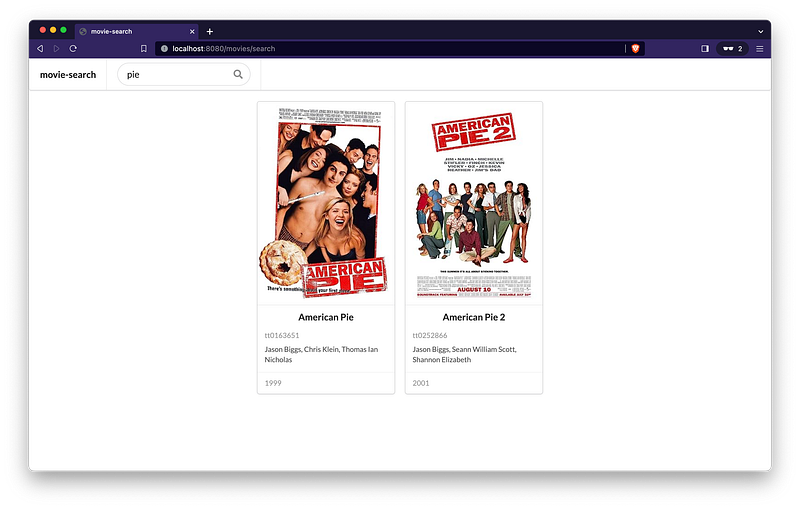
Search is working fine! 🎉
Finally, let’s delete the “Spiderhead” movie whose imdbId is tt9783600. For it, in a terminal, run:
curl -i -X DELETE localhost:9080/api/movies/tt9783600
We should get 200 Success. Checking Movie Search UI without any filter, we should get:
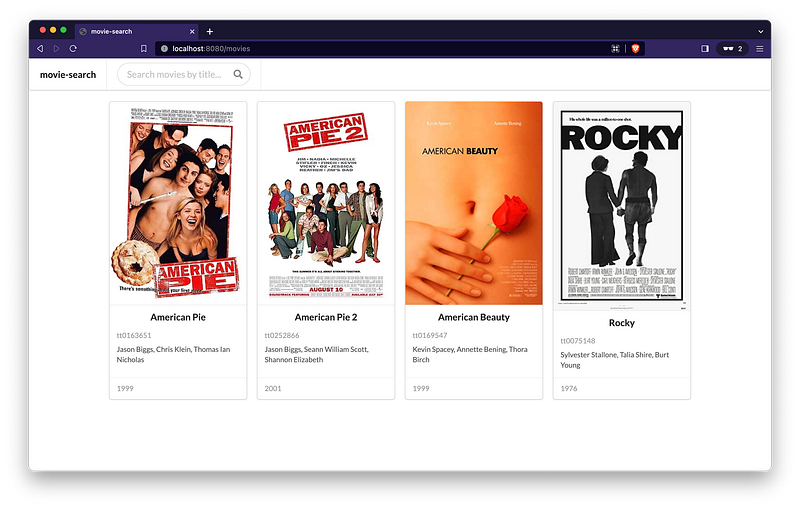
Go ahead and try to create new movies, update and delete them.
Shutdown and Clean up
In the terminal where the Movie API is running, press Ctrl+C to stop the application. Similarly, in the terminal where Movie Search is running, repeat the process by pressing Ctrl+C.
In order to shut down and clean up the MySQL — Kafka Connect — Elasticsearch setup, see the “Shutdown and Clean up” in the article below:
Conclusion
In this article, we’ve built and connected two Spring Boot applications: Movie API and Movie Search. These apps work together with MySQL — Kafka Connect — Elasticsearch setup. Movie API deals with MySQL, letting users manage movies, while Movie Search interfaces with Elasticsearch, allowing users to easily see and search for movies. We wrapped things up by showing that our solution works smoothly.
Support and Engagement
If you enjoyed this article and would like to show your support, please consider taking the following actions:
- 👏 Engage by clapping, highlighting, and replying to my story. I’ll be happy to answer any of your questions;
- 🌐 Share my story on Social Media;
- 🔔 Follow me on: Medium | LinkedIn | Twitter | GitHub;
- ✉️ Subscribe to my newsletter, so you don’t miss out on my latest posts.


