

Build Containers From Scratch in Go
In the last few years, the use of containers has increased significantly. The concept of containers have been around for several years, but it was Docker’s easy-to-use command line that started to popularize containers among developer in 2013.
In this series, I am trying to demonstrate how containers work underneath and how I did develop the vessel.
What is vessel?
vessel is an educational-purpose project of mine that implements a tiny version of Docker to manage containers. It does not use either containerd or runc, it uses a set of Linux features to be able to create containers.
vessel is neither production-ready nor well-tested software. It’s just a simple project to learn more about containers.
Let’s start: reading about Docker!
I found it useful to take a look at Docker docs and gain insight into containers first, before starting to code.
Docker, regarding its documentation, takes advantage of several features of the Linux kernel and combines them into a wrapper called a container format. Those features are:
- Namespaces
- Control groups
- Union file systems
Now let’s go through the above list and understand what they are briefly.
What is Namespace!?
Linux namespaces are the underlying technology behind the most modern container implementations. Namespaces are processes’ awareness of what else is running around them. Namespaces allow for isolating global system resources within a group of processes. The network namespace, for example, isolates the networking stack, which means processes within that network namespace can have their own independent routes, firewall rules, and network devices.
So without namespaces, processes in a container could, for example, unmount a file system, or set down a network interface in another container.
What kind of resource can isolate using namespaces?
In the current Linux kernel (5.9), there are 8 types of different namespaces. Each namespace can isolate certain global system resources.
- Cgroup: This namespace isolates the Control Groups root directory. I will explain what cgroups are in part 2. But for a short explanation, cgroup allows the system to define resource restriction to a group of processes. There is, however, a note to mention here, “cgroup namespace” only controls which cgroups are visible within the namespace. The namespace can not assign resource restrictions. We will explain this in-depth soon.
- IPC: This namespace isolates inter-process communication mechanisms such as System V and POSIX message queues. Understanding IPC is not hard but this post is not going through this topic.
- Network: This namespace isolates routes, firewall rules, and network devices that a group of processes within the namespace can see.
- Mount: This namespace isolates the list of mount points in each namespace. Processes running in separate mount namespaces can mount and unmount without affecting other namespaces.
- PID: This namespace isolates process ID number space. It enables functions such as suspending/resuming processes within the namespace.
- Time: This namespace isolates
CLOCK_MONOTONICandCLOCK_BOOTTIMEsystem clocks which affect APIs that measure against these clocks such as system uptime. - User: This namespace isolates user IDs, group IDs, the root directory, keys, and capabilities. This allows a process to be root within the namespace, but not outside of it (like in host).
- UTS: This namespace isolates the hostname and the domain name
An important note about namespaces
Namespaces are not doing anything but isolation, this means, for example, joining a new network namespace won’t give you a set of isolated network devices, you have to create them on your own. The same thing about the UTS namespace, it won’t change your hostname. The only thing it does is isolate hostname-related system calls. We are going to do these things through this series together.
Namespaces lifetime
A namespace will automatically turn down when the last process in the namespace leaves the namespace. However, there are a number of exceptions that keep the namespace alive without any member processes. We will explain one of these exceptions in creating a network namespace for vessel.
Namespaces system calls
Now we briefly know what namespaces are, it is time to see how to interact with them. In Linux, there are a set of system calls that enable creating, joining, and discovering namespace.
clone: This system call actually creates a new process. But with the aid of the flags argument, the new process will create its own new namespaces.setns: This system call allows the running process to join an existing namespace.unshare: This system call is actually the same as clone but the difference is that this syscall will create and move the current process to a new namespace butclonewill create a new process with new namespaces.
Bonus point: Internally fork and vfork syscalls simply call clone() with different arguments.
Namespace Flags
The system calls mentioned above need a flag to be able to specify the namespaces you want.
CLONE_NEWCGROUP Cgroup namespaces
CLONE_NEWIPC    IPC namespaces
CLONE_NEWNET    Network namespaces
CLONE_NEWNS     Mount namespaces$$
CLONE_NEWPID    PID namespaces
CLONE_NEWTIME   Time namespaces
CLONE_NEWUSER   User namespaces
CLONE_NEWUTS    UTS namespaces
For example, if you want to create a new Network namespace for the current process you should call unshare with CLONE_NEWNET flag, and if you wanna create a new process with a new User and UTS namespace you should call clone with CLONE_NEWUSER|CLONE_NEWUTS. The vertical bar represents OR bitwise which combines two flags.
Namespace file
In above I’ve mentioned that the setns syscall will move a running process between namespaces. But how can we specify which namespace we want to move to? Well, after creating a namespace, the member processes will have a symbolic link to the namespace file.
In Unix, Everything is a file.
In your shell, for example, by listing files under the /proc/[pid]/ns directory, you can see the process namespaces. Here you can see the current namespaces of the running shell (self stands for current shell pid):
$ ls -l /proc/self/ns | cut -d ' ' -f 10-12cgroup -> cgroup:[4026531835]
ipc -> ipc:[4026531839]
mnt -> mnt:[4026531840]
net -> net:[4026532008]
pid -> pid:[4026531836]
pid_for_children -> pid:[4026531836]
time -> time:[4026531834]
time_for_children -> time:[4026531834]
user -> user:[4026531837]
uts -> uts:[4026531838]Also using lsns command you can see a list of processes namespaces:
# lsns
        NS TYPE   NPROCS   PID USER    COMMAND
4026531834 time      244     1 root    /sbin/init
4026531835 cgroup    244     1 root    /sbin/init
4026531836 pid       199     1 root    /sbin/init
4026531837 user      198     1 root    /sbin/init
4026531838 uts       241     1 root    /sbin/init
4026531839 ipc       244     1 root    /sbin/init
4026531840 mnt       234     1 root    /sbin/init
What actually setns syscall does is change the link of the files under the /proc/[pid]/ns directory.
Enough talk, LET’S CODE!
Now we know everything we want. It is time to write our first code to run on a separated namespace. For our first try let’s see how unshare works. The code below, at line 1 using the syscall package and Unshare method creates a new namespace for the current running Go program, then in line 5 sets the hostname to “container”, then at line 9 it creates a new command and runs it. Run starts the command and waits for it to finish.
Creation of name spaces needs
CAP_SYS_ADMINcapability, except for user namespace. Thus you need to run the program as root.
Let’s build the program and test it. For the first command in the host, I run ps to monitor the running processes, then get the hostname and current shell PID (like self, $$ stands for current process PID).
$ ps
    PID TTY          TIME CMD
  27973 pts/2    00:00:00 sh
  27984 pts/2    00:00:00 ps
$ hostname
host$ echo $$
27973Now let’s see what happens after running our program. Getting the hostname it returns “container”. seems working!
$ hostname
container
Let’s see what our process ID is. YES! it is 1, worked.
$ echo $$
1
Let’s run ps to see running processes inside the container.
$ ps
    PID TTY          TIME CMD
  27973 pts/2    00:00:00 sh
  27998 pts/2    00:00:00 unshare
  28003 pts/2    00:00:00 sh
  28011 pts/2    00:00:00 ps
What happened!? We can see host processes inside containers with large PIDs which does not make sense.
I am going to kill one of these processes to see what happened:
$ kill 27998
sh: kill: (27998) - No such process
No such process, it says. Wonderful? let me explain. The code actually worked, we are inside a new PID namespace and we can see our process ID is 1. The problem is the ps command. The ps, underneath, uses the proc pseudo-file system to list all running processes. To be able to have our own proc file system we need a new mount namespace, plus a new root path to mount proc into it. We’ll dive into that in the next part.
Clone in Go
As far as I am concerned, Go has no clone functionality. There is, however, a package called goclone which wraps clone system call for Go. But the solution we are going to use is different. In the vessel, we are using a package called reexec which was developed by the Docker team.
What is reexec?
Go allows you to run a command with a new set of namespaces. The idea behind reexec is to re-execute the running program itself with new namespaces. reexec package, under the hood, will return a *exec.Cmd from Go standard library which calls /proc/self/exe. This file is basically a link to the running program executable file.
Now you know how reexec works, let’s dive into some code from the vessel. The code below is in the early stages of the vessel. It is actually the code to run a new process with a set of new namespaces. The process then will be our container. At lines 1 to 4, the function creates arguments and a new reexec command, then sets the standard input, output, and error for it.
Note: The vessel’s fork sub-command (line 1) is the container mode. Although it has been hidden in usage.
The SysProcAttr of command in Go holds OS-specific attributes. One of those attributes is Cloneflags, by passing flags into this value, the command will run with the new specific namespaces. Thus we have our new process with new IPC, UTS, PID, and Mount (NS) namespaces. But what about the Network namespace?!
Dive into the network namespace
As I’ve already mentioned, namespaces only isolate the resource and the boundaries of the container’s awareness. Thus, running a container with a new network namespace won’t help that much. We should do something about connecting the containers to the outside network as well. But how is this possible?!
What is a virtual ethernet device?
The veth can act as a tunnel between network namespaces. It means it can create a connection to a network device in another namespace.
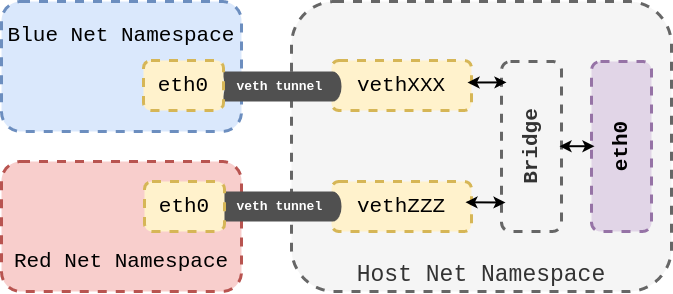
Virtual Ethernet Devices are always created in interconnected pairs. All data transmitted on one device in the pair, will immediately be received on the other device. When either device is down the link state of the pair is down.
In figure 1, for example, there are two veth pairs. In each pair, one of the peer devices is inside the host network namespace and the other one is inside the container. The devices in the host namespace are connected to a bridge which is routed to a physical internet-connected device named eth0.
Now let’s see how the vessel creates such a network.
The above code covers the SetupNetwork method of the container package in the vessel. This method's responsibility is to create a network as we’ve seen in figure 1.
Before calling this method, the vessel creates its bridge named vessel0. This is the name actually passed to the SetupNetwork's bridge value.
From now on, things can be a little bit confusing, But don’t worry. Make sure to read this multiple times and follow the code.
In lines 3-4, the veth device pair names are defined. Then at line 6, veth will be created with associated names. At line 9, the veth will assign vessel0 as its master for further communication.
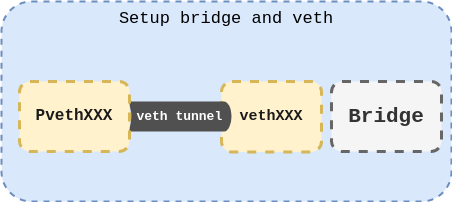
Now it’s time to create a new fresh network namespace and move one of veth pairs into it. Our container will join this network namespace after all. The problem, however, is namespaces’ lifetime! As I mentioned before a namespace will be torn down when the last process member leaves the namespace. I also did mention that there are some exceptions. One of those exceptions is when a namespace is bind-mounted. That is why there is a function named MountNewNetworkNamespace. This function creates a new namespace and binds it to a file to keep it alive. The following code covers this function.
In line 2, the function creates a file. This file will be used to bind the new network namespace. Then at line 9, the function stores the current namespace link to be able to get back to it. Now it’s time to create a new network namespace and join it using unshare system call at line 15. The function now binds the /proc/self/ns/net to the created file at line 2. Remember, the /proc/self/ns/net will change after unshare system call.
It is all good, we only need to leave the current network namespace and back to our previous one using setns system call at line 29. That is why the function has stored the process network namespace in the first place (line 9).
Back to the SetupNetwork function, now let’s move the peer device to the namespace that we have just created at MountNewNetworkNamespace function. Since the nsMountTarget value is bound to the network namespace, it represents the namespace itself. Thus we can use this file’s descriptor to specify the namespace.
Well, after all, we have a virtual ethernet device pair in which one of its devices is inside the host network namespace and the other one is inside a new namespace.
Now the only remaining task is configuration of the device inside our new namespace. The problem is that the device is no longer visible from the host network namespace, Thus, we need to join the network namespace again using the SetNetNsByFile function(line 21). This function simply calls setns syscall with the given file’s descriptor. Note that we need to defer the unset function (line 25) to leave container network namespace at the end of the function.
The rest of the code (line 22-43), now, runs inside the container network namespace. First thing is to rename the container device to eth0 (line 29), then associate a new IP address (line 32), set the device up (line 35), add the gateway for the device (line 38), and at the end, setup loopback (127.0.0.1) network interface. Now we are done here and our network namespace is fully ready.
Also mention that the 172.30.0.1 is the default IP address of vessel0 bridge, it’s not the best way to do it, due to the chance that this IP address is already in use. I did it for simplicity. Now it is your task to make it better and send a Pull Request.
Conclusion
We learned that namespace is one of the Linux features which isolates global system resources for a group of processes, thus it is the fundamental technology in most containers. Also, we learned how to interact with namespaces using unshare, clone, and setns system calls in Go.
It is not finished yet. We will discuss union file systems in the next part, but for now, let’s give it a try and read the vessel code to understand it.
Also do not forget to google “Liz Rice” and watch her talks about containers.


