Read Medium logo
No Results
Translate to
Read Medium Logo
Free OpenAI o1 chatTry OpenAI o1 API
Read Medium logo
No Results
Translate to
avatarRushi Mistry

总结

undefined

摘要

<h2 id="3191">Visual Hierarchy</h2><p id="9874">White space is a key tool for establishing visual hierarchy within a design. Through strategic spacing, important elements can be given more prominence, guiding users’ attention to what matters most.</p><figure id="5893"><img src="https://cdn-images-1.readmedium.com/v2/resize:fit:800/1*azwFgm7l-sbCBMqbSV84Lg.png"><figcaption><i>Example of a UI layout showcasing the impact of white space on visual hierarchy.</i></figcaption></figure><h2 id="d5f4">Enhancing Interactivity</h2><p id="8745">When you’re navigating a website or app, accidental taps or clicks can be frustrating. White space can be used to buffer interactive elements like buttons and links. This not only reduces the chance of unintended actions but also enhances the overall user-friendliness of the interface.</p><figure id="d9c9"><img src="https://cdn-images-1.readmedium.com/v2/resize:fit:800/1*N092fnYgh0TBuVhLq1YD_A.png"><figcaption><i>A comparison of interactive elements with and without white space.</i></figcaption></figure><h2 id="b850">Aesthetics and Balance</h2><p id="e12d">While white space is a functional element, it also greatly impacts aesthetics. It provides a sense of balance and elegance, making the UI visually appealing. A cluttered interface can be overwhelming, while a well-spaced design exudes a sense of simplicity and sophistication.</p><figure id="7068"><img src="https://cdn-images-1.readmedium.com/v2/resize:fit:800/1*Rmy7T9oJS0c65xeVbLaWog.png"><figcaption><i>Side-by-side comparison of a cluttered UI and a well-spaced UI.</i></figcaption></figure><h1 id="5bbd">Examples of Effective White Space Usage</h1><h2 id="a321">Apple:</h2><figure id="c9a8"><img src="https://cdn-images-1.readmedium.com/v2/resize:fit:800/1*YsQ7dB2wLnhAoZRnBHikOg.png"><figcaption></figcaption></figure><p id="2b3d">Apple’s websit # 观点 e and product design are excellent examples of using white space to convey a sense of elegance and simplicity. Their use of ample white space allows users to focus on key product features.Google:</p><h2 id="f7cb">Google:</h2><figure id="fc53"><img src="https://cdn-images-1.readmedium.com/v2/resize:fit:800/1*R4ZE2z2NqdpGo9nrjOi_Rw.png"><figcaption></figcaption></figure><p id="25b7">Google’s search engine exemplifies the power of minimalism and white space. The uncluttered interface puts the search bar at the center, making it the focal point for users.</p><h2 id="e68e">Spotify:</h2><figure id="bb1c"><img src="https://cdn-images-1.readmedium.com/v2/resize:fit:800/1*mFBVyq5_knwjZV60u0979w.png"><figcaption></figcaption></figure><p id="8c43">The Spotify app employs white space around album covers and track listings, making it easy for users to navigate and explore music.</p><p id="fdca">— — — — — — — — — — — — — — — — — — — — — — — — — — — — — — — — — — — — —</p><p id="dcbe">In conclusion, the power of white space in UI design is undeniable. It serves as the cornerstone of clean, intuitive, and visually appealing interfaces. By enhancing clarity, establishing visual hierarchy, improving interactivity, and contributing to aesthetics, white space is a versatile and indispensable tool for designers.</p><p id="fd71">Furthermore, it’s essential for designers to advocate for the importance of white space, especially when pressured to reduce spacing for the sake of showcasing more products or offerings. While the intention may be to provide more information, overcrowding the interface can lead to a negative user experience and potential drop-offs. Balancing content with white space ensures that users can seamlessly navigate and engage with the interface, resulting in a more satisfying and effective user experience.</p></article></body>Elmo.chat 是一个 AI 助手,能够快速总结网页、YouTube 视频、PDF 文档,并支持多语言,提供深入的关键词分析和即时问答功能。

The Power of White Space in UI Design: Less is More

In the ever-evolving world of user interface (UI) design, it’s tempting to fill every pixel with information. However, the secret to creating clean, intuitive, and visually appealing designs lies in the judicious use of white space. In this article, we delve deep into the significance of white space in UI design, examining its impact on user experience, aesthetics, and functionality.
Thumbnail

Introduction:

The world of UI design is dynamic, ever-evolving, and perpetually driven by innovation. Amidst all the trends and technologies, one design principle remains timeless: the strategic utilization of white space. Often misunderstood as “empty” or “wasted” space, white space is anything but. It’s the breathing room that allows other design elements to shine and communicates more than words ever could. It’s the unsung hero of user interfaces.

Why White Space Matters

Clarity and Readability

White space is the unsung hero of user interface (UI) design. It might seem like “empty” space, but in reality, it’s anything but. Adequate white space around text and content makes it more legible. It allows users to digest information without feeling overwhelmed. When text and elements are too close, it creates visual noise, making it harder for users to understand the content.

Side-by-side comparison of text with and without white space.

Visual Hierarchy

White space is a key tool for establishing visual hierarchy within a design. Through strategic spacing, important elements can be given more prominence, guiding users’ attention to what matters most.

Example of a UI layout showcasing the impact of white space on visual hierarchy.

Enhancing Interactivity

When you’re navigating a website or app, accidental taps or clicks can be frustrating. White space can be used to buffer interactive elements like buttons and links. This not only reduces the chance of unintended actions but also enhances the overall user-friendliness of the interface.
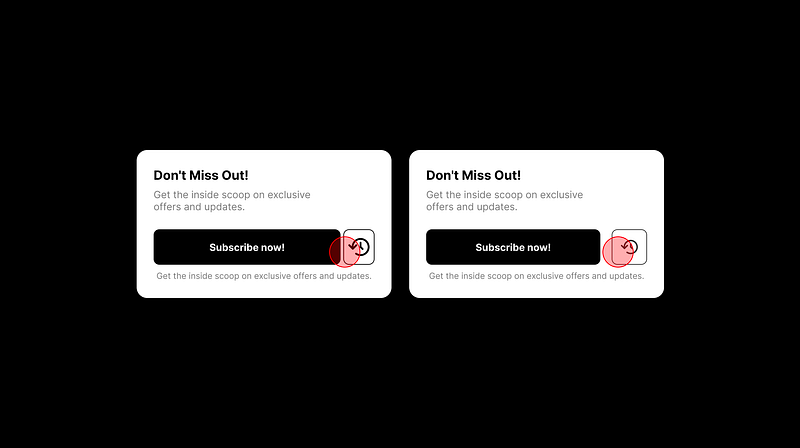
A comparison of interactive elements with and without white space.

Aesthetics and Balance

While white space is a functional element, it also greatly impacts aesthetics. It provides a sense of balance and elegance, making the UI visually appealing. A cluttered interface can be overwhelming, while a well-spaced design exudes a sense of simplicity and sophistication.

Side-by-side comparison of a cluttered UI and a well-spaced UI.

Examples of Effective White Space Usage

Apple:
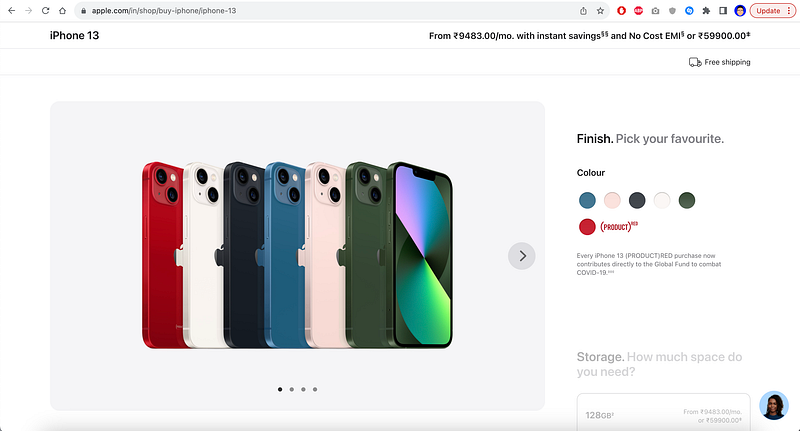
Apple’s website and product design are excellent examples of using white space to convey a sense of elegance and simplicity. Their use of ample white space allows users to focus on key product features.Google:

Google:
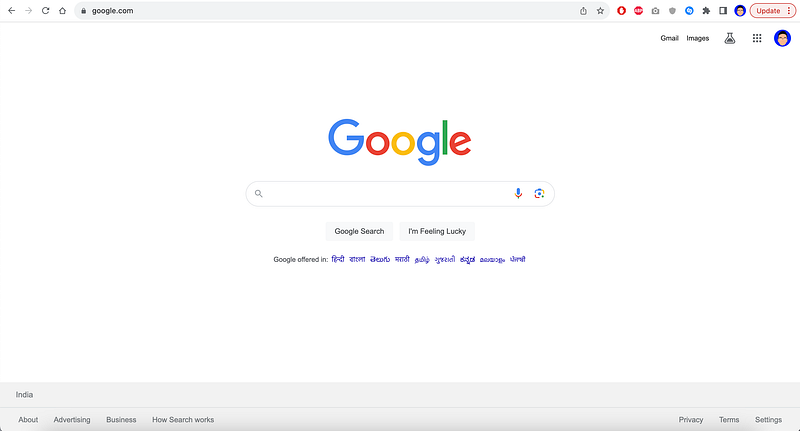
Google’s search engine exemplifies the power of minimalism and white space. The uncluttered interface puts the search bar at the center, making it the focal point for users.

Spotify:
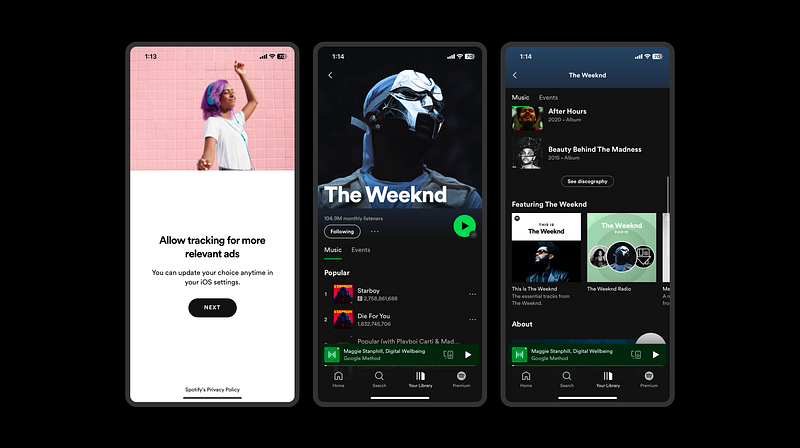
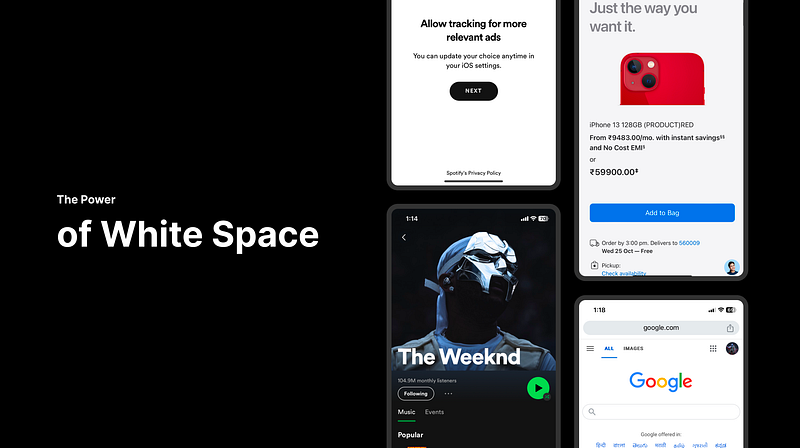
The Spotify app employs white space around album covers and track listings, making it easy for users to navigate and explore music.

— — — — — — — — — — — — — — — — — — — — — — — — — — — — — — — — — — — — —

In conclusion, the power of white space in UI design is undeniable. It serves as the cornerstone of clean, intuitive, and visually appealing interfaces. By enhancing clarity, establishing visual hierarchy, improving interactivity, and contributing to aesthetics, white space is a versatile and indispensable tool for designers.

Furthermore, it’s essential for designers to advocate for the importance of white space, especially when pressured to reduce spacing for the sake of showcasing more products or offerings. While the intention may be to provide more information, overcrowding the interface can lead to a negative user experience and potential drop-offs. Balancing content with white space ensures that users can seamlessly navigate and engage with the interface, resulting in a more satisfying and effective user experience.

UI
Design Thinking
Design Process
Visual Design
UX
Recommended from ReadMedium
avatarHriday Checker
Everything You Need to Know About Design Systems

Design systems have become integral to my daily work, and it seems they are for many others too. I’ve grown even more convinced that every…

4 min read
avatarThalion
UX/UI Design and AI Trends for 2025

It is much more than a new UI style predictions, it’s about the shifting role of the designer

7 min read
avatarNick Babich
5 Techniques For Effective User Onboarding

What happens during the first experience can make or break any app. To ensure users don’t delete your app after the first try, you must…

7 min read
avatarMichal Malewicz
Figma is not forever.

And inVision is now gone.

4 min read
avatarArjun Kumar
Awwward-winning animation techniques for websites

Helping designers craft unforgettable animations through simple coding techniques

11 min read
avatarSara Irshad
10 AI Super Tools Every UI/UX Designer Needs

More tools:

5 min read