
OSCP Prep: Introducing My Runbooks — Enumeration
As cliché as it sounds, getting through the OSCP is all about becoming good at enumeration. While going through the certification, I read the phrase “enumerate harder” by many former students, and I’m here to tell you it’s true. As such, I thought I would share my runbooks for enumeration. I will split it into enumerating machines from the outside, Linux enumeration, and Windows enumeration. This write-up focuses on the outside enumeration and future write-ups will dive into Linux and Windows, respectively.
The idea with this split is that I always start my enumeration following the runbook here, and then dive into the next runbook depending on the OS of the target machine.
What Is a Runbook?
One of the key concepts that I used to get me through the OSCP is the concept of a runbook, which is a "TODO-list" of stuff you carry out in a certain situation. This can help you reduce stress and keep you on the right track. By following a predetermined runbook, change the exam scenario so you don't have to ask "So what should I do next constantly?". Instead, you simply look into your runbook to see the next step.
The exact steps in your runbook will vary greatly depending on what kinds of CTFs you are doing and what order you like to do things in. I developed my runbooks during the OSCP challenge machines and by going through the NetSecFocus list of machines. As such, these runbooks will roughly cover the OSCP level.
A Word of Caution
I am sharing my approach to the exam to inspire future students about how the exam can be approached. However, it's important to note that everyone is different and people may need to tackle the OSCP differently. As such, your runbook may end up looking significantly different from mine. Or you may not even benefit from a runbook.
If my approach seems interesting, have a look at creating your own runbook to follow when doing practice machines and see how it feels. And feel free to be heavily inspired by my runbook. But if following a predefined checklist feels unnatural to you, feel free to disregard the concept entirely and do something else.
My Runbook for Initial Enumeration of Machines
So here's my runbook for enumerating machines from the outside. The assumption here is that we only know the IP of the machine and nothing else. As such, the enumeration is very broad and meant to catch "everything". This won't catch everything, but it should help you cover the enumeration of most machines on the level of the OSCP.
Start Autorecon
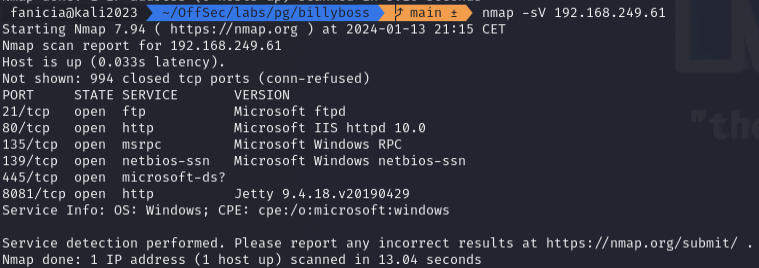
Run Autorecon: sudo env PATH=$PATH autorecon $TARGET_IP. Autorecon is meant as a faster way to enumerate an entire machine rather than running everything from nmap to smbmap, gobuster, etc. yourself. This tool is allowed for the OSCP exam as it doesn't do anything you aren't allowed to do yourself. It just does it faster. I use it primarily to get an overview of the target. Any ports that show up as open during the Autorecon scan should be scrutinized via manual enumeration. Autorecon also runs enough tools to give you a pretty good idea of the target's OS and OS version. All of these quick hints will help you figure out where to go next.
The First Deep Dives
Insane as it sounds, I often end up zooming in on stuff like SMB ports (typically 139, 135), FTP ports (typically port 21) while autorecon is running. The reason is that they are usually easy to exclude as "uninteresting". If you find an FTP server always check if the server allows the credentials anonymous:anonymous. If this is not the case, the FTP server may become relevant later if you find credentials somewhere, but it may also mean that the FTP server is a rabbit hole. The same kind of check goes if you find a SMB server; Always check if you can access the shares with the Guest account.
By ensuring I check off the quick and easy stuff, I force myself to have a look at it before I need it. Often information from SMB or FTP turns out to be credentials to other systems. As such, it can be good to gather all those credentials early, so you know what you have to work with.
Go Through Autorecon Results
Once stuff like the above is taken care of, autorecon has had a bit of time to dive into most ports. By now, it may have shown us that stuff is running on unusual ports. Some machines on the OSCP level "hide" certain services on a port number that hints at "the usual" port, but is not the usual port. I have seen quite a few HTTP servers located on ports 8082, 4443, and so forth. Just because a service runs on an unexpected port does not mean it is your way in, but an HTTP server on port 8082 and another one on port 80 could mean the machine creator wants you to waste time chasing your tail on port 80 while the juicy RCE is on port 8082.
Check The Databases
Is there a MySQL/PostgreSQL/MSSQL Server with an open port? Check if you can access it using default credentials. Some misconfigured databases will give you RCE straight away, but other boxes will give you information about the system through the database.
Look into HTTP Servers
In the interest of keeping this write-up somewhat short, I can’t say everything I want to say on HTTP servers. They are often the way to get the initial access if they contain a poorly configured CMS or some other piece of software with a gaping Critical-CVE-size hole. On the other hand, I have often spent a lot of time enumerating directories of HTTP servers, diving into their login forms looking for SQLi and similar enumeration techniques, just to realize that the way in was something else entirely.
A quick summary of how I handle HTTP servers is:
- Is it just an HTML template created with a typical templating tool? If so, the HTTP server is most likely not worth spending a ton of time on. Consider if you need to enumerate the directories of the server more than what you got from Autorecon, but don’t spend time looking for stuff like SQLi if you can tell there is no backend to the server.
- What software are we looking at and what version is it? As I said earlier, sometimes just Googling the name of the software will show you that you’re looking at something relevant.
- Check for phpinfo if the HTTP server uses PHP. This endpoint is meant as a debugging endpoint for developers during development and it should not be exposed. Some boxes will just give you general information about the system through phpinfo, but others might leak credentials that you can abuse.
- If there’s a login form always check credentials like
admin:adminorjenkins:jenkinsif the software is Jenkins. - Is the server a Git repository? use something like git-dumper to check if someone accidentally exposed a git repository. In that case, the important stuff can be hidden in previous git commits or the history of the repository.
- Use Burp to check for stuff like SQLi, create a user if possible, and poke around the site. Is there anything that stands out here?
And even after all these steps, I’m sure I forgot something. I know for sure that I do deviate from the exact formula now and then at least. The runbook is primarily a way to ensure there is always a “next step”.
Final Remarks
In the end, your process will be different from everybody else’s. However, I believe finding your groove with tackling boxes is what will get you through the OSCP and a runbook is one tool to do that. I found that having something I could always go back to after a deep rabbit hole helped me a lot during my practice. At this point, I will most likely just be adjusting it as I level up my game further.
A couple of caveats are relevant to mention, though. A runbook is a supplement to your skills as a pentester or CTF’er. No magic list alone will get you from zero to hero. Likewise, using Autorecon doesn’t mean you don’t need to understand the basics of all the underlying tools. You still need to understand how to enumerate using nmap, smbmap, gobuster and similar tools. I often end up diving into specific enumeration commands with these tools to dive further into something not found by Autorecon. So let Autorecon do the heavy lifting, but make sure you understand what is going on.
If you want to dive into my notes fairly unorganized notes from the OSCP and other red-teaming exercises, feel free to have a look at my Github Repository here.
Is there anything obvious you feel like I’m missing? Let me know in the comments!


