
Building an AI System for Retrieval-Augmented Generation (RAG) and Fine-Tuned LLMs with Hopsworks

Introduction
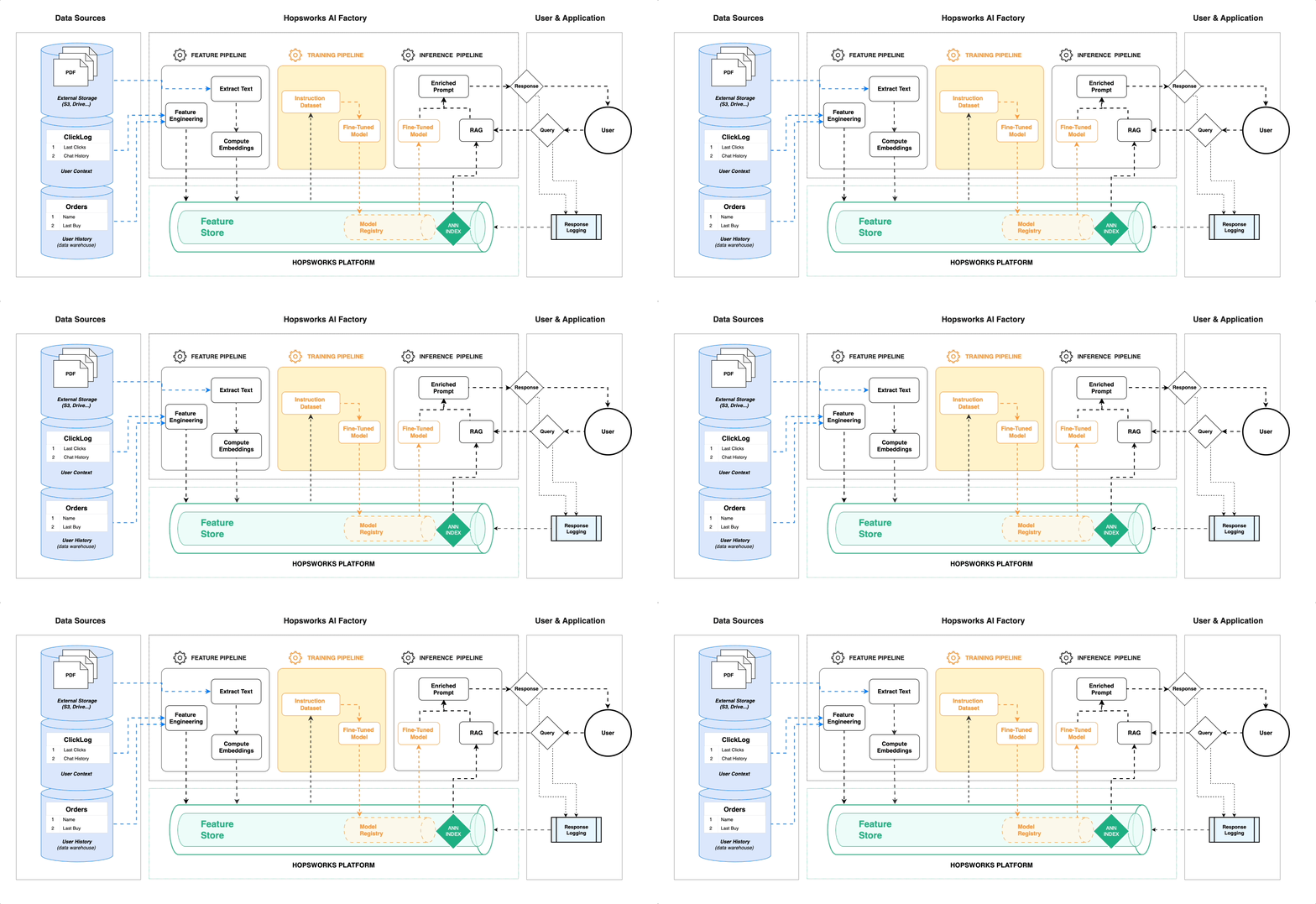
In the era of large language models (LLMs), integrating external knowledge into AI systems has opened the door to more precise, contextualized responses. Retrieval-Augmented Generation (RAG) is a key technology that combines the strengths of LLMs with external data, like PDFs, to answer queries with high relevance and accuracy. When built on top of platforms like Hopsworks, the system becomes even more powerful, providing seamless integration of feature engineering, vector indexing, and model training. This article will guide you through building such a system that fine-tunes models, retrieves answers from indexed data, and provides a simple user interface (UI) for querying.
Definitions
- Retrieval-Augmented Generation (RAG): RAG combines external data retrieval with generative capabilities of LLMs. The LLM retrieves relevant documents and generates a context-rich response based on the query and the retrieved information.
- Fine-Tuning LLMs: Fine-tuning involves adjusting a pre-trained language model with a specific dataset to tailor it for specific tasks, leading to improved performance in domain-specific contexts.
- Hopsworks: A data platform designed for AI and machine learning, enabling feature engineering, model training, and vector indexing all within a unified architecture.
Benefits of Integrating RAG with Fine-Tuned LLMs on Hopsworks
- Improved Accuracy: By fine-tuning models on task-specific data and retrieving relevant external documents (like PDFs), the AI system can produce highly accurate answers.
- Dynamic Knowledge Base: Instead of relying solely on the model’s pre-trained knowledge, RAG can dynamically incorporate new data, creating responses that reflect up-to-date information.
- Seamless Model Management: Hopsworks offers built-in capabilities for model versioning, vector indexing, and dataset management, allowing efficient development and deployment pipelines.
- Customizability: With Hopsworks, it is easy to configure the model’s components, such as switching between different models (e.g., GPT, Llama-3–70B, or Mistral 7B), allowing flexibility in architecture design.
Code Implementation
Lets delve into the code implementation for Retrieval-Augmented Generation (RAG) and Fine-Tuned LLMs with Hopsworks.Here is the example as follows:
import streamlit as st
import hopsworks
from sentence_transformers import SentenceTransformer
from FlagEmbedding import FlagReranker
from functions.prompt_engineering import get_context_and_source
from functions.llm_chain import get_llm_chain
import config
import warnings
warnings.filterwarnings('ignore')

st.title("💬 AI assistant")

@st.cache_resource()
def connect_to_hopsworks():
    # Initialize Hopsworks feature store connection
    project = hopsworks.login()
    fs = project.get_feature_store()
    mr = project.get_model_registry()

    # Retrieve the 'documents' feature view
    feature_view = fs.get_feature_view(
        name="documents",
        version=1,
    )

    # Initialize serving
    feature_view.init_serving(1)

    # Get the Mistral model from Model Registry
    mistral_model = mr.get_model(
        name="mistral_model",
        version=1,
    )

    # Download the Mistral model files to a local directory
    saved_model_dir = mistral_model.download()

    return feature_view, saved_model_dir


@st.cache_resource()
def get_models(saved_model_dir):

    # Load the Sentence Transformer
    sentence_transformer = SentenceTransformer(
        config.MODEL_SENTENCE_TRANSFORMER,
    ).to(config.DEVICE)

    llm_chain = get_llm_chain(saved_model_dir)

    return sentence_transformer, llm_chain


@st.cache_resource()
def get_reranker():
    reranker = FlagReranker(
        'BAAI/bge-reranker-large',
        use_fp16=True,
    )
    return reranker


def predict(user_query, sentence_transformer, feature_view, reranker, llm_chain):

    st.write('⚙️ Generating Response...')

    session_id = {
        "configurable": {"session_id": "default"}
    }

    # Retrieve reranked context and source
    context, source = get_context_and_source(
        user_query,
        sentence_transformer,
        feature_view,
        reranker,
    )

    # Generate model response
    model_output = llm_chain.invoke({
            "context": context,
            "question": user_query,
        },
        session_id,
    )

    return model_output.split('### RESPONSE:\n')[-1] + source


# Retrieve the feature view and the saved_model_dir
feature_view, saved_model_dir = connect_to_hopsworks()

# Load and retrieve the sentence_transformer and llm_chain
sentence_transformer, llm_chain = get_models(saved_model_dir)

# Retrieve the reranking model
reranker = get_reranker()

# Initialize chat history
if "messages" not in st.session_state:
    st.session_state.messages = []

# Display chat messages from history on app rerun
for message in st.session_state.messages:
    with st.chat_message(message["role"]):
        st.markdown(message["content"])

# React to user input
if user_query := st.chat_input("How can I help you?"):
    # Display user message in chat message container
    st.chat_message("user").markdown(user_query)
    # Add user message to chat history
    st.session_state.messages.append({"role": "user", "content": user_query})

    response = predict(
        user_query,
        sentence_transformer,
        feature_view,
        reranker,
        llm_chain,
    )

    # Display assistant response in chat message container
    with st.chat_message("assistant"):
        st.markdown(response)
    # Add assistant response to chat history
    st.session_state.messages.append({"role": "assistant", "content": response})
Conclusion
By leveraging the power of Hopsworks and combining it with Retrieval-Augmented Generation (RAG) and fine-tuned LLMs, you can build a highly efficient AI system tailored to domain-specific tasks. The vector embedding and fine-tuning pipelines allow your models to retrieve and utilize the most relevant data dynamically, increasing both precision and relevance in responses. With a user-friendly Streamlit UI, querying your private knowledge base becomes a breeze, providing not just answers, but also citations to source documents. Whether you’re working with open-source models or powerful private models, the system architecture is flexible enough to suit your needs.
Resources
Stay connected and support my work through various platforms:
Github Patreon Kaggle Hugging-Face YouTube GumRoad Calendly
Like my content? Feel free to Buy Me a Coffee ☕ !
Requests and questions: If you have a project in mind that you’d like me to work on or if you have any questions about the concepts I’ve explained, don’t hesitate to let me know. I’m always looking for new ideas for future Notebooks and I love helping to resolve any doubts you might have.
Remember, each “Like”, “Share”, and “Star” greatly contributes to my work and motivates me to continue producing more quality content. Thank you for your support!
If you enjoyed this story, feel free to subscribe to Medium, and you will get notifications when my new articles will be published, as well as full access to thousands of stories from other authors.


