avatarEva Schicker

Free AI web copilot to create summaries, insights and extended knowledge, download it at here

3262

Abstract

tions, and goals.</p><figure id="d1e9"><img src="https://cdn-images-1.readmedium.com/v2/resize:fit:800/1*fztNeRXUDlFv_8JCPSH-Bw.png"><figcaption>A diagram listing pain points that shoppers and visitors might express during user interviews.</figcaption></figure><p id="8bd8">Deeply empathizing with visitors and shoppers’ needs will make for happier shoppers, and will make visitors want to return often.</p><h2 id="9811">2. Empathize with shop owners</h2><p id="4359">Likewise, listen to the shop owners who depend on visitors’ traffic and happy pedestrians for buying their wares. What are the shop owners most pressing needs or concerns?</p><figure id="6871"><img src="https://cdn-images-1.readmedium.com/v2/resize:fit:800/1*9QiGiO36H4kMtCOG95B53g.png"><figcaption>A diagram listing pain points that shop owners might express as being their top concerns during user interviews.</figcaption></figure><p id="be99">Shop owners will have an entirely different set of pain points. While shoppers might want to bring their pets, shop owners might not want to accommodate for such and need to have a no-pet policy inside their stores.</p><p id="3386">By listening and empathizing with shop owners pain points, the app will have a greatly expanded data set.</p><h2 id="5627">3. Empathize with area residents</h2><p id="b13f">What about the people who actually live on the perimeter of the pedestrian zone? How are they coping with the influx of visitors in a restricted pedestrian zone?</p><p id="22d1">Listen to their stories and pain points.</p><figure id="739b"><img src="https://cdn-images-1.readmedium.com/v2/resize:fit:800/1*nYu-lLOcRuXxJgvG8Ovm-g.png"><figcaption>A diagram listing pain points that area residents might express as being their top concerns during user interviews.</figcaption></figure><p id="bcf7">Area residents might want to access this app for information such as safety precautions, cleanliness report, or city ordinances.</p><h1 id="6865">Ask open-ended questions and show empathy for a wide variety of user stories</h1><p id="8722">Foster a sense of psychological safety by being emphatic to <b>all</b> your users’ pain points and needs.</p><p id="6183">Build an empathetic research foundation to gather insightful data. Data analysis will identify top pain points that are priorities to all users.</p><p id="abeb">For instance, if safety is a concern to most, indicate whether there’s an area supervisor, such as a retail or event guard, on duty. Likewise, indicate restroom availabilities, pet-friendly stations, and water fountains.</p><p id="e2ae">A popular design solution might be a time chart for busy times.</p><h1 id="42f8">Showing empathy with users’ pain points can determine the product’s top features</h1><p id="06b1">Taking the above pain points into consideration, the product’s main features can include solutions to all different sets of users.</p><figure id="9e7c"><img src="https://cdn-images-1.readmedium.com/v2/resize:fit:800/1*QlZ6arlipj0tmVD37Q4k6Q.png"><figcaption>An illustration of the app’s map features that address users’ pain points, such as access to rest rooms, parking, outdoor seating, shaded areas, and also, a time-chart of when the area is busiest and most quiet.</figcaption></figure><p id="2895">For

Options

instance, based on the above lists of pain points, this app can focus on top features such a busy/quiet time read-outs, markings of comfort spaces within the pedestrian zone, rest rooms, cafés, parking spaces for residents or restricted parking, and others.</p><h1 id="bc3e">Shape your style of empathy as a UX designer</h1><p id="9293">There are many ways to express empathy. Being a good listener is key to comprehending users’ pain points.</p><p id="ca18">Develop a mature personality as a designer so interview participants feel at ease with you. Create a safe space for participants to express their feelings in their words. Don’t interrupt too often, and then, only to define an insight more thoroughly.</p><p id="7f15">Become fluid with note taking. Record the interview with the user’s permission, or have someone assist you with taking solid notes during your interview session.</p><h1 id="bb03">To remember</h1><p id="9805">Empathy is the ability to understand someone else’s feelings or thoughts in a situation.</p><p id="187d">As UX designers, we need to truly understand how our users are feeling, in the positive and negative, and what they are thinking and wishing for.</p><p id="4a9f">In order to design products that are useful, enjoyable, and accessible to our users, we need to have a deeply empathic understanding of the pains associated when users’ needs are not solved.</p><p id="a6af">To understand users’ needs with empathy is to drive towards a better outcome for everyone.</p><h2 id="7c41">Interested in learning more about UX design, AI, design tools, trends, and art? Join Medium with this link, and support my future writing.</h2><p id="6b65">Thank you! ✍️🧡</p><p id="0505"><i>All illustrations designed in Adobe Illustrator, ©Eva Schicker 2023.</i></p><h2 id="33de">Read up on more stories about UX and design:</h2><div id="9fc0" class="link-block"> <a href="https://evaschicker.medium.com/designing-community-icons-using-ux-gestalt-principles-a10737541380"> <div> <div> <h2>Designing community icons using UX Gestalt principles</h2> <div><h3>3 examples to define iconic UI elements for your design projects</h3></div> <div><p>evaschicker.medium.com</p></div> </div> <div> <div style="background-image: url(https://miro.readmedium.com/v2/resize:fit:320/1*lOfnuHJnVsIucjls6wjEvQ.png)"></div> </div> </div> </a> </div><div id="dc4d" class="link-block"> <a href="https://evaschicker.medium.com/an-empathy-map-is-a-great-ux-research-tool-to-start-your-design-concept-494e41613c1a"> <div> <div> <h2>An empathy map is a great UX research tool to start your design concept</h2> <div><h3>Always consider your users’ needs and pain points first</h3></div> <div><p>evaschicker.medium.com</p></div> </div> <div> <div style="background-image: url(https://miro.readmedium.com/v2/resize:fit:320/1*AXoNA9QlrJjNo_XjXySKxg.png)"></div> </div> </div> </a> </div><p id="b9e6">Thank you.</p></article></body>

Empathy is the foundation of solid UX research

Listen, empathize, and empower
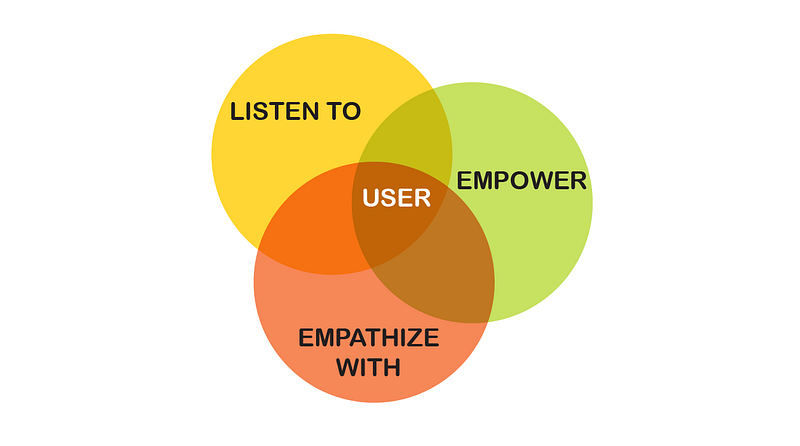
The three top skills to develop as a UX designer: Listen, empathize, and empower. Thus, the user is always at the center of UX research.

Listen, empathize, and empower. These skills allow UX designer to draw wisdom, insight, and creativity from their users interviews.

To listen is to encourage users to express their concerns and pain points in their words, to empathize means that you are understanding and learning about the users’ difficulties, and to empower means that the product will provide the user with what they need to alleviate or even solve their pain points.

Accessing users’ pain points with empathy

Most importantly, cultivating empathy in the research phase means that, as UX designers, we step away from assumptions and guesses about our users’ stories and pain points. Rather, we are gathering research data based on real user input based on their stories and insights.

A real-world example

We are building an app to track accessibility to urban, pedestrian-only zones around the world. As UX designer, how can we identify our users’ most pressing pain points and their ultimate needs?

Let’s draw up a simple overview of a pedestrian zone in an urban space.
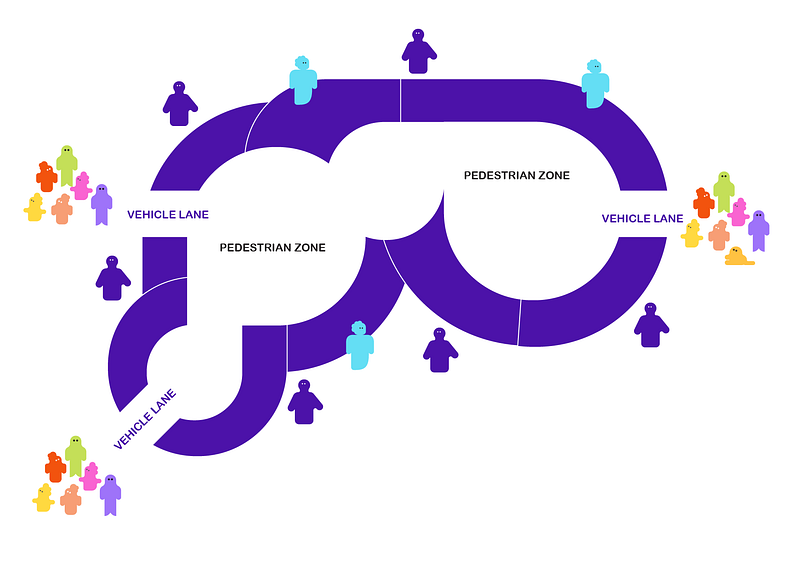
An illustration of a simple map indicating a pedestrian zone within an urban space. Different groups of people, visitors, shop owners, and residents, will access the space and will want to use an app designed to represent this pedestrian zone.

We indicate the pedestrian zone, the shops lining the zone, and three vehicle access lanes. We have a number of people, visitors, shoppers, shop owners, residents, who will use this area in different ways.

Using empathy as a way to delve into the mindset of the people who populate this zone, we’ll ask the following:

How can visitors, shoppers, store owners, and residents all benefit from this app? What are their foremost needs?

What are their needs? Their motivations? Their pain points?

By listening to their stories in their words, we can empathize with what is most important to them individually and what causes real pain, that might result in them not visiting the area.

Where do we start with empathy?

As researchers, we’ll speak with real users to get to the cause of their pain points. These are any UX issues causing discomfort and unease to the user, and thus blocking the user from getting what they require in order to thrive.

1. Empathize with visitors and shoppers

What will users who plan on visiting or shopping in a pedestrian zone tell you? Listen to them, understand their pain points, motivations, and goals.
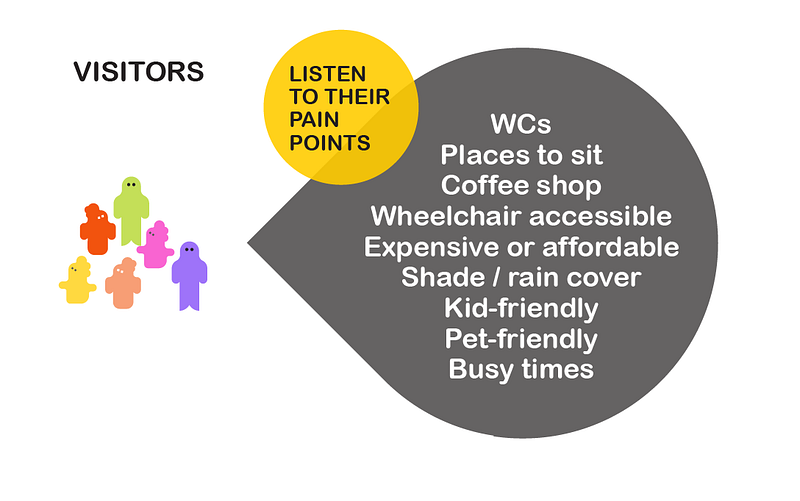
A diagram listing pain points that shoppers and visitors might express during user interviews.

Deeply empathizing with visitors and shoppers’ needs will make for happier shoppers, and will make visitors want to return often.

2. Empathize with shop owners

Likewise, listen to the shop owners who depend on visitors’ traffic and happy pedestrians for buying their wares. What are the shop owners most pressing needs or concerns?
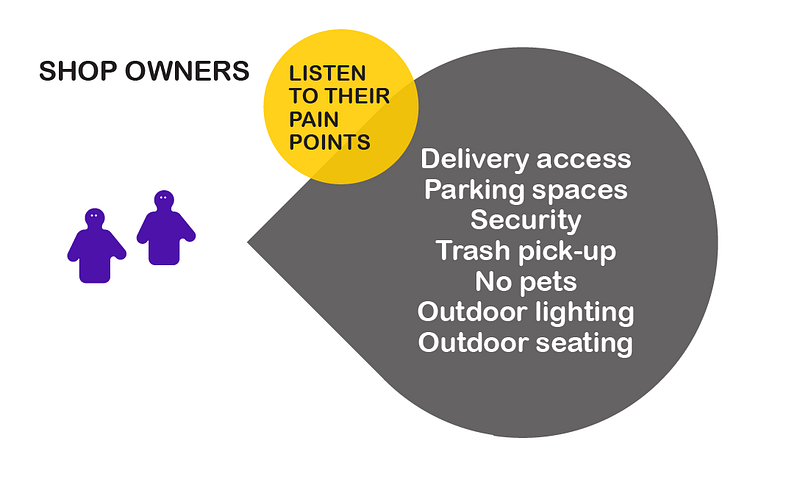
A diagram listing pain points that shop owners might express as being their top concerns during user interviews.

Shop owners will have an entirely different set of pain points. While shoppers might want to bring their pets, shop owners might not want to accommodate for such and need to have a no-pet policy inside their stores.

By listening and empathizing with shop owners pain points, the app will have a greatly expanded data set.

3. Empathize with area residents

What about the people who actually live on the perimeter of the pedestrian zone? How are they coping with the influx of visitors in a restricted pedestrian zone?

Listen to their stories and pain points.
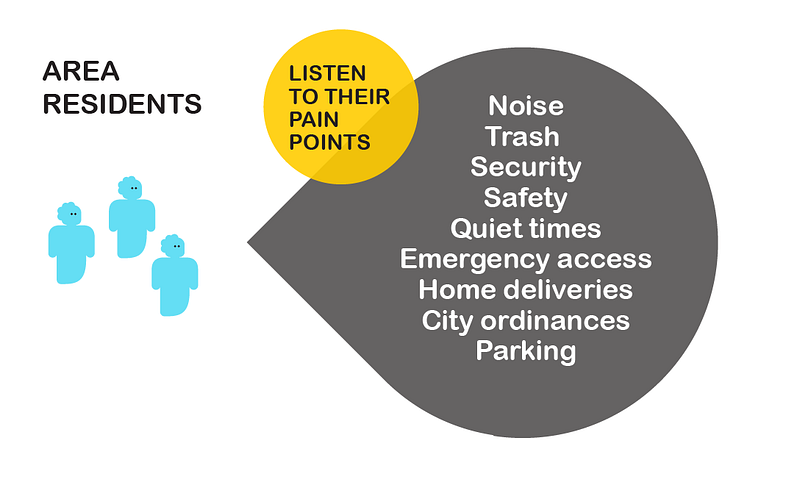
A diagram listing pain points that area residents might express as being their top concerns during user interviews.

Area residents might want to access this app for information such as safety precautions, cleanliness report, or city ordinances.

Ask open-ended questions and show empathy for a wide variety of user stories

Foster a sense of psychological safety by being emphatic to all your users’ pain points and needs.

Build an empathetic research foundation to gather insightful data. Data analysis will identify top pain points that are priorities to all users.

For instance, if safety is a concern to most, indicate whether there’s an area supervisor, such as a retail or event guard, on duty. Likewise, indicate restroom availabilities, pet-friendly stations, and water fountains.

A popular design solution might be a time chart for busy times.

Showing empathy with users’ pain points can determine the product’s top features

Taking the above pain points into consideration, the product’s main features can include solutions to all different sets of users.
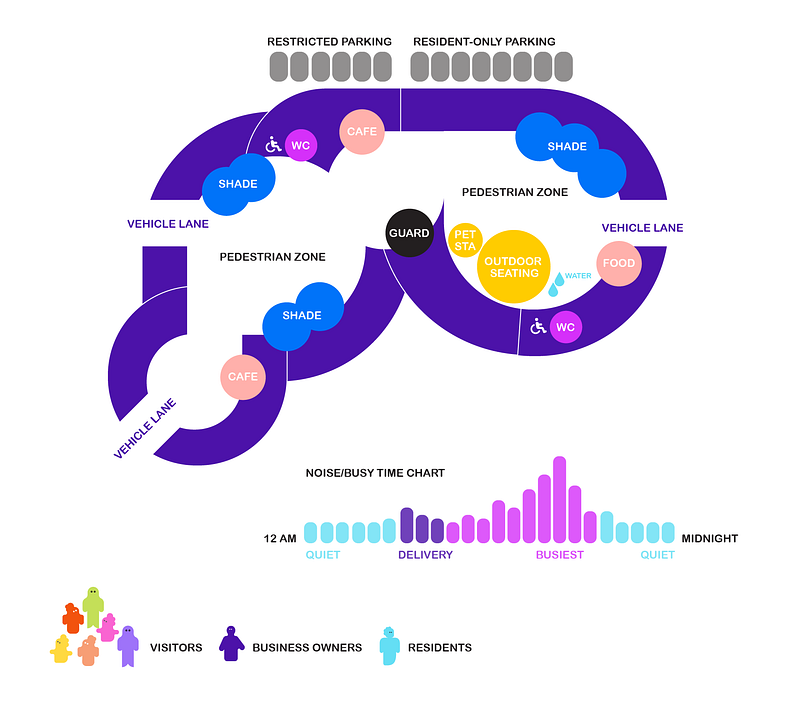
An illustration of the app’s map features that address users’ pain points, such as access to rest rooms, parking, outdoor seating, shaded areas, and also, a time-chart of when the area is busiest and most quiet.

For instance, based on the above lists of pain points, this app can focus on top features such a busy/quiet time read-outs, markings of comfort spaces within the pedestrian zone, rest rooms, cafés, parking spaces for residents or restricted parking, and others.

Shape your style of empathy as a UX designer

There are many ways to express empathy. Being a good listener is key to comprehending users’ pain points.

Develop a mature personality as a designer so interview participants feel at ease with you. Create a safe space for participants to express their feelings in their words. Don’t interrupt too often, and then, only to define an insight more thoroughly.

Become fluid with note taking. Record the interview with the user’s permission, or have someone assist you with taking solid notes during your interview session.

To remember

Empathy is the ability to understand someone else’s feelings or thoughts in a situation.

As UX designers, we need to truly understand how our users are feeling, in the positive and negative, and what they are thinking and wishing for.

In order to design products that are useful, enjoyable, and accessible to our users, we need to have a deeply empathic understanding of the pains associated when users’ needs are not solved.

To understand users’ needs with empathy is to drive towards a better outcome for everyone.

Interested in learning more about UX design, AI, design tools, trends, and art? Join Medium with this link, and support my future writing.

Thank you! ✍️🧡

All illustrations designed in Adobe Illustrator, ©Eva Schicker 2023.

Read up on more stories about UX and design:

Thank you.

UX
Design
Creativity
Ideas
Empathy
Recommended from ReadMedium