
How to Embed a GIF on Medium using GIPHY

GIFs are the life blood of the internet.
You see them on Twitter. You post stickers of them on Instagram. All the cool kids share them in the DMs.
And here’s what a GIF looks like on Medium.
There are a few different websites you can use to upload GIFs onto Medium but GIPHY is my favourite because it’s easy to use. Here are the two ways you can embed a GIF using GIPHY.
Option 1
- Go to https://giphy.com/
- Search for the GIF you want using the top toolbar. If you don’t have a specific GIF in mind you can search by a keyword like “laugh” or “dance”

I searched for “Carlton Banks”.
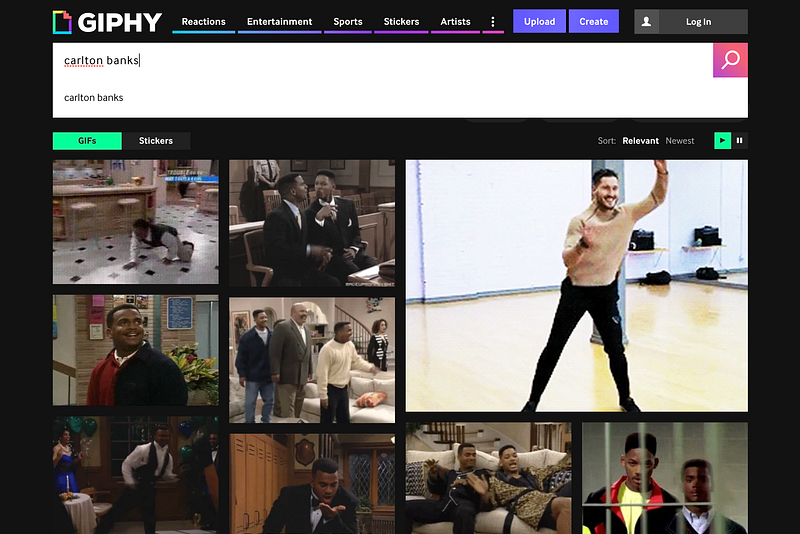
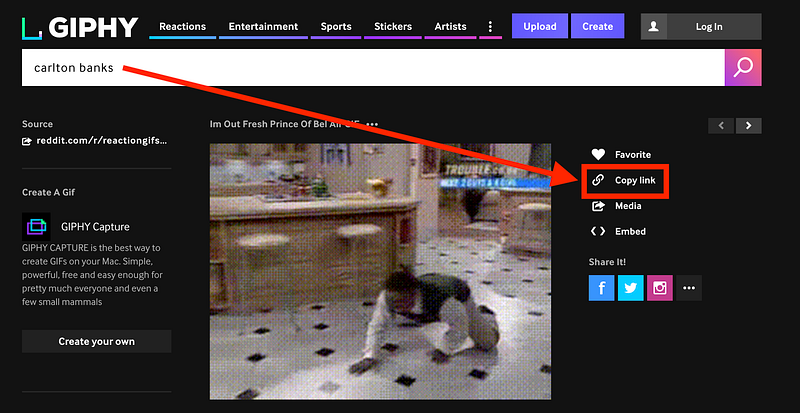
- Once you find the GIF of your dreams, click on it, then click “Copy link” to the right of it
- Copy the short link
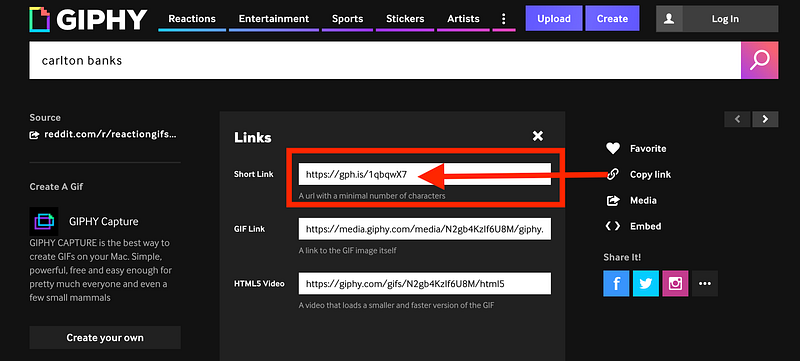
- Paste the link into your Medium article and hit Enter
The GIF should automatically embed itself into your Medium post from there!
If it doesn’t…
Option 2 — if option 1 fails
- Find your GIF as in option 1
- Then click the “+” button to the left of an empty line in the editor

- Then click the “<>” embed button.

- Paste in your GIPHY link and the link should automatically convert to an embed from there!

Only use this option if the GIF doesn’t automatically load the GIF.
Should you use GIFs in your Medium article?
There’s at least one case where you shouldn’t.
Even though GIFs are awesome, a lot of publications prefer not to have them. So if you plan on submitting a piece of content I’d avoid adding GIFs, unless you want their editor to give you this look:
Otherwise, enjoy! GIFs are a way to add some fun to your articles, so use it whatever way you see fit.


