
Elasticsearch JSON Data Ingestion
In this article, We will show you how to ingest JSON data to Elasticsearch.

We hope you are familiar with Elasticsearch if not, don’t worry you will learn from this article.
Video
Initial Setup
The first step is to setup Elasticsearch on your system. We are using Docker to setup. Make sure you have installed docker on your system or can download it from the Docker webpage.
Let’s start
Create a new file docker-compose.yml under any directory, In our case, we are using the following project structure.
Project (Directory)
├── docker-compose.yml (File)
docker-compose.yml
In the above file, we are creating 2 containers one for Elasticsearch and the second for Kibana
To start containers, Run the following command in the terminal
docker-compose upWhen you run the above command you will see the following output in the terminal.

Verify Running Elasticsearch
To verify, Running container of Elasticsearch. Open the browser and type the following URL
http://localhost:9200You will see the JSON response in the browser as shown below in the screenshot.

Verify Running Kibana
To verify, Running container of Kibana. Open the browser and type the following URL
http://localhost:5601You will see the Welcome screen in the browser as shown below in the screenshot.

We are done with Elasticsearch and Kibana setup using Docker Compose
Create Elasticsearch Index
If you are familiar with relational databases such as MySql and Postgres. If you want to create a new table you need to create the database first then you can add a table to that database. Similar to Elasticsearch, we create a document instead of a table because Elasticsearch is a NoSQL database and you can’t create the document without an index have a look at the following table comparison between MySql and Elasticserach
To create a new index use the following CURL
PUT (Method Type)
http://localhost:9200/cart?&prettyCURL:
curl --request PUT \
--url 'http://localhost:9200/cart?pretty=' \
--header 'Connection: keep-alive'Using the above CURL, we have created the index name cart as shown below in the screenshot, We used Insomnia for testing you can download and try

Ingest Single JSON Object
We have created the cart index before, Now we will ingest a Single JSON document in the index cart
{
 "id": 1,
 "title":"iPhone 11",
 "category": "Mobile Phone",
 "price": 123300,
 "formatted_price": "$1233.00 USD",
 "description": "iPhone 11, 64 GB "
}
To insert a Single JSON object you can use the following CURL with the above JSON body
PUT (Method Type)
http://localhost:9200/cart/_doc/?pretty
CURL:
curl --request POST \
--url 'http://localhost:9200/cart/_doc/?pretty=' \
--header 'Content-Type: application/json' \
--data '{
"id": 1,
"title":"iPhone 11",
"category": "Mobile Phone",
"price": 123300,
"formatted_price": "$1233.00 USD",
"description": "iPhone 11, 64 GB "
}'Using the above CURL, we have stored the Single JSON document as shown below in the screenshot

Elasticsearch Mapping
As we have data types in the Relation Databases, We do have data types in the Elasticsearch as well called Mapping. In the above screenshot, we have inserted a Single JSON object to the Elasticsearch. If you noticed we haven’t created any Mapping before. It was created automatically. If you want to check the Mapping you can use the following CURL
GET (Method Type)
http://localhost:9200/cart/_mapping?prettyCURL:
curl --request GET \
--url 'http://localhost:9200/cart/_mapping?pretty=' \
--header 'Content-Type: application/json'Using the above CURL, You can see the document Mapping as shown below in the screenshot

Elasticsearch Get All Document
We have inserted a Single JSON object before. To check an inserted document in the index cart. Use the following CURL with JSON Body
GET (Method Type)
http://localhost:9200/cart/_search?pretty
JSON Body
{
"query": {
"match_all": {
}
}
}CURL:
curl --request GET \
--url 'http://localhost:9200/cart/_search?pretty=' \
--header 'Content-Type: application/json' \
--data '{
"query": {
"match_all": {
}
}
}'Using the above CURL, we can see all the stored documents in the index cart as shown below in the screenshot

Elasticsearch Ingest Bulk/Multiple Documents
Insert Single JSON document is very simple in the Elasticsearch as compare to the Multiple/Bulk data ingestion. You need to convert the following JSON to NDJSON format
JSON
{
 "id": 1,
 "title":"iPhone 11",
 "category": "Mobile Phone",
 "price": 123300,
 "formatted_price": "$1233.00 USD",
 "description": "iPhone 11, 64 GB "
}
NDJSON
{"index":{"_index":"cart","_id":1,"_type":"_doc"}}
{"id":1,"title":"iPhone 11","category":"Mobile Phone","price":123300,"formatted_price":"$1233.00 USD","description":"iPhone 11, 64 GB "}There is a very nice library called json-to-es-bulk you can use to generate the NDJSON format bulk data for Elasticsearch
We have experimented on Repl.it. You can also use that to convert to NDSON
We have the following test.json file and want to convert it into NDJSON format to insert to Elasticsearch using the following command under the Shell Tab on Repl.it
node index.js -f test.json --index cart --type _docTry to use the Shell tab as shown in the following screenshot

It will generate a new file request-data.txt contains NDJSON formatted JSON data as shown below
We can use the above data to insert bulk JSON documents to the Elasticsearch
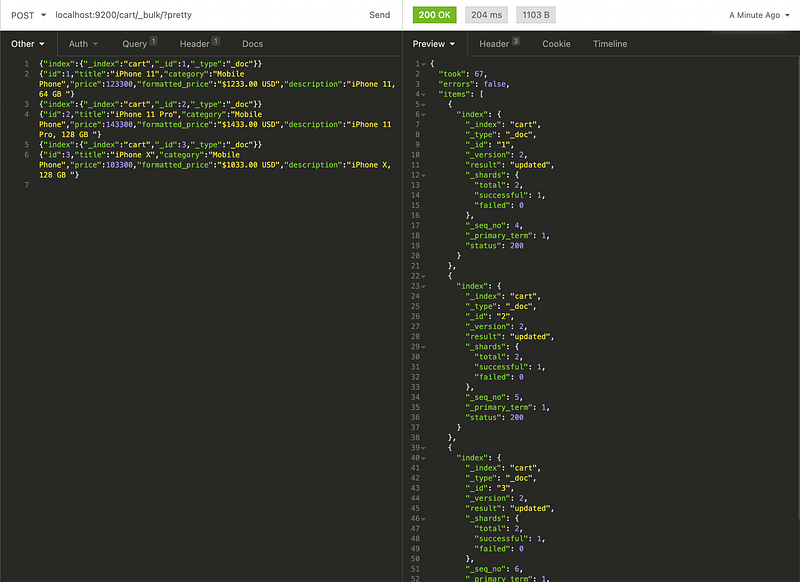
Let’s use the following CURL to ingest bulk JSON data to the Elasticsearch
POST (Method Type)
http://localhost:9200/cart/_bulk/?pretty
CURL:
curl --request POST \
--url 'http://localhost:9200/cart/_bulk/?pretty=' \
--header 'Content-Type: application/x-ndjson' \
--data '{"index":{"_index":"cart","_id":1,"_type":"_doc"}}
{"id":1,"title":"iPhone 11","category":"Mobile Phone","price":123300,"formatted_price":"$1233.00 USD","description":"iPhone 11, 64 GB "}
{"index":{"_index":"cart","_id":2,"_type":"_doc"}}
{"id":2,"title":"iPhone 11 Pro","category":"Mobile Phone","price":143300,"formatted_price":"$1433.00 USD","description":"iPhone 11 Pro, 128 GB "}
{"index":{"_index":"cart","_id":3,"_type":"_doc"}}
{"id":3,"title":"iPhone X","category":"Mobile Phone","price":103300,"formatted_price":"$1033.00 USD","description":"iPhone X, 128 GB "}
'When you use the above CURL it will ingest bulk JSON data as shown below in the screenshot
To verify, the ingested JSON data you can you the following CURL
GET (Method Type)
http://localhost:9200/cart/_search?prettyCURL:
curl --request GET \
--url 'http://localhost:9200/cart/_search?pretty=' \
--header 'Content-Type: application/json' \
--data '{
"query": {
"match_all": {
}
}
}'Using the above CURL, you can retrieve all the ingested documents as shown below on the screenshot

We are done with the bulk JSON data Ingestion with Elasticsearch
Thank you! 🚀🚀🚀🚀🚀🚀


