Elasticsearch: Cluster Monitoring Guide
Introduction
In the evolving digital landscape, data is crucial. As businesses expand their digital footprints, the need for effective tools to manage, search, and analyze large datasets becomes essential. Elasticsearch, a highly scalable open-source full-text search and analytics engine, is an invaluable tool in this context. To fully understand its potential and its bottlenecks, monitoring the cluster becomes necessary. Here’s how you can enable Elasticsearch Cluster Monitoring for better data insights.

Why Monitor Your Elasticsearch Cluster?
Before diving into the “how”, it’s essential to understand the “why”. By enabling monitoring on your Elasticsearch cluster:
- You gain insights into cluster performance.
- Diagnose and troubleshoot issues quicker.
- Make data-driven decisions for scaling and optimizing.
Steps to Enable Elasticsearch Cluster Monitoring
Understand Your Cluster
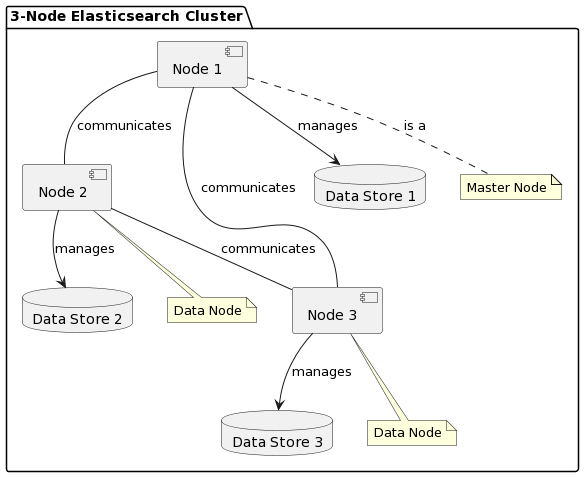
Before making any changes, it’s pivotal to understand your setup. The Elasticsearch cluster used in this example is a 3-node cluster with Kibana, primarily for proof of concept.
Access Kibana
Kibana is a visualization tool that offers a real-time summary of your data stored in Elasticsearch. To begin the monitoring process, access your Kibana instance. It’s typically accessible via a web browser.
Enable the Collection of Monitoring Data
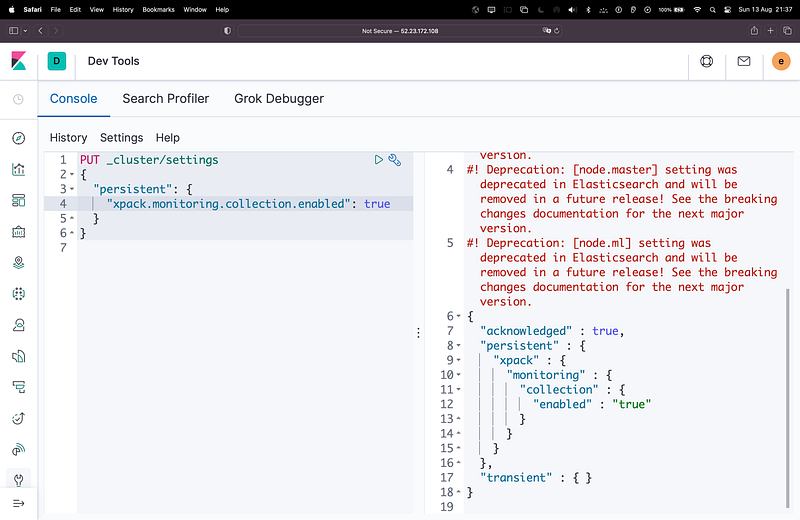
In the Kibana console tool, execute the following command:
PUT _cluster/settings
{
  "persistent": {
    "xpack.monitoring.collection.enabled": true
  }
}
This command ensures that your Elasticsearch cluster starts collecting monitoring data.
Exploring Your Data
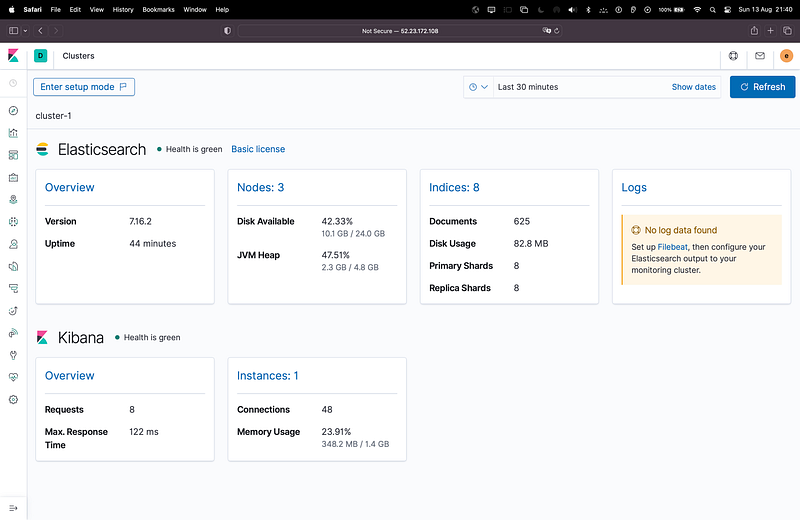
Once the data collection is enabled, you can explore this data in Kibana. Navigate to the “Stack Monitoring” application within Kibana and take a deep dive into your cluster’s performance metrics.
Conclusion
Enabling monitoring for your Elasticsearch cluster is a step in the right direction for businesses that want to remain proactive. It offers invaluable insights that help in informed decision-making, ensuring that your applications and services run smoothly. Whether you’re a seasoned data infrastructure engineer or just starting, understanding your cluster’s performance can make all the difference.