Elastic Search — Day 2: Data Modeling and Indexing
Welcome to Day 2 of our 10-day DevOps Elasticsearch course! Yesterday, we delved into the fundamentals of Elasticsearch and its architecture. Today, we’re going to explore the crucial aspects of Elasticsearch data modeling and indexing, laying the foundation for efficient data storage and retrieval in your Elasticsearch cluster.
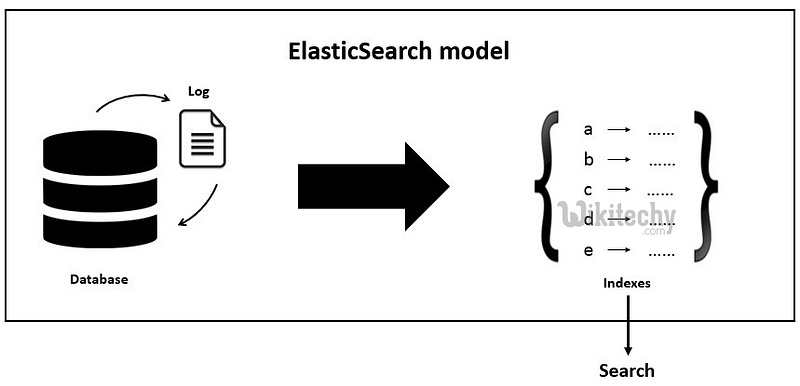
Understanding data modeling conceps:
It is essential for effectively organizing and managing your data within Elasticsearch indices. Here’s a detailed explanation:
1. Schema-less Nature: Elasticsearch follows a schema-less approach, which means you don’t have to define a rigid structure (schema) for your data upfront, unlike traditional relational databases. This flexibility allows you to store and index documents with varying structures within the same index.
2. JSON Documents: In Elasticsearch, data is represented as JSON documents. Each document represents a single entity or record, and it consists of field-value pairs. These documents are stored in indexes, which act as containers for organizing and managing related documents.
3. Dynamic Mapping: When you index a document without specifying a mapping, Elasticsearch automatically generates a dynamic mapping based on the document’s structure. It analyzes the fields and assigns data types to them dynamically. While dynamic mapping provides convenience, it’s essential to understand how Elasticsearch infers mappings to avoid unexpected results.
4. Explicit Mapping: While dynamic mapping is convenient, it’s often beneficial to define explicit mappings for your indexes. Explicit mappings allow you to control how fields are indexed and analyzed, which can improve search relevance and performance. With explicit mappings, you can define the data types, index settings, and custom analyzers for each field.
5. Mapping Types and Properties: In earlier versions of Elasticsearch, documents within an index were organized into mapping types. However, starting from Elasticsearch 7.x, mapping types are deprecated, and indices can only contain a single mapping type. Each mapping type consists of properties that define the characteristics of the fields within the document.
6. Field Data Types: Elasticsearch supports various field data types, including:
- Text: Used for full-text search. Analyzed for full-text search capabilities like stemming and tokenization.
- Keyword: Used for exact matching and aggregations. Not analyzed, stored as-is.
- Numeric: Includes integer, long, float, double, and more. Used for numerical values.
- Date: Used for date and time values.
- Object: Used for nested documents.
- Array: Supports arrays of values.
7. Nested Documents: Elasticsearch allows you to index nested documents within a parent document. This feature is useful for representing hierarchical data structures or arrays of objects.
8. Mapping Dynamic Templates: Dynamic templates allow you to define patterns that match field names and apply specific mappings to those fields dynamically. This is useful when dealing with dynamic fields or fields with varying data types.
9. Index Settings: Index settings define the behavior and characteristics of an index. These settings include the number of shards, replicas, analyzer configurations, and more.
Understanding data modeling concepts in Elasticsearch involves grasping the flexible nature of document storage, defining mappings, understanding field data types, and utilizing various features like nested documents and dynamic templates.
Mapping types and properties:
It plays a crucial role in defining how documents are indexed and stored within an index. Let’s delve deeper into these concepts:
Mapping Types : In earlier versions of Elasticsearch (prior to 7.x), documents within an index were organized into mapping types. Mapping types allowed you to define different schemas for documents within the same index. For example, within a single index representing “products,” you could have mapping types for “laptops,” “smartphones,” and “tablets,” each with its own set of fields and properties.
However, starting with Elasticsearch 7.x, mapping types have been deprecated. This means that indices can only contain a single mapping type, and all documents within that index share the same mapping structure.
Properties: Properties define the characteristics and behavior of fields within a document. Each field in a document is associated with a set of properties that determine how the field is indexed, analyzed, and queried. Here are some commonly used properties in Elasticsearch mappings:
- Type: Defines the data type of the field (e.g., text, keyword, integer, date).
- Indexing Options: Determines how the field is indexed. Options include “analyzed” (for full-text search), “not_analyzed” (for exact matching), and “no” (field is not indexed).
- Analyzer: Specifies the analyzer used for tokenizing and analyzing text fields during indexing and searching.
- Searchable: Indicates whether the field is searchable (default is true).
- Stored: Determines whether the field is stored in the index and retrievable from search results (default is false).
- Multi-fields: Allows you to define multiple representations of a single field, each with its own properties and analyzers.
- Null Value: Specifies a default value for the field if the field is null or missing in the document.
- Format: For date fields, specifies the date format.
Example Mapping: Here’s an example of a simple mapping definition in Elasticsearch:
{
  "mappings": {
    "properties": {
      "title": {
        "type": "text",
        "analyzer": "english",
        "fields": {
          "keyword": {
            "type": "keyword"
          }
        }
      },
      "price": {
        "type": "double"
      },
      "category": {
        "type": "keyword"
      },
      "description": {
        "type": "text",
        "index": false
      },
      "created_at": {
        "type": "date",
        "format": "yyyy-MM-dd HH:mm:ss"
      }
    }
  }
}
In this example:
- title: A text field analyzed with the English analyzer and a keyword sub-field for exact matching.
- price: A double field for storing numeric values.
- category: A keyword field for storing categorical data.
- description: A text field that is not indexed (only stored).
- created_at: A date field with a specific date format.
Mapping types and properties in Elasticsearch allow you to define the structure and behavior of your documents, facilitating efficient indexing, querying, and retrieval of data.
Creating indexes and defining mappings:
These are fundamental steps in setting up your data storage and retrieval system. Let’s explore these concepts in detail:
Creating Indexes: An index in Elasticsearch is similar to a database in traditional SQL databases. It’s a logical namespace that points to one or more physical shards that store your data. Here’s how you create an index:
PUT /my_index
{
  "settings": {
    "number_of_shards": 3,
    "number_of_replicas": 2
  }
}
In this example:
- PUT /my_index: This is the API endpoint for creating an index named “my_index”.
- “settings”: This section allows you to specify settings for the index.
- “number_of_shards”: Defines the number of primary shards the index should have. More shards distribute data across the cluster for better scalability and parallelism.
- “number_of_replicas”: Indicates the number of replica shards for each primary shard. Replica shards provide fault tolerance and improve search performance by distributing search load.
Defining Mappings: Mappings in Elasticsearch define the schema for your documents within an index. They specify the data types, properties, and behavior of each field in your documents. Here’s how you define mappings while creating an index:
PUT /my_index
{
  "mappings": {
    "properties": {
      "title": {
        "type": "text",
        "analyzer": "english"
      },
      "description": {
        "type": "text"
      },
      "price": {
        "type": "double"
      },
      "tags": {
        "type": "keyword"
      },
      "created_at": {
        "type": "date"
      }
    }
  }
}
In this example:
- “mappings”: This section specifies the mappings for the fields in your documents.
- “properties”: Defines the properties for each field.
- “type”: Specifies the data type of the field (e.g., text, keyword, double, date).
- “analyzer”: Specifies the analyzer used for text fields during indexing and searching. It defines how text is tokenized and processed.
- “created_at”: A date field without any specific format. Elasticsearch will use its default date parsing logic.
Updating Mappings: Mappings can be updated after index creation, but some changes are not allowed for existing fields (e.g., changing the data type of a field). However, you can add new fields or modify settings such as analyzers and formats.
PUT /my_index/_mapping
{
  "properties": {
    "views": {
      "type": "integer"
    }
  }
}
In this example, we’re adding a new field named “views” of type “integer” to the mapping of the “my_index” index.
Creating indexes and defining mappings are critical steps in setting up your Elasticsearch data storage. Properly defining mappings ensures that Elasticsearch understands your data structure and can index and search it efficiently.
Introduction to indexing and CRUD operations:
It is essential for interacting with your data effectively. These operations allow you to store, retrieve, update, and delete documents within your Elasticsearch cluster. Let’s delve into each of these operations:
Indexing Documents: Indexing is the process of adding documents to an index in Elasticsearch. Each document is a JSON object that contains data fields and their corresponding values. When you index a document, Elasticsearch stores it in one or more shards based on the index’s configuration.
To index a document, you use the ‘PUT’ or ‘POST’ HTTP method along with the index name, document type (optional in Elasticsearch 7.x and above), and a unique identifier for the document (optional). Here’s an example of indexing a document:
POST /my_index/_doc/1
{
  "title": "Sample Document",
  "content": "This is a sample document for indexing in Elasticsearch."
}
In this example:
- ‘POST /my_index/_doc/1’: This instructs Elasticsearch to index the document into the “my_index” index with a unique identifier “1”.
- {“title”: “Sample Document”, “content”: “…”}: This is the JSON document being indexed.
Retrieving Documents: Retrieving documents allows you to search and fetch specific documents or a set of documents from an index. You can perform various types of searches, including full-text search, term-based search, range queries, etc.
To retrieve documents, you use the ‘GET’ HTTP method along with the index name and document ID. Here’s an example of retrieving a document by ID:
GET /my_index/_doc/1
This request fetches the document with the ID “1” from the “my_index” index.
Updating Documents: Updating documents allows you to modify existing documents in the index without reindexing the entire document. You can update specific fields or replace the entire document with a new one.
To update a document, you use the ‘POST’ or ‘PUT’ HTTP method along with the index name, document type (optional), and document ID. Here’s an example of updating a document:
POST /my_index/_doc/1/_update
{
  "doc": {
    "content": "Updated content for the sample document."
  }
}
In this example, we’re updating the “content” field of the document with ID “1” in the “my_index” index.
Deleting Documents: Deleting documents allows you to remove specific documents from an index. Once deleted, documents are no longer available for search or retrieval.
To delete a document, you use the ‘DELETE’ HTTP method along with the index name, document type (optional), and document ID. Here’s an example of deleting a document:
DELETE /my_index/_doc/1
This request deletes the document with the ID “1” from the “my_index” index.
Understanding indexing and CRUD operations in Elasticsearch is crucial for managing your data effectively. These operations enable you to store, retrieve, update, and delete documents within your Elasticsearch cluster, empowering you to build powerful search and analytics applications.
Here are some scenario-based interview questions related to Data Modeling and Indexing!
- Imagine you’re tasked with indexing a large volume of product data for an e-commerce platform into Elasticsearch. How would you approach this task efficiently?
- You’ve received JSON data from various sources to be indexed into Elasticsearch. How would you ensure data integrity and handle any potential errors during the indexing process?
- Suppose a user is searching for a specific product by its name in your e-commerce application. How would you design the Elasticsearch query to retrieve the most relevant results?
- In a scenario where users need to filter products based on multiple criteria such as category, price range, and availability, how would you construct the Elasticsearch query to accommodate these requirements?
- Consider a situation where a product’s price needs to be updated in your Elasticsearch index due to a promotional offer. How would you perform this update efficiently while minimizing downtime?
- What strategies would you employ to handle versioning and concurrency control when updating documents in Elasticsearch to prevent conflicts and ensure data consistency?
- Suppose a product is discontinued and needs to be removed from your Elasticsearch index. How would you safely delete the document without affecting other operations or causing data corruption?
- In a scenario where user accounts are deactivated and their associated data needs to be purged from the system, how would you implement a deletion strategy in Elasticsearch to comply with data privacy regulations and ensure data is permanently removed?
- Imagine there’s a network outage or a node failure during the indexing process. How would you handle partial indexing and ensure data consistency once the system is restored?
- In the event of a failed CRUD operation in Elasticsearch, how would you identify the root cause of the failure, log relevant information for troubleshooting, and implement retries or fallback mechanisms to recover from errors?
- Suppose your Elasticsearch cluster experiences performance degradation during peak usage hours. What strategies would you employ to optimize indexing and search performance, such as shard allocation, index settings tuning, and query optimization?
- How would you design and implement index lifecycle management (ILM) policies in Elasticsearch to automate data retention, rollover, and optimization processes based on predefined criteria like data age and size?
Conclusion:
In today’s session, we explored the intricacies of Elasticsearch data modeling and indexing. We learned about mapping types, properties, creating indexes, and performing CRUD operations. Understanding these concepts is crucial for building efficient and scalable Elasticsearch applications.
Stay tuned for tomorrow’s session, where we’ll delve into Searching and Querying in Elasticsearch. Happy indexing!


