Elaborate Microservice async example with FastAPI, RabbitMQ, MongoDB and Redis — part5.
Introduction
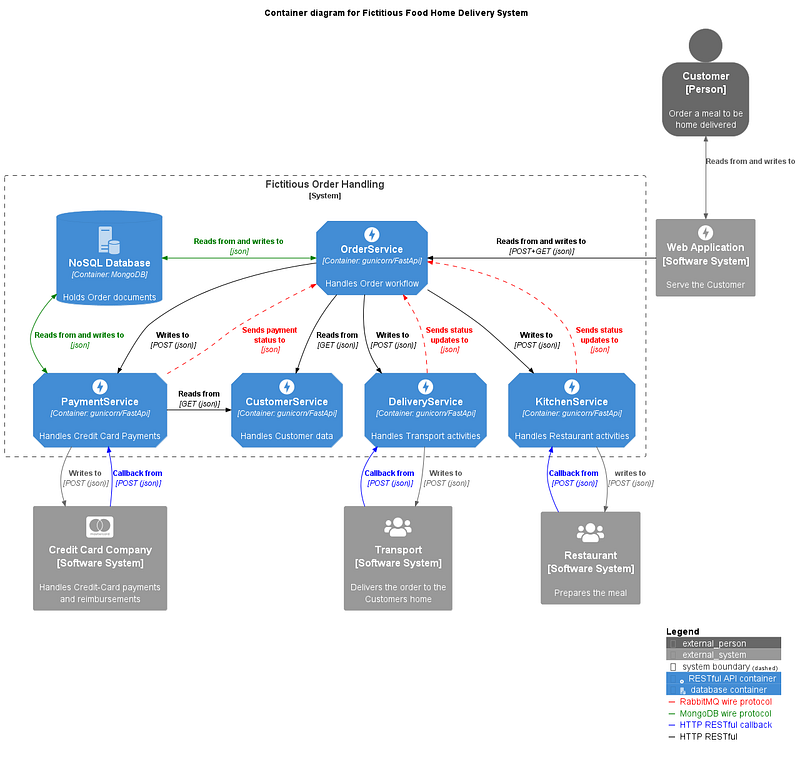
This is part5 in the series. This part talks about the OrderService configuration handling, unified logging and OpenAPI documentation enrichment.
Here’s a brief outline of the article parts:
- Introduction and installation of required components.
- OrderService Architecture and Design patterns.
- OrderService usage of RabbitMQ.
- PaymentService Architecture and Design patterns.
- FastAPI enhancements (this article).
- Putting it all together.
Configuration handling
The Pydantic configuration handling is quite powerful. I’m only using a small part of it’s functionality in this example. The flexibility that you get by using config handling is huge. Just think of a scenario where you deploy in a test, stage or production environment. The URL will will most likely differ from your development environment, pointing to other servers and will use other users and passwords to connect. Log levels might differ etc.
If you want to discover more of the capabilities that Pydantic has to offer. I’ve written another Medium article that explores the Pydantic configuration possibilities more deeply and how they can be extended using class inheritance. That article is Lovely Python config handling using Pydantic.
I’ll be using a default .env file for some project constants and log level. Pydantic secrets are used for the external components connection URLs since they contain passwords. Another good thing with using secrets is that they integrate seamlessly with Docker secrets if that’s how you deploy your FastAPI projects.
config/.env
VERSION="1.2.0"
NAME="OrderService API"
SERVICE_NAME='OrderService'
SERVICE_LOG_LEVEL="info"
I’m showing the .env file for the OrderService. The same consept is used for the PaymentService, but with different content.
config/setup.py
# BUILTIN modules
import site

# Third party modules
from dotenv import load_dotenv
from pydantic import BaseSettings

# Constants
MISSING_SECRET = '>>> missing SECRETS file <<<'
""" Error message for missing secrets file. """
MISSING_ENV = '>>> missing ENV value <<<'
""" Error message for missing values in the .env file. """


# ---------------------------------------------------------
#
class Configuration(BaseSettings):
    """ Configuration parameters. """

    # OpenAPI documentation.
    name: str = MISSING_ENV
    version: str = MISSING_ENV

    # Service parameters.
    service_name: str = MISSING_ENV
    service_log_level: str = MISSING_ENV

    # External resource parameters.
    url_timeout: tuple = (1.0, 5.0)
    mongo_url: str = MISSING_SECRET
    redis_url: str = MISSING_SECRET
    rabbit_url: str = MISSING_SECRET

    # Handles both local and Docker environments.
    class Config:
        secrets_dir = f'{site.USER_BASE}/secrets'


# ---------------------------------------------------------

# Note that the ".env" file is always implicitly loaded.
load_dotenv()

config = Configuration()
""" Configuration parameters instance. """
Using this is quite simple. You import it and later on in the code you reference it, like this:
from ..config.setup import config
...

self.rabbit_client = RabbitClient(config.rabbit_url,
                                  config.service_name,
                                  self.process_response_message)
I’m using the missing constants as a “debug technique”. The idea is that all the attributes values will be replaced with their final value, either by what’s in the .env file or in one of the secrets files. When you start your system and something isn’t working you can do a config.dict() in the debugger (the Pydantic classes BaseModel and BaseSettings have a dict method).
An example of a dict dump:
'apiTimeout': (9.05, 60),
 'dbServer': 'localhost:3306',
 'env': 'dev',
 'hdrData': {'Content-Type': 'application/json'},
 'mongoPwd': '>>> missing SECRETS file <<<',
 'mongoUrl': 'mongodb://phoenix:>>> missing SECRETS file <<<@localhost:27017/',
 'mqServer': 'localhost',
 'platform': 'Windows',
 'portalApi': 'http://localhost',
 'routingDbPort': 8012,
 'server': 'CHARON',
 'trackingDbPort': 8006}
If you look at the value of the mongoPwd parameter you see what I mean.
Unified logging
All of the used third party libraries use a different logging format. Some use use a timestamp, some don’t. All of them are mostly in black & white. To Unify all logging to the the same format and to use color I have implemented a custom logging class, that is based on the third-party package loguru.
tools/custom_logging.py
# BUILTIN modules
import sys
import logging
from typing import cast
from types import FrameType

# Third party modules
from loguru import logger


# ---------------------------------------------------------
#
class InterceptHandler(logging.Handler):
    """ Logs to loguru from Python logging module. """

    def emit(self, record: logging.LogRecord):
        try:
            level = logger.level(record.levelname).name

        except ValueError:
            level = str(record.levelno)

        frame, depth = logging.currentframe(), 2

        while frame.f_code.co_filename == logging.__file__:
            frame = cast(FrameType, frame.f_back)
            depth += 1

        logger.opt(
            depth=depth,
            exception=record.exc_info).log(
            level,
            record.getMessage()
        )


# ---------------------------------------------------------
#
def create_unified_logger(log_level: str) -> tuple:
    """ Return unified Loguru logger object.

    :return: unified Loguru logger object.
    """

    level = log_level

    # Remove all existing loggers.
    logger.remove()

    # Create a basic Loguru logging config.
    logger.add(
        diagnose=True,
        backtrace=True,
        sink=sys.stderr,
        level=level.upper(),
    )

    # Prepare to incorporate python standard logging.
    seen = set()
    logging.basicConfig(handlers=[InterceptHandler()], level=0)

    for logger_name in logging.root.manager.loggerDict.keys():

        if logger_name not in seen:
            seen.add(logger_name.split(".")[0])
            mod_logger = logging.getLogger(logger_name)
            mod_logger.handlers = [InterceptHandler(level=level.upper())]
            mod_logger.propagate = False

    return level, logger.bind(request_id=None, method=None)
It’s not much code but the bulk of the intelligence is in the loguru package. What this code does is to identify all files in the import closure that uses python logging and hijack these calls to point to our customization instead.
I’m not defining my own logging format. Instead I’m using the default loguru format config. That’s good enough for this example.
The last piece of the puzzle is the next file.
run.py
# Third party modules
import uvicorn

# Local modules
from src.web.main import app


if __name__ == "__main__":

    uv_config = {'app': 'src.web.main:app', 'port': 8000,
                 'log_level': app.level, 'reload': True,
                 'log_config': {"disable_existing_loggers": False, "version": 1}}
    uvicorn.run(**uv_config)
The log_config parameter makes it all work. The log_level parameter get its value from when we instantiated the app in the main.py file. And that value came from the .env file that we looked at earlier.
OpenAPI documentation enrichment
There are a lot of them in this example. I will not go though them all. I will show you some of the techniques that I have used, and their result. Lets take a look at the OpenAPI web page for OrderService:
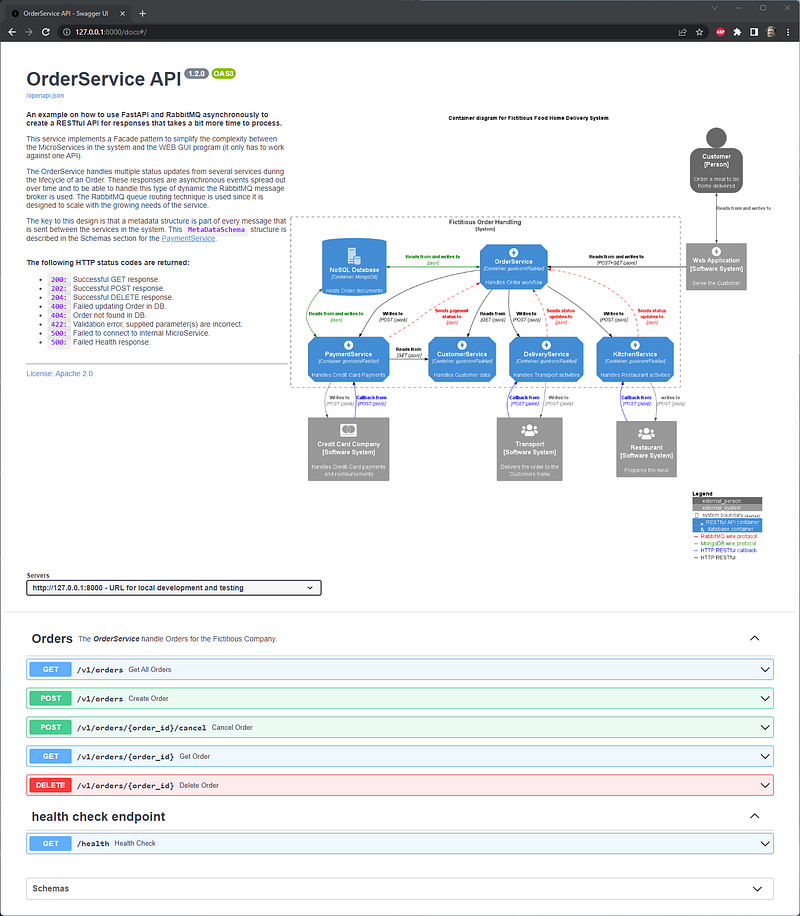
Pretty cool huh. Jokes aside the top part is created when the app is instantiated. It looks like this (from web/main.py):
app = Service(
    servers=servers,
    lifespan=lifespan,
    title=config.name,
    version=config.version,
    description=description,
    license_info=license_info,
    openapi_tags=tags_metadata,
)
The documentation parts looks like this (from web/api/documentation.py):
from fastapi import Path

# Local modules
from ...config.setup import config


order_id_documentation = Path(
    ...,
    description='**Order ID**: *Example `dbb86c27-2eed-410d-881e-ad47487dd228`*. '
                'A unique identifier for an existing Order.',
)

resource_example = {
    "status": True,
    "version": f"{config.version}",
    "name": f"{config.service_name}",
    "resources": [
        {
            "name": "MongoDb",
            "status": True
        },
        {
            "name": "RabbitMq",
            "status": True
        },
        {
            "name": "PaymentService",
            "status": True
        },
        {
            "name": "KitchenService",
            "status": True
        },
        {
            "name": "DeliveryService",
            "status": True
        },
        {
            "name": "CustomerService",
            "status": True
        },
    ]
}

tags_metadata = [
    {
        "name": "Orders",
        "description": f"The ***{config.service_name}*** handle Orders for the Fictitious Company.",
    }
]

license_info = {
    "name": "License: Apache 2.0",
    "url": "https://www.apache.org/licenses/LICENSE-2.0.html",
}

servers = [
    {
        "url": "http://127.0.0.1:8000",
        "description": "URL for local development and testing"
    },
    {
        "url": "https://coffeemesh-staging.com",
        "description": "staging server for testing purposes only"
    },
    {
        "url": "https://coffeemesh.com",
        "description": "main production server"
    },
]

description = """
<img width="65%" align="right" src="/static/order_container_diagram.png"/>
**An example on how to use FastAPI and RabbitMQ asynchronously to create a RESTful API for responses that
takes a bit more time to process.**

This service implements a Facade pattern to simplify the complexity between the MicroServices in the system
and the WEB GUI program (it only has to work against one API).

The OrderService handles multiple status updates from several services during the lifecycle of an Order. These
responses are asynchronous events spread out over time and to be able to handle this type of dynamic the RabbitMQ
message broker is used. The RabbitMQ queue routing technique is used since it is designed to scale with the growing
needs of the service.

The key to this design is that a metadata structure is part of every message that is sent between the services in
the system. This `MetaDataSchema` structure is described in the Schemas section for the
[PaymentService](http://127.0.0.1:8001/docs).

<br>**The following HTTP status codes are returned:**
  * `200:` Successful GET response.
  * `202:` Successful POST response.
  * `204:` Successful DELETE response.
  * `400:` Failed updating Order in DB.
  * `404:` Order not found in DB.
  * `422:` Validation error, supplied parameter(s) are incorrect.
  * `500:` Failed to connect to internal MicroService.
  * `500:` Failed Health response.
<br><br>
---
"""
In many places FastAPI accepts text that is Markdown formatted and the description field is one of them.
If we step into the Order Cancel endpoint it looks like this:
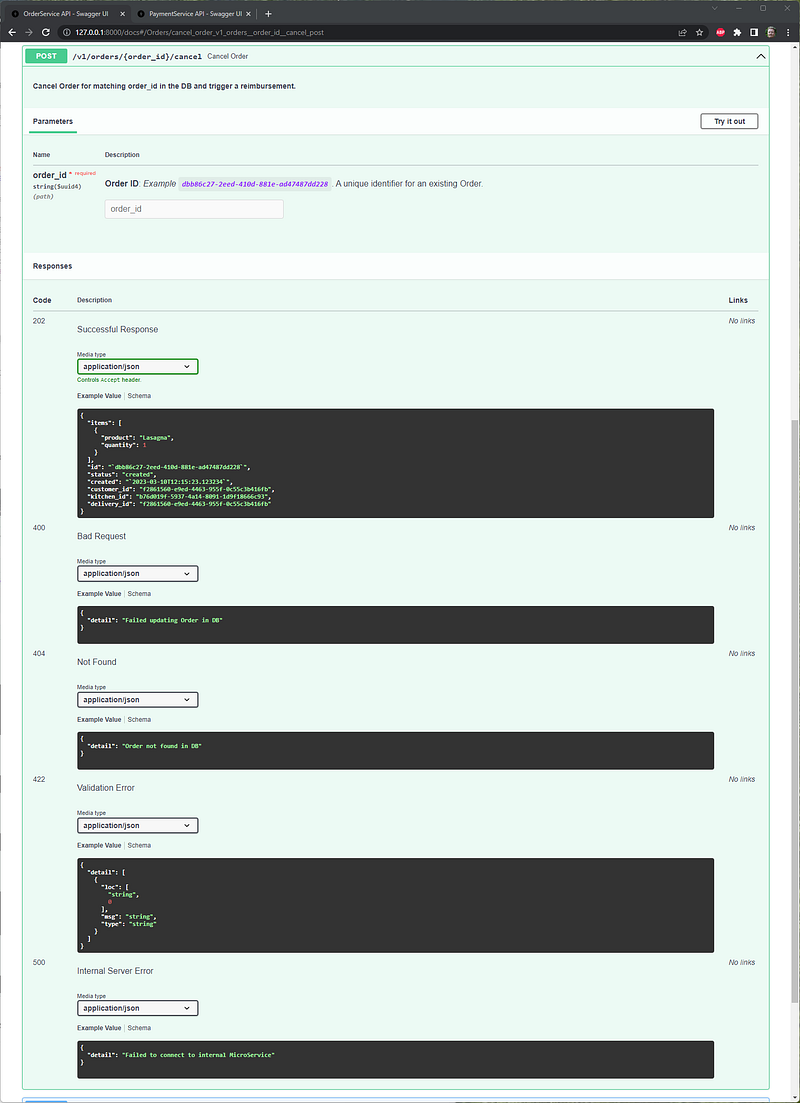
The endpoint description is in bold and the path parameter has a fuller description, including an example. All the possible responses are visible with code, descriptive text and example data.
The majority of this is declared in the endpoint declaration (from web/api/api.py):
@router.post(
    "/{order_id}/cancel",
    response_model=OrderResponse,
    status_code=status.HTTP_202_ACCEPTED,
    responses={
        500: {'model': ConnectError},
        404: {"model": NotFoundError},
        400: {"model": FailedUpdateError}}
)
async def cancel_order(order_id: UUID4 = order_id_documentation) -> OrderResponse:
    """
    **Cancel Order for matching order_id in the DB and trigger a reimbursement.**
    """
    service = OrdersApi(OrdersRepository())
    return await service.cancel_order(order_id)
The definitions are defined in the web/api/schemas.py file and the web/api/documentaytion.py file that we looked at previously. The two techniques that I have used are (from web/api/schemas.py):
from ...repository.documentation import order_documentation as order_doc
...

class OrderResponse(OrderItems):
    """ Expected default order response parameters. """
    id: UUID4 = Field(**order_doc['id'])
    status: Status = Field(**order_doc['status'])
    created: datetime = Field(**order_doc['created'])
    customer_id: UUID4 = Field(**order_doc['customer_id'])
    kitchen_id: Optional[UUID4] = Field(**order_doc['kitchen_id'])
    delivery_id: Optional[UUID4] = Field(**order_doc['delivery_id'])
Adding enhancements using the Field class. The benefit of doing it this way is that you can supply more than one parameter to the Field class.
And this is what the order_doc declaration looks like (from repository/documentation.py):
order_documentation = {
    "status": {'description': 'Order workflow status.'},
    "updated": {'example': [{"`2023-03-10T12:15:23.123234`", "paymentPaid"}],
                'default': [], 'description': 'Order status change history.'},
    "when": {'example': "`2023-03-10T12:15:23.123234`",
             'description': 'Timestamp for the Order status change.'},
    "created": {'example': "`2023-03-10T12:15:23.123234`",
                'description': 'Timestamp when the Order was created.'},
    "id": {'example': "`dbb86c27-2eed-410d-881e-ad47487dd228`",
           'description': '**Order ID**: A unique identifier for an existing Order.'},
    "kitchen_id": {'default': None, 'example': 'b76d019f-5937-4a14-8091-1d9f18666c93',
                   'description': 'Kitchen ID for the Order meal being produced.'},
    "delivery_id": {'default': None, 'example': 'f2861560-e9ed-4463-955f-0c55c3b416fb',
                    'description': 'Delivery ID for the Order during delivered.'},
    "customer_id": {'example': 'f2861560-e9ed-4463-955f-0c55c3b416fb',
                    'description': 'Customer ID for the person that created the Order.'},
}
This is visible as an response example and also under the Schemas on the web page. The OrderResponse class looks like this under Schemas on the web page:
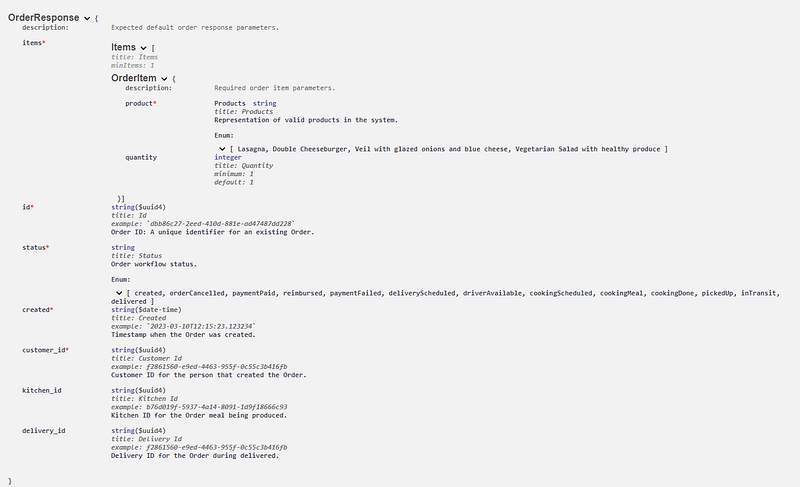
The other technique I have used is for pure example data, for example like this:
class HealthSchema(BaseModel):
    """ Representation of a  health response.

    :ivar name: Service name.
    :ivar status: Overall health status
    :ivar version: Service version.
    :ivar resources: Status for individual resources..
    """

    status: bool
    version: str
    name: str
    resources: List[ResourceSchema]

    class Config:
        schema_extra = {"example": resource_example}
Using the inner Config class to declare an example. The resource_example is defined in the web/api/documentation.py file we looked at earlier.
Conclusion
The example code is available in my GitHub repository.
In this article we have taken a look at the OrderService configuration handling, unified logging and OpenAPI documentation enrichment.
I hope you enjoyed this article and are stooked for the upcoming parts of this article series. Remember, if you like this article don’t hesitate to clap (I mean digitally 😊).
Happy coding in Gotham.
/Anders


