
EKS Blueprints: IaC Modules for Production-Ready Kubernetes
Bootstrap a fully-featured Kubernetes cluster on AWS with EKS Blueprints via Terraform and AWS CDK.

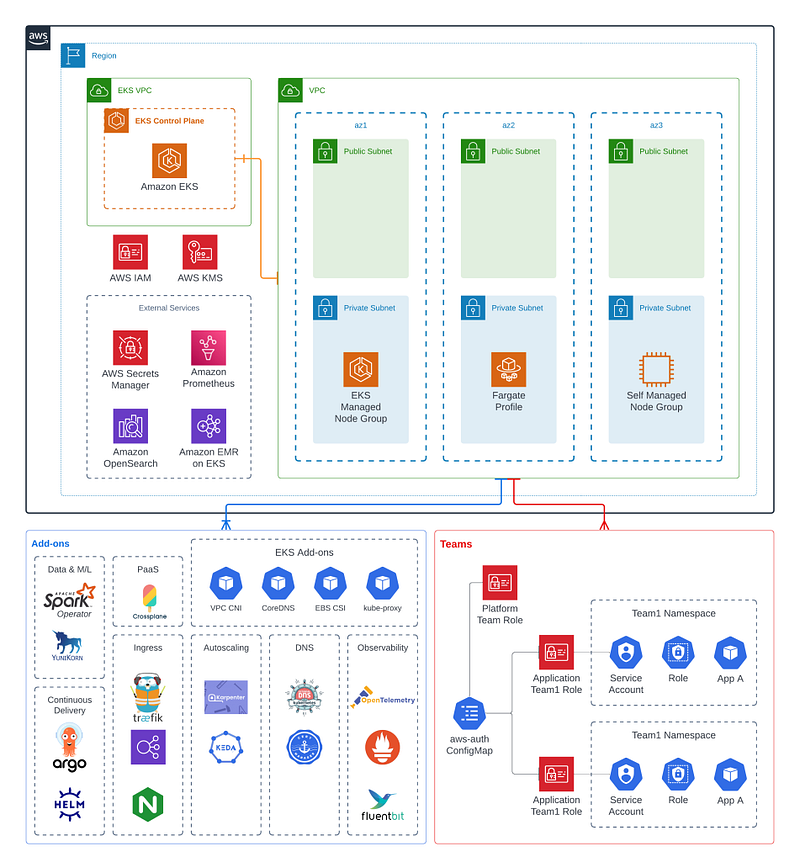
Earlier this week, AWS team announced EKS Blueprints, a collection of open-source, infrastructure as code (IaC) modules to bootstrap an EKS cluster with popular Kubernetes tools such as Prometheus, Karpenter, Nginx, Traefik, AWS Load Balancer Controller, and more. AWS Blueprints also provides a template to create soft multi-tenancy based on namespaces and RBAC roles with pre-wired aws-auth configs. The initial launch of AWS Blueprints supports Terraform and AWS CDK, with Pulumi available in preview.
Motivation
In my annual comparison of managed Kubernetes offerings, I noted how AWS EKS lacked a lot of the management features present in AKS and GKE such as automated node repair, upgrades, and a built in ingress controller. With the introduction of EKS add-ons, EKS has recently made significant stride in rolling out management for key Kubernetes components including AWS CNI, CoreDNS, kube-proxy, and Amazon EBS CSI controller. Now with EKS Blueprints, AWS is extending that support in a modular manner to expedite the process of installing popular open-source tools and security controls to bootstrap a more production-ready cluster.
Most likely, teams with experience with EKS already have some variation of EKS Blueprints, whether it is custom Terraform modules, ArgoCD setup, or custom scripts to install various Helm charts. Other teams may be using application frameworks on top of EKS like Shipa, KubeSphere, or Devtron to achieve the same experience. However, I still see value in EKS Blueprints in that AWS is making efforts to work with different vendors and the open-source community to create opinionated templates to promote best practices and facilitate discussions around how to bootstrap and manage EKS at scale.
Deep Dive into Blueprints
As the name suggests, EKS Blueprints are templates to bootstrap an EKS cluster with popular tooling to deploy and operate workloads. On Terraform, these come in the form of modules:
module "eks_blueprints" {
  source = "github.com/aws-ia/terraform-aws-eks-blueprints?ref=v4.0.2"
# EKS Cluster VPC and Subnet mandatory config
vpc_id = <vpc_id>
private_subnet_ids = <private_subnet_ids># EKS CLUSTER VERSION
cluster_version = "1.21"# EKS MANAGED NODE GROUPS
managed_node_groups = {
mg_5 = {
node_group_name = "managed-ondemand"
instance_types = ["m5.large"]
min_size = "2"
}
}
}# Add-ons
module "kubernetes_addons" {
source = "github.com/aws-ia/terraform-aws-eks-blueprints//modules/kubernetes-addons?ref=v4.0.2" eks_cluster_id = module.eks_blueprints.eks_cluster_id # EKS Add-ons
enable_amazon_eks_vpc_cni = true
enable_amazon_eks_coredns = true
enable_amazon_eks_kube_proxy = true
enable_amazon_eks_aws_ebs_csi_driver = true # Self-managed Add-ons
enable_aws_for_fluentbit = true
enable_aws_load_balancer_controller = true
enable_aws_efs_csi_driver = true
enable_cluster_autoscaler = true
enable_metrics_server = true
}And with CDK, EksBlueprint builder can be called:
const app = new cdk.App();const stackId = "<stack_id>";// By default will provision in a new VPC
blueprints.EksBlueprint.builder()
.region('us-west-2')
.version(eks.KubernetesVersion.V1_21)
.addOns(
new blueprints.addons.VpcCniAddOn(),
new blueprints.addons.CoreDnsAddOn(),
new blueprints.addons.KubeProxyAddOn(),
// Self-managed Add-ons
new blueprints.addons.AwsForFluentBitAddOn(),
new blueprints.addons.AwsLoadBalancerControllerAddOn(),
new blueprints.addons.ClusterAutoScalerAddOn(),
new blueprints.addons.EfsCsiDriverAddOn(),
new blueprints.addons.MetricsServerAddOn()
)
.build(app, stackId);At a first glance, EKS Blueprints do not look remarkably different than the Terraform AWS EKS module. However, the Kubernetes add-on module does abstract away the underlying Helm chart management into simple boolean enable/disable statements for each of the popular addons like fluent-bit, EFS CSI driver, cluster autoscaler, and metrics server. Some might not like managing Helm charts via Terraform and opt to manage it separately via ArgoCD or Flux. Nonetheless, the templates show one possible way to manage these tools in a centralized manner.
The more interesting part of EKS Blueprints is the template for managing multi-tenancy. The examples to configure appropriate IAM roles, policies, aws-auth ConfigMap, as well as EKS IAM roles for service accounts (IRSA) integration are useful to bootstrap soft multi-tenancy via namespaces. The templates follow the EKS best practices as laid out on the soft multi-tenancy section. These include adding quotas, labels, and mapping users/roles.
module “eks-blueprints” {
  …
  application_teams = {
    team-blue = {
      "labels" = {
        "appName" = "blue-team-app",
      }
      "quota" = {
        "requests.cpu"    = "2000m",
        "requests.memory" = "4Gi",
        "limits.cpu"      = "2000m",
        "limits.memory"   = "8Gi",
      }
      users = ["arn:aws:iam::<aws-account-id>:user/team-blue-user"]
    }
  }
platform_teams = {
platform_admin = {
users = ["arn:aws:iam::<aws-account-id>:user/platform-user"]
}
}
}Final Thoughts
As I have noted in my post on Karpenter, AWS has recently made significant strides to make EKS a more managed experience. It is nice to see AWS working with industry partners (Datadog, Dynatrace, HashiCorp, Kubecost, NewRelic, Ondat, Rafay, Snyk, Tetrate, Kasten By Veeam) to lower the time and effort required to create a fully-featured cluster ready for development. I’m looking forward to new integrations being built to handle some other common use cases such as secret management, config reloading, and more.


