Effortless Hot Reloading in Golang: Harnessing the Power of Viper
fsnotify, and Callback Functions for Dynamic Configuration Updates

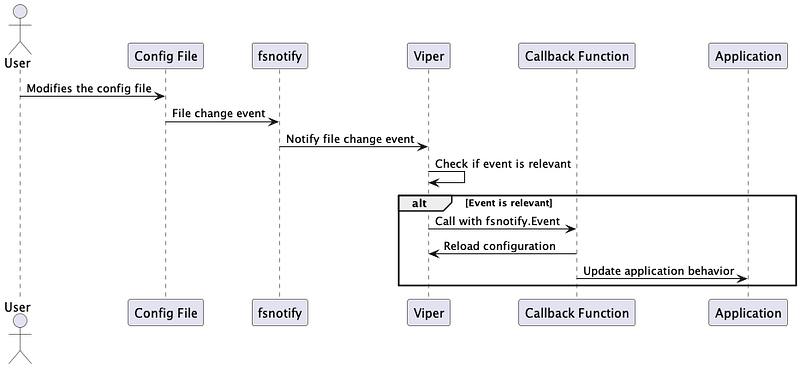
In this post, we’ll create a simple HTTP server that serves a configurable welcome message. The server will hot-reload the configuration when the YAML file is changed. We use the following concepts: push mechanism for change emitting and callback functions, which are a powerful concepts in distributed systems and asynchronous programming. Let’s look what are we going to build.
Install Viper
First, make sure you have the Viper package installed. Run the following command in your terminal:
go get -u github.com/spf13/viper
Create a YAML configuration file
Create a config.yaml file with the following content:
server:B
  Host: "localhost"
  Port: 8080
  WelcomeMessage: "Welcome to our hot-reloading server!"
Write the Go application
Create a main.go file with the following code:
package main

import (
 "fmt"
 "log"
 "net/http"
 "sync"

 "github.com/fsnotify/fsnotify"
 "github.com/spf13/viper"
)

type ServerConfig struct {
 Host           string
 Port           int
 WelcomeMessage string
}

var serverConfig ServerConfig
var mutex sync.RWMutex

func loadConfig() {
 viper.SetConfigName("config")
 viper.AddConfigPath(".")
 viper.SetConfigType("yaml")

 err := viper.ReadInConfig()
 if err != nil {
  log.Fatalf("Error reading config file: %s", err)
 }

 err = viper.UnmarshalKey("server", &serverConfig)
 if err != nil {
  log.Fatalf("Unable to decode server config into struct: %s", err)
 }
}

func main() {
 loadConfig()

 viper.WatchConfig()
 viper.OnConfigChange(func(e fsnotify.Event) {
  fmt.Println("Config file changed:", e.Name)
  mutex.Lock()
  loadConfig()
  mutex.Unlock()
 })

 log.Printf("Welcome message: %s\n", serverConfig.WelcomeMessage)

 http.HandleFunc("/", func(w http.ResponseWriter, r *http.Request) {
  mutex.RLock()
  welcomeMessage := serverConfig.WelcomeMessage
  mutex.RUnlock()
  fmt.Fprint(w, welcomeMessage)
 })

 address := fmt.Sprintf("%s:%d", serverConfig.Host, serverConfig.Port)
 fmt.Printf("Starting server at %s\n", address)
 log.Fatal(http.ListenAndServe(address, nil))
}
The server will start listening at localhost:8080. Open your web browser and navigate to http://localhost:8080. You should see the welcome message configured in config.yaml. Now, edit the config.yaml file, change the WelcomeMessage value, and save the file. When you refresh the browser, you should see the updated welcome message. This example demonstrates a use case where a server reads its configuration from a YAML file and hot-reloads it when the file is changed. You can extend and adapt this code for more complex applications and configurations as needed.
How it works with viper
The viper.OnConfigChange method is a function provided by the Viper library to handle configuration changes. It allows you to register a callback function that gets executed when a change in the monitored configuration file is detected. This makes it easy to implement hot-reloading functionality in your application, as the callback function can be used to reload the configuration and update your application's behavior accordingly.
Internally, Viper uses the fsnotify library to monitor the specified configuration file for changes. When Viper is set up to watch the configuration file using the viper.WatchConfig() method, it creates a new fsnotify.Watcher instance to monitor the file system events related to the configuration file. Viper listens for events such as file creation, modification, deletion, and renaming.
When an event is detected, Viper checks if the event is relevant to the monitored configuration file (e.g., if the file has been modified). If the event is relevant, Viper proceeds to execute the registered callback function provided via the OnConfigChange method. This callback function is passed an fsnotify.Event object that contains information about the file system event, such as the event type and the file's name.
Here’s an example of how to use viper.OnConfigChange:
viper.WatchConfig()
viper.OnConfigChange(func(e fsnotify.Event) {
    fmt.Println("Config file changed:", e.Name)
    // Code to reload the configuration and update the application behavior
})
In this example, the WatchConfig() method is called to start monitoring the configuration file. Then, the OnConfigChange method is used to register a callback function that prints a message and performs any necessary actions to reload the configuration and update the application when the configuration file is changed.
By using viper.OnConfigChange, you can simplify the process of reacting to configuration changes in your application and implement hot-reloading functionality with minimal effort.
How it works with fsnotify
Using a push mechanism like fsnotify to subscribe to file system events has several advantages over a polling-based approach where you would check for changes at regular intervals:
- Resource efficiency: Subscribing to events with
fsnotifyis more resource-efficient because it relies on the operating system's file system event notifications. This means your application only receives updates when an actual change occurs. In contrast, a polling-based approach requires your application to repeatedly check for changes, which can consume unnecessary CPU and I/O resources even when no changes are being made. - Real-time responsiveness: Since
fsnotifyprovides immediate notifications when changes occur, your application can react to these changes in real-time. With a polling-based approach, there would be a delay between when the change occurs and when your application detects it, depending on the polling interval. This delay can be detrimental to the user experience, especially in cases where immediate updates are important, such as live configuration changes. - Simplicity: Using an event-driven approach with
fsnotifyoften leads to simpler and more maintainable code. The application only needs to react to relevant events, which results in a clear separation of concerns. In a polling-based approach, the application needs to manage the polling mechanism, adding complexity and potential for bugs. - Scalability: As the number of files to monitor increases, an event-driven approach like
fsnotifyscales better than a polling-based approach. Withfsnotify, your application only receives events for actual changes, no matter how many files are being monitored. In a polling-based approach, the amount of work required to check for changes increases linearly with the number of monitored files, which can lead to performance issues.
Overall, using a push mechanism like fsnotify to subscribe to file system events is beneficial because it offers better resource efficiency, real-time responsiveness, simplicity, and scalability compared to polling-based approaches. This makes it a preferred choice for applications that need to react to file system changes efficiently and promptly.
How it works with callback functions
A callback function, also known as a “call-after” function, is a function that is passed as an argument to another function and is intended to be called at a later point in time. The function that receives the callback function as an argument is responsible for executing the callback function when certain conditions are met or when a specific event occurs. In our case we invoked callback function withviper.OnConfigChange.
Callback functions are useful in a variety of scenarios, including:
- Asynchronous programming: In scenarios where a function performs time-consuming operations, such as reading from a file or making a network request, a callback function can be used to handle the result of the operation once it’s completed. This allows the program to continue executing other tasks without waiting for the time-consuming operation to finish, improving overall performance and responsiveness.
- Event-driven programming: Callback functions are often used in event-driven systems, where an application reacts to events such as user input, timers, or file system changes. In such systems, a callback function can be registered to handle a specific event, and it gets called when the event occurs. This enables a clean separation of concerns, as the event handling logic is encapsulated in the callback function.
- Customization and extensibility: Callback functions can be used to provide customization and extensibility points in a library or framework. By allowing users to provide their own callback functions, a library can offer the flexibility to perform custom actions or modify the default behavior according to specific requirements.
Conclusion
This postdemonstrated how to use push mechanisms, callback functions, and the Viper library to implement hot-reloading of a configuration file in a Go web server application. By leveraging the fsnotify library, Viper efficiently watches for changes in the configuration file and triggers the registered callback function as soon as a change is detected. This push mechanism enables real-time responsiveness and eliminates the need for periodic polling, thus providing better resource efficiency.
The callback function is a powerful programming concept that allows us to separate concerns and respond to specific events, such as a configuration change in this example. By registering a callback function with viper.OnConfigChange, we can reload the configuration and update the server's behavior without restarting the application. This enhances the user experience and enables more dynamic application behavior.
The demonstrated approach can be especially useful in distributed systems where configuration changes need to be propagated across multiple instances of an application. The hot-reloading functionality ensures that all instances can react to configuration changes in real-time without downtime, improving overall system resilience and maintainability. By using a combination of push mechanisms, callback functions, and the Viper library, developers can create flexible and efficient applications that adapt to changing requirements with ease.
If you enjoy reading medium articles and are interested in becoming a member, I would be happy to share my referral link with you!


