avatarMonu Kumar Modi

Free AI web copilot to create summaries, insights and extended knowledge, download it at here

1581

Abstract

]; } } <span class="hljs-keyword">return</span> { <span class="hljs-attr">min</span>: min, <span class="hljs-attr">max</span>: max }; }</pre></div><p id="6b9e">Here’s an example of how you can use the function:</p><div id="2247"><pre><span class="hljs-keyword">let</span> numbers = [<span class="hljs-number">3</span>, <span class="hljs-number">5</span>, <span class="hljs-number">1</span>, <span class="hljs-number">10</span>, <span class="hljs-number">2</span>]; <span class="hljs-keyword">let</span> minMax = <span class="hljs-title function_">findMinMax</span>(numbers); <span class="hljs-variable language_">console</span>.<span class="hljs-title function_">log</span>(minMax); <span class="hljs-comment">// Output: { min: 1, max: 10 }</span></pre></div><p id="d9a8">In the example above, we have an array of numbers called “numbers.” We pass this array as an argument to the “findMinMax” function, and assign the returned object to a variable called “minMax.” We then log the “minMax” variable to the console, which outputs the minimum and maximum values in the array: 1 and 10, respectively.</p><p id="a7b8">It’s a simple function with O(n) time complexity and easy to understand. This function can be useful in situations where you need to find the range of values in an array, and is a good example of how a small, specific function can be useful in many different programs.</p><p id="37cb"><b>If you’re interested in learning more about coding in Javascript, be sure to follow me for more code snippets and examples. I’ll be sharing valuable information and tips

Options

on how to master the language and improve your skills as a developer. So, stay tuned for more updates, and let’s continue learning together.</b></p><p id="8e29">Happy learning 😄</p><p id="c8ee">Do support our publication by following it</p><div id="adb2" class="link-block"> <a href="https://medium.com/thefreshwrites"> <div> <div> <h2>The Fresh Writes</h2> <div><h3>We support small publishers to enhance their articles and increase their growth</h3></div> <div><p>medium.com</p></div> </div> <div> <div style="background-image: url(https://miro.readmedium.com/v2/resize:fit:320/1*Yqvp7nKT1C7ocQ9dzDewfA.png)"></div> </div> </div> </a> </div><div id="7fa8" class="link-block"> <a href="https://readmedium.com/function-to-efficiently-reverse-alternate-k-length-chunks-of-a-string-in-javascript-38e5d386e7c"> <div> <div> <h2>Coding: Reverse Alternate K-length Chunks of a String In Javascript</h2> <div><h3>In this article, we will be discussing a code snippet that demonstrates how to reverse alternate chunks of a string…</h3></div> <div><p>medium.com</p></div> </div> <div> <div style="background-image: url(https://miro.readmedium.com/v2/resize:fit:320/1*hE_mjmdgwsPr3usFLt3fSQ.png)"></div> </div> </div> </a> </div></article></body>

Coding: Finding the Min/Max Values in an Array using JavaScript

In this post, we will be discussing a simple JavaScript function that can be used to find the minimum and maximum values in an array. The function, called “findMinMax,” takes in an array as its only parameter.
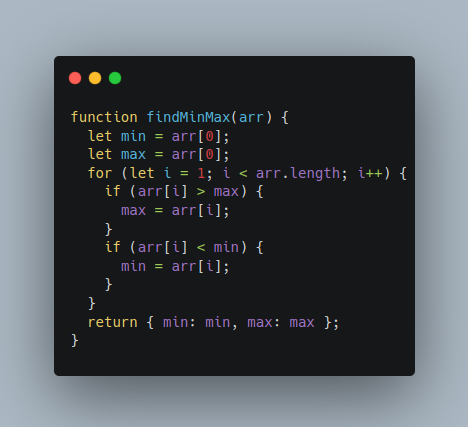
The function starts by initializing two variables, “min” and “max,” to the first element of the array. It then uses a for loop to iterate through the rest of the array, comparing each element to the current min and max values. If an element is greater than the current max, it becomes the new max. If an element is less than the current min, it becomes the new min.

Here’s the full code for the function:

function findMinMax(arr) {
  let min = arr[0];
  let max = arr[0];
  for (let i = 1; i < arr.length; i++) {
    if (arr[i] > max) {
      max = arr[i];
    }
    if (arr[i] < min) {
      min = arr[i];
    }
  }
  return { min: min, max: max };
}

Here’s an example of how you can use the function:

let numbers = [3, 5, 1, 10, 2];
let minMax = findMinMax(numbers);
console.log(minMax); // Output: { min: 1, max: 10 }

In the example above, we have an array of numbers called “numbers.” We pass this array as an argument to the “findMinMax” function, and assign the returned object to a variable called “minMax.” We then log the “minMax” variable to the console, which outputs the minimum and maximum values in the array: 1 and 10, respectively.

It’s a simple function with O(n) time complexity and easy to understand. This function can be useful in situations where you need to find the range of values in an array, and is a good example of how a small, specific function can be useful in many different programs.

If you’re interested in learning more about coding in Javascript, be sure to follow me for more code snippets and examples. I’ll be sharing valuable information and tips on how to master the language and improve your skills as a developer. So, stay tuned for more updates, and let’s continue learning together.

Happy learning 😄

Do support our publication by following it

JavaScript
Coding
Interview
Data Structures
Arrays
Recommended from ReadMedium