
Securing your Kubernetes Applications Efficiently — Part 1
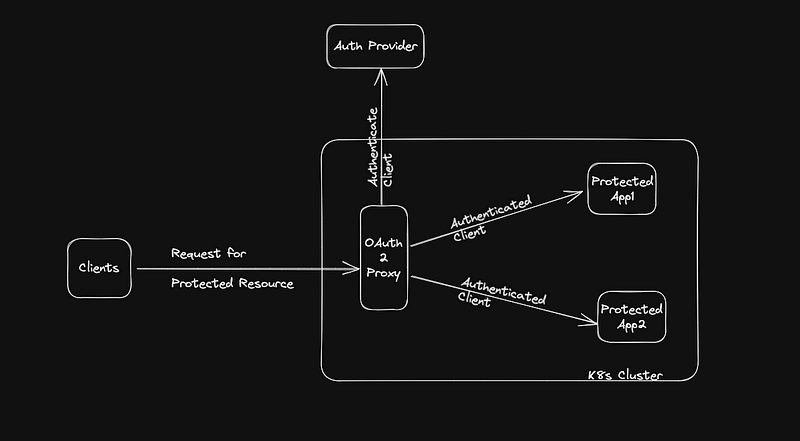
Secure application access is critical with the growth of Kubernetes adoption. Every secured application deployed to a Kubernetes cluster requires client authentication. However, implementing authentication for each application is time-consuming, less secure, and adds maintenance overhead. Instead, wouldn’t it be better to offload the authentication workflow to a configurable proxy? This way, every application will benefit, resulting in a secure and efficient process.
OAuth2 Proxy is a popular open-source project that acts as an authentication middleware between your application and the identity provider, designed to be a single point of configuration for all your authentication needs. Configuring OAuth2 Proxy once saves time and effort as every application in the cluster offloads its authentication flow to it.
In this blog post, we’ll conceptually explore how OAuth2 Proxy works by walking through the Login , Post Login and Logout workflows. In the subsequent post, we will get our hands dirty by doing a step by step configuration, deployment and validation in a local k8s cluster.
Login Workflow
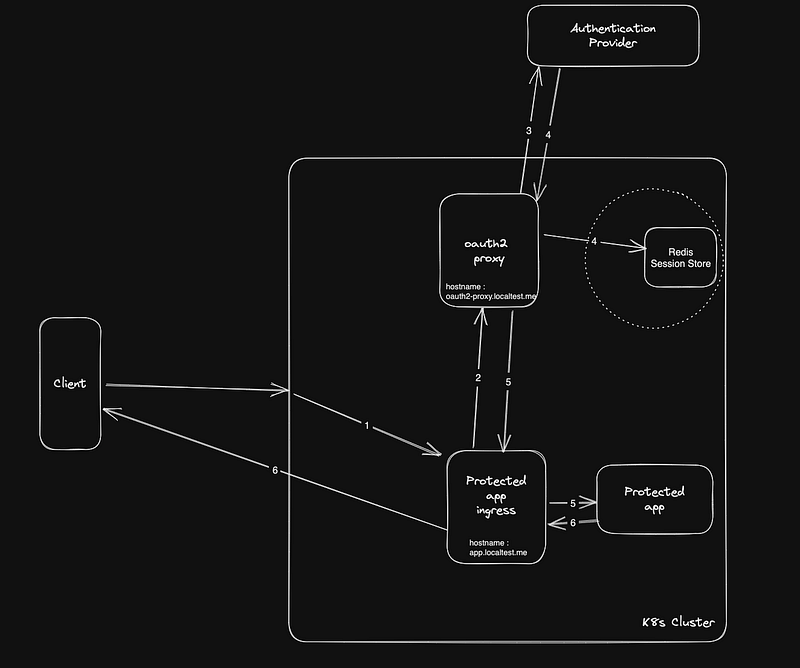
- Client sends a request to the protected app http://app.localtest.me
- Ingress looks for any authentication or session cookie, if not present, forwards the request to the endpoint on the proxy to kickstart the OAuth2 workflow. It includes the redirect query string to the url the client requested (like http://oauth2-proxy.localtest.me/oauth2/start?rd=http://app.localtest.me )
- OAuth2-proxy kick starts the authentication flow using the authentication provider related configuration , it further forwards the request to authentication provider for logging in the user.
- User enters login info, the authentication provider authenticates the user and sends the authenticated response with headers back to the callback url configured. The callback url will be the oauth2-proxy callback endpoint ( like http://oauth2-proxy.localtest.me/oauth2/callback ). (optionally), if a session store is configured the auth session related info is stored.
- OAuth2-Proxy creates a cookie with authentication info ( if a session store is configured, just the session token will be configured in cookie ) and redirects to the protected app with response headers.
- Protected app , can perform additional authorization checks using the header info and responds back to the user with the requested resource including the cookie.
Note : If Single Sign On (SSO) is enabled and user has signed in previously using a different app, the user will be automatically signed in by the authentication provider (in step 4) with out credential prompt
Post Login Workflow
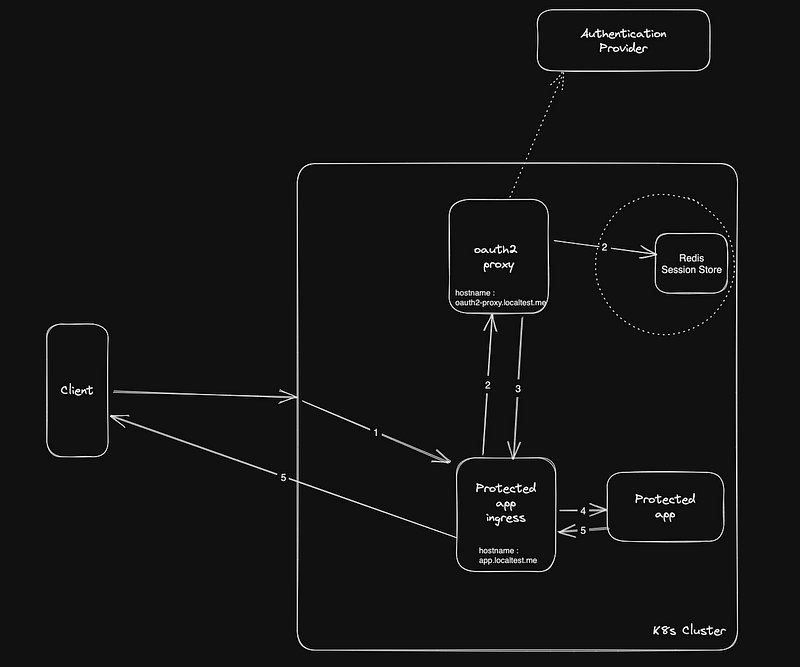
- Client sends a request to the protected app http://app.localtest.me , request now includes the session cookie (if it’s missing, client will go through the login workflow again)
- Protected app forwards the request to the auth endpoint of OAuth2-Proxy (http://oauth2-proxy.localtest.me/oauth2/auth) , the cookie is parsed to extract info from session store (if configured) and token is validated. If cookie is invalid or token has expired, the user is sent to authentication provider for the login workflow. For production workloads it is a good practice to configure a session store, as this will reduce the cookie size and keeps session info secure.
- OAuth2-Proxy returns the request back to protected app ingress with response headers.
- These response headers are in turn forwarded to the protected app for additional authorization checks.
- After successful authorization, the protected app responds to the user with the requested resource
Note: You can also configure oauth2-proxy to support refresh token, which will periodically refresh auth token
Logout Workflow
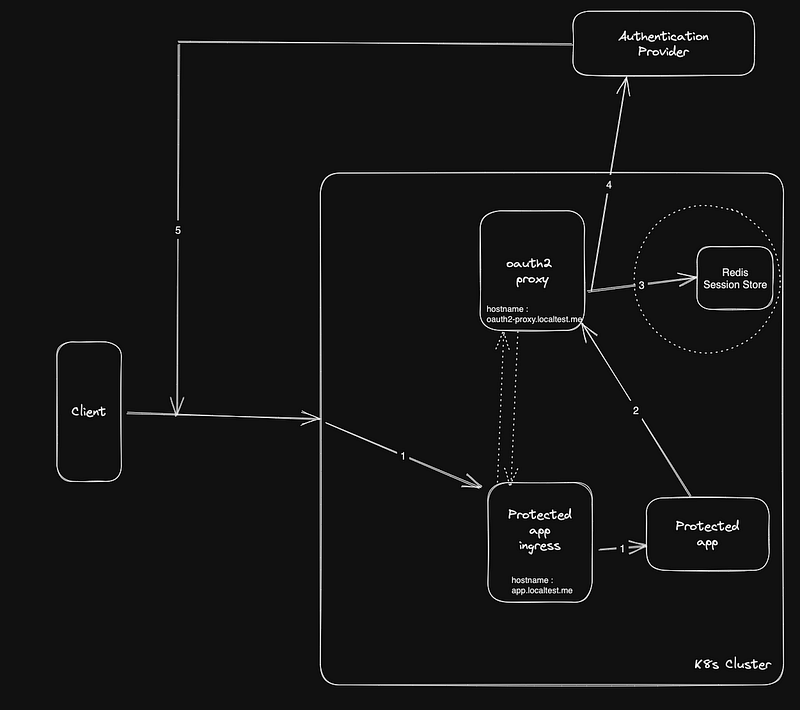
- Client sends a logout request to the protected app http://app.localtest.me
- Protected app calls the OAuth2-Proxy sign_out endpoint including the redirect url (like http://oauth2-proxy.localtest.me/sign_out?rd=<redirect url>) Note : The redirect url will be URL encoded string of the logout endpoint of your authentication provider and any appropriate query strings for the authentication provider to redirect after logging out
// sample redirect url encoded
const rd = encodeURIComponent("https://<your auth provider oidc endpoint>/logout?clientid=myappclientid")
// sample OAuth2 Proxy signout endpoint configuration
const signOutEndpoint = `http://oauth2-proxy.localtest.me/sign_out?rd=${rd}`
3. OAuth2-Proxy deletes the session info from session store (if configured) , deletes the cookie and redirects to Authentication Provider logout endpoint configured in Step 2.
4. Authentication provider logs the user out and sends the user back to the logout url ( like http://app.localtest.me ) configured for the app with clientid received in it’s query string
5. The request comes back to the protected app ingress and user will be redirected to the Login workflow.
Note : For the Redirect in Step 3 to work, the hostname of the Redirect URL for OAuth2 Proxy (in this case the authentication provider logout endpoint) should be configured in the allowed whitelist domains. If not, only the oauth2-proxy cookie will be deleted but the user is not really logged out of authentication provider
Given the conceptual understanding of various authentication workflows , let’s look at some of the pros and cons of using OAuth2-Proxy in your workloads.
Advantages of using OAuth2-Proxy
- Simplifies Authentication and Authorization, by reducing the overhead required by each application developer to build and maintain each application
- Enhances security by consolidating Auth workflow in a single location, making it easier to rotate secrets and strong security standards enforcement
- Offers easy integration with most of the popular OAuth2 providers.
- Provides flexibility with numerous configuration options
- Integrates and runs well within Kubernetes clusters and various Ingress controller offerings as it is developed in a cloud native fashion
Drawbacks to keep in mind
- Increases the complexity of troubleshooting , as it adds another black box layer within your request flow
- Introduces additional performance overhead
- Configuration can get complex if your cluster has apps that require integration with multiple authentication providers ( using something like Auth0 you can easily overcome this, we will discuss this in the post about configuration )
- Proxy can become a single point of failure and needs additional security controls.
- Dependency on code that your team doesn’t own or control the release cycles
As with any architecture, the decision to leverage OAuth2 Proxy for your workloads is all about evaluating tradeoffs and considering what works best for your organization. In my next post, I will write about configuring, deploying the proxy to a local k8s cluster and validating the workflow. Follow along !!


