avatarDiana Dovgopol

Free AI web copilot to create summaries, insights and extended knowledge, download it at here

4219

Abstract

audio file, which can be downloaded, played on the player page, or embedded on a website or social network.</p><p id="8ad6">Speechki supports 76 languages, and it generates audio within minutes. If you don’t specify the voice and language, it will automatically select them. For instance, in my case, <a href="https://www.france-hotel-guide.com/en/blog/what-is-paris-famous-for/#:~:text=Paris%2C%20the%20city%20of%20Lights,cathedral%2C%20and%20the%20Eiffel%20tower.">the text</a> was read aloud by a male voice, which sounded quite good.</p><figure id="837b"><img src="https://cdn-images-1.readmedium.com/v2/resize:fit:800/1*J7r57NJ98br5WwvuSZFYXA.jpeg"><figcaption>Screenshot</figcaption></figure><p id="311a">Once you register, you can listen to your audio on <a href="https://plugin.speechki.org/result?id=5035c97e-11ae-11ee-a548-de1a1b9d93bc&amp;token=e5cb67dd28b0753f8984cb3110e0ef030490b9cb884597ae0bbf53e3568dfb19">the plugin’s website.</a></p><p id="aa43">This plugin is particularly beneficial for individuals managing social networks or creating advertisements. With this tool, you can edit audio within minutes, allowing you to save valuable time.</p><h2 id="33ae">ChatGPT Plugin #3: Paxi AI</h2><p id="48f0">This tool serves as your very own personal assistant. It’s designed to assist you in discovering other helpful tools, apps, and websites based on your specific requests. Consider it your go-to platform for finding the resources you need.</p><p id="264c">For instance, let’s say I’m interested in creating an avatar from my photos, but I’m unsure about which application to use. On top of that, I prefer a free option.</p><p id="2215">So, I decided to give Paxi AI a try.</p><p id="aa0e">First, I asked ChatGPT “How I can use this plugin?” which is something I recommend you to do when trying a new plugin,</p><figure id="0893"><img src="https://cdn-images-1.readmedium.com/v2/resize:fit:800/1*caWr5whvdohZSPgQJB8K4Q.jpeg"><figcaption>Screenshot</figcaption></figure><p id="7c98">We can interact with Paxi AI with a simple prompt, but, apparently, if we use the code shown above we’ll obtain better results.</p><p id="f738">So, I copied the code and replaced “data analysis” with another request.</p><figure id="ed98"><img src="https://cdn-images-1.readmedium.com/v2/resize:fit:800/1*TJRrOuX9pV3l5mfIVu0yBQ.jpeg"><figcaption>Screenshot</figcaption></figure><p id="7978">As you can see, I discovered two nice AI tools that allow me to create avatars for free. I’m thrilled with the options I found!</p><h2 id="4383">ChatGPT Plugins #4–5: Amazing Talker & Speak</h2><p id="c0e2">I put these 2 plugins together because they have one goal — improve your language learning experience.</p><p id="9d72">First, Speak works as an AI language tutor, just like Duolingo, but with some cool advantages. It supports 10 languages, including English, French, German, Spanish, Italian, Russian, Portuguese, Japanese, Chinese, and Korean. This plugin allows you to practice listening, writing, and reading, making it even more versatile than Duolingo.</p><p id="ce6d">To activate Speak, all you need to do is ask any language-related question. It can translate, explain grammar rules, suggest phrases, and even help with your homework. While ChatGPT can handle similar queries without plugins (as I mentioned in one of <a href="https://readmedium.com/how-to-use-chatgpt-to-learn-a-language-and-practice-it-f7e7e38b1cee">my articles</a>), Speak provides more detailed explanations and different types of answers.</p><figure id="2484"><img src="https://cdn-images-1.readmedium.com/v2/resize:fit:800/1*qP48K721fq2YeDTk4bX_CQ.jpeg"><figcaption>Screenshot</figcaption></figure><p id="3cf3">Speak did an awesome job of explaining the difference between the two verbs with clear examples. I personally think it’s one of the best language-learning plugins out there at the moment.</p><p id="f2d0">But if an AI language tutor isn’t enough, just get a real one with the Amazing Talker plugin.</p><p id="143d">Amazing Talker is designed to enhance language learning through personalized online lessons. This handy tool facilitates the connection between users and language teachers. To get started, simply specify the langu

Options

age you want to learn and provide the necessary details.</p><p id="f620">With Amazing Talker, you can do teacher search, lesson scheduling, and lesson review.</p><p id="7490">I wrote my language needs and added some details, and here’s what I got.</p><figure id="04d4"><img src="https://cdn-images-1.readmedium.com/v2/resize:fit:800/1*O7Wl8CZFIF7Yx1RBSyftBQ.jpeg"><figcaption>Screenshot</figcaption></figure><p id="9746">Good! I got 3 teachers who match my requirements and price.</p><h2 id="bb11">ChatGPT Plugin #6: Video Insights</h2><p id="2da3">Video Insights is great for summarizing YouTube videos.</p><p id="a161">What Video Insights can do: By simply providing the URL of the video, ChatGPT can offer detailed information about the video.</p><p id="5e77">Now you can know what a video is about without having to watch it entirely.</p><p id="c4df">I asked ChatGPT what this <a href="https://www.youtube.com/watch?v=ugRc5jx80yg&amp;ab_channel=MarkRober">YouTube video</a> is about and this is what I got.</p><figure id="c697"><img src="https://cdn-images-1.readmedium.com/v2/resize:fit:800/1*03BuD8BV6xDRY7MunCpAHw.jpeg"><figcaption>Screenshot</figcaption></figure><p id="d16b">It’s absolutely incredible! I got the description for a 13-minute video ready in less than 1 minute. And I can use this plugin also for work or study materials.</p><h2 id="5155">ChatGPT Plugin #7: Link Reader</h2><p id="3302">The Link Reader plugin is an impressive tool that is capable of extracting information from various types of links, such as web pages and PDF files.</p><p id="dafc">By sending a link to a website, PDF document, image, or similar source, the chatbot will analyze its contents. After the analysis, you can inquire about the gathered data and ChatGPT will provide detailed answers to your questions.</p><p id="77f0">For example, I shared with ChatGPT a link to an article on the Internet about <a href="https://www.timeshighereducation.com/world-university-rankings/2023/world-ranking">World University Rankings 2023</a> and asked it to write me what the link was about.</p><p id="4f75">And here is what I got:</p><figure id="93e9"><img src="https://cdn-images-1.readmedium.com/v2/resize:fit:800/1*ntmtDVCJs0-I7mvt_RH03A.jpeg"><figcaption>Screenshot</figcaption></figure><p id="7b1f">I got fairly accurate information in a matter of seconds.</p><p id="6f23">Additionally, this awesome plugin can quickly give you descriptions of charts or images by simply sharing the image URL.</p><p id="beb3">I asked ChatGPT to describe the diagram from <a href="https://www.visualcapitalist.com/visualizing-salaries-college-degrees/">this site</a> and here is what I got.</p><figure id="abd6"><img src="https://cdn-images-1.readmedium.com/v2/resize:fit:800/1*Tq_LGe4RPvoXJvLPFqYUjQ.jpeg"><figcaption>Screenshot</figcaption></figure><blockquote id="debe"><p>Note: Keep in mind that this plugin can’t always read your images directly or does it with much difficulty.</p></blockquote><h2 id="d28e">Artificial Corner’s Free ChatGPT Cheat Sheet</h2><p id="4c9c">We’re offering a free cheat sheet to our readers. <a href="https://frankandrade.ck.page/08c94cf1c1"><b>Join our newsletter with 30K+ people and get our free ChatGPT cheat sheet.</b></a></p><p id="ddbf"><i>Loved this story and want to support me as a writer? Consider signing up for Medium. If you <a href="https://medium.com/@dianatheathlete/membership">sign up with my link</a>, I earn a small commission at no cost to you! And you’ll get full access to all stories on Medium.</i></p><div id="142a" class="link-block"> <a href="https://dianatheathlete.medium.com/membership"> <div> <div> <h2>Join Medium with my referral link - Diana Dovgopol</h2> <div><h3>As a Medium member, a portion of your membership fee goes to writers you read, and you get full access to every story…</h3></div> <div><p>dianatheathlete.medium.com</p></div> </div> <div> <div style="background-image: url(https://miro.readmedium.com/v2/resize:fit:320/0*UTa24wlW5CCNpCjo)"></div> </div> </div> </a> </div></article></body>

I’ve Tried (Almost All) ChatGPT Plugins. Here Are The Best!

These plugins will improve the way you use ChatGPT.

Image licensed from iStock

One of the first things I did after subscribing to ChatGPT Plus was to download many plugins from the Plugin Store. I have to say that ChatGPT plugins are really useful improvements that have changed the way I use ChatGPT.

As of now, there are around 200 plugins available, and the number keeps growing every day. Although many plugins are truly useless, I’ve found some that are worth a try.

Here are the best ChatGPT plugins available today.

First things first — Enable plugins

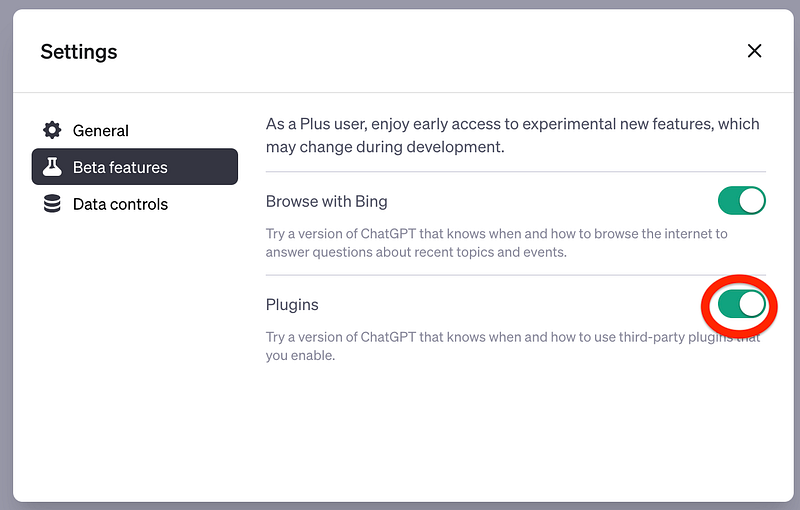
To enable plugins, you need a ChatGPT Plus subscription. If you have a subscription, follow the steps below to enable plugins.

  • On the ChatGPT website go to the lower-left corner, and click on the three dots next to your name.
  • Select Settings and click on “Beta Features”
  • Enable “Plugins”
Screenshot

Then, in the chat interface, select “GPT-4,” click on “No Plugins Enabled” and select Plugin Store to download a new plugin or just choose a plugin that was already installed.
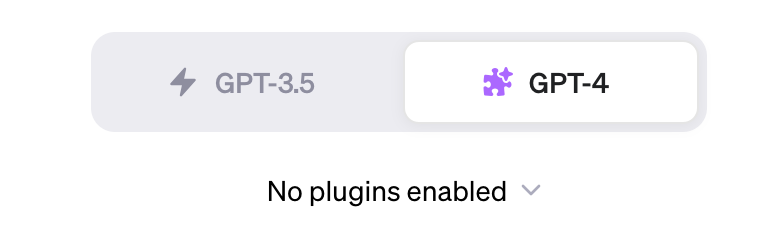
Screenshot

Note: You can enable up to three plugins simultaneously in a chat. That’s why it is recommended to select plugins that work well together

ChatGPT Plugin #1: Photorealistic

Midjourney can generate images for simple requests, but the results might not be mind-blowing. However, with v5 it has become more skilled at generating photorealistic images, which means you’ll need to provide more detailed descriptions to get a good outcome.

Here’s when Photorealistic comes in handy. Photorealistic can generate a long prompt from a short phrase.

Simply describe what you want to visualize in the picture you wish to generate using Midjourney. It can transform just a few words into a detailed description, capturing the desired atmosphere, camera perspective, colors, angles, and various other parameters.
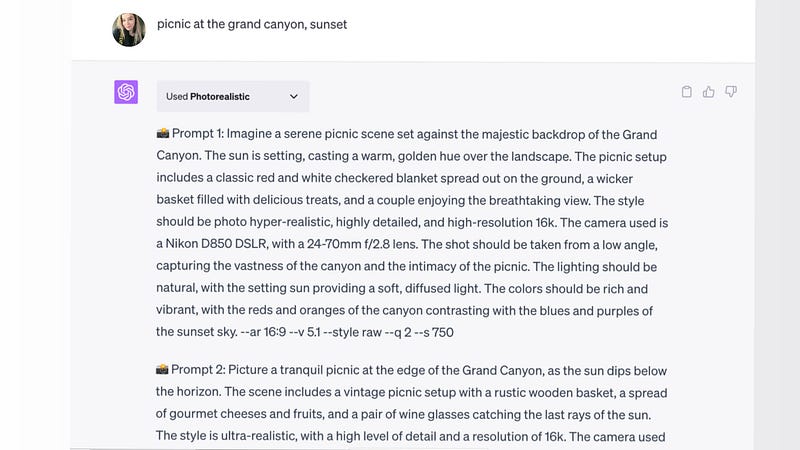
Screenshot

I copied the completed prompt and pasted it into Midjourney, and here are the results I got.

Created by Midjourney

Here’s another image I got after improving the prompt below with Photorealistic.

Prompt: Summer holidays in the USA, carelessness, youth, friends

Created by Midjourney

This plugin is incredibly valuable. It not only saves time but also sparks fresh ideas, making it highly beneficial for generating images with Midjourney.

ChatGPT Plugin #2: Speechki

Speechki generates text into audio in minutes.

To activate the plugin, simply write or paste the desired text. Speechki will provide a link to an audio file, which can be downloaded, played on the player page, or embedded on a website or social network.

Speechki supports 76 languages, and it generates audio within minutes. If you don’t specify the voice and language, it will automatically select them. For instance, in my case, the text was read aloud by a male voice, which sounded quite good.
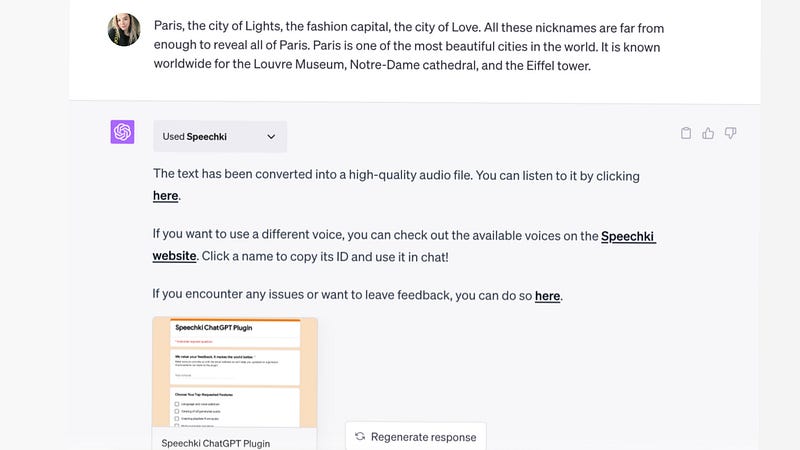
Screenshot

Once you register, you can listen to your audio on the plugin’s website.

This plugin is particularly beneficial for individuals managing social networks or creating advertisements. With this tool, you can edit audio within minutes, allowing you to save valuable time.

ChatGPT Plugin #3: Paxi AI

This tool serves as your very own personal assistant. It’s designed to assist you in discovering other helpful tools, apps, and websites based on your specific requests. Consider it your go-to platform for finding the resources you need.

For instance, let’s say I’m interested in creating an avatar from my photos, but I’m unsure about which application to use. On top of that, I prefer a free option.

So, I decided to give Paxi AI a try.

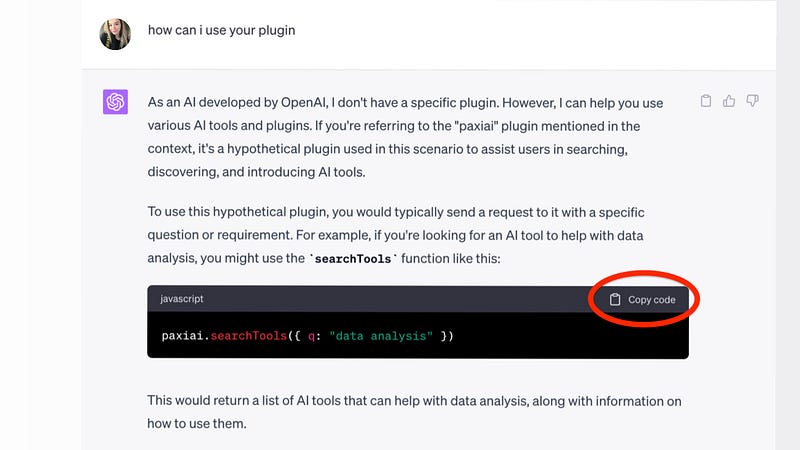
First, I asked ChatGPT “How I can use this plugin?” which is something I recommend you to do when trying a new plugin,
Screenshot

We can interact with Paxi AI with a simple prompt, but, apparently, if we use the code shown above we’ll obtain better results.

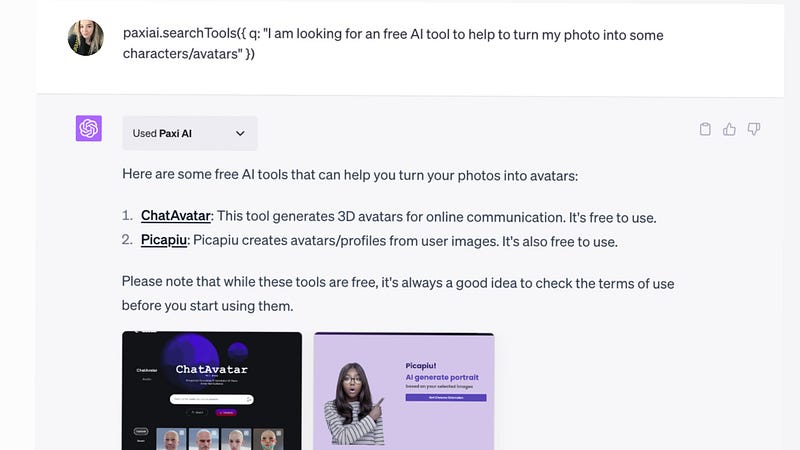
So, I copied the code and replaced “data analysis” with another request.
Screenshot

As you can see, I discovered two nice AI tools that allow me to create avatars for free. I’m thrilled with the options I found!

ChatGPT Plugins #4–5: Amazing Talker & Speak

I put these 2 plugins together because they have one goal — improve your language learning experience.

First, Speak works as an AI language tutor, just like Duolingo, but with some cool advantages. It supports 10 languages, including English, French, German, Spanish, Italian, Russian, Portuguese, Japanese, Chinese, and Korean. This plugin allows you to practice listening, writing, and reading, making it even more versatile than Duolingo.

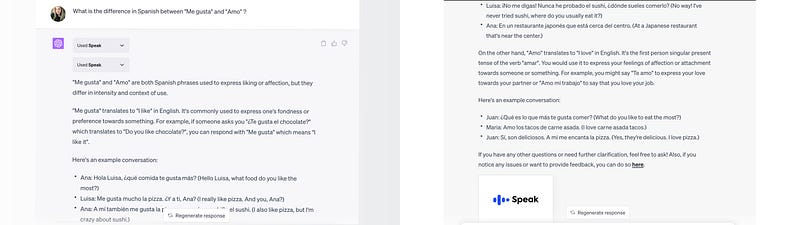
To activate Speak, all you need to do is ask any language-related question. It can translate, explain grammar rules, suggest phrases, and even help with your homework. While ChatGPT can handle similar queries without plugins (as I mentioned in one of my articles), Speak provides more detailed explanations and different types of answers.
Screenshot

Speak did an awesome job of explaining the difference between the two verbs with clear examples. I personally think it’s one of the best language-learning plugins out there at the moment.

But if an AI language tutor isn’t enough, just get a real one with the Amazing Talker plugin.

Amazing Talker is designed to enhance language learning through personalized online lessons. This handy tool facilitates the connection between users and language teachers. To get started, simply specify the language you want to learn and provide the necessary details.

With Amazing Talker, you can do teacher search, lesson scheduling, and lesson review.

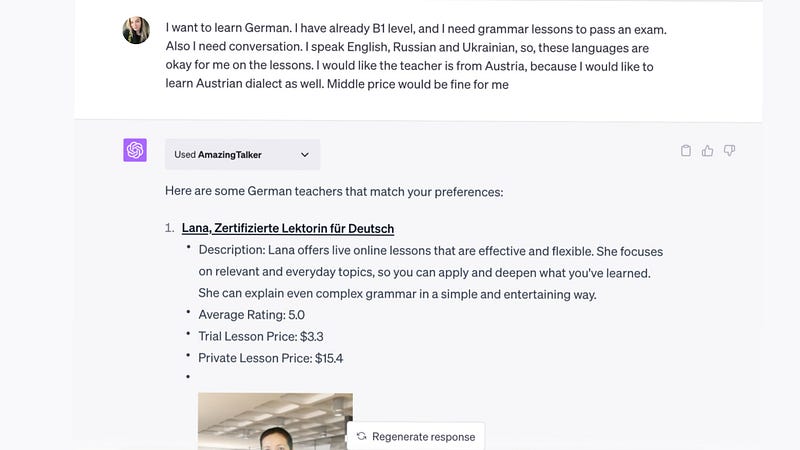
I wrote my language needs and added some details, and here’s what I got.
Screenshot

Good! I got 3 teachers who match my requirements and price.

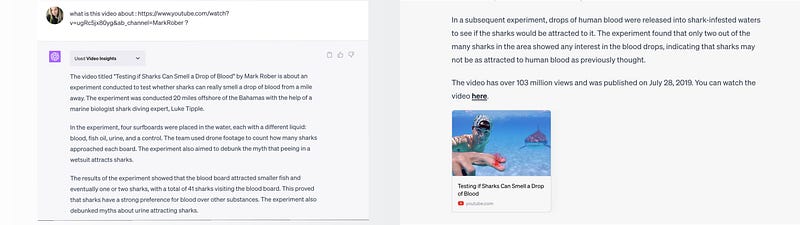
ChatGPT Plugin #6: Video Insights

Video Insights is great for summarizing YouTube videos.

What Video Insights can do: By simply providing the URL of the video, ChatGPT can offer detailed information about the video.

Now you can know what a video is about without having to watch it entirely.

I asked ChatGPT what this YouTube video is about and this is what I got.
Screenshot

It’s absolutely incredible! I got the description for a 13-minute video ready in less than 1 minute. And I can use this plugin also for work or study materials.

ChatGPT Plugin #7: Link Reader

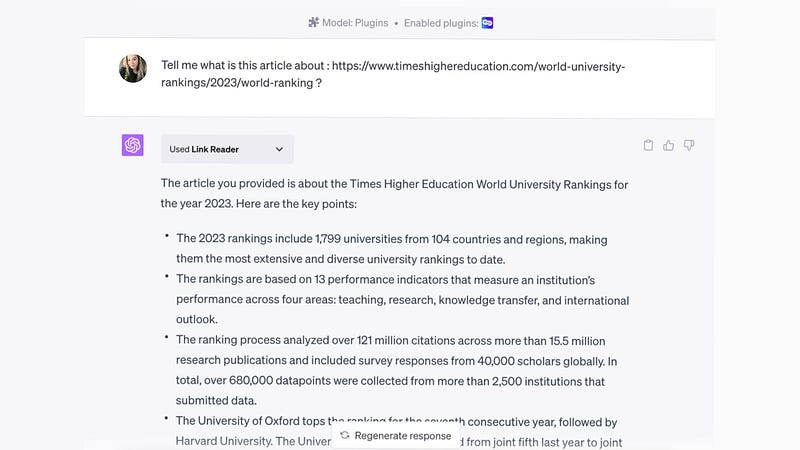
The Link Reader plugin is an impressive tool that is capable of extracting information from various types of links, such as web pages and PDF files.

By sending a link to a website, PDF document, image, or similar source, the chatbot will analyze its contents. After the analysis, you can inquire about the gathered data and ChatGPT will provide detailed answers to your questions.

For example, I shared with ChatGPT a link to an article on the Internet about World University Rankings 2023 and asked it to write me what the link was about.

And here is what I got:
Screenshot

I got fairly accurate information in a matter of seconds.

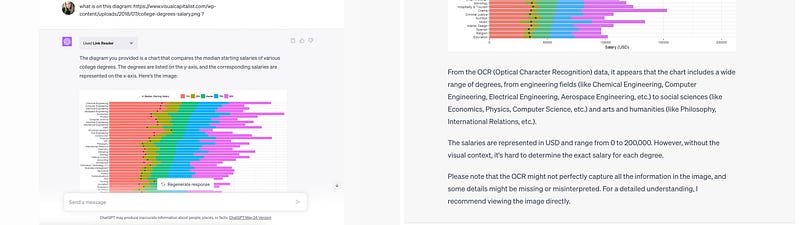
Additionally, this awesome plugin can quickly give you descriptions of charts or images by simply sharing the image URL.

I asked ChatGPT to describe the diagram from this site and here is what I got.
Screenshot

Note: Keep in mind that this plugin can’t always read your images directly or does it with much difficulty.

Artificial Corner’s Free ChatGPT Cheat Sheet

We’re offering a free cheat sheet to our readers. Join our newsletter with 30K+ people and get our free ChatGPT cheat sheet.

Loved this story and want to support me as a writer? Consider signing up for Medium. If you sign up with my link, I earn a small commission at no cost to you! And you’ll get full access to all stories on Medium.

ChatGPT
Artificial Intelligence
Technology
Science
Life
Recommended from ReadMedium