
Easily Obtain Kaggle Datasets In Python

Kaggle is an excellent platform for data science and machine learning practitioners. Be it for learning, joining competitions, or exploring datasets, its public API offers an option to obtain datasets easily.
As such, this post will be looking at how to install, set up and access the API to obtain Kaggle datasets.
Installation
To install kaggle on your base / virtual environment, run the following pip install.
pip install kaggleObtaining Authentication
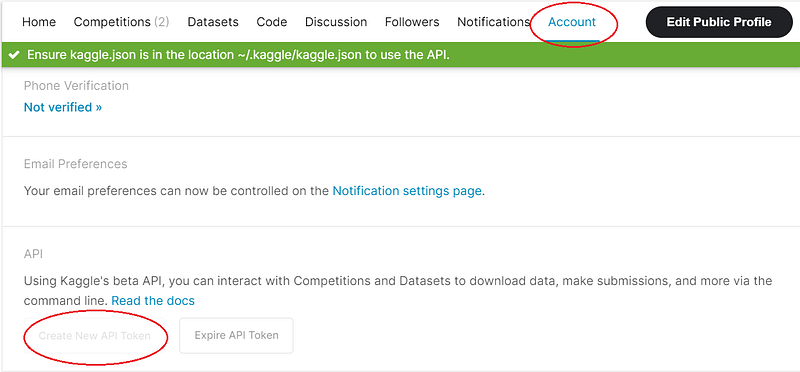
After installing the package, we would require credentials to access its public API. So, firstly, create a Kaggle account if you haven’t already. Next, click on the top right-hand corner to access your profile and click on the Account tab.
From which, scroll down a little until you see the API section. Click on “Create New API Token” to download your credentials. It would be in a JSON format file consisting of your username and key.
Moving Credentials To Folder
The next step before using the API endpoints would be to store your credentials in the correct folder.
By default, after the pip installation, a new folder would be created with the following path: C:\Users\
Move the JSON file to the Kaggle path created via installation.
Exploring Kaggle API Endpoints
After following the steps above, we can begin exploring the use of this package. I would be executing them in a Jupyter Notebook.
The Kaggle API offers the following endpoints with various commands:
- Competitions {list, files, download, submit, submissions, leaderboard}
- Datasets {list, files, download, create, version, init}
- Kernels {list, init, push, pull, output, status}
- Config {view, set, unset}
Competitions Endpoint
Suppose we would like to access the datasets of currently active competitions on Kaggle; we can do so with the following command.
!kaggle competitions list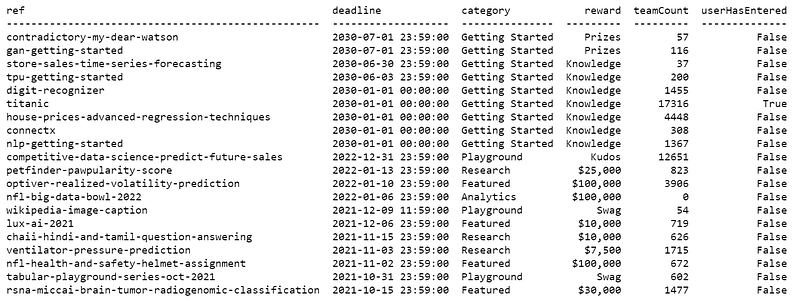
Using the other commands, we can also check out the leaderboard scoring for a competition. For example, suppose we are interested to see the leaderboard for the “contradictory-my-dear-watson” competition.
!kaggle competitions leaderboard --show contradictory-my-dear-watson
We can also search for competitions with a keyword. For example, suppose we want to search for competitions related to finance.
!kaggle competitions list -s finance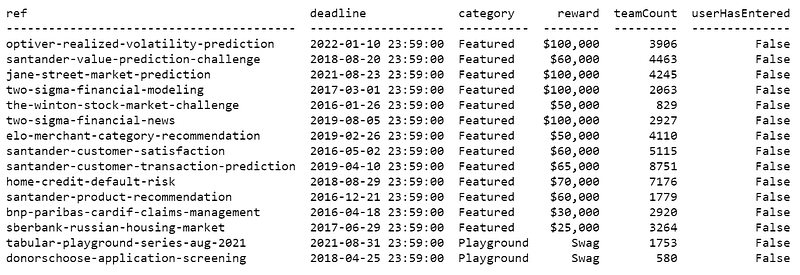
To check the files associated with a competition dataset, we can use the following command.
!kaggle competitions files titanic
To explore more endpoints, use the following command.
!kaggle competitions -h
Datasets Endpoint
Similar to the competitions endpoints, we can also obtain datasets using the datasets endpoint. Thus, we would replace the competition with datasets.
!kaggle datasets list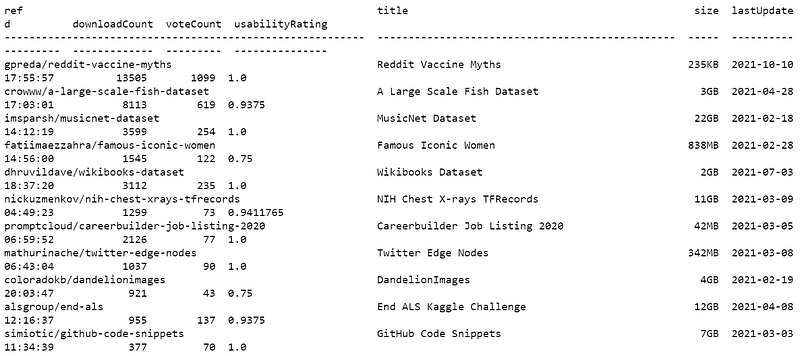
We can also sort the datasets by most active and last updated.
!kaggle datasets list --sort-by active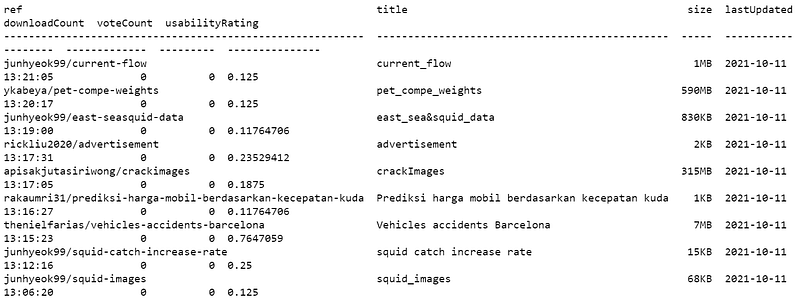
To explore more endpoints, use the following command.
!kaggle datasets -h
Downloading, Unzipping and Reading Kaggle Datasets
Finally, we can also download the files associated with a competition or dataset. For example, suppose I am interested in downloading the files for “Reddit Vaccine Myth”.
Firstly, obtain the reference of the dataset. For Reddit Vaccine Myth, we can see that the reference for the dataset is: gpreda/reddit-vaccine-myths
!kaggle datasets list
Once we have the dataset’s reference, we can download the files using the following command.
!kaggle datasets download gpreda/reddit-vaccine-myths
By default, the files would be downloaded into your current working Python script directory in a ZIP file.
To extract a ZIP file, use the following function.
from zipfile import ZipFile

with ZipFile('reddit-vaccine-myths.zip', 'r') as zip:
    zip.printdir()
    zip.extractall()
Once that’s done, read in your files!
import pandas as pddf = pd.read_csv("reddit_vm.csv")
df.head()
Simple as that! Once set up, this would likely help streamline the model building processing by obtaining and reading data directly from Kaggle.
The complete documentation can be found: Kaggle.
A curious learner? Unlock the full potential of your learning on medium and support writers just like myself for less than a cup of coffee.


