
Tips and Tricks
Easiest way to remember Regular Expressions (Regex)
Understand the basics of Regular Expressions to become more effective in extracting patterns
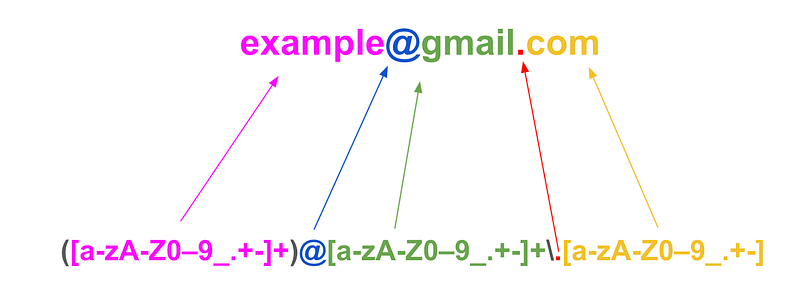
If you are like me, at the start, regular expression patterns just looked like gibberish. But after paying close attention, you will notice that they aren’t actually as daunting as they seem.
As with many concepts, it is usually helpful to start with an example so let’s use this one here:
Let us say we are trying to extract the name from an email address’ domain name like this one: example@gmail.com; so in this case, we would be trying to extract just the “gmail” part.
To practice along, I highly recommend you use this site: https://regex101.com/.
Before we begin to tackle our example, let us look at some common characters that you may come across or need.
+The character + in a regular expression means “match the preceding character one or more times”. For exampleab+cmatches “abc”, “abbc”, “abbbc” but it doesn’t match “ac”. The plus character, used in a regular expression, is called a Kleene plus, named after the mathematician, Stephen Kleene (1909–1994), who introduced the concept. source*This character in a regular expression means “match the preceding character zero or more times”. For exampleab*cmatches “abc”, “abbc”, “abbbc” and “ac”. This is likewise called the Kleene star.- The question mark
?indicates zero or one occurrences of the preceding element. For example,colou?rmatches both "color" and "colour". .the full stop matches any single character. For examplea.cmatches “abc”, “adc”, “aec” etc. If we wanted to match multiple characters before the letter “c”, we would just use the star*from above like this:a.*cand this would match “abdefghc”.[a-z]: This is very useful as it defines a range of possible values. Here it simply refers to all lowercase alphabets from a to z. We can do the same for uppercase alphabets and all positive numbers like this[A-Z]&[0-9].^: This matches the starting position of any line.[^b]atmatches all strings matched by.atexcept "bat". So when used within the square brackets, the letter following^is excluded.^[hc]atmatches "hat" and "cat", but only at the beginning of the string or line.
Now that we are quite equipped, let us look at our example again. So to get just the name part of the email address’ domain, we would use this regular expression:
@([a-zA-Z0-9_.+-]+)\.[a-zA-Z0-9_.+-]
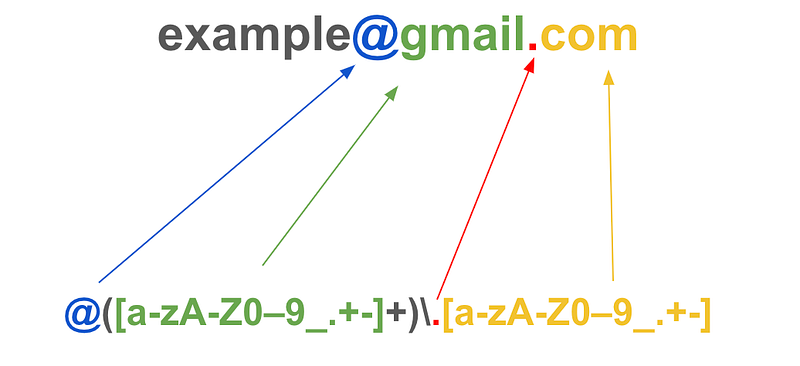
This would return “gmail”, which is what we wanted.
Here is a breakdown of every element in our example.
- @: this says we want our search to start from “@”.
(): This bracket allows us to isolate just a part of our search pattern that we would like to return. Removing these brackets and adding a+at the end of our regex, will allow us to match everything after the “@”: @gmail.com.[]: The square brackets allows us to include all the characters we would like to match and even include ranges like this: a-z and 0–9. We also have other characters after the range like “_”, “.”, “+”, “-” etc which are literal characters that our expression looks for. We could also include special characters like German letters if needed ex.“Ü”+: We have seen that the plus matches the preceding character one or more times. Since this is outside our square bracket, we are basically matching everything in the square brackets multiple times. Cool aye?- \: The backspace escapes the full-stop so that our regular expression doesn’t think that this is part of our quantifiers as defined above. We need the full-stop to be part of our pattern literally since it is in our search term “[email protected]”
.: the full-stop is outside the brackets()so our regular expression will look for all strings before that point and the square brackets that follow.
To ensure the “@gmail.com” is at the end of the string, you can include +$ . $ asserts that the position is at the end of the line. So our finished product would look like this
@([a-zA-Z0-9_.+-]+)\.[a-zA-Z0-9_.+-]+$
Now let’s say we just want to extract “example” from the email address “[email protected]”, we would just add another pattern in front of the one we used above like this ([a-zA-Z0-9_.+-]+) . Notice that the bracket ()is now in front of the first part of the regular expression, indicating that that is the only part we would like to extract.
([a-zA-Z0-9_.+-]+)@[a-zA-Z0-9_.+-]+\.[a-zA-Z0-9_.+-]
Extra
To extract German characters using Regular Expression, you just include them in your patterns like this:
([a-zA-Z0-9äüö_.+-]+)@[a-zA-Z0-9_.+-]+\.[a-zA-Z0-9_.+-]
This will return “ Schäfer” from “Schä[email protected]”
This was a very simple example and there are many other ways to achieve the same results. But I believe this could help in being able to pick up more complex regular expressions.
I hope you found this helpful and feel free to share other tips and tricks in the comments.
You can become a Medium member and enjoy more stories like this.


