avatarThe Scraper Guy

Free AI web copilot to create summaries, insights and extended knowledge, download it at here

6032

Abstract

) odds = test[i].<span class="hljs-built_in">find_elements</span>( By.CSS_SELECTOR, <span class="hljs-string">".gl-ParticipantBorderless_Odds"</span> ) home_teams.<span class="hljs-built_in">append</span>(home_team) home_teams.<span class="hljs-built_in">append</span>(home_team) away_teams.<span class="hljs-built_in">append</span>(away_team) away_teams.<span class="hljs-built_in">append</span>(away_team) match_date_and_time.<span class="hljs-built_in">append</span>(match_datetime) match_date_and_time.<span class="hljs-built_in">append</span>(match_datetime) market_type.<span class="hljs-built_in">append</span>(market_type_element[<span class="hljs-number">0</span>].text) market_type.<span class="hljs-built_in">append</span>(market_type_element[<span class="hljs-number">0</span>].text) market_odds.<span class="hljs-built_in">append</span>(odds[<span class="hljs-number">0</span>].text) market_odds.<span class="hljs-built_in">append</span>(odds[<span class="hljs-number">1</span>].text) market_names.<span class="hljs-built_in">append</span>(market_name[<span class="hljs-number">0</span>].text) market_names.<span class="hljs-built_in">append</span>(market_name[<span class="hljs-number">1</span>].text) <span class="hljs-built_in">elif</span>(market_type_element[<span class="hljs-number">0</span>].text == <span class="hljs-string">"Full Time Result"</span>): market_name = test[i].<span class="hljs-built_in">find_elements</span>( By.CSS_SELECTOR, <span class="hljs-string">".gl-Participant_Name"</span> ) odds = test[i].<span class="hljs-built_in">find_elements</span>( By.CSS_SELECTOR, <span class="hljs-string">".gl-Participant_Odds"</span> ) home_teams.<span class="hljs-built_in">append</span>(home_team) home_teams.<span class="hljs-built_in">append</span>(home_team) home_teams.<span class="hljs-built_in">append</span>(home_team) away_teams.<span class="hljs-built_in">append</span>(away_team) away_teams.<span class="hljs-built_in">append</span>(away_team) away_teams.<span class="hljs-built_in">append</span>(away_team) match_date_and_time.<span class="hljs-built_in">append</span>(match_datetime) match_date_and_time.<span class="hljs-built_in">append</span>(match_datetime) match_date_and_time.<span class="hljs-built_in">append</span>(match_datetime) market_type.<span class="hljs-built_in">append</span>(market_type_element[<span class="hljs-number">0</span>].text) market_type.<span class="hljs-built_in">append</span>(market_type_element[<span class="hljs-number">0</span>].text) market_type.<span class="hljs-built_in">append</span>(market_type_element[<span class="hljs-number">0</span>].text) market_odds.<span class="hljs-built_in">append</span>(odds[<span class="hljs-number">0</span>].text) market_odds.<span class="hljs-built_in">append</span>(odds[<span class="hljs-number">1</span>].text) market_odds.<span class="hljs-built_in">append</span>(odds[<span class="hljs-number">2</span>].text) market_names.<span class="hljs-built_in">append</span>(market_name[<span class="hljs-number">0</span>].text) market_names.<span class="hljs-built_in">append</span>(market_name[<span class="hljs-number">1</span>].text) market_names.<span class="hljs-built_in">append</span>(market_name[<span class="hljs-number">2</span>].text)

else:
    <span class="hljs-built_in">print</span>(<span class="hljs-string">"Issue With Market Name"</span>)</pre></div><p id="bc0d">We then begin to execute our main program just as we done in Part 1, we create a chromedriver instance, and open two new tabs and accept the cookies.</p><div id="318b"><pre>new_driver = <span class="hljs-title function_ invoke__">driver_code</span>()

<span class="hljs-title function_ invoke__">open_tab</span>(new_driver, <span class="hljs-symbol">'https</span>:<span class="hljs-comment">//www.bet365.com/#/AC/B1/C1/D1002/E91422157/G40/H^1/')</span> <span class="hljs-title function_ invoke__">accept_cookies</span>(new_driver) time.<span class="hljs-title function_ invoke__">sleep</span>(<span class="hljs-number">1</span>) <span class="hljs-title function_ invoke__">open_tab</span>(new_driver, <span class="hljs-symbol">'https</span>:<span class="hljs-comment">//www.bet365.com/#/AC/B1/C1/D1002/E91422157/G40/H^1/')</span> <span class="hljs-title function_ invoke__">accept_cookies</span>(new_driver)</pre></div><p id="05ad">Once the page has loaded we can then search for the match container elements. There is nothing special about these elements, I just chose these arbitrarily as they represent the number of matches we are scraping and they are clickable. We initially search for these elements, intialize some arrays and then go into a for loop with the length being the length of the match container elements list. The first line we need in each iteration of the loop is to re-search for these match container elements. To understand this, we need to look at the flow of this program.</p><p id="ecfb">So as explained, we initially search for our match containers. We then execute a for loop with length of our match container elements. Using a new variable elements_to_click we search for our match containers again within the for loop. We click on the element corresponding to the variable i in our for loop which opens the specific match page. We scrape the data, and then we open a new tab bringing us back to the list of all matches and then close the first tab in our browser, just to prevent too many tabs from being open at once.</p><p id="80ff">As we are opening a new tab each time to return to the match list page we need to re-search for the match container elements at the start of each execution or we will encounter a stale element error.</p><div id="77b5"><pre>teams

Options

_ = new_driver.find_elements( By.CSS_SELECTOR, <span class="hljs-string">".rcl-ParticipantFixtureDetails_LhsContainerInner "</span> ) market_names = [] market_odds = [] market_type = [] home_teams = [] away_teams = [] match_date_and_time = [] num_matches = len(teams_) for i in range(num_matches): elements_to_click = new_driver.find_elements( By.CSS_SELECTOR, <span class="hljs-string">".rcl-ParticipantFixtureDetails_LhsContainerInner "</span> ) elements_to_click[i].click()</pre></div><p id="b687">Now going back to the actual scraping, once we have clicked into our match we search for the market containers which I have called test here (probably not the best naming convention), team names, date and time of the match.</p><div id="9c01"><pre>time.sleep(<span class="hljs-number">1</span>) team_names = new_driver.find_elements( <span class="hljs-keyword">By</span>.CSS_SELECTOR, <span class="hljs-string">".sph-FixturePodHeader_TeamName "</span> ) date_and_time = new_driver.find_elements( <span class="hljs-keyword">By</span>.CSS_SELECTOR, <span class="hljs-string">".sph-ExtraData_TimeStamp "</span> ) test = new_driver.find_elements( <span class="hljs-keyword">By</span>.CSS_SELECTOR, <span class="hljs-string">".gl-MarketGroupPod.gl-MarketGroup"</span> ) home_team = team_names[<span class="hljs-number">0</span>].<span class="hljs-keyword">text</span> away_team = team_names[<span class="hljs-number">1</span>].<span class="hljs-keyword">text</span> match_datetime = date_and_time[<span class="hljs-number">0</span>].<span class="hljs-keyword">text</span></pre></div><p id="6b40">Now given the fact that there are multiple markets, we run a for loop and within each execution we search for the market name, then call our function get_odds_from_market_name and pass in all applicable data. If the market name corresponds to one we are looking for, our function appends the relevant data to our arrays otherwise the else clause activates and just prints to the console.</p><div id="7390"><pre>for <span class="hljs-selector-tag">i</span> in <span class="hljs-built_in">range</span>(len(test)): market_type_element = test[i].<span class="hljs-built_in">find_elements</span>( By.CSS_SELECTOR, <span class="hljs-string">".gl-MarketGroupButton_Text "</span> ) <span class="hljs-built_in">get_odds_from_market_name</span>(new_driver, market_type_element, market_names, market_odds, market_type, home_teams, home_team, away_teams, away_team, match_date_and_time, match_datetime) time.<span class="hljs-built_in">sleep</span>(<span class="hljs-number">3</span>)</pre></div><p id="05dc">Once this function has finished we then just open a new tab going to our initial Bet365 page with the list of matches example below —</p><figure id="b1cb"><img src="https://cdn-images-1.readmedium.com/v2/resize:fit:800/1*jRUqfw_OC3MHSCRmEtLWbg.png"><figcaption></figcaption></figure><p id="2afb">We set this newly opened tab as our “main tab” . We switch to the first tab that is open in our window, close it and then switch back to our main tab and continue the program execution and click into the next match.</p><div id="b29f"><pre> open_tab(new_driver,<span class="hljs-string">'https://www.bet365.com/#/AC/B1/C1/D1002/E91422157/G40/H^1/'</span>) main_tab = new_driver.current_window_handle <span class="hljs-comment"># Perform actions that open a new tab (e.g., clicking a link with target="_blank")</span> <span class="hljs-comment"># Get all window handles</span> all_tabs = new_driver.window_handles <span class="hljs-comment"># Find the index of the tab you want to close</span> tab_to_close_index = 0 <span class="hljs-comment"># Replace with the index of the tab you want to close</span> <span class="hljs-comment"># Switch to the tab you want to close</span> new_driver.switch_to.window(all_tabs[tab_to_close_index]) <span class="hljs-comment"># Close the tab</span> new_driver.close() <span class="hljs-comment"># Switch back to the main tab</span> new_driver.switch_to.window(main_tab)</pre></div><p id="f8ca">Then once we have scraped all available matches we quit the driver and create a new dataframe that will contain all of our data.</p><div id="d8f8"><pre>new_driver.quit() columns = [<span class="hljs-string">'Home Team'</span>, <span class="hljs-string">'Away Team'</span>,<span class="hljs-string">"Match Time and Date"</span>,<span class="hljs-string">"Market Type"</span>,<span class="hljs-string">"Market Name"</span>,<span class="hljs-string">"Market Odds"</span>]

<span class="hljs-comment"># Initialize a new DataFrame with columns</span> new_dataframe = pd.DataFrame(columns=columns)

<span class="hljs-comment"># Add arrays to columns</span> new_dataframe[<span class="hljs-string">'Home Team'</span>] = home_teams new_dataframe[<span class="hljs-string">'Away Team'</span>] = away_teams new_dataframe[<span class="hljs-string">'Match Time and Date'</span>] = match_date_and_time new_dataframe[<span class="hljs-string">'Market Type'</span>] = market_type new_dataframe[<span class="hljs-string">'Market Name'</span>] = market_names new_dataframe[<span class="hljs-string">'Market Odds'</span>] = market_odds

new_dataframe</pre></div><p id="0295">Our dataframe should look something like this -</p><figure id="ed73"><img src="https://cdn-images-1.readmedium.com/v2/resize:fit:800/1*Y36eYBNDdTInNBE1C0QUkA.png"><figcaption></figcaption></figure><p id="31c9">And that is all for todays article. This is quite a bit more technical than yesterdays article so if there are any issues please let me know.</p><p id="4939">If you enjoyed this please leave a clap and consider following. You can find me at PaulConish on Twitter/X.</p></article></body>

EASIEST Method to Scrape Match Odds, Both Teams To Score and Over 2.5 Goals For Premier League Football Bet365 using Selenium and Python

Today we are going to build on yesterdays article which scrapes match odds from Bet365 Premier League football matches. The Part 1 of this article can be found here

We are going to focus on scraping the following markets today — Full Time Result, Over 2.5 goals and Both Teams To Score markets. To do this we need to actually click into each match, scrape the odds we require and return to the match list page.

In addition, if there are other markets you want to scrape, just simply apply the same concepts here to those markets and extend the functionality. This article is focused on the foundational concepts and can be tailored to your specific needs.

The full Jupyter Notebook can be found here-

https://github.com/paulc160/Bet365-O25-BTTS-Match-Odds-Scraper/blob/main/Bet365_Odds_Scraper_O25_BTTS_MatchOdds.ipynb

Now let us begin.

To start we can import libraries and create a driver function that holds our chromedriver instance details. These can be found in Part 1, the link to which can be found above.

Similarly we will use the accept_cookies and open_tab functions which can be found in Part 1 or the github link above.

The next function we will look at is get_odds_from_market_name. This function takes in our data that we scrape from the match page and based on the market name e.g. “Both Teams To Score”, will add our data to its relevant array. The amount of times for example the Team Names will get added to their respective array will depend on the number of outcomes being scraped in the market. For example Over/Under 2.5 has two outcomes Over and Under so there are two new odds to be added, so team names will also be added twice. For Full Time Result there will be 3 new outcomes etc.

So in essence this function holds the logic for adding our data to the relevant arrays. If you wish to add a new market simply add an elif statement here with the relevant market name, which you can find by inspecting the element in a regular chrome window.

def get_odds_from_market_name(driver, market_type_element, market_names, market_odds, market_type, home_teams, home_team, away_teams, away_team, match_date_and_time, match_datetime):
    if(market_type_element[0].text == "Goals Over/Under"):
        market_line = test[i].find_elements(
            By.CSS_SELECTOR, ".srb-ParticipantLabelCentered.gl-Market_General-cn1 "
        )
        market_name = test[i].find_elements(
            By.CSS_SELECTOR, ".gl-MarketColumnHeader "
        )
        odds = test[i].find_elements(
            By.CSS_SELECTOR, ".gl-ParticipantOddsOnly_Odds"
        )
        home_teams.append(home_team)
        home_teams.append(home_team)
        away_teams.append(away_team)
        away_teams.append(away_team)
        match_date_and_time.append(match_datetime)
        match_date_and_time.append(match_datetime)
        market_type.append(market_type_element[0].text + " " + market_line[0].text)
        market_type.append(market_type_element[0].text + " " + market_line[0].text)
        market_odds.append(odds[0].text)
        market_odds.append(odds[1].text)
        market_names.append(market_name[1].text)
        market_names.append(market_name[2].text)
    elif(market_type_element[0].text == "Both Teams to Score"):
        market_name = test[i].find_elements(
            By.CSS_SELECTOR, ".gl-ParticipantBorderless_Name"
        )
        odds = test[i].find_elements(
            By.CSS_SELECTOR, ".gl-ParticipantBorderless_Odds"
        )
        home_teams.append(home_team)
        home_teams.append(home_team)
        away_teams.append(away_team)
        away_teams.append(away_team)
        match_date_and_time.append(match_datetime)
        match_date_and_time.append(match_datetime)
        market_type.append(market_type_element[0].text)
        market_type.append(market_type_element[0].text)
        market_odds.append(odds[0].text)
        market_odds.append(odds[1].text)
        market_names.append(market_name[0].text)
        market_names.append(market_name[1].text)
    elif(market_type_element[0].text == "Full Time Result"):
        market_name = test[i].find_elements(
            By.CSS_SELECTOR, ".gl-Participant_Name"
        )
        odds = test[i].find_elements(
            By.CSS_SELECTOR, ".gl-Participant_Odds"
        )
        home_teams.append(home_team)
        home_teams.append(home_team)
        home_teams.append(home_team)
        away_teams.append(away_team)
        away_teams.append(away_team)
        away_teams.append(away_team)
        match_date_and_time.append(match_datetime)
        match_date_and_time.append(match_datetime)
        match_date_and_time.append(match_datetime)
        market_type.append(market_type_element[0].text)
        market_type.append(market_type_element[0].text)
        market_type.append(market_type_element[0].text)
        market_odds.append(odds[0].text)
        market_odds.append(odds[1].text)
        market_odds.append(odds[2].text)
        market_names.append(market_name[0].text)
        market_names.append(market_name[1].text)
        market_names.append(market_name[2].text)
        
    else:
        print("Issue With Market Name")

We then begin to execute our main program just as we done in Part 1, we create a chromedriver instance, and open two new tabs and accept the cookies.

new_driver = driver_code()
open_tab(new_driver, 'https://www.bet365.com/#/AC/B1/C1/D1002/E91422157/G40/H^1/')
accept_cookies(new_driver)
time.sleep(1)
open_tab(new_driver, 'https://www.bet365.com/#/AC/B1/C1/D1002/E91422157/G40/H^1/')
accept_cookies(new_driver)

Once the page has loaded we can then search for the match container elements. There is nothing special about these elements, I just chose these arbitrarily as they represent the number of matches we are scraping and they are clickable. We initially search for these elements, intialize some arrays and then go into a for loop with the length being the length of the match container elements list. The first line we need in each iteration of the loop is to re-search for these match container elements. To understand this, we need to look at the flow of this program.

So as explained, we initially search for our match containers. We then execute a for loop with length of our match container elements. Using a new variable elements_to_click we search for our match containers again within the for loop. We click on the element corresponding to the variable i in our for loop which opens the specific match page. We scrape the data, and then we open a new tab bringing us back to the list of all matches and then close the first tab in our browser, just to prevent too many tabs from being open at once.

As we are opening a new tab each time to return to the match list page we need to re-search for the match container elements at the start of each execution or we will encounter a stale element error.

teams_ = new_driver.find_elements(
                By.CSS_SELECTOR, ".rcl-ParticipantFixtureDetails_LhsContainerInner "
                 )
market_names = []
market_odds = []
market_type = []
home_teams = []
away_teams = []
match_date_and_time = []
num_matches = len(teams_)
for i in range(num_matches):
    elements_to_click = new_driver.find_elements(
                By.CSS_SELECTOR, ".rcl-ParticipantFixtureDetails_LhsContainerInner "
                 )
    elements_to_click[i].click()

Now going back to the actual scraping, once we have clicked into our match we search for the market containers which I have called test here (probably not the best naming convention), team names, date and time of the match.

time.sleep(1)
    team_names = new_driver.find_elements(
                    By.CSS_SELECTOR, ".sph-FixturePodHeader_TeamName "
                     )
    date_and_time = new_driver.find_elements(
                    By.CSS_SELECTOR, ".sph-ExtraData_TimeStamp "
                     )
    test = new_driver.find_elements(
                    By.CSS_SELECTOR, ".gl-MarketGroupPod.gl-MarketGroup"
                     )
    home_team = team_names[0].text
    away_team = team_names[1].text
    match_datetime = date_and_time[0].text

Now given the fact that there are multiple markets, we run a for loop and within each execution we search for the market name, then call our function get_odds_from_market_name and pass in all applicable data. If the market name corresponds to one we are looking for, our function appends the relevant data to our arrays otherwise the else clause activates and just prints to the console.

for i in range(len(test)):
        market_type_element = test[i].find_elements(
                    By.CSS_SELECTOR, ".gl-MarketGroupButton_Text "
                     )
        get_odds_from_market_name(new_driver, market_type_element, market_names, market_odds, market_type,
                                  home_teams, home_team, away_teams, away_team, match_date_and_time, match_datetime)
    time.sleep(3)

Once this function has finished we then just open a new tab going to our initial Bet365 page with the list of matches example below —
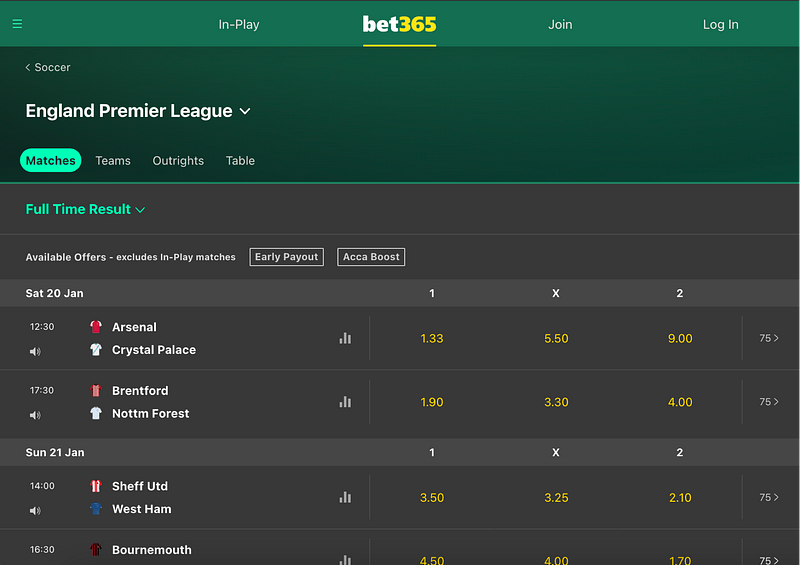
We set this newly opened tab as our “main tab” . We switch to the first tab that is open in our window, close it and then switch back to our main tab and continue the program execution and click into the next match.

    open_tab(new_driver,'https://www.bet365.com/#/AC/B1/C1/D1002/E91422157/G40/H^1/')
    main_tab = new_driver.current_window_handle
    # Perform actions that open a new tab (e.g., clicking a link with target="_blank")
    # Get all window handles
    all_tabs = new_driver.window_handles
    # Find the index of the tab you want to close
    tab_to_close_index = 0  # Replace with the index of the tab you want to close
    # Switch to the tab you want to close
    new_driver.switch_to.window(all_tabs[tab_to_close_index])
    # Close the tab
    new_driver.close()
    # Switch back to the main tab
    new_driver.switch_to.window(main_tab)

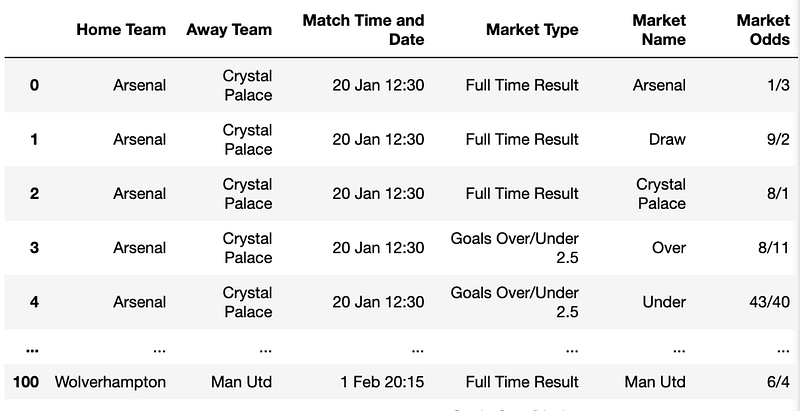
Then once we have scraped all available matches we quit the driver and create a new dataframe that will contain all of our data.

new_driver.quit()
columns = ['Home Team', 'Away Team',"Match Time and Date","Market Type","Market Name","Market Odds"]

# Initialize a new DataFrame with columns
new_dataframe = pd.DataFrame(columns=columns)

# Add arrays to columns
new_dataframe['Home Team'] = home_teams
new_dataframe['Away Team'] = away_teams
new_dataframe['Match Time and Date'] = match_date_and_time
new_dataframe['Market Type'] = market_type
new_dataframe['Market Name'] = market_names
new_dataframe['Market Odds'] = market_odds

new_dataframe

Our dataframe should look something like this -
And that is all for todays article. This is quite a bit more technical than yesterdays article so if there are any issues please let me know.

If you enjoyed this please leave a clap and consider following. You can find me at PaulConish on Twitter/X.

Sports
Sports Betting
Python
Sports Data
Programming
Recommended from ReadMedium