
Earn $100 by making low-content books (Earning Proof at the end!)
This was an experiment I did with my cousin who loves creating low-content books nowadays. I write fiction and non-fiction but low content is easier to make and has high-profit margins. And above that, they are in demand.
I would be putting all the secrets I have for making money creating low-content books. Low-content books are minimum or no content books like journals, coloring books, planners, quote books, etc.
I made Planners for my cousin. So this post will concentrate only on Planners. I have no idea about other Low-content books.
Free Software you need -
- Canva Free version — for making the interior of Planner
- Seller app Freemium version account — for finding niches
- Smallpdf merger website — for merging pdf pages
Step One — Research Niche
You have to find a niche that people are searching on Amazon. Log into your Sellerapp account and select Product Research (Left-hand side) from Dashboard.
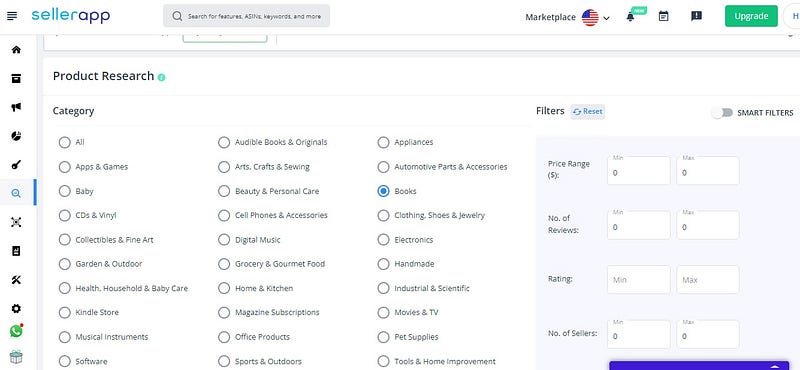
Select Book Category from the left.
To the Right, turn on the Smart Filters and set the following values.
Price — 0 to 9 (target books at lower prices.)
Reviews — 0 to 4
Ratings — 0 to 5
No. Of Sellers — 1 to 20
BSR — 500 to 20000 (the lower the BSR, the better)
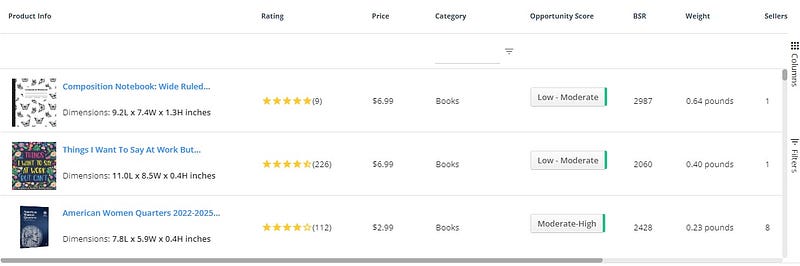
You’ll get some results. Now you have to choose which meets your requirement or has lower competition or you can make. My cousin and I always go for Fitness Planners. You find your Niche.
Step Two— Make the Interior of the book
Now, once you have an idea about a low-content book, start making the interior of the book. I made Fitness Planners and used Canva free version for it.
Go to canva.com and sign up for free. Then click on the Custom Design button from the upper right corner and fill 6 x 9 in there. (6 in for width and 9 in for height). And start from scratch.
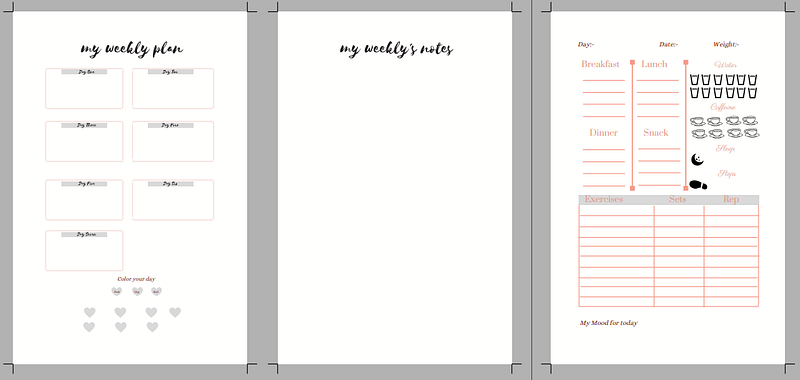
The above is the design I made for my cousin. There are many pages but I am giving some as an example. Feel free to use it for your low-content project as well. My cousin and I won’t mind…. ;)
Make sure you leave the border from all sides (a grey area).
Go to Amazon and type the Niche you have selected in the search box. Select the topmost book and see the interior and try to get some inspiration.
If I take Fitness Planner, then I always make 90 days planner. No more than that because as the pages will increase and so will the price. Now, make the unique pages and download the PDF version from CANVA. And using smallpdf.com, merge the pdfs.
When I make 90 days planner, actually, in reality, I make only 30 days planner (one-month plan) and then paste the same design two times using smallpdf.com and the last pdf becomes 90 days planner.
Step Three— Book Cover
For the book cover, use Canva.
Important points to remember -
- The size of the book will be 6 x 9 inches
- Always make the interior in black and white. If you use color, then the price will increase.
- Keep pages under 100.
- Make at least 3 Pages unique. And then copy-paste it until it reaches 100 pages.
Step Four— Publish
Now, that everything is ready, upload the book and the cover to your KDP account. Make the book available in PRINT and tick on “Expanded Distribution”.
Other formats like Kindle or Hardcover are of no use. So don’t waste time there.
Where you can apply this technique?
- Colouring Books
- Crossword Books
- Planners
- Journals
What not to do?
- Do not price the books high.
- Choose simple black and white interiors
- After publishing, forget about the book and repeat the process.
Screenshot from my cousin’s account
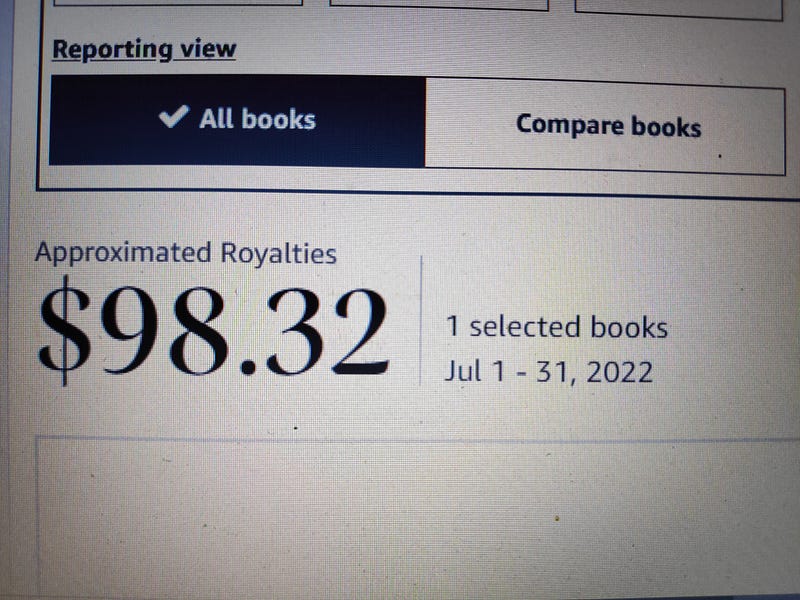
We followed all the above steps. But keep in mind these ones. These were the turning points in our sales -
- Keep price low. Do not be GREEDY!
- Take one week to make the interior of the book
- Ask your friends and family to buy and leave a review (We got 3 from our friends). This will help to crawl up on the page.
- Good Keywords
Make sure you follow, clap or comment because that encourages me to write more.
If you want to know more about making money writing ebooks, then you can check out my book “My Mistakes in Self-Publishing”. Happy Writing Journey!


