
Will Flutter and Dart be the Next Big Thing in Application Development?
That’s a genuine question, believe it or not, and I almost find it surprising myself, asking it. There is no denying, having been a JavaScript-based developer for quite a long time now, I had my moments of unshakeable borderline religious belief that JavaScript will eventually take over a huge portion of application development. It’s already a multi-purpose language, and while snobs will call it “just a scripting language” — which it technically is — it has proven its versatility and approachability many-many times. On the web, on mobile (Ionic, React Native, PhoneGap, JQuery Mobile), desktop (Electron, Node-Webkit), embedded, etc. Purely objectively speaking, JS can do a lot, and has done so for nearly 2.5 decades now. Kudos to Brendan Eich and all the other key contributors. We all shall be eternally grateful! 🙏
It goes without saying that JavaScript has single-handedly pushed app development into many next phases and enabled engineers and creatives to take their ideas to platforms previously unavailable to them, but… because there is always a “but”, there is also no denying that just because JS could do all that, it was also not always the best choice for the job. Whenever JS is looked at from a performance aspect, it often ends up being regarded as the sloth of programming languages. Turns out, more often than not, the reality is a bit more nuanced. What creates the impression of a “slow language” might have more to do with the architecture of which it is a part than the language itself. In Ionic you had Angular, the bundled web views cobbled together with Cordova plugins; in React Native you have the bridge between the device’s API and the JS app; in Electron and NWJS an entire headless browser bundled in. Add to that the fact that JS is an interpreted language which makes it inherently 5–10 times slower than a compiled language, and you got yourself an arguable case on both sides of the fence — an argument that Google wants to solve in one fell swoop…
Meet Dart and Flutter…
Google’s proposed solution to all your app development dilemmas, world peace and global warming. Hang on. I may have gotten slightly carried away with those last two, but the former is true. Dart and Flutter are presented to the app developer community as a viable alternative to the JavaScript ecosystem. Not a small undertaking, I’ll give ’em that! But it seems to be working…
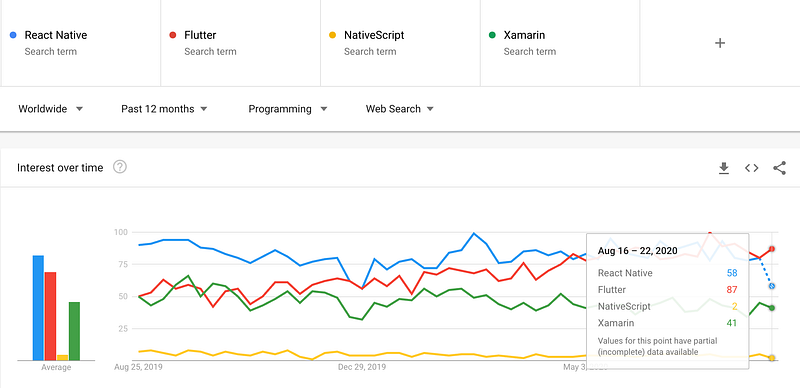
Data seems to indicate that over time the popularity of React Native and Xamarin is in a slow, but nevertheless visible decline, while Flutter is enjoying considerable popularity. Search popularity alone of course doesn’t necessarily give us a full picture, so I went a step further. Take a look at the below screen-grabs:


This gives us an even more educated guess and indication that VSCode users have interacted more with Flutter than React Native. Note also the developer experience expressed through the star votes for the two major plugins. Four stars for React Native vs. five stars for Flutter. Now powder me with sugar and call me a donut, but if that all is not an indication that Flutter is on a clear rise, then I don’t know what is.
So, there’s clearly some bias on my end, hence it’s maybe time to explain myself and why I am both excited and hopeful about the future of Dart and Flutter.
Developer Experience & Tools
Coming from WebStorm, Android Studio (free!) feels like home, and in my opinion, it’s the ideal IDE for Flutter development. Good news for VSCode fans too, you will be able to use that as well and the Flutter docs will provide you with instructions on how to do that.
Of course, if you’re intending to build and test iOS apps as well, you will have to work on MacOS, and have Xcode installed. You’ll barely touch it other than for some app ID related stuff though. What you really need Xcode for is the iOS simulators, which brings me to one of the dopest things about developing Flutter apps — hot reload. It’s hot indeed. Watching the app reload on the simulator or the actual device in a split second as you hit save, I tell you it’s the sexiest thing I’ve seen in a long time in software development. It’s also worth noting that there are two types of reloading in Flutter:
Hot reload
This only repaints the widget that was changed in the widget-tree of your code, because of the code-changes you made. Anything unaffected by that code-change, will stay as is, including your app’s state. This is blazing fast.
Performing hot reload...
Syncing files to device iPhone SE (2nd generation)...
Reloaded 3 of 511 libraries in 396ms.
Hot restart
This repaints the entire app, and the state gets wiped away as well. This, while a bit slower than hot reload, it’s still incredibly fast.
Performing hot restart...
Syncing files to device iPhone SE (2nd generation)...
Restarted application in 1,153ms.
Refactoring code is something inescapable to every developer or engineer, so being able to confidently “break” your own code with as little disruption and “collateral damage” as possible, with the intent of making it better, is nothing shy of a superpower that Flutter in combination with Android Studio give you. Here are just a few examples.
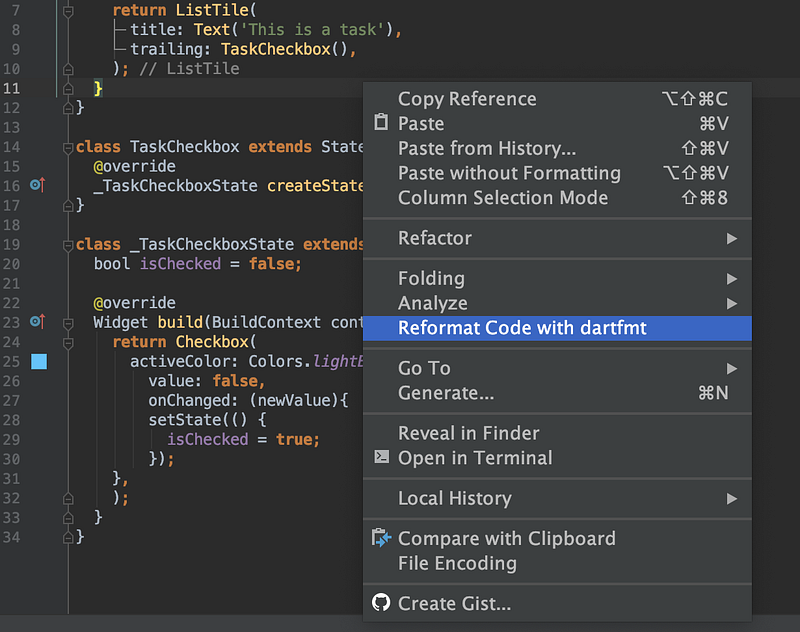
Reformat code with dartfmt
Clean-looking code is important in Flutter, as nested widgets can quickly look like a spaghetti rabbit-hole, but this reformatting tool puts everything into place, looking all nice and tidy. It’s also smart enough that if you put commas between your widgets, it will perform the reformatting action as you save the file, so you don’t have to manually trigger it.
Convert to StatefulWidget
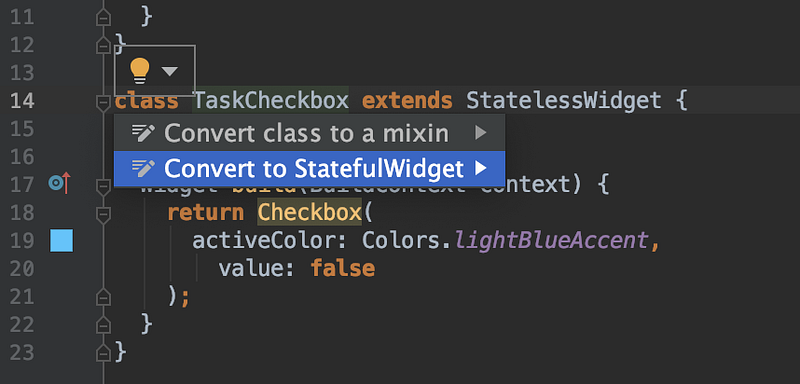
Just like in React, in Flutter you’ll also find stateful and stateless components called widgets. It happens more than a few times during the development of an app that you suddenly realise, your stateless widget actually has to be stateful. This takes a single click in Flutter, as illustrated below (note: these options become available via the little lightbulb dropdown, which you will get for all widgets).
Pro tip: when you create a new widget you can also just type stless or stful and it will auto-generate a stateless and a stateful widget respectively.
Wrap with …
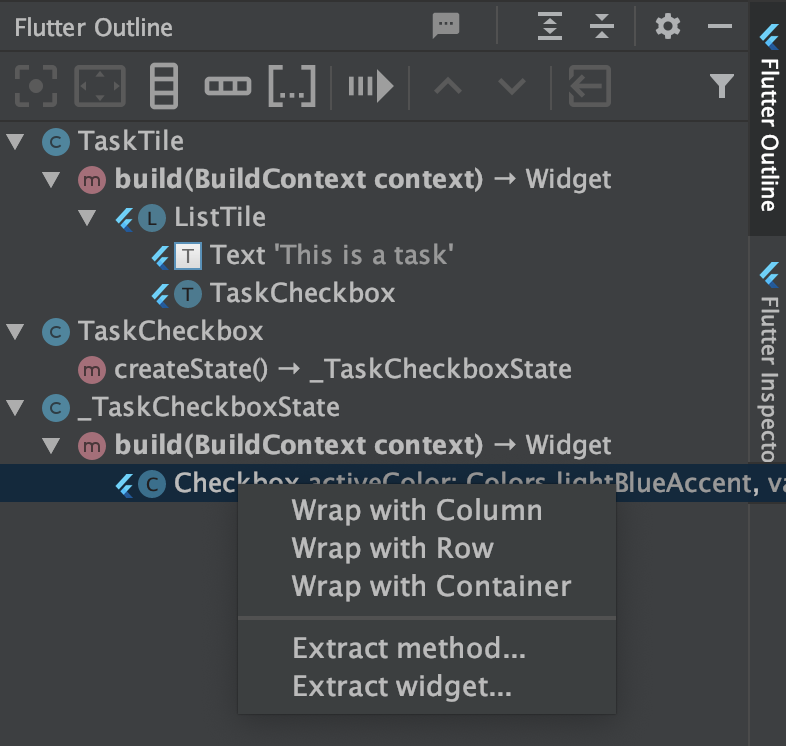
This is another one that aims to reduce complexity and make an otherwise error-prone action, simple and bulletproof. As you build your Flutter UI, you will often find you will want to wrap your components with a Container, Row or Column. The Flutter Outline in Android Studio allows you to do that with a single click. This side-menu also allows you to extract a method or a widget, further aiding refactoring efforts.
Copy/cut-paste? Get outta here. That’s so last year… As you’re extracting your widget, it will ask you to name it, and voila, you have yourself a custom widget separated out, and that widget name is also applied where you cut out your chunk of code from! It’s magic!
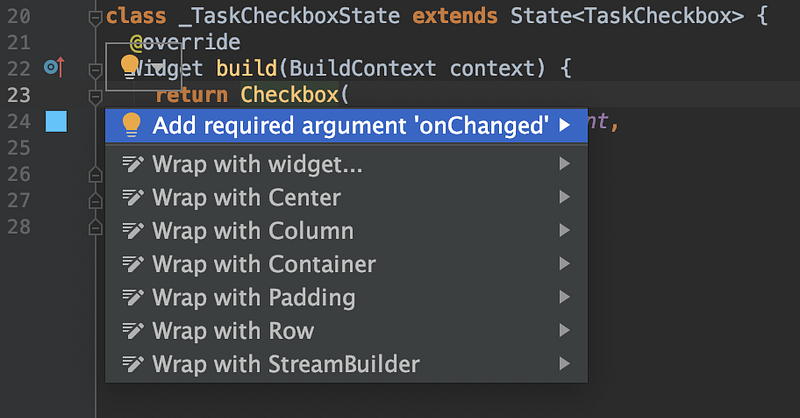
There are even more actions if you use the wee lightbulb dropdown, all very useful. Wrap with widget, for instance, wraps your selected widget tree with an anonymous widget which you then can turn into whatever widget you like.
Wrap with StreamBuilder is also handy as it allows for quickly setting up your component to take data from a service such as Firebase and replicate the child component based on the data it listens to.
The list of handy tools you will find in Android Studio to build, refactor, run and test your app is nearly limitless. Hands down the best ever developer experience I had. But, it’s not all down to the IDE…
Community and documentation
Exactly. Because you can have great tools all you want, if the docs are crap, and the community is either very small or novice, frustration will mount. Thank the gods of Kobol, this is not the case with Flutter and Dart. Flutter has grown a solid community around itself in 4 years — its inception was in 2017 — and googling issues will bring up plenty of solutions on StackOverflow. The even better news is that you actually won’t have to do that too often. The documentation is stellar, and this is something I noticed before. Google (and this is big coming from me, who always has a bone to pick with the mighty Google) really knows how to write developer-friendly, detailed documentation with easy to digest and reusable examples. This is incredibly important when picking up both a new language and a new framework. The integration with Firebase is also exceptional and well documented.
Now, don’t get me wrong, I see why Google does this. It’s a lot more than just being nice to developers. It’s a hook to lure us into their development and build ecosystem, and they’re succeeding. While I am an Apple fan for many-many reasons, when it comes to developing for Apple, I can’t say it’s a painless and frustration-free experience. The learning-curve is also pretty steep, and the tools, while solid, are definitely not the most intuitive. Flutter and Dart has a huge potential to lure people away from Swift and Xcode.
You don’t care much about official documentation? No bother, as mentioned before, there are plenty of discussions happening already on StackOverflow, so you’ll be in great company!
Flutter is Refreshingly Beautiful
Design system
Flutter follows the Material design system and does it so religiously. I like that. It allows for predictability in my designs and overall UX, but without taking away the flexibility of applying my own artistic flavour to it.
In Flutter everything in the UI is a widget, and all of these widgets allow for customisation at any level. You can go down the rabbit hole of material design, as low as shape primitives like square and circle which form your UI components. The bottom line is, Flutter doesn’t have to look like a vanilla Google app. Having said that, if you’re not great at design or you don’t have the time and expertise to roll your own versions of the widgets, creating an app with bog-standard Material widgets will absolutely result in a good-looking, intuitive, familiar and reliable application, and often times that’s all one really needs to get their idea, app or business off the ground.
The Cupertino widgets
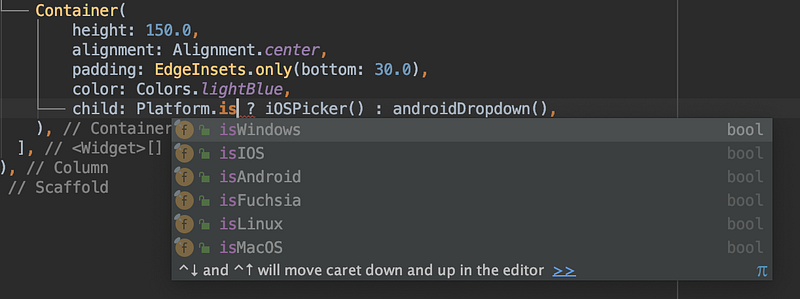
For those familiar with hybrid mobile apps, the concept of opinionated design and UI on both the Apple and Google front is nothing new, so naturally the question arises — but what about my UI elements that are very Apple specific, like the picker? You’ll be happy to hear, Flutter has you covered, and to explain that, I need to sneak in a very exciting piece of information — Flutter supports six (6!) operating systems. By simply checking whether I am running the app on an iOS device or not, I can load the iOS version of the component that is provided out of the box by Flutter via the Cupertino Widgets package or I can load the Android flavoured widget. Note, you don’t have to, all Flutter components work just fine on iOS as well, but most UX and design professionals will agree that you want apps running on iOS to look and behave in the expected manner.
If you’re suddenly wondering whether this kind of negates the “one code-base” philosophy or not, I would say it’s splitting hairs at this point. There are a total of 24 Apple-specific widgets, out of which realistically speaking each app will use maybe three or four. If it’s a very large application, maybe eight or ten. From my perspective this is a very small price to pay for an otherwise identical code-base that can compile to multiple OSs and the web. If you’re a smart engineer, you will keep your logic and data manipulation as OS-agnostic as possible in which case the OS-specific code will be minimal.
Declarative UI
I must admit, before Flutter, I didn’t even realise declarative programming existed — well, there is CSS, but I always tend to forget about that — but it does and that’s the paradigm Flutter uses for the UI. If you’re interested in the details, your best bet is in the Flutter docs itself. No use in me attempting to explain it, as it would just be pointless regurgitation of their docs anyway.
State management
If you’ve ever written a React app, dealing with state is nothing new to you. If you’ve written more than one React app then you’re likely intimately familiar with the bloodiest of battles between developers over state management. It is vicious! Couples break up over it. Decades long friendships go down the toilet, relatives disown each other, it is a massacre. It’s one of the reasons why I never truly fell in love with React. It’s a decent library, but it’s also a source of contention and bad blood between developers.
Naturally, the moment I realised Flutter had two types of widgets: stateful and stateless, I started worrying this will be yet another framework with the same kind of blood-shed and philosophical debate over how one should manage the state. Maybe I’ve gotten increasingly zen over the last couple of years, but I cannot possibly spend another minute arguing about things that genuinely don’t bring any tangible value to the resulting product. The only thing I can agree on is that state management is necessary in an application. How exactly one should do it largely depends on the application and its purpose.
In Flutter there are three major ways you can manage your state. Neither of these is good or bad, each fits a specific scenario and should be applied as such.
- Local state with setState() — this is as simple as it gets. You have your component or view, you set a variable, you run the
setState()function inside which you change that variable’s value. If your app doesn’t do much, this approach is fine. - Lifting the state — this method results in prop drilling, something that every React developer learned to hate very early on. You basically have your state inside the parent, and you pass the values and callbacks down to the subsequent children, one child at a time which then use callbacks to change the parent’s state again. It becomes very difficult to maintain very quickly, but good enough for a small app.
- Provider + Consumer — this is the scalable method and the one recommended by Google. Flutter Provider is actually a community developed solution started by Remi Rousselet, who is also attempting to add hooks capabilities to Flutter, something I may or may not be enthusiastic about. Regardless, the provider-consumer solution is certainly a good one, and works well and is required for larger or scalable apps.
More officially recognised state management solutions are presented on the Flutter documentation site.
Dart is Kinda Cool!
Welcome back to OOP.
Dart feels a lot like TypeScript, without the constant horrifying thought in the back of my mind that it all compiles down to JavaScript and the sole reason for its existence is some Microsoft engineers couldn’t deal with the fact that JavaScript was a scripting language and didn’t support static typing or interfaces. As I kept writing Dart though, I started enjoying some of the cool features it brought to my code.
First of all, it’s an object oriented programming language, and while functional programming zealots would have you believe OOP is an abomination, the fact of the matter is the top 10 or so currently popular programming languages are all either entirely or at least partially OOP, but definitely not on the functional programming paradigm bandwagon. And there is a very good reason for that. The OOP paradigm is organic. Objects emulate the real world, the way the human brain works. Humans understand things and their properties, what those properties are/do and where they sit in the context of other things and their own respective properties. It makes sense, whereas in functional programming all that is thrown out the window, forcing one to self-inflict migraines to digest 10 lines of code that in OOP would have just made sense in a matter of seconds. Sure, in the long run, one might rewire their brain to think functionally, but statistics currently show there is little to no appetite for that in the larger software engineering community, so sticking to OOP and thus to Dart is not a bad bet.
Const vs. Final
This was new to me, and so far no UI developer I talked to heard about a similar concept before. In Dart you have not one but two kinds of constants. My initial reaction was WT-actual-Fudge?!? It turns out in Dart const is used as a compile-time constant, while final is a run-time constant. Why is this useful you ask? Well, there are plenty of cases where you want the option to set a variable to a value dynamically, and then never ever change that value for the life of the app. Very useful when you want to set some initial values coming from an API that you know are not supposed to change afterwards. It could also help with securing your app, as outside attempts to manipulate the value of a final will fail miserably; say the price of a product for example.
Private properties
Another great feature I wish I had in JavaScript is private properties. Setting myAmazingProperty to _myAmazingProperty and thus reducing the scope of its availability to that component and that component or class only, is incredibly useful. Makes code less bug-prone, easier to read and debug.
Enums
This is another nice trick up Dart’s sleeve. I wish JavaScript came with this out of the box, without having to resort to what this guy suggests in his blog-post. Enums in Dart look great and make a lot of sense too. Take for instance this example:
enum Status {
   none,
   running,
   stopped,
   paused
}

void main() {
   print(Status.values);
   Status.values.forEach((value) => print('value: $value, index: ${value.index}'));
   print('running: ${Status.running}, ${Status.running.index}');
   print('running index: ${Status.values[1]}');
}
You’re welcome to play around with the code yourself in dartPad.
But wait, there’s more…
Dart is a great language not just because it’s OOP, or because it has the features I mentioned. Those are just the ones that stood out to me. There is plenty more, of course, where those came from. Futures (async/await), arrow functions, null aware operators, mixins, streams. There are a lot of goodies in Dart and I highly recommend taking the official Dart tour.
For a barely eight year old language, Dart feels incredibly stable and feature-rich. Being a descendant of the ALGOL (algorithmic language) family, it’s also no surprise it shares traits with C, C#, JavaScript, Java and a good few others. The syntax is easy to pick up if you’ve written any of the above languages before, and especially so if you have at least dabbled in TypeScript or Angular in the past.
An Attempt to Answer my Own Question…
By all means, my conclusion could be seen as controversial, and you’re more than welcome to share your thoughts in the comments, but here’s my take on it anyway. For the first time in a very long time we have a genuine contender for the cross-platform development crown. That is indubitably a good thing.
From where I stand, Flutter is a brilliant framework built on top of a well thought-out, familiar-feeling language, called Dart. It levels the mobile app development playing field and opens it up to a whole lot more developers and creative professionals who want their apps out there, in the wild, for people to use.
Flutter also has a huge potential in saving companies anywhere between thousands and millions yearly by providing a reliable design language, familiar UX, intuitive and mature developer tools, so that product teams can do what they do best — focus on building great products for customers. Flutter is an exciting prospect of living in a world where one can deploy one code-base to mobile, desktop and the web. Now this is the kind of innovation I can truly get excited about. Only time will tell of course whether the current trend in popularity will be sustained and what current development trend it will displace. Ionic was once the go-to solution for mobile hybrid development only to be quickly overtaken by React Native. Seeing how the developer community’s interest for Flutter and React Native seems to be already at least neck-and-neck, I for one feel that the hope is warranted for a future full of Fluttery goodness. 😁
Later edit: for those who prefer conversations on Reddit, another passionate Flutter fan started a Reddit thread based on this very article.
Attila Vago — Sr. Software Engineer building amazing educational software. Cool nerd since forever, writer of codes and blogs. Web accessibility advocate. Lego fan. Loves craft beer!