DynamoDB — How to design your data relationship fit into “One Table” (Part 1)
Amazon DynamoDB is a fully managed, serverless, key-value NoSQL database designed to run high-performance applications at any scale. When it comes to serverless architecture in AWS, DynamoDB is kind of the first NoSQL database we want to use mainly because it is very simple to setup and natively support serverless mode:
- It is charged by usage.
- Establish database connection is cheap and fast comparing to relational database such as Aurora.
- The read/write capacity unit model makes it easier to scale up and down. It is flexible to set up among on-demand, fixed, auto scale mode.
- No need to manage any compute resources or runtime environment. Everything is setup in a minute.
- Support data stream which makes populate data to other sources possible.
- Global table achieves multiple master cluster goal.
At first glance, it sounds very attractive when you want to choose a NoSQL database to your application. But after a few years working with DynamoDB, it is kind of a very special database especially when it comes to data model, managing relational data, etc.
In this post, I’d like to share some data model design on using DynamoDB which includes one to one, one to many and many to many relationship data. Especially focus on how to fit many relational data into “one table” design. It requires you have some basic knowledge about what DynamoDB is, how GSI works.
Let’s give a scenario about what data we are going to model. Imagine we are setting up a To B business to sell office product to other partners and you want to manage your business partners and use DynamoDB to save all data. There are 3 different subjects: Business, Customer, Order.
- Business: it is a company who has business relationship with your company.
- Customer: It is under business. Customer is the individual who has direct contact with your business. e.g. a customer from a coffee shop make an order for some chairs. One business may have more than one customers.
- Order: is the oder made by each customer.
Core Data
First thing comes to database is how to store the basic information for each entity, Business , Customer and Order . In relational database, we will have to create 3 tables, one for each. DynamoDB suggests to use “One Table” to store our data as much as we can (later in this chapter I will explain in what case we need a separate table).
Let create one DynamoDB table, called Entity . If you don’t know what read/write capacity you need to support, just set up On Demand mode which let AWS manages your provision based on real time traffic. Be aware that this mode may increase your cost.
At beginning, we need to pick up a partition key and sort key when creating the table. Since we are going to fit all data into one table, I am going to set id as partition key and type as sort key. Both are string type.
- id: It has the unique identifier for each entity saved in the table.
- type: indicates what this item is.
e.g.

There are 3 rows in this table. The id means unique id for each subject. The type field tells what this row is. It can be customer, order , business . Based on different types, other attributes could be different. For example, customer has firstName, lastName but business only has businessName.
If you want to query a customer data, we can use a query like:
id = 001 and type = customersame for other data business and order. But the query works when you know what partition key is. In most cases, we don’t want know the specific id for the items you want to query. For instance, you may get the id for a business and want to query all customers under this business. This comes to the point how to handle relationship between customer and business . Of cause, we don’t want to do a join query in DynamoDB.
One to Many
One to many relationship is a typical data model most applications need to support. We can use foreign key in relational database to manage the relationship but what about DynamoDB ?
This brings an important concept GSI (Global Secondary Index) when using DynamoDB. Query in DynamoDB only support on partition key and sort key. On contrary to Query , Scan is an operation you can use to query any fields from a table but you should avoid using it as much as you can since it works as scanning all items in memory from your table without looking at any index. It may be useful on an operational maintenance job but definitely not in an application.
In order to model the relationship, we will create two additional fields on customer and order , businessId and customId as shown below.

businessId is added in every customer and order data while customerId is in every order day. With these two new fields, we can tell which business a customer belongs to, same for order (which customer makes the order). But query still doesn’t work without a proper GSI.
Next, we are going to create two more GSI,
- businessIdGsi
`businessId` is partition key and
typeis sort key. - customerIdGsi
`customerId` is the partition key and
typeis sort key.
Next, let’s talk about the queries requirement we need to support,
- If you want to query all customers under one business, the query can be on
businessIdGsi:
businessId = 002 AND type = customer2. If you want to query all orders made by one customer, query can be done in customerIdGsi
customerId = 001 AND type = order3. If you want to query all orders under one business, then we need to look at businessIdGsi :
businessId = 002 AND type = orderHow to sort data
When reviewing this design, one thing come to mind is how to sort the data in different order. Especially for order data. There are usually millions of orders under one business or customer. When querying orders, we always want to support pagination . But if all orders have the same sort key value which is order , then there is no way to tell what the next page start with. Generally when querying data like orders , people likes to response them based on order created time. One thought is to create a GSI (global secondary index) whose sort key is createdTime field. However, every data has createdTime field, how can we differentiate whether this is order data?
Let’s look at our sort key in main table which is type . It doesn’t make use of sort key if all orders have the same value in their sort key. What we end up doing is to append timestamp on the value of sort key to make it sortable, the data is changed to:

As in the above figure, an epoch time is appended in the sort key to indicate the time when the data is created. There is no problem for DynamoDB to sort string value since it is just alphabet order and all epoch time has the same length. Now the query to get order becomes: customerId = 001 AND type begin_with order. Also after making this case, if you want to query order data, the query becomes id = 003 AND type begin_with order . If your id is unique, then you probably don’t need begin_with operator.
Whether to put created time in customer data is up to your requirement. Usually people want to sort customer by their name, if so, you can append their name on the sort key e.g. customer.firstName.lasterName .
A little hint for sorting name value or any string value is that DynamoDB doesn’t support case insensitive query. We usually save the sortable value as lower case in the table and convert all values from request to lower case before sending them to DB. In this way, we can support case insensitive query on string values.
Add one more subject
We want to make our design flexible so that we can bring different subjects data in. Usually a big business has many different stores in different location. sore is a new subject we want to add in this table. Let’s see whether our design is flexible enough to bring this data in.

Follow our design, we can just add a new type store and put storeName as suffix in the sort key to make it sortable on store name. Store is under business, so it has businessId in the data. We can use the businessIdGsi to query all stores under one business.
Many to Many relationship
It is very simple to add a new subject store in our table but what about relationship? It is under business so it has one to many relationship with business same as customer and order. But it is complicated about customer. One store may include more than one customers while one customer may also manage more than one stores. This is a typical many to many relationship. In relational database world, we usually create a separate table which has both customerId and storeId as primary key to indicate the relationship. But what can we do in DynamoDB to use one table to manage them?
As in NoSQL world, there is no problem to duplicate data in DB and in some cases it is a good practise to do so. What we come up with is to duplicate the relationship as two different item. Let say custom001 and store004 has a bi-directional relationship. What we can do is to duplicate two items (one for each relationship)

If customer001 manages store004 , we create a new item in the table which has customer#001 as partition key and store#004 as sort key. The attribute fields in this item is for store attributes. The customer# and store# are the prefix we use to indicate this is a relationship records.
Similarly, if store004 also includes customer001 , we create another item which has store#004 as partition key and customer#001 as the sort key. And the other attributes in this record is customer’s attributes.
By doing that, let’s see what query we can support:
- Query all stores for one customer:
id = customer#001 AND type begin_with store#. The response items will include all stores’ attributes. - Query all customers for one store:
id = store#004 AND type begin_with customer#. The response items will include all customers’ attributes.
One important note here is that the attributes in these duplicate items is important. They are always based on the value in the sort key which is
type. If the type value iscustomer#customerId, then all attributes in this item is customers’ attributes.
With this setup, whenever there is a relationship created request (e.g. assign a customer to a store), we are going to create a separate item in the table which is a duplicate of the existing core record.
Now, let’s table about update . As you can see above, this mode makes query very easy but we have to update many duplicate items if a store’s attribute is changed. In order to do that, we need to create a new GSI typeGsiwhich has an inverse key schema than the main table: partition key is type, sort key is id . Then we a site data is changed, after updating the core item (id = siteId and type begin_with site), we also need to update all relationship items which is indicated by querying typeGsi : type = store#storeId AND id begin_with customer# .
By doing that, we are able to support many to many relationship within one table. The benefits on that is to make query simple. Basically you can use one query to get all the data (if the data size is less than 1 MB). But it makes
updatehard because it needs to update many duplicate items. In reality, we get far more query requests than mutation. Based on that, we think it is worth doing such design. Of cause, if your business mode works different than mine. For example, you may not want to use this design if most of requests come to you is to mutate data. This will end up a high write requests hit on table which will increase your WCU.
Query more than one subjects
When we are dealing with many different subjects in database, there will be some requirement to search all of them based on some common labels or tags. For example, business team wants to support tag subject. They want to make a tag system which can attach on any subject. e.g. create a tag music which is tagged on all data who relate to music business. How do we query them?
Back to our design model, we can think tag is a different subject with some relationship with existing subjects.
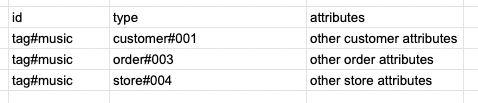
As above image shows, we can use tag#tagName as partition key and subject# as prefix for sort key to duplicate all tag relationship items. And other attributes follows the same patten which is indicated by type . Now let see queries, we can simply query id = tag#music AND type begin_with order# to find all orders with tag music . Similarly, we can query id = tag#music to find all data with music tag.
If you remember how we update duplicate items in Many to Many relationship section, it updates all item based on typeGsi which also covers the tag relationship case. We can use this pattern to build any relationship and make use of existing update logic.
Query more than one tags
One problem you may have if you follow this pattern is that how to support querying more than one tags in one go? e.g. they want to query music , book , art in API and find all related data. Since we can only use one partition key when querying from the table but different tags mean more than one partitions. The solution I have in my project is to make a multiple queries run in parallel, one for each tag, then aggregate the result in application level before responding to frontend. The next token is just a string value which can be used against different partition keys. The downside of this is that it will retrieve extra data from the table. But when consider the query always come with a limit (which is pagination), the extra data is not a huge problem for us.
A note about updating existing items, I am in a project to manage more than 20 different subjects with many relationships among them. If there are many cases need to update duplicate items, then it has to put the logic in many different places. So instead of doing that, I put the update logic in DynamoDB stream handler. In my main application, it only update the
coreitem and the stream handler will handle updating duplicate items. It makes sure no missing update in the table which is hard to fix if it happens. Also there will be no race condition since the stream handler is triggered based on the same order as updating. But of cause, it will give a little delay time on update. I would say a few seconds delay is acceptable in most of applications who are using DynamoDB. It is an eventual consistency model. If not, please don’t put it in the stream handler.
DynamoDB Limitation
I have to say, DynamoDB gives us a lot of flexibility on data mode design and it scales very fast. But it doesn’t mean One Table design can fit any cases that why I put a quote on “One Table” in this article’s title. There are some cases we want to put data in a different table.
Need to sort on many different fields
If you use DynamoDB to store some metrics data, like Life time data volume , Last 30 days volume , Last 7 days volume , Life time Average volume etc. Storing these data in the table is not hard, but what makes it hard is if they want you to support querying data by sorting on different metrics.

By looking at above table, each row represents all metrics data for one business. There could be millions of businesses in your table so you have to support pagination. For example, they want to query different metric in a desc sorted order. In order to do that, you may have to create GSI per metric. And DynamoDB has maximum 20 GSI per table (you may be able to increase this limit to 30 or 40 based on different regions). But it still has a hard limit on the number of GSI. So you may probably think about to put these data into different tables.
Need to filter on different fields
In the previous few sections when I talked about data model, I am more focus on key schema (partition key and sort key). However, there could be many attributes for each subject data.

Look at above image about order data fields. There could be more than 10 or 20 fields for each order. And I have to support filtering data for different fields or combination of fields. e.g. querying the first 50 orders whose status is FINISHED and created in last month and finish two days ago and from Melbourne and using VISA card. It is hard to make all the filter fields in the sort key (since we can only have one sort key in one GSI). We have to put all these fields inside filter expression rather than key expression . When we send a query including limit + key expression + filter . DynamoDB performances the key expression query and limit first then do a scan to filter on the response data. That means usually what you get is less than the limit you sent to the table. Then you will have to send another query to retrieve some items and aggregate the results until it either meets the requested limit (50) or receiving a null on next page token. If your data is not evenly spread among different filter values, that will lead to query the entire partition and run timed out (which is usually 30 seconds).
In my other post, I will give a few solutions to solve this issue. (DynamoDB — How to query with many complicated filters (Part 2))
Update GSI
I am using Cloudformation as IaC to manage DynamoDB provision on AWS. The issue on updating CF stack including DynamoDB is that we can’t create or delete more than one GSIs in one go. If there is a case to create more than one GSIs, you have to split the update into two CF update requests.
If you want to update existing GSI, you can only update its RCU or WCU which means you can’t update key schema.
In addition, it doesn’t support boolean type as key schema.
Text search
DynamoDB is not designed to support text search. The solution for free text searching or language searching is to integrate it with Elasticsearch. I am using DynamoDB stream handler to replicate data into Elasticsearch. The replication logic needs to handle duplicate items since we don’t want to use them in Elasticsearch the same way as we use them in DynamoDB.
After setting up the integration between Elasticsearch and DynamoDB, we can forward text search request to ES while other requests to DynamoDB. It gives us very flexible mode to support different query requirement.
Projection Attributes in GSI
When we create a GSI, we can select the needed fields into the new index rather than putting everything in it. However, DynamoDB only supports up to 20 fields in a GSI as projection attributes. If you have more than that, you have to use ALL which to bring every fields in.
Another limitation on using projection attributes is that we can’t change it after making the index. If there is one more field need to be put in the index, you have to create a new index including the new field and change your application to query from the new index rather than the old one.
Conclusion
DynamoDB is a great database product especially in applications designed as serverless architecture. It doesn’t work as regular NoSQL database like MongoDB but it offers more flexibility in terms of indexing comparing with key+value database like Redis. It has its own limitations but make good use of it can make your application enjoys the benefits from it. I have heard many developers complain about using DynamoDB and talking about its down side or limitations. But based on my few years experience in Zeller ( a fintech company ), it does give me some advantages on saving more than 20 different subjects in one table including financial transactions, customer information, payment/terminal settings. The key part is to design your data model in a way that fit into DynamoDB pattern. Don’t be too strict on using One Table design. Try to think it in a flexible way and also can use it to be integrated with other data source like Elasticsearch.
Joey Zhao
A software developer who created a lot of bugs also fixed a lot of bugs ( so does everyone else). Working in a fintech company, Zeller, on payment and banking space.
Related Articles
DynamoDB — How to query with many complicated filters (Part 2)


