avatarGourav Kajal

Free AI web copilot to create summaries, insights and extended knowledge, download it at here

2085

Abstract

fined" width="undefined"> </div> </div> </figure></iframe></div></div></figure><p id="12c4">Let’s discuss what we are doing here, step by step.</p><ol><li>We just created a simple reactive Form with two fields, <code>Country</code> and <code>County</code>.</li><li>We have a drop-down for <code>Country</code> and whenever the drop-down value is changed, we are calling a function which is <code>onCountryChange()</code> to update the validator(s) for <code>County</code>.</li><li>Just to verify if the <code>Required</code> validator is set, we are checking if <code>County</code> field has <code>required</code> error or not.</li><li>We simply initialized the reactive form with default validation.</li><li>In <code>onCountryChange()</code> method, we are checking the value of the country selected. If this value is <code>B</code> (just in my case), we are setting the <code>Required</code> validator for <code>County</code> with the <code>setValidators()</code> method.</li><li>And if <code>Country</code> is not <code>B</code>, we are just clearing the validators.</li></ol><p id="27bf">Here’s how it will look in the browser :</p><figure id="4e8d"><img src="https://cdn-images-1.readmedium.com/v2/resize:fit:800/0*NzKFNzZjUxB1hFim.png"><figcaption></figcaption></figure><figure id="7469"><img src="https://cdn-images-1.readmedium.com/v2/resize:fit:800/0*AuNZNcjaa66GJxJj.png"><figcaption></figcaption></figure><p id="76d2">And that’s it. It’s that simple to add or remove validators in Angular reactive forms.</p><h1 id="42a9">Some Important Points to Remember</h1><p id="e771">1. <code>setValidators()</code> method removes all the previous/default validators from form control. For example, let’s suppose during form initialization, you set <code>maxLength</code> and <code>minLength</code> validators for <code>County</code>. But once <code>setValidators([Validators.required])</code> executes, it will remove <code>maxLength</code> and <code>minLength</code> from <code>County</code> and set the <code>Required</code> validator only.</p><p i

Options

d="febb">So if you want to have <code>maxLength</code> and <code>minLength</code><b> </b>as well, just do something like this :</p><div id="1390"><pre><span class="hljs-function"><span class="hljs-title">setValidators</span><span class="hljs-params">([Validators.required, Validators.maxLength(<span class="hljs-number">10</span>)</span></span>, Validators<span class="hljs-selector-class">.minLength</span>(<span class="hljs-number">5</span>)])</pre></div><p id="988e">2. Always use the <code>updateValueAndValidity()</code> method after updating (either add or remove) validators. Because all your changes related to control will be reflected only if you put this statement, i.e., <code>updateValueAndValidity()</code>.</p><p id="19f8">3. Unfortunately, Angular doesn’t provide a way to remove only a single validator from form control. It has a <code>clearValidators()</code> method, but that will remove all the validators.</p><p id="b29b">For this, we can do two things. We can either use <code>clearValidators()</code> to remove all validators and then use <code>setValidators()</code> to set needed validation, or we can directly use <code>setValidators()</code> with the needed validators only (without the validator you don’t want to have).</p><p id="efb0">This is it for this article. I hope this was helpful.</p><h1 id="e325">References</h1><p id="45e5">The final code is available on GitHub:</p><div id="8f98" class="link-block"> <a href="https://github.com/gouravkajal/dummyApp-dynamicFormValidation"> <div> <div> <h2>gouravkajal/dummyApp-dynamicFormValidation</h2> <div><h3>This project was generated with Angular CLI version 11.0.2. Run ng serve for a dev server. Navigate to…</h3></div> <div><p>github.com</p></div> </div> <div> <div style="background-image: url(https://miro.readmedium.com/v2/resize:fit:320/)"></div> </div> </div> </a> </div><p id="c044">Thanks for reading!</p></article></body>

Dynamically Add/Remove Validators in Angular Reactive Forms

A simple guide to adding and removing dynamic validations in Angular reactive forms
Image credit: Author

If you’re developing an Angular application, you might face a situation where you have to add or remove some validators dynamically in form controls. For example, let’s suppose you have a County field in your reactive form and you want to make it required based on the country selected by the user. For this, you might think of adding and removing the Required validator from the County field based on the country selected.

Well, for this kind of scenario, Angular helps us a lot. We have some built-in functions in Angular which we can use to set validators conditionally — and thanks to reactive forms, which allows us to do so very, very easily.

So let’s just start from the beginning.

I’m expecting that you have a running Angular application with reactive forms. For me, I have a very simple form with two fields. One is for Country and the second one is for County, as mentioned in the beginning.

I have a template and corresponding component code as shown below.

Let’s discuss what we are doing here, step by step.

  1. We just created a simple reactive Form with two fields, Country and County.
  2. We have a drop-down for Country and whenever the drop-down value is changed, we are calling a function which is onCountryChange() to update the validator(s) for County.
  3. Just to verify if the Required validator is set, we are checking if County field has required error or not.
  4. We simply initialized the reactive form with default validation.
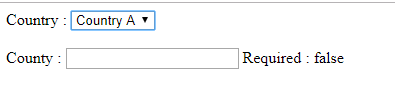
  5. In onCountryChange() method, we are checking the value of the country selected. If this value is B (just in my case), we are setting the Required validator for County with the setValidators() method.
  6. And if Country is not B, we are just clearing the validators.

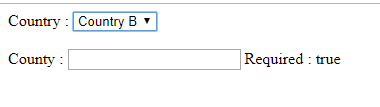
Here’s how it will look in the browser :
And that’s it. It’s that simple to add or remove validators in Angular reactive forms.

Some Important Points to Remember

1. setValidators() method removes all the previous/default validators from form control. For example, let’s suppose during form initialization, you set maxLength and minLength validators for County. But once setValidators([Validators.required]) executes, it will remove maxLength and minLength from County and set the Required validator only.

So if you want to have maxLength and minLength as well, just do something like this :

setValidators([Validators.required, Validators.maxLength(10), Validators.minLength(5)])

2. Always use the updateValueAndValidity() method after updating (either add or remove) validators. Because all your changes related to control will be reflected only if you put this statement, i.e., updateValueAndValidity().

3. Unfortunately, Angular doesn’t provide a way to remove only a single validator from form control. It has a clearValidators() method, but that will remove all the validators.

For this, we can do two things. We can either use clearValidators() to remove all validators and then use setValidators() to set needed validation, or we can directly use setValidators() with the needed validators only (without the validator you don’t want to have).

This is it for this article. I hope this was helpful.

References

The final code is available on GitHub:

Thanks for reading!

Programming
Angular
JavaScript
Nodejs
Front End Development
Recommended from ReadMedium