
Dynamic Module Federation in Angular

This is part 3 of the series on Module Federation.
- Module Federation Concepts: Clearly Explained with an Example
- Module Federation using Angular Standalone Components — In 6 Steps
- Dynamic Module Federation in Angular
This article will go through dynamic module federation using Angular standalone components. We already went through static module federation in part 2 of the series. Please take a look if you haven’t done so to understand what we built.
This application examples and code are generated using Angular version 17.
You can find the source code used in this app here. You can use angular-mfe-remote as the remote and angular-mfe-dynamic-host as the host.
Static vs Dynamic Module Federation
Module federation is divided into two categories based on how the remote application is loaded into the host app.
Static In static module federation, the URLs of the remote applications are already known at the compilation time and are provided as part of the Webpack config. For example, in the following example, the URL is given directly in the config.
new ModuleFederationPlugin({
  name: "angular-mfe-host",
  filename: "remoteEntry.js",
  remotes: {
    remote: "http://localhost:4201/remoteEntry.js",
  },
  shared: {
    // Shared Libraries
  },
  library: {
    type: "module",
  },
}),
Dynamic In dynamic module federation, the URLs are only known at the runtime and not during compilation. In this case, we don’t give any remotes as part of the Webpack config. The modules are loaded at runtime using a dynamic URL as we will see.
new ModuleFederationPlugin({
  name: "angular-mfe-host",
  filename: "remoteEntry.js",
  shared: {
    // Shared Libraries
  },
  library: {
    type: "module",
  },
}),
Our App Preview
We have a simple notes app with only two tabs: Notes and Customer. The app containing both notes and customers is the shell or the host app. However, the customer is an app(remote) in itself. The host uses the module federation to load the customer app and use it in its app.
Host: http://locahost:4200 Remote: http://locahost:4201
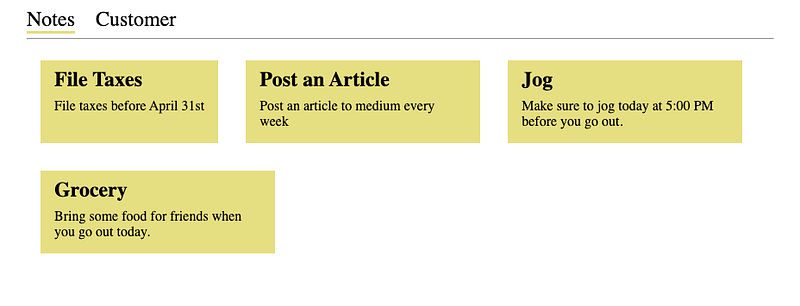
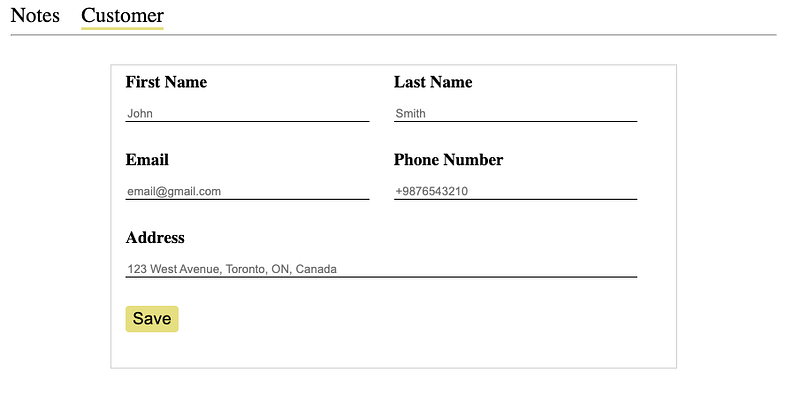
This was already achieved using static module federation in part 2 of the series.
Concepts Recap
Before we dive into the implementation, let's recap a few things.
- A remote entry file is generated on the remote side that the host uses to get the exposed modules.
- A Webpack shared scope object is used by the host and the remote to put shared libraries. The scope is ‘default’ by default.
- This remote entry file contains two methods: init and get.
- The init method is used to initialize the remote container. It decides which remote libraries will be in the shared scope and loaded later.
- The get method is used to get the module out of the remote container.
If you want to go into details, please read part 1 of this series. Let’s move forward with our implementation now.
Implementation
As mentioned, we have already built the app in part 2 of the series using 6 steps. In this article, we are only going to look at step number 5 where we load a remote application into the host application.
We were loading the remote exposed module using the dynamic import as follows.
export const routes: Routes = [
  // Other paths
  {
    path: 'customer',
    loadComponent: () =>
      import('remote/Customer').then((m) => m.CustomerComponent),
  },
];
However, if we remove remotes from the Webpack config, the above code will start throwing the following error as Webpack will not recognize the given import path.
Module not found: Error: Can't resolve 'remote/Customer'Now we cannot import the remote directly as Webpack has no idea about this module. So, we are going to create our simple helper method to load a remote module for this.
// declare is used to tell the compiler that variable exists already,
// and therefore can be referenced by other code
// There is no need to compile this statement into JavaScript.
declare const __webpack_init_sharing__: (shareScope: string) => Promise<void>;
declare const __webpack_share_scopes__: { default: string };

/**
 * Method to load remote module
 * @param url - URL of the remote
 * @param moduleName - Exposed module to load
 * @returns Promise of loaded module
 */
async function loadRemote(url: string, moduleName: string): Promise<any> {
  // 1. Initialize webpack sharing scope
  await __webpack_init_sharing__('default');

  // 2. Load the remote entry file. put comments to let webpack knows to
  // ignore this import while bundling
  const container = await import(/* webpackIgnore:true */ url);

  // 3. Initialize the remote container and pass the shared scope, so that
  // the remote can decide which shared libraries to put into the scope
  await container.init(__webpack_share_scopes__.default);

  // 4. Get the required module from the remote container and return it
  const factory = await container.get(moduleName);
  const module = factory();
  return module;
}
The method is taking the remote URL and the name of the exposed module we want to load. Although I have comments, I will explain a bit about this method.
- We are initializing the default scope using the mentioned Webpack method. This will create a shared object and fill it with the host-shared libraries.
- Load the remote entry file using the ECMAScript dynamic import. We are adding /* webpackIgnore: true */ to convey to Webpack to ignore this import while bundling as it is not part of the current build.
- In the third step, we call the init method of the remote container to initialize it. We are also passing the shared object so that the remote can put and load their required libraries.
- Finally, we are getting the required module from the remote container using the get method.
We have also declared Webpack variables at the top so that the compiler will not complain about their existence.
Now, we can use this created method to load the remote module.
export const routes: Routes = [
  // Other paths
  {
    path: 'customer',
    loadComponent: () =>
      // Calling the created method using the required parameters
      // and get the customer component
      loadRemote('http://localhost:4201/remoteEntry.js', './Customer').then(
        (m) => m.CustomerComponent
      ),
  },
];
And that is all needed to remote an app using a dynamic module. This is very powerful as we can create the URL of the remote app at runtime. This is important when we are using the “Build Once Deploy Everywhere” approach where URLs are different for each environment.
Thank you for reading this article. Hopefully, you will have learned something new today.
Please subscribe and stay tuned for the next articles.


