avatarBritni Pepper

Free AI web copilot to create summaries, insights and extended knowledge, download it at here

1178

Abstract

haven’t blogged since I discovered Medium.</p><p id="eee3">The blogroll served two purposes. First, I could see instantly when someone I followed put up a new post. Immediate gratification, the downfall of many a maiden. But fun.</p><p id="c0ab">Second, if a cool new blog appeared, someone would follow it, it would appear on their blogroll, and I’d notice it. Check it out, put it on mine.</p><p id="feb6">So many cool blogs! It’s I wonder I ever got anything done.</p><h2 id="6fa6">And now it’s a generation later</h2><p id="6b31">Here I am on Medium, along with a bunch of way more interesting and energetic people. I follow some of them.</p><p id="2644">And now Medium has introduced a blogroll feature. It’s a list of people and pubs you follow, the top five most recent posts shown.</p><p id="1084">Personally, I find the Medium front page feature kind of random. It throws up things I might be interested in — and mostly am — but it’s busy and distracting and I rarely go there.</p><p id="e6c8">But a blogroll feature is limited and always uptodate. If someone I love publishes a piece, it’s right there, just a click away for the full experience.</p><p id="5d57">I’ve i

Options

mplemented it: just go <a href="https://britnipepper.medium.com/">here</a> to see how it works on the screen.</p><h2 id="9901">So how do I do it, Smartypants?</h2><p id="4bb8">Easy-peasy.</p><ol><li>Click on the round avatar image at the top right of your avatar screen.</li><li>In the list that magically appears, click on the “Design your profile” item.</li><li>On the left hand side is the design menu. Expand the bottom item — helpfully labeled “Blogroll” — and tick the “Show Blogroll” box.</li><li>Viola! Your blogroll will now appear on your profile. Check it out!</li><li>You may want to edit the list of people and pubs you follow if you have a massive erotica habit like some of us do. Just sayin’.</li></ol><figure id="28b4"><img src="https://cdn-images-1.readmedium.com/v2/resize:fit:800/1*vYtRcyQggf9-H-juxhXNFQ.png"><figcaption>Screenshot of my profile</figcaption></figure><h2 id="64d4">Synergy follows</h2><p id="d5f1">Nosey along to the profiles of people you follow and see who they follow. If they aren’t displaying your latest masterpiece, guilt them into following you.</p><p id="fabe">Everyone wins!</p><p id="f6e3"><b><i>Britni</i></b></p></article></body>

Drumroll: Blogroll

Medium implements a beloved feature
Photo by Jason Rosewell on Unsplash

Before there was social media there were blogs. I mean, there still are, perhaps more than ever, but let’s face it, who spends their time navigating the blogosphere nowadays?

Back in the glory days of LiveJournal I blogged like a madwoman and so did all my friends. It was how we shared our lives. Problems with the boyfriend, funny stories about the rels, good vibes requested for the job interview, I’m repainting the windows, the dog just sicked up on my pizza…

It was all happening on the blogs and boards.

Enter the blogroll

A blogroll was a list — a rollcall — of blogs you followed, showing their latest posts. Still available on WordPress, but I haven’t blogged since I discovered Medium.

The blogroll served two purposes. First, I could see instantly when someone I followed put up a new post. Immediate gratification, the downfall of many a maiden. But fun.

Second, if a cool new blog appeared, someone would follow it, it would appear on their blogroll, and I’d notice it. Check it out, put it on mine.

So many cool blogs! It’s I wonder I ever got anything done.

And now it’s a generation later

Here I am on Medium, along with a bunch of way more interesting and energetic people. I follow some of them.

And now Medium has introduced a blogroll feature. It’s a list of people and pubs you follow, the top five most recent posts shown.

Personally, I find the Medium front page feature kind of random. It throws up things I might be interested in — and mostly am — but it’s busy and distracting and I rarely go there.

But a blogroll feature is limited and always uptodate. If someone I love publishes a piece, it’s right there, just a click away for the full experience.

I’ve implemented it: just go here to see how it works on the screen.

So how do I do it, Smartypants?

Easy-peasy.

  1. Click on the round avatar image at the top right of your avatar screen.
  2. In the list that magically appears, click on the “Design your profile” item.
  3. On the left hand side is the design menu. Expand the bottom item — helpfully labeled “Blogroll” — and tick the “Show Blogroll” box.
  4. Viola! Your blogroll will now appear on your profile. Check it out!
  5. You may want to edit the list of people and pubs you follow if you have a massive erotica habit like some of us do. Just sayin’.
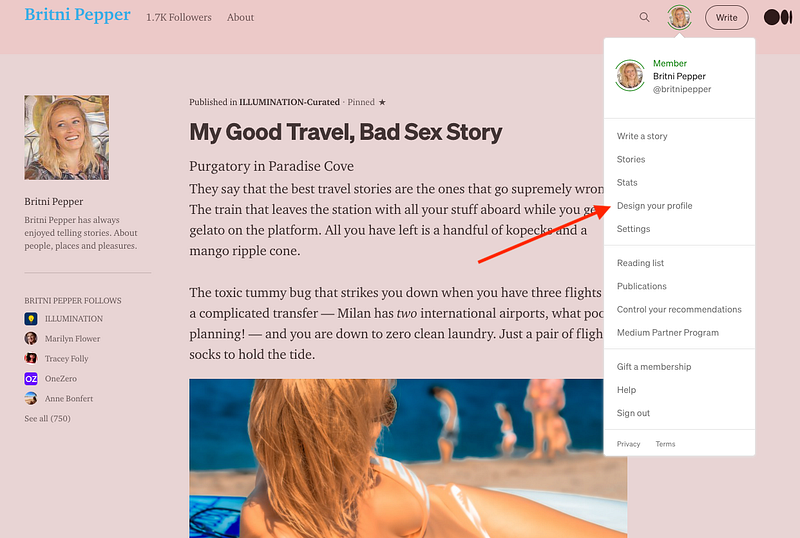
Screenshot of my profile

Synergy follows

Nosey along to the profiles of people you follow and see who they follow. If they aren’t displaying your latest masterpiece, guilt them into following you.

Everyone wins!

Britni

Blogging
Blogroll
Writing
Friends
Discovery
Recommended from ReadMedium