DRIP for Beginners. Get the info. Get the coin. 2022
Earn 1% a day! Buy 100 DRIP, withdraw 365 DRIP over the next year! Or, compound your 1% and build up your DRIP supply to enormous gains!
Disclaimer: This is how-to on how to buy DRIP. Please do your own research, as this is not financial advice, just instructions on how to get started with Drip!
DRIP is one of the hottest coins on the Binance Smart Chain. It has a remarkable system of rewards, long-term sustainability, and exciting partnerships and increased utility on the horizon. But, it’s on the Binance Smart Chain, and while it’s getting easier to get access to that blockchain, there’s still a bit of a learning curve. This article will show you how what DRIP is and how to get it.
If you already have a Metamask Wallet with BNB in it, feel free to skip down to Part 4!
Part 1: What is the difference between standard exchanges and personal wallets?
- DRIP is a token on the Binance Smart Chain. That means that it is not a token that is bought or sold (yet) on a centralized exchange like Coinbase or Binance (or BinanceUS). It is purchased in other ways and can be held in a user’s individual wallet. Don’t worry if this is uncharted waters for you! Let’s dive in.
- When you buy crypto on Coinbase, you do own the crypto, but you do not actually HOLD the crypto. Instead, Binance holds the crypto for you in their “wallets”. When you login to the site, either on the web or the mobile app, you can interact with your crypto, but you never hold it. There are benefits to this: easy of use, simple login/password access. But, there are drawbacks. If Coinbase ever decided to go out of business, you couldn’t access any of your crypto. It is highly unlikely this would happen, but never say never. There’s another way.
- Crypto coins and tokens that are not held by centralized exchanges (Coinbase, Binance) are held by an individual’s wallet. This means that a user has control over their coins and tokens. The coins and tokens are actually stored on the blockchain, but your wallet gives you (and only you) access to them. When you use a personal wallet, you can buy/sell/transfer without the use of a centralized exchange. There are benefits: no corporation is in control of your finances, 24/7 access, total control. There are also drawbacks: if you ever lose your “keys” to your wallet, you can never recover it. We’ll get into backing up your wallet in a bit, but it’s super important. Also, I’ll mention this again too, but NEVER GIVE ANYONE YOUR PRIVATE KEYS. Giving someone your public wallet address is just fine. But your private key is what allows you to have access to your coins, and you should never, ever, ever share that with someone.
- When you make a purchase on Coinbase, you pay a small fee for the exchange, something like 0.5% of the purchase, which gets paid to Coinbase. When you send crypto from Coinbase to a different exchange or wallet, you pay a small amount of the token that you send to Coinbase for making sending the token. Send Bitcoin, pay a small fee in Bitcoin. Send Ethereum, pay a small fee in Ethereum.
- When you hold your own coins in your own wallet, you don’t pay any company fees to send crypto (or do other things, like interact with other websites using crypto). Instead, you have to hold small amounts of a native token to pay for those fees. For example, if you are sending Ethereum in your wallet and you want to send Ethereum, you will pay Ethereum to send it. But, there are TONS of other coins that live on the Ethereum system (or “blockchain”). In order to send SHIBA INU, for example, you need to also hold some Ethereum. Because SHIBA INU lives on the Ethereum system, or blockchain, you pay fees in Ethereum.
- There are dozens of blockchains. Ethereum is the largest one, but Binance Smart Chain (or “Binance BNB Chain” as it is somethings called) is another increasingly popular blockchain. Every blockchain has its own native token that is required to pay fees when tokens are sent or when interacting with websites using crypto. Binance Smart Chain has a native token called BNB, and it is very important to always hold small amounts of BNB in your wallet.
- Multi-blockchain wallets. There are, again, dozens and dozens of different wallets you can use to hold crypto and interact with websites. The most popular wallet is called “Metamask”, and can actually interact with a lot of different blockchains at the same time. For this article, we will be using Metamask to interact with the Binance Smart Chain.
Part 2: Setting up your Metamask Wallet
- Metamask is, by default, an Ethereum wallet, but can easily use the Binance Smart Chain. To do so, follow the instructions at https://academy.binance.com/en/articles/connecting-metamask-to-binance-smart-chain
- I’ll summarize here.
- Download Metamask to your iOS or Android device, or install the Metamask Google Chrome extension.
- Create a new wallet.
- Write down (ON PAPER) your 12-word seed phrase. This is your recovery method if you lose access to your Metamask. Don’t save it on your computer. Write it down and put it somewhere safe.
- Set up the Binance Smart Chain access (Settings>Network>Add New Network)
- Network Name: Smart Chain
- New RPC URL: https://bsc-dataseed.binance.org/
- ChainID: 56
- Symbol: BNB
- Block Explorer URL: https://bscscan.com
- Switch to Binance Smart Chain. Your MetaMask wallet should now say “Smart Chain”
Part 3: Funding your wallet with BNB
- You’ll need to create an account on Binance or BinanceUS (in the United States, you have to use BinanceUS)
- Binance.com or Binance.us
- I use Coinbase as my “onramp” for crypto, so I buy Bitcoin on Coinbase using PayPal or bank, and then send Bitcoin to BinanceUS. This article helps with that process: https://cryptohead.com/how-to-transfer-from-coinbase-to-binance/
- Once you have Bitcoin on Binance (or BinanceUS), you need to buy BNB with the Bitcoin. Whatever you want to spend to buy DRIP needs to be used to buy BNB.
- Back to MetaMask. Find out your wallet address. It’s listed in your wallet under the account balance, which is likely $0 if you just set it up. Copy your wallet address (it starts with 0x) to the clipboard or write it down carefully, checking every character twice.
- Back to Binance (or BinanceUS). VERY IMPORTANT STEP HERE. In your BNB Funds, select “Withdraw”. Select the amount that you want to transfer to your MetaMask wallet. Here’s the important part. The next part asks you if you want to send your BNB on the BEP-2, BEP-20, or ETH-20 network. You MUST select BEP-20 for it to go to your Binance Smart Chain Metamask wallet! If you are at all unsure of this step, send a small amount to test it and make sure it arrives.
- This site has a detailed step-by-step process: https://academy.binance.com/en/articles/how-to-withdraw-bep20-tokens-on-binance-smart-chain
- After you’ve selected BEP-20 (!!!!), paste your wallet address and make sure all the amounts and wallet address information is correct. Select Withdraw.
- There may be some additional steps where you have to enter a code that is texted to you and then check your email to confirm the withdrawal. This is normal.
- Within 5 minutes, you will have your BNB in your Metamask wallet, and it will show up. If it doesn’t show up, make sure that you are seeing the “SMART CHAIN” wallet in Metamask and not the Ethereum Wallet.
Part 4: Buying DRIP on Metamask with BNB
- You should now have BNB in your Metamask wallet.
- Go to https://drip.community and you will see the DRIP front page.
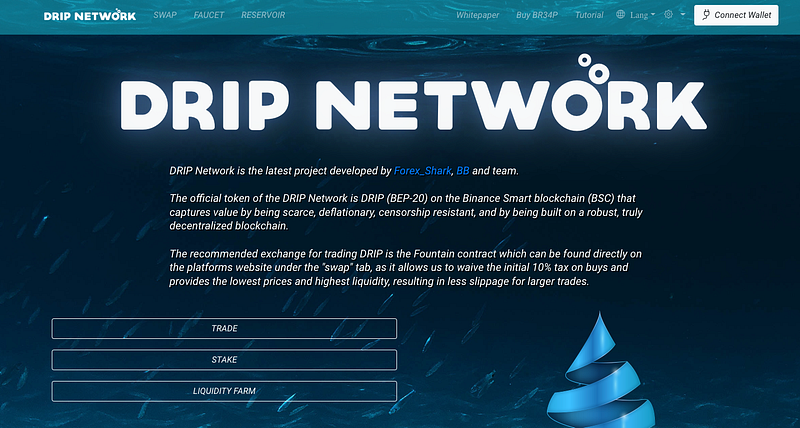
- This is a web3 site which means it doesn’t really do anything until you connect your wallet (top right of the screen). When you connect your wallet for the first time, you’re going to have to approve the connection to the DRIP site. Don’t worry, this is normal.
- After you have connected your wallet, you can now buy DRIP!
- Click on SWAP at the top menu.
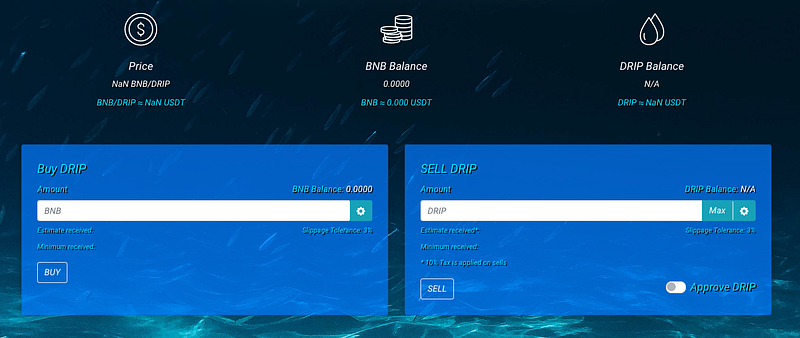
- Your site will display the amount of BNB in your wallet, the current DRIP price, and the amount of DRIP in your wallet. (an unconnected wallet, above, shows null values in those fields).
- Choose how much DRIP you want to buy. Important! You’re about to enter the amount you want to SPEND, in BNB. It is recommended that you save 0.1 BNB in your wallet, because you’ll need that for all transactions on the Binance Smart Chain system.
- It is also recommended that you keep an additional 0.1 BNB in your wallet to contribute to the DRIP Reservoir. So, keep 0.2 BNB total. More on the DRIP Reservoir in this article: https://cryptozoa.com/drip-reservoir-how-to-sustain-a-drip-price-floor-simply-c35ed55a6421
- Enter the amount of BNB that you want to spend in the BUY DRIP field, and click BUY. You will be presented with a MetaMask dialog box asking you to confirm the transaction. Please note, DRIP has a 10% buy tax, which goes into the Faucet vault (the source of all DRIP rewards). This is normal, and an important part of the DRIP ecosystem.
- After the transaction has been processed, your DRIP balance will reflect your new DRIP, and your BNB balance will reflect the spent BNB.
Part 5: Depositing DRIP into the DRIP Faucet
- You could hold DRIP in your wallet, waiting for the price to increase and sell for a profit. But, that would be missing out on the key usage of the platform, the DRIP FAUCET.
- The DRIP Faucet is where you deposit your DRIP, and can earn 1% every day. Every day, you can either withdraw your 1%, or you can compound it back into your deposits. You get to withdraw 365 days if you never compound. That means you get to withdraw 365% of the DRIP that you deposit. But, know this: you don’t get to withdraw your initial deposit. Instead, you get 1% a day back you. You could withdraw every day for 100 days to get back your initial deposit. And then, you could continue to withdraw for another 265 days, 1% of your original investment each day. Most DRIP users compound (or “hydrate” as it’s called on the website) far more than they claim.
- The TL:DR version: Deposit in the Faucet. Get 1% of your total investment a day back to you for 365 days. Each day, hydrate/compound to increase your total investment, or claim/withdraw to your MetaMask wallet.
- When you claim, you can sell your DRIP for BNB on the SWAP page of the Drip website.
- Taxes on DRIP transactions. DRIP is dependent on reasonable taxes for its longterm success. For buying, there is a 10% tax, which goes into the DRIP Faucet to pay investors. For selling, there is a 10% tax, which goes into the DRIP faucet. For hydrating/compounding, there is a 5% tax, which goes into the DRIP faucet. These taxes provide steady flow into the faucet. And, while unlikely, if the faucet ever runs dry, new DRIP will be minted to pay out the faucet. There is also a whale tax, which only applies to investors who have DRIP totaling at least 1% of the entire DRIP in circulation. The more DRIP you hold above that, they more tax there is when you sell DRIP.
- In order to deposit into the faucet, you must use a buddy referral. To get a buddy referral, you can join the DRIP Telegram at https://t.me/DRIPtoken_Chat. There are sure to be buddy links in that group. Or, you may use my referral address: 0x15A6429C32b3C1cd03b427f80D5170690d1f7061 Just enter into the “Get a Buddy Section” and click UPDATE.
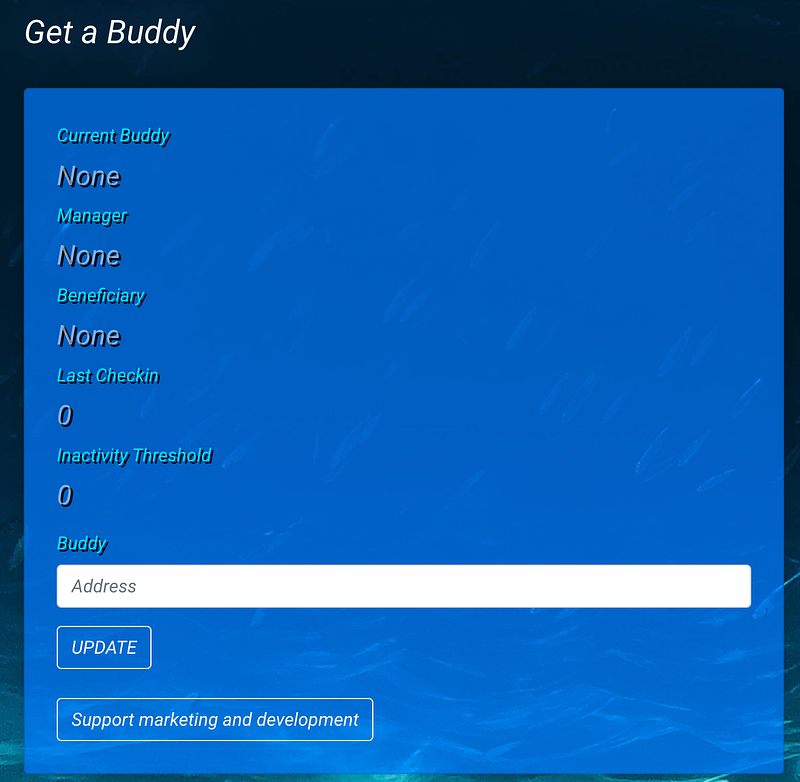
- You can also use this link to access the DRIP page, which has the buddy address embedded: https://drip.community/faucet?buddy=0x15A6429C32b3C1cd03b427f80D5170690d1f7061
- After you’ve registered your referral code, you can deposit your DRIP into the faucet!
- Come back once a day and hydrate or withdraw. I recommend that, at first, you wait until you have 1 DRIP to claim before you hydrate, as each hydrate/compound costs a little of your BNB in your wallet for fees.
Part 6: The DRIP Reservoir
- Remember before when I suggested you keep 0.2 BNB after you buy your DRIP? 0.1 BNB is for the gas fees. The other 0.1 is for the DRIP Reservoir. The DRIP Reservoir is crucial to the DRIP ecosystem because it helps maintain a price floor for the token. For more information on the DRIP Reservoir, check out https://cryptozoa.com/drip-reservoir-how-to-sustain-a-drip-price-floor-simply-c35ed55a6421.
If you’ve successfully bought DRIP for the first time, welcome to the system! I believe there are exciting things to come and I’m excited to be a part of it! Feel free to leave a comment if you just bought DRIP!