avatarJim McAulay🍁 I'm nobody. Are you a nobody too?

Free AI web copilot to create summaries, insights and extended knowledge, download it at here

1675

Abstract

turtle is located at position 0,0. (this position is the center of the screen and is called home() ). If we want to draw a circle with a radius of 100 pixels centered at 0,0 we would have to move the turtle to an outside edge and since we don’t want to show a line we would have to pick up the pen; then turn the turtle to the left 90 degrees; put the pen back down and draw the circle.</p><div id="f2aa"><pre>import turtle as T T<span class="hljs-selector-class">.penup</span> () T<span class="hljs-selector-class">.forward</span> (<span class="hljs-number">100</span>) T<span class="hljs-selector-class">.left</span> (<span class="hljs-number">90</span>) T<span class="hljs-selector-class">.pendown</span>() T<span class="hljs-selector-class">.circle</span> (<span class="hljs-number">100</span>)</pre></div><p id="4b60">Now, let’s use the circle command to create the Olympic rings.</p><div id="c66b"><pre><span class="hljs-keyword">import</span> turtle <span class="hljs-keyword">as</span> T <span class="hljs-type">T</span>.width (<span class="hljs-number">10</span>)</pre></div><div id="98b1"><pre>T.circle (<span class="hljs-number">100</span>) # A black <span class="hljs-type">circle</span> <span class="hljs-keyword">set</span> above center.</pre></div><div id="4621"><pre>T<span class="hljs-selector-class">.penup</span>() T<span class="hljs-selector-class">.goto</span> (-<span class="hljs-number">215</span>,<span class="hljs-number">0</span>) # we factor in the thickness of line and space T<span class="hljs-selector-class">.pendown</span>() between circles. T<span class="hljs-selector-class">.color</span> ("blue") T<span class="hljs-selector-class">.ci

Options

rcle</span> (<span class="hljs-number">100</span>)</pre></div><div id="1fbf"><pre>T<span class="hljs-selector-class">.penup</span>() T<span class="hljs-selector-class">.goto</span> (<span class="hljs-number">215</span>,<span class="hljs-number">0</span>) T<span class="hljs-selector-class">.pendown</span>() T<span class="hljs-selector-class">.color</span> (<span class="hljs-string">"red"</span>) T<span class="hljs-selector-class">.circle</span> (<span class="hljs-number">100</span>)</pre></div><div id="5259"><pre>T<span class="hljs-selector-class">.penup</span>() T<span class="hljs-selector-class">.goto</span> (-<span class="hljs-number">115</span>,-<span class="hljs-number">100</span>) T<span class="hljs-selector-class">.pendown</span>() T<span class="hljs-selector-class">.color</span> (<span class="hljs-string">"yellow"</span>) T<span class="hljs-selector-class">.circle</span> (<span class="hljs-number">100</span>)</pre></div><div id="1794"><pre>T<span class="hljs-selector-class">.penup</span>() T<span class="hljs-selector-class">.goto</span> (<span class="hljs-number">115</span>,-<span class="hljs-number">100</span>) T<span class="hljs-selector-class">.pendown</span>() T<span class="hljs-selector-class">.color</span> (<span class="hljs-string">"green"</span>) T<span class="hljs-selector-class">.circle</span> (<span class="hljs-number">100</span>)</pre></div><p id="d24a"><a href="https://readmedium.com/c4d5fe0b9b6c?source=post_page-----acf8106ab83d----------------------">Jim McAulay🍁</a> says: “If YouTube, Twitter, and Facebook merged would the new company be called You Twit Face.”</p><p id="db01">53–52</p><p id="5710">21–21</p></article></body>

Drawing The Olympic Rings With Python Turtle

Continuing lesson on the circle command.
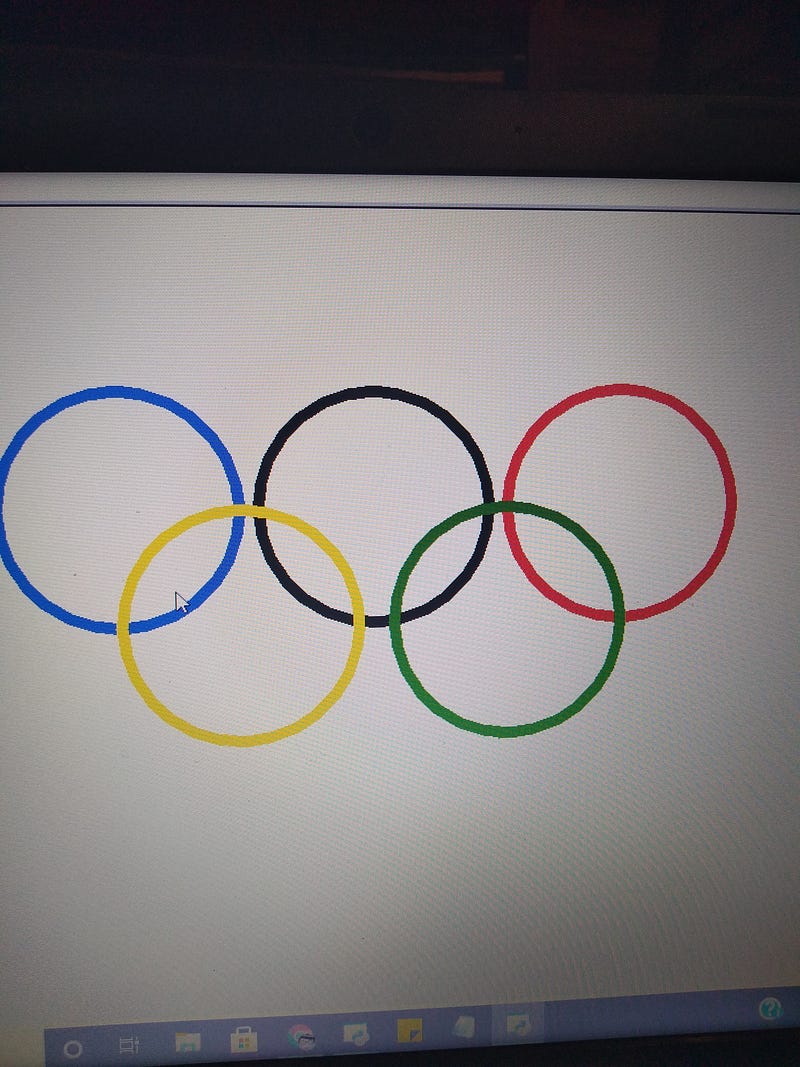
screenshot my computer

In a previous lesson, we introduced the circle command in Python Turtle now we are going to explore a bit further.

The circle command goes from the current position of the turtle and draws a circle with a given radius moving counterclockwise. if the radius is entered as a negative number it goes clockwise.

Here’s a drawing of a pair of semicircles to illustrate.

screen capture my computer
import turtle as T
T.width (10)
T.color ("blue")
T. circle (50,180)
T.color ("red")
T. circle (-50,180)

When drawing a circle we frequently want to draw the circle from the center.

Here is one way to accomplish this. We will look at another way in another lesson.

The turtle is located at position 0,0. (this position is the center of the screen and is called home() ). If we want to draw a circle with a radius of 100 pixels centered at 0,0 we would have to move the turtle to an outside edge and since we don’t want to show a line we would have to pick up the pen; then turn the turtle to the left 90 degrees; put the pen back down and draw the circle.

import turtle as T
T.penup ()
T.forward (100)
T.left (90)
T.pendown()
T.circle (100)

Now, let’s use the circle command to create the Olympic rings.

import turtle as T
T.width (10)
T.circle (100) # A black circle set above center.
T.penup()
T.goto (-215,0) # we factor in the thickness of line and space
T.pendown()      between circles.
T.color ("blue")
T.circle (100)
T.penup()
T.goto (215,0)
T.pendown()
T.color ("red")
T.circle (100)
T.penup()
T.goto (-115,-100)
T.pendown()
T.color ("yellow")
T.circle (100)
T.penup()
T.goto (115,-100)
T.pendown()
T.color ("green")
T.circle (100)

Jim McAulay🍁 says: “If YouTube, Twitter, and Facebook merged would the new company be called You Twit Face.”

53–52

21–21

Technology
Python
Programming For Beginners
Jim Mcaulay
Illumination
Recommended from ReadMedium