Wait, I Shouldn’t Use MetaMask??
MetaMask was the DeFi Mobile wallet/browser of choice when DeFi burst on the scene in 2021. It is a Google chrome desktop extension and a mobile app, which makes it versatile and powerful. But, I’ve found that MetaMask, while powerful and extremely helpful, has met its match in a new mobile wallet. This article will introduce you to a far better DeFi mobile wallet: SafePal.

This article focuses on the mobile side of things. I do still use the MetaMask Chrome extension, because it just works well, integrating with websites with ease..once a blockchain has been set up. It’s still annoying to have to add a new blockchain, but thankfully, you don’t have to do that too often. It’s not like you have to add a new blockchain every day!
The only annoying thing about the MetaMask Chrome extension is whenever you want to switch blockchains. You have to manually change the blockchain to engage your wallet with different sites that use different blockchains (BSC, Ethereum, Arbitrum, etc).
The MetaMask mobile app was a serious upgrade over the mobile app I used before, which was Trustwallet. For some reason, Trustwallet decided to completely remove the web browser function, which meant that you couldn’t visit websites.
Enter MetaMask. Relatively easy to import your existing Trustwallet wallet address. The browser is powerful and easy to use. But, let me tell you. The browser is SLOW. I have a phone that’s a couple of years old, and it is crawling, but only on MetaMask. If I have multiple DeFi sites open in multiple browser windows, it slows to a crawl. And, like the desktop extension, you need to manually switch blockchains to use platforms on different networks.
There HAS to Be a Better Way!
SafePal to the rescue! I was completely blown away when I downloaded the SafePal app and ran it for the first time. I did have to enter in my seed phrase to import my wallet address, but I had done that a number of times for MetaMask on different devices, so that was no problem.
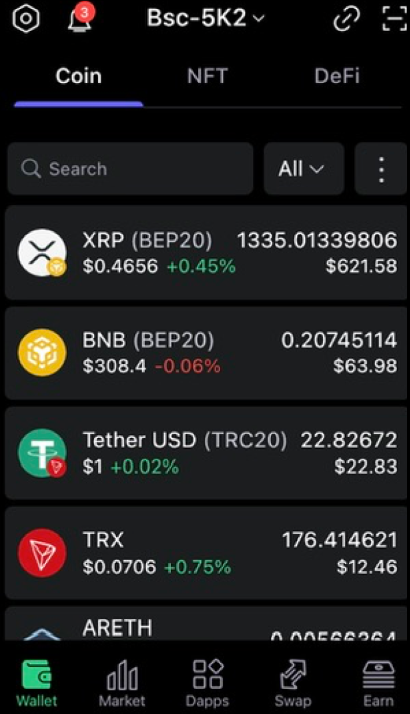
SafePal has some amazing features, which I’ll talk about next.
- Multi-chain switch, transparently
- Different wallet types, integrated into the same app
- Bridging
- Extremely fast and easy to use
Multi-Chains
I wanted to use a dApp on Arbitrum: Firefund’s new Arbitrum ETH staking, where I can earn 0.5% in ETH a day. So, I just opened the “Dapps” tab, entered the address, and it automatically switched chains. Easy! Then, whenever you open up a website that uses any supported chain, it just works. You don’t have switch chains manually. AND, you can have multiple platforms open on different chains and they can stay open at the same time, without problem. MetaMask can’t do that!
Different Wallet Types
MetaMask can let you access any blockchain that shares an address with your ETH wallet address. For example, Binance Smart Chain uses your ETH address, and you can use MetaMask for both, sharing the same address, and switching back and forth between blockchains. But, in the “assets” tab, you can only see the assets that you own that are the currently selected blockchain. If I want use a Tron wallet to send TRC-20 USDT to Crypto Program (where I earn 25% a month on USDT provided), I need to use TronLink, which is a completely different app and wallet.
In SafePal, there is an integrated Tron wallet. It creates a new Tron wallet within the app, and let’s me see the Tron wallet embedded in the listed assets. In other words, the SafePal app shows you ALL of the assets that you own, regardless of the type of wallet. Different wallets and even different wallet types and addresses across multiple blockchains, all in one view.
Built-in Bridging
You can bridge between blockchains in Metamask. It’s not terribly difficult, but you have to copy/paste your destination wallet into the bridging site, and to the novice, it can be intimidating. While swapping is pretty much instantaneous, bridging can take up to 15 minutes from one chain to the next.
In the SafePal app, you can easily bridge between blockchains inside the app, using your built-in other wallet addresses smoothly. When I want to bridge USDT from BEP-20 to TRC-20 or ERC-20, I just select SWAP from the bottom menu, and then choose BRIDGE. Then, enter the starting token (and network), and the destination token (and network), and then initiate.
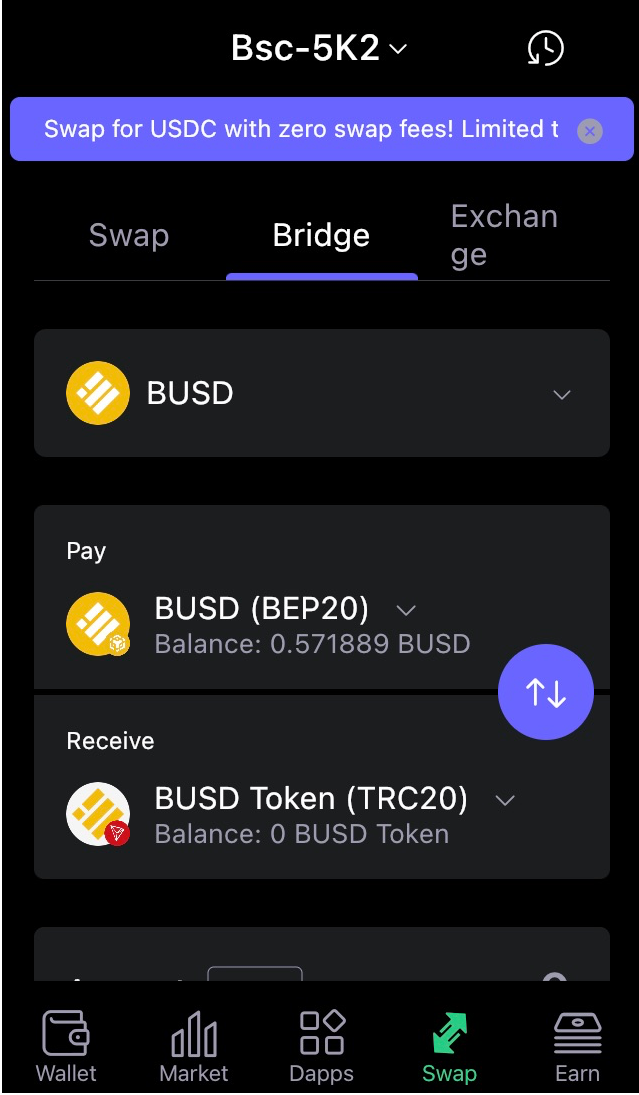
It’s so easy! It takes about 5 minutes, depending on network congestion.
Browsing dApp Sites is Easy and Fast
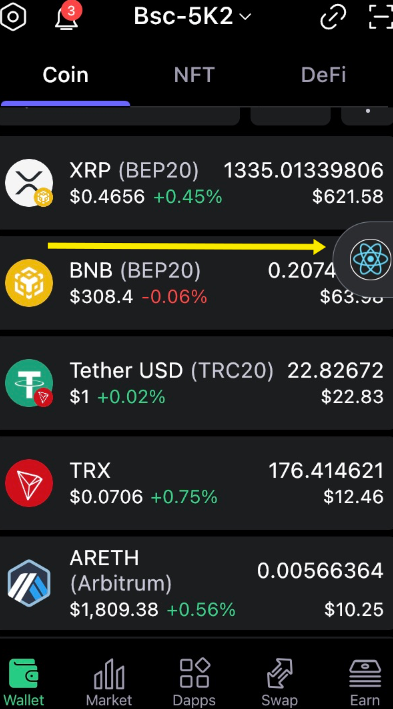
While MetaMask gets slow when you have 5 or more websites open in the browser, SafePal is a speed demon. It can easily handle multiple platforms open at once with speed. You can “minimize” a platform, where it shows up as a small icon that you can move around as you do other things:
Conclusion
There are so many great things about the SafePal app. As always, be careful with your seed phrase when you import a previous wallet. And, I’m not posting a link to the app here. It’s always better to search it yourself in the App Store to make certain it’s the official app.
I hope you find as much joy in ease of use in the SafePal app as I have!
Please follow me on Medium! Thanks for reading.