
Don’t use loc/iloc with Loops In Python, Instead, Use This!
Run your loops at a 60X faster speed

Recently, I was experimenting with loops in python and I realized that using ‘iloc’/ ‘loc’ within the loops takes a lot of time to execute. The immediate next question was why is ‘loc’ taking too much time and what is the alternative to ‘loc’?
In this blog, we will answer these questions by looking at some practical examples.
What is loc — if you don’t know already!
The loc[] function is a pandas function that is used to access the values within a DataFrame using the row index and column name. It is used when you know which row and column you want to access.
Let’s understand loc using an example. We have the following pandas DataFrame named df(shown below) and we want to access the value corresponding to the 2nd row in the column ‘a’ i.e. 10.
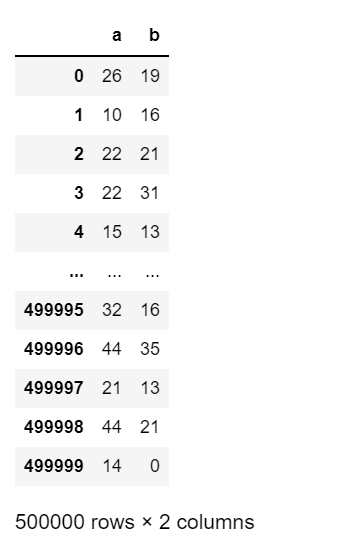
We can access the value using the following code:
##df.loc[index, column_name]df.loc[1,'a']### Output: 10 Similarly, iloc is used to access the value using index and column number.
##df.loc[index, column_number]df.iloc[1,0]### Output: 10So, the loc function is used to access columns using column names while the iloc function is used to access columns using column indexes.
What happens if you use loc/iloc with loops in Python?
Imagine, we want to add a new column ‘c’, which is equal to the sum of values of column ‘a’ and column ‘b’, to our DataFrame df.
Using the ‘for’ loop, we can iterate through our DataFrame and add a new column ‘c’ using the loc function as shown below:
import timestart = time.time()# Iterating through the DataFrame df
for index, row in df.iterrows():
df.loc[index,'c'] = row.a + row.b
end = time.time()
print(end - start)
### Time taken: 2414 secondsThe time taken to iterate and update values using loc is around 40 minutes, which is a lot.
Alternative: Using ‘at’ in place of ‘loc’
We can perform the same manipulation by replacing ‘loc’ with ‘at’ (or replacing ‘iloc’ with ‘iat’) as shown below.
import timestart = time.time()# Iterating through DataFrame
for index, row in df.iterrows():
df.at[index,'c'] = row.a + row.bend = time.time()
print(end - start)### Time taken: 40 secondsThe code gets executed in ~ 0.7 minutes which is 60 times faster as compared to the time taken by the loc function.
‘loc’ vs ‘at’ why the difference in the runtime?
- ‘at’/ ‘iat’
at and iat are meant to access a scalar, that is, a single element in the DataFrame, as shown below:
df.at[2,'a']
### Output: 22df.iat[2,0]
### Output: 22If we try to access a series using at and iat, then it throws an error as shown below:
## This will give an error as we are trying to access multiple rows
df.at[:3,'a']
### Output: ValueError: At based indexing on an integer index can only have integer indexers- ‘loc’/ ‘iloc’
loc and iloc are meant to access multiple elements(series/dataframe) at the same time, potentially to perform vectorized operations.
df.loc[:3,'a']
### Output
##0    26
##1    10
##2    22
##3 22df.loc[:3,0]
### Output
##0 26
##1 10
##2 22
##3 22As, at is used to access a scaler value so it is lightweight (implementation is fast) as compared to loc which is used to access series/datafame and thus takes more space and time.
The following blog talks about the best practices of iterating through a pandas dataframe. I would recommend you to skim through this.
Conclusion
Using ‘loc’/’iloc’ within the loops in python is not optimal and should be avoided. Instead, we should use ‘at’ / ‘iat’ wherever required as they are much faster as compared to ‘loc’ / ‘iloc’.
Also, please keep in mind that ‘loc’/’iloc’ works amazingly well ‘outside’ the loops in python when we apply vectorized operations.
Thank You!
I hope you found the story useful. You can get all my posts in your inbox. Do that here!If you like to experience Medium yourself, consider supporting me and thousands of other writers by signing up for a membership. It only costs $5 per month, it supports us, writers, greatly, and you get to access all the amazing stories on Medium.