
Don’t Overcomplicate Your Angular App
Avoiding Common Overengineering Pitfalls in Angular Apps
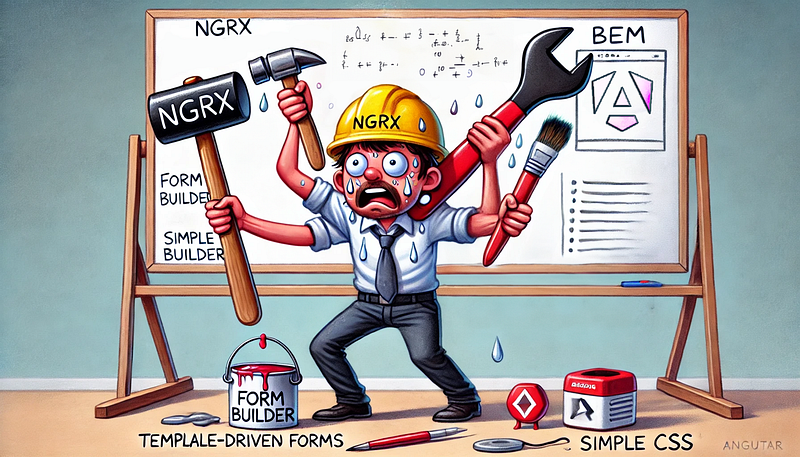
During latest technical interviews that I conducted in EPAM, where I work as Lead software engineer, I found out, that candidates who gain experience with some popular tools, are prone to start blindly using it by default.
Despite of all cons, they recommend it to use in any cases, even if it significantly increases complexity of the app.
So, I decided to collect most common good technologies that use Angular developers, but probably should not.
Store pattern
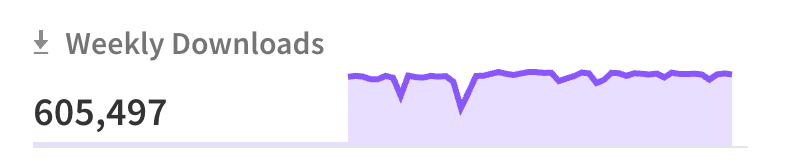
And I will start with probably the most popular library for modern Angular application — NGRX. It has more than 600k weekly installs.
Store pattern became popular from React apps, since you were choosing between using Store or passing props through entire tree of elements.
I agree — Store is great! Just as NGRX, it’s so well integrated into Angular ecosystem using observables.
But it requires so much code to write for adding any state change. To add single button, you need to write an action, create a reducer, which will do something on this action dispatch, store property, subscribe to store changes, and probably event use effect.
It’s complicated even for huge apps. That’s why people created NGXS and Akita.
But it still not the easiest way to manage your state and share data across the components.
What am I suggesting?
Look at the Angular fundamentals! Angular from the box gave us services that we can use for keeping state between components.
Just recently we got signals! That are so simple, minimal, fast, and reactive!
They took the best from the react hooks and gave us ability to build large, scalable, fast, and at the same time simple applications.
Just look on how you can deal with to-do app state using Angular built-in features.
import { Injectable, Signal, signal } from '@angular/core';

export interface Todo {
  id: number;
  text: string;
  completed: boolean;
}

@Injectable({
  providedIn: 'root',
})
export class TodoService {
  // Create a signal for managing the to-do list state
  private todosSignal = signal<Todo[]>([]);

  // Signal for exposing the current state of todos (read-only to external components)
  get todos(): Signal<Todo[]> {
    return this.todosSignal.asReadonly();
  }

  addTodo(text: string): void {
    const newTodo: Todo = {
      id: Date.now(),
      text,
      completed: false,
    };
    this.todosSignal.update((currentTodos) => [...currentTodos, newTodo]);
  }

  removeTodo(id: number): void {
    this.todosSignal.update((currentTodos) => currentTodos.filter((todo) => todo.id !== id));
  }

  toggleTodo(id: number): void {
    this.todosSignal.update((currentTodos) =>
      currentTodos.map((todo) => (todo.id === id ? { ...todo, completed: !todo.completed } : todo)),
    );
  }

  clearCompleted(): void {
    this.todosSignal.update((currentTodos) => currentTodos.filter((todo) => !todo.completed));
  }
}
And why we can’t use the same approach even for complex application like finance dashboards, or search with dozens of filters?
Just split the logic across services and use Store only if it’s really required.
BEM styling
BEM (Block, Element, Modifier) came to us from times, when we had a huge site with a single CSS file. And we had to deal somehow with styling only that part that we want, without affecting other parts with the same class names.
But these times already in the past, because now we have angular component view encapsulation, CSS modules, and shadow Dom.
So, when you are creating a component, you can define class names how you wish, without worrying, that somewhere you can override same name class.
Default view encapsulation will add a unique attribute for every class inside the component like native CSS modules.
Just name classes describing what they do, for example:
<div class="card">
  <img class="avatar" src="profile.jpg" alt="Profile Picture" />
  <div class="info">
    <h2 class="name">John Doe</h2>
    <p class="bio">Software Engineer at XYZ</p>
  </div>
</div>
And keep it simple inside style file:
.card {
  border: 1px solid #ddd;
  border-radius: 8px;
  padding: 16px;
  display: flex;
  align-items: center;
  width: 100%;
}

.avatar {
  border-radius: 50%;
  width: 64px;
  height: 64px;
  margin-right: 16px;
}

.info {
  flex: 1;
}

.name {
  font-size: 1.2em;
  font-weight: bold;
}

.bio {
  color: #666;
}
So, it will be compiled into html and css with unique attributes automatically:
<!-- Rendered HTML -->
<div _ngcontent-c0 class="card">
  <img _ngcontent-c0 class="avatar" src="profile.jpg" alt="Profile Picture" />
  <div _ngcontent-c0 class="info">
    <h2 _ngcontent-c0 class="name">John Doe</h2>
    <p _ngcontent-c0 class="bio">Software Engineer at XYZ</p>
  </div>
</div>
/* Generated CSS in the browser */
.card[_ngcontent-c0] {
border: 1px solid #ddd;
border-radius: 8px;
padding: 16px;
}
.avatar[_ngcontent-c0] {
border-radius: 50%;
width: 64px;
height: 64px;
}
.info[_ngcontent-c0] {
flex: 1;
}
.name[_ngcontent-c0] {
font-size: 1.2em;
font-weight: bold;
}
.bio[_ngcontent-c0] {
color: #666;
}And please, stop using nesting selectors for writing parts of the class.
.block {
  &--element {
    /* styles for .block--element */
  }
}
This looks nice visually, but it is so hard to find any class name during debug session. It’s impossible to just copy the class name from dev tools and search it, and also you can’t navigate from html with cmd+click to styles, because IDE is unable to understand that you defined block__element class.
BEM is outdated not only for Angular apps. For React and Vue, you can use CSS modules or CSS inside JS as well.
Here is how CSS modules work: You still define simple html with simple class names:
<div id="profile-card" class="card">
  <img class="avatar" src="profile.jpg" alt="Profile Picture" />
  <div class="info">
    <h2 class="name">John Doe</h2>
    <p class="bio">Software Engineer at XYZ</p>
  </div>
</div>
Then save common CSS styles from previous example to profile-card.module.css.
And use it inside JS file:
import styles from './profile-card.module.css'; // Import CSS module

const card = document.getElementById('profile-card');

// Apply the CSS module styles to the HTML elements
card.className = styles.card;
card.querySelector('.avatar').className = styles.avatar;
card.querySelector('.info').className = styles.info;
card.querySelector('.name').className = styles.name;
card.querySelector('.bio').className = styles. Bio;
It’s a native JS simple example, in React or Vue it works much more organic.
Form Builders for Simple Forms
The next overengineering example is using form builders everywhere. Form Group and Form Control are great! With them you can build dynamically forms with any complexity, add or remove fields, validate them modify dynamically.
But it’s not a native functionality, it’s a code developed by Angular team. When you use Angular reactive forms, you import into your application a solid piece of code. Also, you need to write own code, which increases component complexity and potentially can introduce bugs.
This approach is valid for a big form, but what about simple small forms like search input, chat input, or even login form?
For these cases it’s better to use template-driven forms:
<div class="form-group">
  <label for="name">Name</label>
  <input type="text" class="form-control" id="name"
         required
         [(ngModel)]="model.name" name="name">
</div>
Or even more native way:
<form #myForm="ngForm" (submit)="onSubmit(myForm)">
  <input name="name" placeholder="Enter your name" />
  <input type="email" name="email" placeholder="Enter your email" />
  <button type="submit">Submit</button>
</form>
and get values using FormData:
onSubmit(form: any) {
    const formData = new FormData(form);
    console.log('Name:', formData.get('name'));
    console.log('Email:', formData.get('email'));
    // Handle the form data as needed
}
Yes, with this approach you are limited with validation and fields customization, but how smaller and faster it is! If you don’t have a requirement and need in dynamic fields and validation, think about the simplest approach.
Summary
As you can see, many popular techniques are often overkilling solution, that sometimes brings more problems than it solves, especially when we have simpler variants.
From what I’ve noticed during recent interviews, developers tend to use complex tools just because they’re familiar with them. But let’s be honest, not every app needs that level of complexity.
Before jumping to popular tools like NGRX, BEM, or form builders for a simple task, take a moment and think: do I really need this, or can Angular’s built-in features handle it?
Angular gives us solid tools straight out of the box, so why not to use them? Keep it simple, and your app (and future you) will thank you.


