
Don’t just Tell, Ask! The rise of conversational AI where Curiosity leads the way
From Static data to Dynamic discovery — How AI curiosity can transform Your Documents into Learning Hubs.

I have always been curious of the suggestion systems: I mean you open a search engine, start typing and BOOM, you get plenty of completion suggestions.
This raised to me the usual questions: How the hell did they do? Will I be able to do the same? With what kind of skills and resources? And so on…
I originally thought that we needed a huge Language model for that… but guess what? This is not the case at all!
I want to create a chatbot for my personal documents that is able to “suggest” me few question about them. IF it is a new document or an old one I don’t need to know upfront. Let’s see together how we can do it ourselves using LLM from Hugging Face and Python (running of free Google Colab notebook) to generate…Questions from a document. All of this only with open-source tools.
Disclaimer: this article was originally published on Artificial Corner. The Medium Publication does not exists anymore on Medium, so the links to the original articles are also broken on Medium. You can still follow Frank Andrade on Substack.
ESA: Exploration Skill Analysis
I started my quest for the know-how required to reach the goal. Since I am always a teacher (even if I am not teaching in schools anymore…) I moved my attention to the questions. What if AI is the one that is asking the question about a text or a document? It will be like giving the AI a document and then asking for suggestions about what question we can ask to that document! It is like we are flipping the game rules!
The first step is to understand how to generate questions, what kind of resources are required… basically what skills do I need to learn.
Since I want an Open Source approach I started to search on Hugging Face Hub if there are models dedicated to the task. What I discovered is way more than expected.
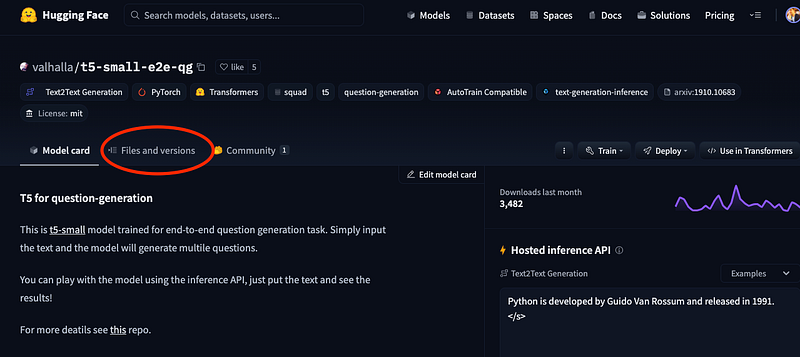
On Hugging Face there are more than a few models for question generation: after going through all of them I decided to pick up the valhalla/t5-small-e2e-qg. In his GiHub Repo, Patil Suraj explores the studies behind this kind on NLP task.
You can find here the model card on Hugging Face
Question generation is the task of automatically generating questions from a text paragraph. […]. Few recent papers, specifically UniLM and ProphetNet have SOTA pre-trained weights available for QG but the usage seems quite complicated.
This project is aimed as an open source study on question generation with pre-trained transformers (specifically seq-2-seq models) using straight-forward end-to-end methods without much complicated pipelines. The goal is to provide simplified data processing and training scripts and easy to use pipelines for inference.
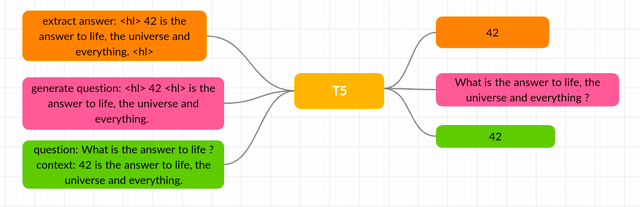
And indeed it is! The initial training was requiring 3 different models to perform this task but we are going to use the approach proposed in the paper Transformer-based End-to-End Question Generation.
This is an End-to-End question generation (answer agnostic) where the model is asked to generate questions without providing the answers. This is possible because we will use the T5 family models: the T5 model (that stands for Text-to-Text Transfer Transformer) is amazing because can perform multiples NLP tasks:
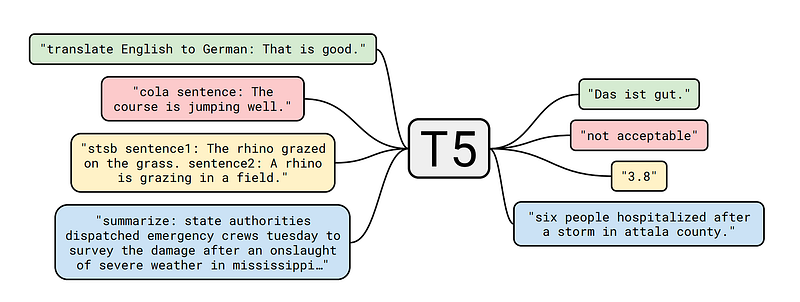
Every task we consider — including translation, question answering, and classification — is cast as feeding our model text as input and training it to generate some target text. This allows us to use the same model, loss function, hyper-parameters, etc. across our diverse set of tasks.
OK that’s enough with the intro, let’s dive in and add more while coding.
What are the Steps…
The journey will be easier than you think: you can code along, or follow the steps on the GitHub repo where you can find the Colab Notebook file too.
Install all the required libraries
Download the model weights (torch version)
Test a question generation inference
Generate question from a document (a text file for now)
As you can see I am not going to dig too much inside Document Loaders or Langchain here: the goal is to be able to have an AI to generate question from a text.
Install all the required libraries
Open a new Google Colab notebook and give it a name. You don’t need any special runtime for this project: the basic one is ok.
%%capture
!pip install transformers
!pip install nltk
!pip install sentencepiece
!pip install langchain
The %%capture magic is a command in Jupyter based interface to hide the outputs (capture) of the commands: in this case we are going to install all the dependencies with pip without having verbose console printouts.
- nltk is the basic library used for the special end-to-end pipeline for question generation;
- sentencepiece is an unsupervised text tokenizer and detokenizer mainly for Neural Network-based text generation systems where the vocabulary size is predetermined prior to the neural model training (SentencePiece allows us to make a purely end-to-end system that does not depend on language-specific pre/postprocessing);
- transformers is required to interact with Hugging Face models;
- langchain is a toolbox of amazing function to interact with external resources and link them in chains with LLMs. We will use it here only as a textSplitter
- pytorch is the library that is able to load and read the model weights. The free tier of Google Colab notebook comes already with Pytorch installed (so you don’t see it in the list)
With torch we have the core library for reading .bin file models from Hugging Face: now we can download and use ANY of the Hugging Face models saved in torch format (not tensor flow)… at least in theory.
The last step is to download the dedicated pipeline for question generation. This is a python file from the Patil Suraj Repo called pipelines.py.
%%capture
!wget https://github.com/patil-suraj/question_generation/raw/master/pipelines.py

Test a question generation inference
It is time for some action!
After having all the dependencies ready we will download model when we instantiate the pipeline for the first time (Colab will do the job for you). Now we can try some question generation inferences.
from pipelines import pipeline

repo = 'valhalla/t5-small-e2e-qg'
nlp = pipeline("e2e-qg", model=repo, tokenizer=repo)

ques = nlp("Python is a programming language. Created by Guido van Rossum and first released in 1991.")
print(ques)
print("---")
text2 =  "By decomposing the image formation process into a sequential application of denoising autoencoders, diffusion models (DMs) achieve state-of-the-art synthesis results on image data and beyond. Additionally, their formulation allows for a guiding mechanism to control the image generation process without retraining. However, since these models typically operate directly in pixel space, optimization of powerful DMs often consumes hundreds of GPU days and inference is expensive due to sequential evaluations. To enable DM training on limited computational resources while retaining their quality and flexibility, we apply them in the latent space of powerful pretrained autoencoders. In contrast to previous work, training diffusion models on such a representation allows for the first time to reach a near-optimal point between complexity reduction and detail preservation, greatly boosting visual fidelity. By introducing cross-attention layers into the model architecture, we turn diffusion models into powerful and flexible generators for general conditioning inputs such as text or bounding boxes and high-resolution synthesis becomes possible in a convolutional manner. Our latent diffusion models (LDMs) achieve a new state of the art for image inpainting and highly competitive performance on various tasks, including unconditional image generation, semantic scene synthesis, and super-resolution, while significantly reducing computational requirements compared to pixel-based DMs."
ques2 = nlp(text2)
print(ques2)
print("---")
As you can see we are importing only pipelines (from the pipelines.py file created by Patil Suraj in his GiHub Repo. This is ok because that python file is already loading all the other dependencies needed. Here the extract, for information only…
import itertools
import logging
from typing import Optional, Dict, Union

from nltk import sent_tokenize
import torch
from transformers import(
    AutoModelForSeq2SeqLM,
    AutoTokenizer,
    PreTrainedModel,
    PreTrainedTokenizer,
)
After the import we create a nlp pipeline specifying few parameters:
- the type of pipeline: “e2e-qg” is the end-to-end pipeline that will leverage the power of the trained T5 model to extract question without having the answers
- the model: this is required since we are going to use a locally downloaded model
- the tokenizer: this is also required since we are going to use a locally downloaded model
Now every time we call the nlp pipeline we simply need to give the text as an argument: the model will generate the questions as a result. Note that the output will be a list, containing all the generated questions.
Example number 1
ques = nlp("Python is a programming language. Created by Guido van Rossum and first released in 1991.")
print(ques)
This example is taken from the model card. The results are printed as a python list
['What is a programming language?', 'Who created Python?',
'When was Python first released?']
Example number 2
I took an extract from the paper about High-Resolution Image Synthesis with Latent Diffusion Models.
text2 =  "By decomposing the image formation process into a sequential application of denoising autoencoders, diffusion models (DMs) achieve state-of-the-art synthesis results on image data and beyond. Additionally, their formulation allows for a guiding mechanism to control the image generation process without retraining. However, since these models typically operate directly in pixel space, optimization of powerful DMs often consumes hundreds of GPU days and inference is expensive due to sequential evaluations. To enable DM training on limited computational resources while retaining their quality and flexibility, we apply them in the latent space of powerful pretrained autoencoders. In contrast to previous work, training diffusion models on such a representation allows for the first time to reach a near-optimal point between complexity reduction and detail preservation, greatly boosting visual fidelity. By introducing cross-attention layers into the model architecture, we turn diffusion models into powerful and flexible generators for general conditioning inputs such as text or bounding boxes and high-resolution synthesis becomes possible in a convolutional manner. Our latent diffusion models (LDMs) achieve a new state of the art for image inpainting and highly competitive performance on various tasks, including unconditional image generation, semantic scene synthesis, and super-resolution, while significantly reducing computational requirements compared to pixel-based DMs."
ques2 = nlp(text2)
print(ques2)
Also here the nlp pipeline is returning a python list with the generated questions.
['What do diffusion models achieve by decomposing the image formation process into a sequential application of denoising autoencoders?',
'What is a guiding mechanism to control the image generation process without retraining?',
'How long does optimization of powerful DMs typically consume?']
Ok. But what if I have a very long text file to process? Or a Chapter f the History School book? Or a huge paper?
Let’s dive in, without many complications.

Generate question from a document (a text file for now)
We are going to use a text file (only text): I took it from a Medium article BERT: A Beginner-Friendly Explanation written By Pushpam Punjabi. It is a good test case because it is a technical article where the meaning of the sentences is relevant.
!wget https://github.com/fabiomatricardi/Abstractive-Extractive/raw/main/BERTexplanation.txtSo let’s download the file (from a repository of mine) and load it as a string into the doc variable.
fname = '/content/BERTexplanation.txt'
with open(fname) as f:
    doc = f.read()
f.close()
The article is around 1800 words long, in terms of number of characters is 11032 long.
We are going to use RecursiveCharacterTextSplitter from LangChain to split the text into chunks. This is required to not exceed the maximum number of tokens every model has.
We create a function that take as arguments the text to be split, the chunks length (in characters) and the overlap (required to not loose the context).
def mysplit(text,chunk,overlap):
  from langchain.text_splitter import RecursiveCharacterTextSplitter
  text_splitter = RecursiveCharacterTextSplitter(
        # Set a really small chunk size, just to show.
        chunk_size = chunk,
        chunk_overlap  = overlap,
        length_function = len,
        )
  texts = text_splitter.split_text(text)
  return texts
Everything else is easy! We call the function on our text and the we iterate over the list to display the questions for each chunk. I am using here 6000 characters with an overlap of 150.
#call the function on our text
texts = mysplit(doc,6000,150)
#iterate over the list to display the questions for each chunk
for test in texts:
  print("---")
  questions = nlp(test)
  for i in questions:
    print('- '+i)
If you run the cells you will get something like this.
---
- What is the name of the book written by Pushpam Punjabi author?
- What is a key component of NLP?
- How does a machine understand human language?
- Who developed Understanding BERT BERT?
---
- What is a useful technique for a variety of NLP tasks?
- How can BERT better understand the overall meaning and
context of a passage of text?
- What is important for applications such as chatbots
or virtual assistants where the ability to understand and
interpret human language is crucial for providing accurate
and helpful responses?
Conclusions (for now)
As you can see some of the questions are not really concise. Also if there is a title (BERT) it will not be recognized as such “Who developed Understanding BERT BERT?” is not really a question right?
ou can increase the number of questions by increasing the number of splits (for example you can use
texts = mysplit(doc,3700,50)There are some next steps we can try:
- the first is to pair the question and use another model to generate the answers;
- another one is to find a way to automatically validate the quality of an answer. Imagine that you have some students that replies to the question with an online form: you can use our AI to evaluate the quality of their responses.
You can find the code and the google Colab notebook in my GitHub Repo here:
Hope you enjoyed the article. If this story provided value and you wish to show a little support, you could:
- Clap a lot of times for this story
- Highlight the parts more relevant to be remembered (it will be easier for you to find it later, and for me to write better articles)
- Learn how to start to Build Your Own AI, download This Free eBook
- Sign up for a Medium membership using my link — ($5/month to read unlimited Medium stories)
- Follow me on Medium
- Read my latest articles https://medium.com/@fabio.matricardi
If you want to read more here some ideas using small models locally:

This story is published on Generative AI. Connect with us on LinkedIn and follow Zeniteq to stay in the loop with the latest AI stories. Let’s shape the future of AI together!


