
Don’t Forget to Check This One Little Box Before You Hit Publish if You Want to Make Money
I’m telling you this because I did forget

This is not a story about tips for making money on Medium. You’ll have to go elsewhere for that. Just head over to the front page, where I’m sure you can find dozens of articles from writers just itching to tell you how to do it.
No, this article won’t help you gain followers or make email lists or get all your stories curated.
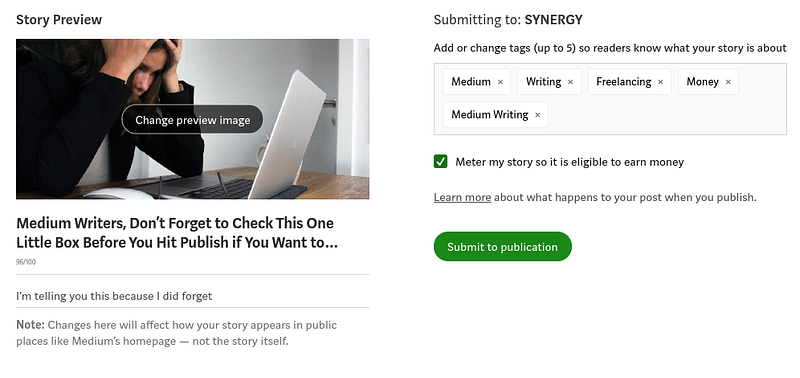
This is literally a reminder to be sure to check off a certain little checkbox to make your story metered before you click publish.
As most of you know, if you want to make money on Medium you must first join the Medium Partner Program. And to make money on an individual story, it must be behind the paywall.
And that’s where I ran into trouble. I swear my little checkbox to meter my stories must have defaulted as checked in the past. But now it’s not, and I have to be sure it’s checked each time I publish.
I forgot to do this for my last couple of stories. I was surprised when I went to check the stats and saw not only were they not distributed, they weren’t eligible to make money.
Although I’m not here on Medium to get rich, I would like to get paid something. Not only that, when you don’t put your stories behind the paywall, they are not eligible for further distribution. So, since I’m not here to write completely for free and also to have no one read my stories, I like everything I publish to be metered.
Maybe I’m the only one to rush as I’m publishing and miss the fact this box is unchecked. In case I’m not, here you go.
Steps to make sure your story is eligible to earn money on Medium:
- Make sure you’re in the Medium Partner Program
- When you’re done writing and editing, click Publish.
- Be sure you’ve added all of your five tags.
- Look for the checkbox that says, “Meter my story so it is eligible to earn money.”
- If it’s not already checked, check it.
- Publish, and you’re done.
If you make the dumb mistake that I did and realize after publishing that your story is not metered, here is the easy fix:
- From your desktop, click “View Story.”
- Click the three-dot button and “Edit story.”
- While in edit mode, choose the three-dot button again.
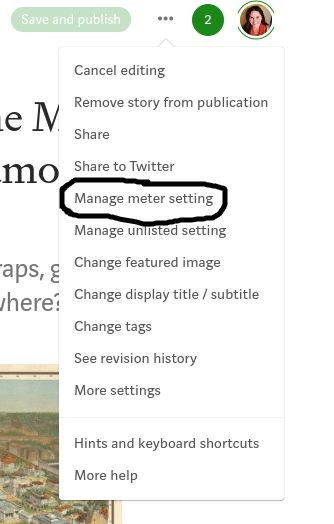
- Choose “Manage meter setting” from the drop-down menu.
- Check the box to “Meter my story so it is eligible to earn money.”
- Click “Save”.
- All better. Your story is now eligible to earn money.
Probably you are more careful than I am, and you’ll never make this absentminded mistake. But if you do, at least it’s an easy fix.
Update 12/9/21: After several readers questioned if previously published stories can be monetized AFTER you get accepted into the Partner Program, I looked into the matter and found the following on Medium Help Center under “Step #3”:
Once you’re in, you can write your story, and put it behind the paywall. You can also put your already published stories behind the paywall to start earning revenue from them.
So the answer is yes. If you have written stories prior to joining the Partner Program, you can go back and monetize those stories. However, you won’t earn money based on previous reads, but you will get paid for reads moving forward.