avatarPrimož Godec

Free AI web copilot to create summaries, insights and extended knowledge, download it at here

3756

Abstract

cation since tokens themselves are features. In the case of document embeddings, features are numbers which are not understandable to human by themselves.</p><h2 id="0d07">Orange</h2><p id="bbb4">For the demonstration in this story, I will use my favourite tool for data analysis — Orange. Orange is one of the most known tools for interactive data analysis, visualization, and machine learning. It is <a href="https://github.com/biolab/orange3">open-source</a> and you can download it from <a href="https://orange.biolab.si/download/">its website</a>. Orange consist of the canvas where you place widgets and connect them together to create the workflow. Each widget represents one step in the data analysis.</p><figure id="ec79"><img src="https://cdn-images-1.readmedium.com/v2/resize:fit:800/1*-VjRrWpzzu9e3cY2Z-1evg.png"><figcaption>Example workflow — the same workflow is used and explained in the later analysis (<i>Image by author</i>)</figcaption></figure><h2 id="0494">Document Embedding widget</h2><p id="f056">Orange offers document embedders through the <a href="https://orange.biolab.si/widget-catalog/text-mining/documentembedding/">Document Embedding widget</a>. It uses <a href="https://fasttext.cc/docs/en/crawl-vectors.html">fastText pretrained embedders</a>, which support 157 languages and maps every document in the vector with 300 elements. Orange’s Document Embedding widget currently supports 31 most common languages.</p><figure id="edb4"><img src="https://cdn-images-1.readmedium.com/v2/resize:fit:800/1*NZyH-Qu_NWSunVBZmxjqjg.png"><figcaption>In the widget, the user sets the language of documents and the aggregation method — it is how embeddings for each word in a document are aggregated into one document embedding (<i>Image by author</i>)</figcaption></figure><h2 id="693f">The Fake News dataset</h2><p id="2877">In this tutorial, we use the sample of <a href="https://www.kaggle.com/c/fake-news/data">Fake News dataset</a>. The dataset sample is available <a href="http://file.biolab.si/datasets/fake.zip">here</a>. It contains two datasets: training set including 2725 text items and testing set with 275 items. Each item is an article which is labelled as a real or fake.</p><h2 id="8902">Fake news identification</h2><p id="e89c">Here we present how to use document embeddings for fake news identification step by step. First, we will load a training part of the dataset with the Corpus widget.</p><figure id="5df9"><img src="https://cdn-images-1.readmedium.com/v2/resize:fit:800/1*g_Z3qj5fAPWJM9Z5q4mSMg.png"><figcaption>Corpus widget with its options (<i>Image by author</i>)</figcaption></figure><p id="dc43">The widget loads table which contains three columns: text, title, and label. After the dataset is loaded, we make sure that the <i>text</i> feature is selected in the <i>Used text features field</i>. It means that the text in this feature is used in the text analysis (tokens from this variable will be embedded), while the <i>title</i> feature is not used. When the dataset is loaded, we connect the Corpus widget to the Document embedder widget which will compute text embeddings. Our workflow should look like this:</p><figure id="7391"><img src="https://cdn-images-1.readmedium.com/v2/resize:fit:800/1*O1YvtgwvweHsQBhD1RhE5A.png"><figcaption>The workflow with Corpus widget which loads data and document embedding widgets which embeds data. The bottom image shows the document embedding widget settings. (<i>Image by author</i>)</figcaption></figure><p id="6b23">In the document embeddings widget, we check that language is set to English since texts in this dataset are English. We will use mean (average) aggregation in this experiment — it is the most standard one. After a minute, documents are embed

Options

ded — embedding progress is shown with the bar around the widget.</p><p id="6a5f">When embeddings are ready, we can train models. In this tutorial, we train two models — Logistic regression and Random forest. We will use default settings for both learners.</p><figure id="174a"><img src="https://cdn-images-1.readmedium.com/v2/resize:fit:800/1*dmwSBfaZtRZiJgWa6-g8fg.png"><figcaption>The workflow from the previous image extended with two additional widgets which train two models — one Logistic regression and the other Random forest. (<i>Image by author</i>)</figcaption></figure><p id="23d7">When our models are trained, we prepare the testing data to see how our models perform on new data. To load testing data, we use another Corpus widget and connect it to the Document embedder widget. Settings are the same as before. The only difference is that this time we load testing part of the dataset in the second Corpus widget. To make predictions and inspect the prediction results on the testing dataset, we use the prediction widget.</p><figure id="b7ea"><img src="https://cdn-images-1.readmedium.com/v2/resize:fit:800/1*kUuDt7KIdWRExdnjY5BYPQ.png"><figcaption>The final workflow. The top part of the workflow loads training data, embeds them, and train models. The bottom part of the workflow loads testing data, embeds them, and send them to the Predictions widgets, which use models to make predictions on them. In the bottom part, we see Prediction widget window where we can inspect prediction for every data instance from the testing part of the dataset. (<i>Image by author</i>)</figcaption></figure><p id="7d16">In the bottom part of the widget, we inspect accuracies. In the column with name CA (classification accuracy), we can see that both models perform with around 80 % accuracy. In the table above, we can find cases where models made mistakes. If we select rows, we can check them in the Corpus Viewer widget which is connected to the Predictions widget. We have also connected the confusion matrix widget to our workflow, which shows the proportions between the predicted and actual classes.</p><figure id="a412"><img src="https://cdn-images-1.readmedium.com/v2/resize:fit:800/1*oabntgKhDrdDPdynY6QdAA.png"><figcaption>On the left is confusion matrix for Random forest and on the right confusion matrix for the logistic regression model (<i>Image by author</i>)</figcaption></figure><p id="50d4">We can see that Logistic regression is slightly more accurate in cases of real news while Random forest model is better for predicting fake news.</p><p id="dc4c">In this tutorial, we explained what the document embeddings are and showed an example of how to use them on a dataset with articles, that are real or fake news. You can try a similar analysis with your own documents or you can also use embeddings for other tasks such as clustering, regression or other types of analysis.</p><h2 id="d94b">References</h2><p id="4abb">[1] Grave, Edouard, et al. Learning word vectors for 157 languages. <i>arXiv preprint arXiv:1802.06893</i>, 2018.</p><p id="d158">[2] Demšar, Janez, et al. Orange: data mining toolbox in Python. <i>the Journal of machine Learning research</i>, 2013, 14.1: 2349–2353.</p><p id="9869">[3] Zhang, Yin; JIN, Rong; Zhou, Zhi-Hua. Understanding bag-of-words model: a statistical framework. <i>International Journal of Machine Learning and Cybernetics</i>, 2010, 1.1–4: 43–52.</p><p id="5f40">[4] Wikipedia: Bag-of-words model. Available at <a href="https://en.wikipedia.org/wiki/Bag-of-words_model">https://en.wikipedia.org/wiki/Bag-of-words_model</a></p><p id="0880">[5] Joulin, Armand, et al. Fasttext. zip: Compressing text classification models. <i>arXiv preprint arXiv:1612.03651</i>, 2016.</p></article></body>

Documents embeddings and text classification without coding

What are document embeddings and how to classify text without a single line of code?
Photo by Annie Spratt on Unsplash

Text is described by the sequence of character. Since every machine learning algorithm needs numbers, we need to transform the text into vectors of real numbers before we can continue with the analysis. To do this, we can use various approaches. The most known approach before the evolution of deep learning was the bag of words which is still widely used because of its advantages. The recent boom in the deep learning brought us new approaches such as word and document embeddings. In this post, we explain what document embedding is, why it is useful, and show its usage on the classification example without coding. For the analysis, we will use the Orange open-source tool.

Word embedding and document embedding

Before we can understand document embeddings, we need to understand the concept of word embeddings. Word embedding is a representation of a word in multidimensional space such that words with similar meanings have similar embedding. It means that each word is mapped to the vector of real numbers that represent the word. Embedding models are mostly based on neural networks.

Document embedding is usually computed from the word embeddings in two steps. First, each word in the document is embedded with the word embedding then word embeddings are aggregated. The most common type of aggregation is the average over each dimension.

Why and when should we use embedders?

Compared to bag-of-words, which counts the number of appearances of each token (word) in the document, embeddings have two main advantages:

  • They do not have a dimensionality problem. The result of bag-of-words is a table which has the number of features equal to the number of unique tokens in all documents in a corpus. Large corpora with long texts result in a large number of unique tokens. It results in huge tables which can exceed the computer memory. Huge tables also increase the learning and evaluation time of machine learning models. Embeddings have constant dimensionality of the vector, which is 300 for fastText embeddings that Orange uses.
  • Most of the preprocessing is not required. In the case of the bag-of-words approach, we solve the dimensionality problem with the text preprocessing where we remove tokens (e.g. words) that seems to be less important for the analysis. It can also cause the removal of some important tokens. When using embedders, we do not need to remove tokens, so we are not losing accuracy. Also most of the basic preprocessing can be omitted (such as normalization) in case of fastText embedding.
  • Embeddings can be pretrained on large corpora with billions of tokens. That way, they capture the significant characteristics of the language and produce the embeddings of high quality. Pretrained models are then used to obtain embeddings of smaller datasets.

The shortcoming of the embedders is that they are difficult to understand. For example, when we use a bag-of-words, we can easily observe which tokens are important for classification since tokens themselves are features. In the case of document embeddings, features are numbers which are not understandable to human by themselves.

Orange

For the demonstration in this story, I will use my favourite tool for data analysis — Orange. Orange is one of the most known tools for interactive data analysis, visualization, and machine learning. It is open-source and you can download it from its website. Orange consist of the canvas where you place widgets and connect them together to create the workflow. Each widget represents one step in the data analysis.
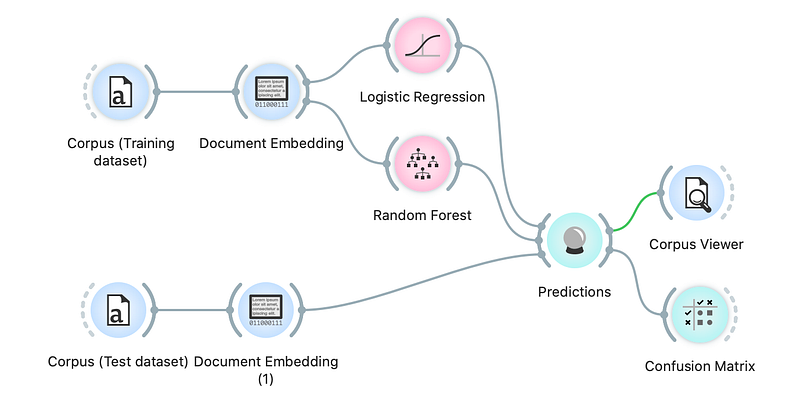
Example workflow — the same workflow is used and explained in the later analysis (Image by author)

Document Embedding widget

Orange offers document embedders through the Document Embedding widget. It uses fastText pretrained embedders, which support 157 languages and maps every document in the vector with 300 elements. Orange’s Document Embedding widget currently supports 31 most common languages.
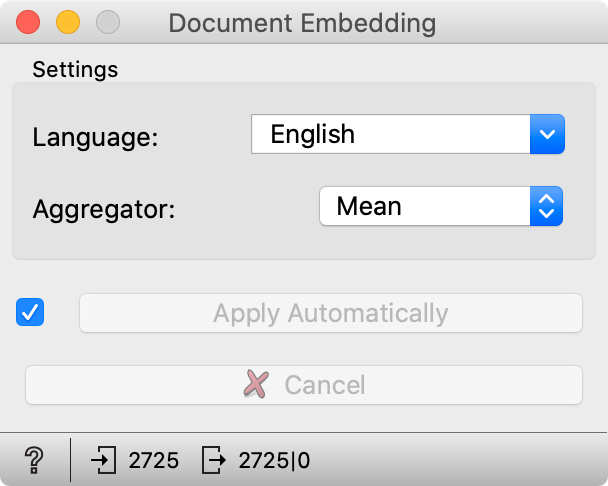
In the widget, the user sets the language of documents and the aggregation method — it is how embeddings for each word in a document are aggregated into one document embedding (Image by author)

The Fake News dataset

In this tutorial, we use the sample of Fake News dataset. The dataset sample is available here. It contains two datasets: training set including 2725 text items and testing set with 275 items. Each item is an article which is labelled as a real or fake.

Fake news identification

Here we present how to use document embeddings for fake news identification step by step. First, we will load a training part of the dataset with the Corpus widget.
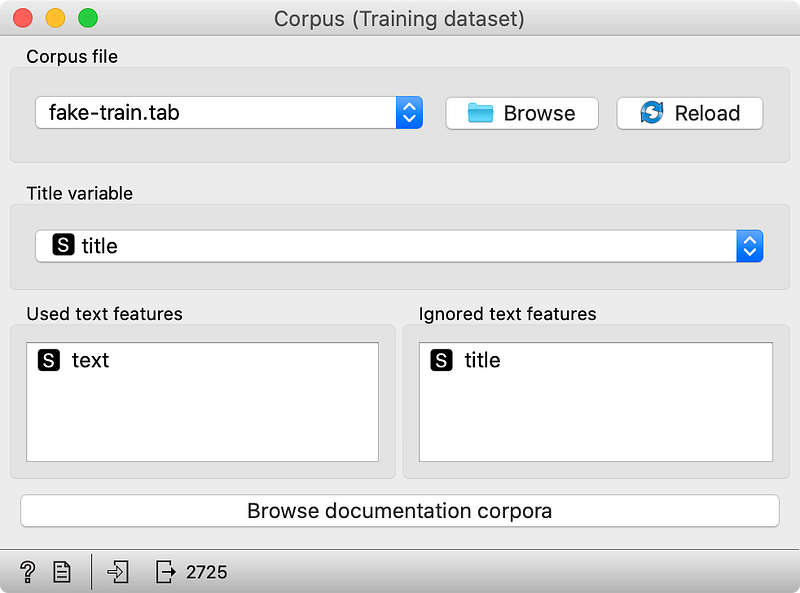
Corpus widget with its options (Image by author)

The widget loads table which contains three columns: text, title, and label. After the dataset is loaded, we make sure that the text feature is selected in the Used text features field. It means that the text in this feature is used in the text analysis (tokens from this variable will be embedded), while the title feature is not used. When the dataset is loaded, we connect the Corpus widget to the Document embedder widget which will compute text embeddings. Our workflow should look like this:
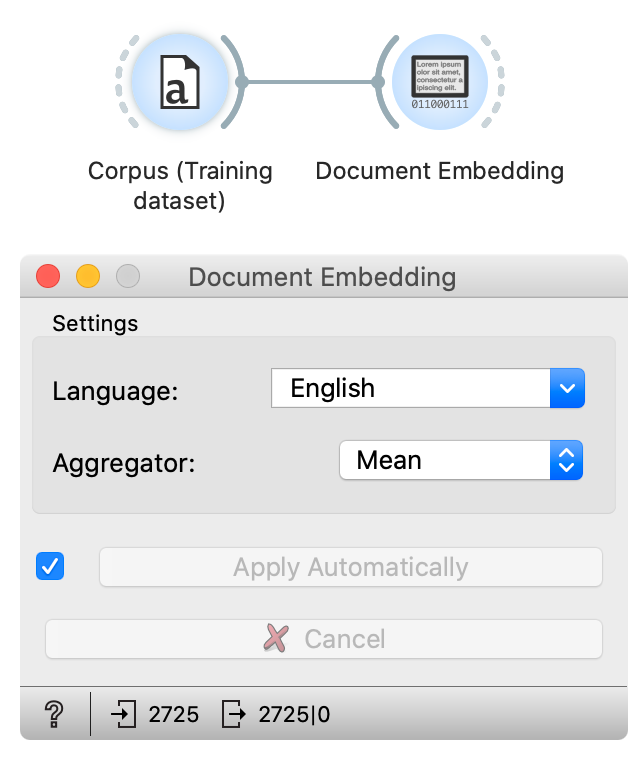
The workflow with Corpus widget which loads data and document embedding widgets which embeds data. The bottom image shows the document embedding widget settings. (Image by author)

In the document embeddings widget, we check that language is set to English since texts in this dataset are English. We will use mean (average) aggregation in this experiment — it is the most standard one. After a minute, documents are embedded — embedding progress is shown with the bar around the widget.

When embeddings are ready, we can train models. In this tutorial, we train two models — Logistic regression and Random forest. We will use default settings for both learners.
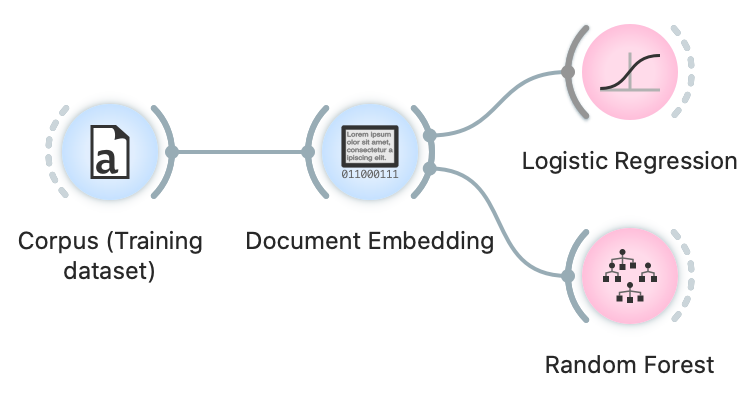
The workflow from the previous image extended with two additional widgets which train two models — one Logistic regression and the other Random forest. (Image by author)

When our models are trained, we prepare the testing data to see how our models perform on new data. To load testing data, we use another Corpus widget and connect it to the Document embedder widget. Settings are the same as before. The only difference is that this time we load testing part of the dataset in the second Corpus widget. To make predictions and inspect the prediction results on the testing dataset, we use the prediction widget.
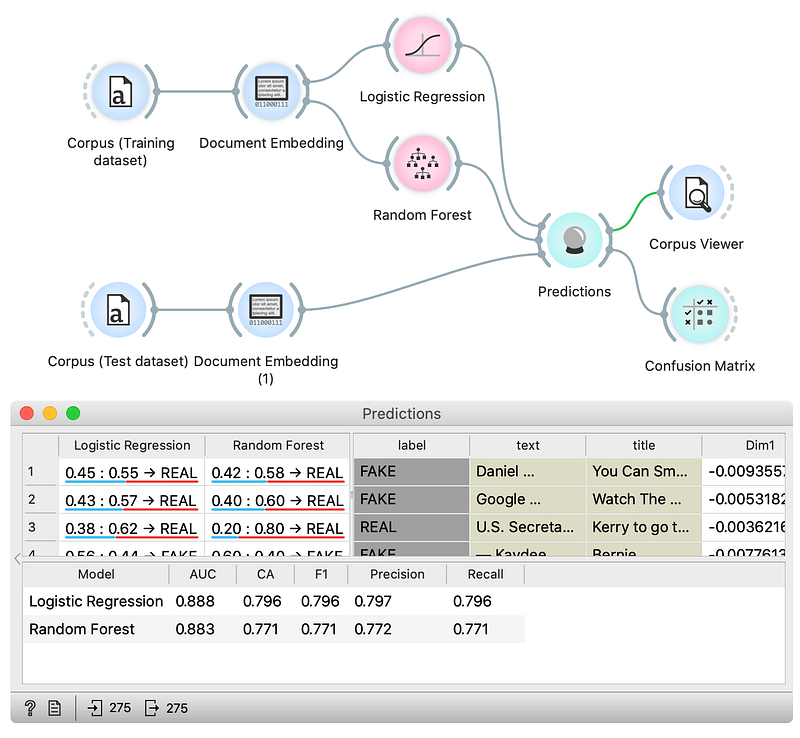
The final workflow. The top part of the workflow loads training data, embeds them, and train models. The bottom part of the workflow loads testing data, embeds them, and send them to the Predictions widgets, which use models to make predictions on them. In the bottom part, we see Prediction widget window where we can inspect prediction for every data instance from the testing part of the dataset. (Image by author)

In the bottom part of the widget, we inspect accuracies. In the column with name CA (classification accuracy), we can see that both models perform with around 80 % accuracy. In the table above, we can find cases where models made mistakes. If we select rows, we can check them in the Corpus Viewer widget which is connected to the Predictions widget. We have also connected the confusion matrix widget to our workflow, which shows the proportions between the predicted and actual classes.
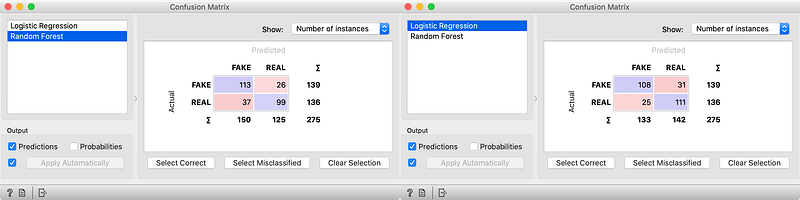
On the left is confusion matrix for Random forest and on the right confusion matrix for the logistic regression model (Image by author)

We can see that Logistic regression is slightly more accurate in cases of real news while Random forest model is better for predicting fake news.

In this tutorial, we explained what the document embeddings are and showed an example of how to use them on a dataset with articles, that are real or fake news. You can try a similar analysis with your own documents or you can also use embeddings for other tasks such as clustering, regression or other types of analysis.

References

[1] Grave, Edouard, et al. Learning word vectors for 157 languages. arXiv preprint arXiv:1802.06893, 2018.

[2] Demšar, Janez, et al. Orange: data mining toolbox in Python. the Journal of machine Learning research, 2013, 14.1: 2349–2353.

[3] Zhang, Yin; JIN, Rong; Zhou, Zhi-Hua. Understanding bag-of-words model: a statistical framework. International Journal of Machine Learning and Cybernetics, 2010, 1.1–4: 43–52.

[4] Wikipedia: Bag-of-words model. Available at https://en.wikipedia.org/wiki/Bag-of-words_model

[5] Joulin, Armand, et al. Fasttext. zip: Compressing text classification models. arXiv preprint arXiv:1612.03651, 2016.

Data Science
Machine Learning
Text Analysis
Text Embedding
Embedding
Recommended from ReadMedium