
Build Powerful Document Embedding in Production: the AWS SageMaker + Multi-threading way
Leveraging SageMaker Job and Multi-threading Technique for Scalability
It has been a while since I publish my latest article. There were so many times I fired up my laptop and started writing but got caught up with the work lately.
So this weekend, I made a deliberate choice to clear my calendar and dedicate a day solely to finalizing the draft. My commitment to myself was to have it ready for publication by early next week. Writing and sharing insights have evolved into a cherished hobby of mine. While I’m eager to invest more time in this pursuit, striking a balance can sometimes prove challenging.
Engouh me talking, let’s go straight to the main content.
In the previous blog, I delved into the process of deploying embedding models on Sagemaker. However, we missed a beat there — we didn’t talk about how to handle a crazy high volume of embedding requests.
Picture this: you’ve got a whopping million documents in your corporate stash, all lining up to get embedded. Now, your buddy glances at your screen and chuckles. Why? Because you’re grappling with the idea of using an age-old classic for loop to tackle this task. (1)
Now, let’s switch gears to a scenario. You’ve whipped up a simple LLM app that’s all fun and games, catering to a chill number of users. But what if it suddenly blows up and goes viral? All those users rushing in could give even a server a headache. How do you make sure your embedding model can handle this wild ride? (2)
No need to be a genius to see that dealing with cases (1) and (2) requires different approaches — Each necessitates a unique approach, a distinct design solution that calls upon various engineering practices and mindsets, so I decided to put on this article, and I think it is a necessary one for a series of building a real chatbot that scale.
If you need to refresh your memory on embedding data, here is your go-to article.
FYI: I won’t put the long chunk of code in the blog from now on. Given the valuable and constructive comments you’ve shared on my previous blog posts, I’ll provide a link to the repository at the end of the article.
Without further ado, let’s start with scenario (2) first.
Scale user-base business to customers LLM application
Consider our scenario: we possess a SaaS application named “DocInsight.” Within this application, users have the ability to upload their documents and make inquiries regarding the content. Users are provided with two options: they can either aggregate multiple documents into a single upload, enabling them to ask questions that pertain to all the documents in the collection, or they can opt to upload individual documents one at a time for processing.
First Iteration Approach: just upload a document directly to the embedding API
This represents the most efficient and straightforward approach. You simply need to directly invoke the API endpoint. No elaborate scalability measures are necessary. However, in a scenario where there are a million concurrent users, each uploading a single document simultaneously, how do you effectively expand and handle the demands of such a scale for your solution?
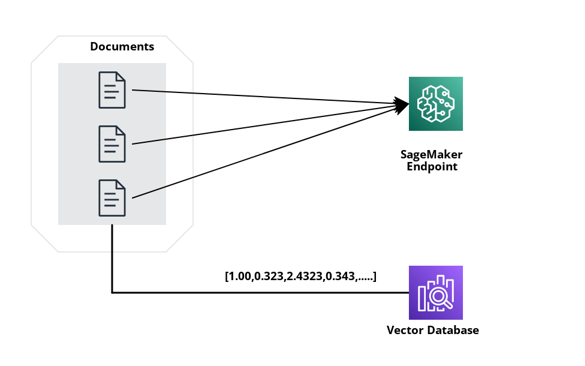
One way to treat this is to either increase the resources of the endpoint (node size), essentially, you just need to request a bigger instance size. Would vertical scaling be a good approach? I don’t think it is in this scenario.
Second Iteration Approach: use SageMaker's built-in Scaling Solution
With this approach, you rely heavily on AWS but this by far is the quickest way to do it without thinking of any fancy scaling solution. Operating in a serverless environment, it dynamically adjusts in accordance with traffic, eliminating the need for manual infrastructure provisioning, management, and monitoring. The approach is primarily configuration-driven, permitting you to define scaling parameters and criteria.
You can find more about this solution here.
For example, you can define a target-tracking scaling policy for a variant, use the SageMakerVariantInvocationsPerInstance predefined metric. SageMakerVariantInvocationsPerInstance is the average number of times per minute that each instance for a variant is invoked.
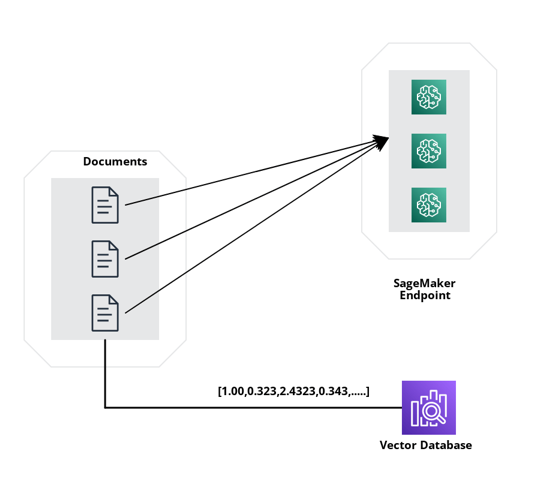
Adding instances will take some time. Moreover, if users consistently upload sets of documents, the challenge arises of concurrently managing document processing tasks such as pre-processing while simultaneously uploading content to the designated endpoint. This is precisely where the third iteration becomes pivotal.
Third Iteration Approach: Multi-threading at the client side.
Through this third iteration, when users upload multiple documents, we can harness the power of multi-threading to efficiently handle document processing prior to initiating calls to the endpoint.
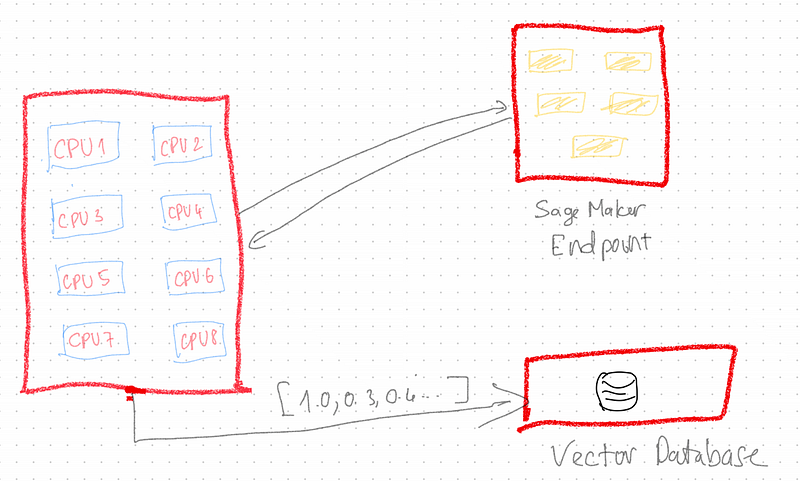
(Sorry for the ugly image, I couldn't find any free tools to draw architects)
For instance, when a user uploads a batch of 5 documents, rather than sequentially processing and uploading each document to the embedding endpoint one by one, the approach involves utilizing the multi-threading capabilities of your computer. In this setup, individual processors of your CPU are assigned to handle distinct documents, simultaneously uploading them to the embedding endpoint. This strategy accelerates client-side processing, and you still depend heavily on the scaling capabilities of the endpoint to manage the increased load effectively.
def process_shard(shard, embeddings_model_endpoint_name, aws_region, os_index_name, os_domain_ep, os_http_auth) -> int:
    st = time.time()
    embeddings = create_sagemaker_embeddings_from_js_model(embeddings_model_endpoint_name, aws_region)
    docsearch = OpenSearchVectorSearch(index_name=os_index_name,
                                       embedding_function=embeddings,
                                       opensearch_url=os_domain_ep,
                                       http_auth=os_http_auth)
    docsearch.add_documents(documents=shard)
    et = time.time() - st
    return 0

.............

with mp.Pool(processes = args.process_count) as pool:
        results = pool.map(partial(process_shard,
                                   embeddings_model_endpoint_name=args.embeddings_model_endpoint_name,
                                   aws_region=args.aws_region,
                                   os_index_name=args.opensearch_index_name,
                                   os_domain_ep=args.opensearch_cluster_domain,
                                   os_http_auth=http_auth),
                           shards[shard_start_index:])
Nice to have: API Gateway in front of embedding endpoint
To enhance both the security and the API-oriented nature of your endpoint, implementing an API Gateway in front of the embedding endpoint is a prudent step. This API Gateway functions as a protective gateway, performing essential tasks like token management and comprehensive API management before routing the calls to the actual API.
Optional consideration: Having your own infra
This approach will move away from our comfort zone and go straight to the software engineer. Ideally, we want to have our own API version and want to develop it from scratch, well when I say from scratch, it is not exactly building from group up. We have plenty of frameworks both front-end and back-end and even a sample code to quick and easy to start an API nowadays. It is long gone the day it took a few days to spin up an API project, with all the advanced libraries/tools/no-low code now, it can take you only a few hours to a day to get an API project up and running. While this endeavour undoubtedly demands a substantial investment of time for development, the benefits lie in constructing our infrastructure from scratch. This affords us complete customization of the code, allowing us full control and the freedom to implement any necessary modifications as needed.
Now, let’s discuss the (1)
Scale Enterprise-base B2B LLM Application
In the context of an enterprise-level LLM application where the typical use case involves uploading and embedding a substantial number of documents ranging from 1 million to 10 million, the third approach with multi-threading and integrated Sagemaker scaling could indeed be a prudent choice.
Leveraging multi-threading to concurrently process documents can significantly expedite the process, especially when dealing with such a large volume of data. Additionally, the built-in scaling capabilities offered by Sagemaker can provide a more streamlined way to handle the scaling demands that come with such a high volume of uploads and embeddings.
So, Should we go with the third approach above with multi-threading + built-in Sagemaker scaling?
Let’s do some quick calculations.
Assuming you have 1 million documents. Your PC is a good one with 16 processors. Hence, each processor will process 62,500 documents. We all know that the embedding endpoint is the first point of bottleneck, but let's just assume we already scale the embedding endpoint beforehand where on average, it takes 3 seconds to return the embedding data, hence, 187,500 seconds a.k.a 52 hours aka ~2.1 days to process 1 million documents (very optimistic, the real use case is way more). I guess you are thinking 2 days to process 1 million documents is not too bad but what if you have 10 million documents or simply 10 customers processing 1 million documents roughly simultaneously? Not so a good number now ayy.
So with this requirement, we cannot use the scale strategy that we’ve discussed in the previous section. It is because
- Long processing time
- As the analysis illustrates, the scalability concerns can escalate quickly, it is hard to predict the level of scaling of the embedding endpoint. In addition, scaling based on traffic is unpredicted and costly.
With that foreseeable difficulty, we will need a different solution for this system.
First Iteration: Use SageMaker Job with Multi-Threading
We will need an embedding endpoint for sure, the embedding endpoint is not going anywhere, but that embedding endpoint will be used for normal queries when users ask the question on their doc. However, to enable users to pose questions about their documents, the prerequisite is the initial embedding of data. Accomplishing this data embedding necessitates the execution of a SageMaker job. For some of you who are not familiar with the SageMaker job, think about it as encapsulated containers where you assemble all necessary components for the job, and the container undertakes predefined and specific tasks based on the provided input. And of course, the incorporation of multi-threading within these containers becomes an intuitive approach to expedite the processing workflow.
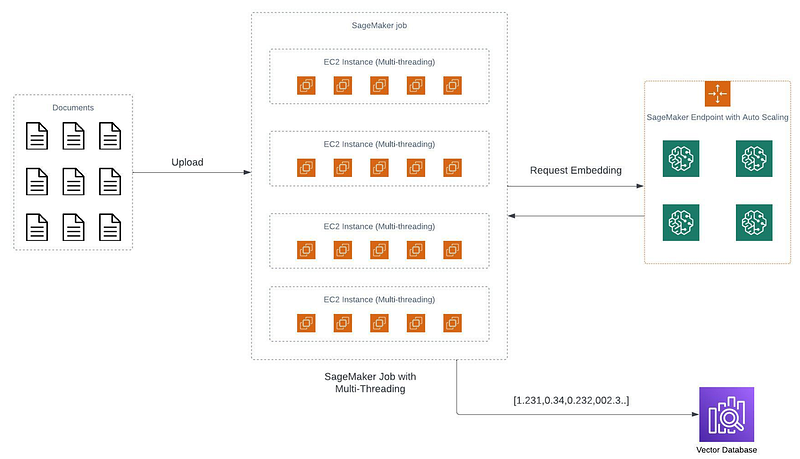
Let’s revisit the scenario presented earlier. Imagine procuring 10 containers, each equipped with 16 CPUs. When dealing with 1 million documents, each container would effectively handle 100,000 documents, and within each container, the 16 processors would be assigned 6,250 documents each. Assuming each document takes approximately 3 seconds to process, the total processing time would amount to 18,750 seconds, equivalent to 316 minutes or approximately 5 hours.
Example of code spinet
# setup the ScriptProcessor with the above parameters
processor = ScriptProcessor(base_job_name=base_job_name,
                            image_uri=image_uri,
                            role=aws_role,
                            instance_type=instance_type,
                            instance_count=instance_count,
                            command=["python3"],
                            tags=tags)

# setup input from S3, note the ShardedByS3Key, this ensures that
# each instance gets a random and equal subset of the files in S3.
inputs = [ProcessingInput(source=f"s3://{bucket}/{app_name}/{DOMAIN}",
                          destination='/opt/ml/processing/input_data',
                          s3_data_distribution_type='ShardedByS3Key',
                          s3_data_type='S3Prefix')]
This remarkable reduction from 2 days of data processing down to a mere 5 hours is undeniably impressive. For those with the flexibility to allocate additional resources, investing in another set of 10 containers could further slash the processing time, resulting in even more expedited data processing.
Second Iteration: Containerize Embedding Endpoint into SageMaker Jobs
We can see that with the first iteration, the bottleneck is still embedding the endpoint. While we assumed that the embedding endpoint could scale seamlessly to manage a million requests, this hasn’t materialized in practice. Essentially, the first iteration merely entails transitioning the document processing from a local machine to a cloud environment. This involves provisioning 10 cloud-based computers and distributing the data evenly among them, essentially delegating identical tasks to each.
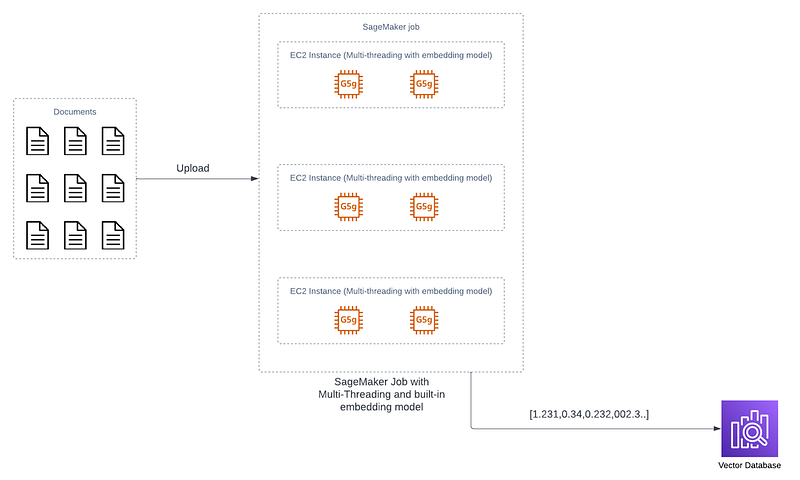
However, these tasks all rely on calls to the embedding endpoint, a known scalability concern. To enhance performance, the strategy involves relocating the embedding endpoint functionality back into the container. This translates to eliminating the need to make calls to the embedding endpoint for the container’s task. Instead, the embedding model is encapsulated within the container, and the container itself handles the embedding task, thereby circumventing the previous bottleneck associated with endpoint scaling.
And again: We will need an embedding endpoint for sure, the embedding endpoint is not going anywhere, but that embedding endpoint will be used to embed the queries when from the user before performing any data retrieval instead of embedding our database.
In Summary
In this article, we have gone through different approaches for building production-ready embedding with the help of AWS SageMaker. We have gone from the simplest approach with just one single SageMaker endpoint to discussing multiple ways of scaling depending on the use case.
The key takeaway is:
- You always need an embedding endpoint with auto-scaling
- If your app target to average users, then use multi-threading from client-side to fasten the embedding process
- If your app target business with the potential of handling dozen of thousands of documents at once, then go with the AWS SageMaker Processing job with the built-in embedding model.
But no matter what type of your application, you still need an embedding endpoint at scale so that every time user asks a question, the embedding endpoint will do it job to return the embedded data
References:
Repo:
AWS SageMaker Job: https://docs.aws.amazon.com/sagemaker/latest/dg/processing-job.html
Python Multi-threading: https://realpython.com/intro-to-python-threading/
Subscribe to my substack as I cover more ML in-depth: https://howaibuildthis.substack.com/


