
Doctest in Python

Introduction
Doctest is a simple but useful testing method for Python programs. Compared with unit test, doctest doesn’t require an independent script to write test cases. Test cases can just be written in the doc information (contents within triple single/double quotes) of a Python function. Then these cases can test the function by using the doctest module.
The
doctestmodule searches for pieces of text that look like interactive Python sessions, and then executes those sessions to verify that they work exactly as shown. (python document)
A Simple Example
Let’s use doctest for a wrong abs() function:
The result is as following:
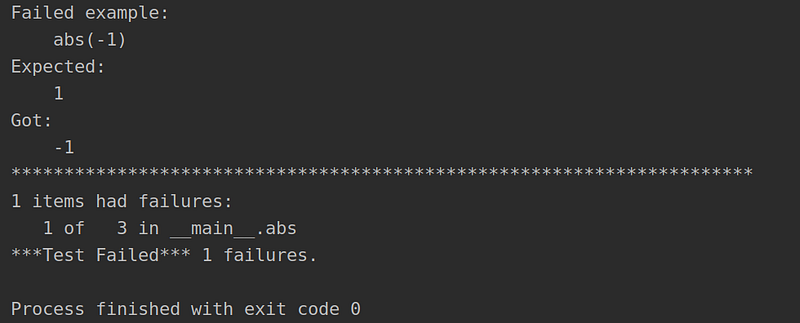
As the above example shown, the doctest is really a convenient and simple way to test the function.
In a nutshell, there are just 3 steps:
- import
doctestmodule - write the test cases within triple single/double quotes using
- use
doctest.testmod()to run doctest
Note: The doctest strictly follows the input and output styles of the Python shell. Therefore, don’t forget the >>> of every input.
If all test cases are passed, the doctest will print nothing.
More Tips of Doctest
1. To Print More Information
In doctest.testmod , there is an important parameter called verbose .
It’s set to False by default, which means that when running the test, only failed cases will output detailed information. If you would like to get full information of every cases, just set it to True .
if __name__ == '__main__':
    doctest.testmod(verbose=True)
2. Another Method to Run Doctest
Actually, we don’t have to write the if __name__ == '__main__': block. We can run doctest directly in the terminal:
$ python -m doctest wrong_abs.py Would like to set verbose to True ? No problem! 👌
$ python -m doctest -v wrong_abs.py3. Put Test Cases to A File
Sometimes, it could be a little messy if we put both comments and test cases below the function. No worries, we can put all the test cases to an independent file and still run doctest perfectly.
For example, let’s create a file called test_cases.txt and put “doctest style” test cases into it:
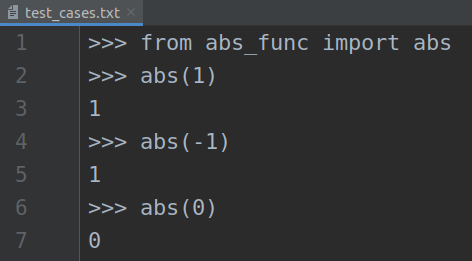
Then run the doctest by this command:
python -m doctest test_cases.txtThe result is identical with the previous one.
Conclusion
Doctest is an easy-to-use test method for Python programs. Using this technique well can help your get a bug-free code.
Thanks for reading.
Related Posts:
More Python Tutorials:


