
avatarTiexin Guo

Free AI web copilot to create summaries, insights and extended knowledge, download it at here

6767

Abstract

from a file</li><li>write: write data to a file</li><li>open: open a file for subsequent reading or writing</li><li>execve: run an executable program</li><li>chown: change the owner of a file</li><li>clone: create a new process</li></ul><h1 id="0792">Permissions</h1><figure id="360d"><img src="https://cdn-images-1.readmedium.com/v2/resize:fit:800/1*O35Ar59cEoQpWTVMsckNaQ.jpeg"><figcaption></figcaption></figure><p id="16ee">On Linux, any Linux system, whether you are using docker containers or not, you are using files. <a href="https://en.wikipedia.org/wiki/Everything_is_a_file">Everything is a file in Linux</a>. Not only documents but also hardware like disks, keyboards, monitors, even network communications, are all exposed through the filesystem. And that is why permission is the cornerstone of security.</p><figure id="897c"><img src="https://cdn-images-1.readmedium.com/v2/resize:fit:800/1*l2wRcr87kqZrXZwRBgTxjg.png"><figcaption></figcaption></figure><p id="aea1">I won’t cover too much about regular file permissions because I assume everyone is familiar with it already. What is interesting, is <i>setuid</i> and <i>setgid.</i></p><h2 id="3519">setuid</h2><p id="592c">Normally, when you execute a file, the process that gets started inherits your user ID. If the file has the <i>setuid</i> bit set, the process will have the user ID of the file’s owner. Let’s do an experiment with the command <i>sleep</i>, but in order to not change the default <i>sleep</i>, let’s copy it first:</p><div id="a852"><pre>vagrant@vagrant ~ cp /bin/<span class="hljs-keyword">sleep</span> ./<span class="hljs-keyword">my</span>-<span class="hljs-keyword">sleep</span> vagrant@vagrant ~ ll ./<span class="hljs-keyword">my</span>-<span class="hljs-keyword">sleep</span> -rwxr-xr-<span class="hljs-keyword">x</span> <span class="hljs-number">1</span> vagrant vagrant <span class="hljs-number">35000</span> Jun <span class="hljs-number">8</span> 09:<span class="hljs-number">25</span> ./<span class="hljs-keyword">my</span>-<span class="hljs-keyword">sleep</span>*</pre></div><p id="18af">As you can see, the <i>my-sleep </i>is owned by the vagrant user. But now let’s run it as the root user:</p><div id="2ef9"><pre>vagrant@vagrant ~ $ sudo ./<span class="hljs-keyword">my</span>-<span class="hljs-keyword">sleep</span> <span class="hljs-number">100</span></pre></div><p id="a6f3">In another terminal, you can see the running process:</p> <figure id="90df"> <div> <div>

            <iframe class="gist-iframe" src="/gist/IronCore864/a792baa712ad25363999b8b3d2c5ed43.js" allowfullscreen="" frameborder="0" height="undefined" width="undefined">
          </div>
        </div>
    </figure></iframe></div></div></figure><p id="ab4e">In the bash shell, we started a <i>sudo</i> command, that is why it’s running as UID 0, and the <i>my-sleep</i> command itself is also running as UID 0.</p><p id="1f3e">Now let’s set the <i>setuid</i> bit for the <i>my-sleep</i>:</p><div id="02f1"><pre>vagrant@vagrant ~ $ <span class="hljs-keyword">chmod</span> +s ./<span class="hljs-keyword">my</span>-<span class="hljs-keyword">sleep</span>

vagrant@vagrant ~ ll ./<span class="hljs-keyword">my</span>-<span class="hljs-keyword">sleep</span> -rwsr-sr-<span class="hljs-keyword">x</span> <span class="hljs-number">1</span> vagrant vagrant <span class="hljs-number">35000</span> Jun <span class="hljs-number">8</span> 09:<span class="hljs-number">25</span> ./<span class="hljs-keyword">my</span>-<span class="hljs-keyword">sleep</span>*</pre></div><p id="f3ff">The second bit “s” replaces “x”, meaning the <i>setuid</i> bit is set.</p><p id="a50b">We do the same experiment by running:</p><div id="9512"><pre>vagrant@vagrant ~ sudo ./<span class="hljs-keyword">my</span>-<span class="hljs-keyword">sleep</span> <span class="hljs-number">100</span></pre></div><p id="244a">In another terminal, we see the running process again:</p> <figure id="174d"> <div> <div>

            <iframe class="gist-iframe" src="/gist/IronCore864/4b8e9ccca43c3eeb2acbc3dd3ace912e.js" allowfullscreen="" frameborder="0" height="undefined" width="undefined">
          </div>
        </div>
    </figure></iframe></div></div></figure><p id="6c5c">Now as you can see, the <i>sudo</i> is still running as UID 0 but the <i>my-sleep</i> command is running as UID 1000 which is the UID of the vagrant user, meaning the <i>my-sleep</i> command didn't start with the user who runs it but started with the file owner.</p><p id="f4ab">The most famous use case for this probably is the command <i>ping</i>.</p><div id="da9c"><pre>vagrant@vagrant ~ $ ll /bin/ping

-rwsr-xr-x<span class="hljs-number"> 1 </span>root root<span class="hljs-number"> 64424 </span>Jun<span class="hljs-number"> 28 </span><span class="hljs-number"> 2019 </span>/bin/ping*</pre></div><p id="0084">As you can see, the command ping’s owner is the root and it has the setuid bit set, and this is because, since ping performs network-related tasks, it calls network-related syscalls, which require escalated permission.</p><p id="c725">Let’s do an experiment by removing the setuid bit of it:</p><div id="2fc4"><pre>vagrant<span class="hljs-symbol">@vagrant</span> ~ cp /bin/<span class="hljs-built_in">ping</span> ./my-<span class="hljs-built_in">ping</span> vagrant<span class="hljs-symbol">@vagrant</span> ~ ll my-<span class="hljs-built_in">ping</span> -rwxr-xr-x <span class="hljs-number">1</span> vagrant vagrant <span class="hljs-number">64424</span> Jun <span class="hljs-number">8</span> <span class="hljs-number">09</span>:<span class="hljs-number">33</span> my-<span class="hljs-built_in">ping</span>* vagrant<span class="hljs-symbol">@vagrant</span> ~ ./my-<span class="hljs-built_in">ping</span> google.com <span class="hljs-built_in">ping</span>: socket: Operation <span class="hljs-literal">not</span> permitted</pre></div><p id="e00d">As you can see above, your ping will not run because it is owned by the vagrant user, and it can’t create a socket. With sudo, you can run <i>my-ping.</i> If we change the owner to root user and give it setuid bit, it will run properly:</p><div id="3a8f"><pre>vagrant@vagrant ~ sudo <span class="hljs-keyword">chown</span> root ./<span class="hljs-keyword">my</span>-ping vagrant@vagrant ~ sudo <span class="hljs-keyword">chmod</span> +s ./<span class="hljs-keyword">my</span>-ping vagrant@vagrant ~ ll <span class="hljs-keyword">my</span>-ping -rwsr-sr-<span class="hljs-keyword">x</span> <span class="hljs-number">1</span> root vagrant <span class="hljs-number">64424</span> Jun <span class="hljs-number">8</span> 09:<span class="hljs-numb

Options

er">36</span> <span class="hljs-keyword">my</span>-ping* vagrant@vagrant ~ ./<span class="hljs-keyword">my</span>-ping google.com PING google.com (<span class="hljs-number">216.58</span>.<span class="hljs-number">207.78</span>) <span class="hljs-number">56</span>(<span class="hljs-number">84</span>) bytes of data. <span class="hljs-number">64</span> bytes from fra16s25-in-f14.<span class="hljs-number">1</span>e10<span class="hljs-number">0</span>.net (<span class="hljs-number">216.58</span>.<span class="hljs-number">207.78</span>): icmp_seq=<span class="hljs-number">1</span> ttl=<span class="hljs-number">63</span> <span class="hljs-keyword">time</span>=<span class="hljs-number">25.4</span> ms</pre></div><p id="5b39">setgid works similarly except that the process’s effective group ID (GID) is changed to the group owner of the file, and a user is granted access based on permissions granted to that group. The most famous example would be the crontab:</p><div id="fe3d"><pre>vagrant@vagrant ~ ll /usr/bin/crontab -rwxr-sr-x<span class="hljs-number"> 1 </span>root crontab<span class="hljs-number"> 39352 </span>Nov<span class="hljs-number"> 16 </span><span class="hljs-number"> 2017 </span>/usr/bin/crontab*</pre></div><h1 id="74ca">Capabilities</h1><figure id="0a94"><img src="https://cdn-images-1.readmedium.com/v2/resize:fit:800/0*Vd1lnY_Bt-Ast9Se"><figcaption>Photo by <a href="https://unsplash.com/@marjan_blan?utm_source=medium&amp;utm_medium=referral">Марьян Блан | @marjanblan</a> on <a href="https://unsplash.com?utm_source=medium&amp;utm_medium=referral">Unsplash</a></figcaption></figure><blockquote id="1807"><p>For the purpose of performing permission checks, traditional UNIX implementations distinguish two categories of processes: privileged processes (whose effective user ID is 0, referred to as superuser or root), and unprivileged processes (whose effective UID is nonzero). Privileged processes bypass all kernel permission checks, while unprivileged processes are subject to full permission checking based on the process’s credentials (usually: effective UID, effective GID, and supplementary group list).</p></blockquote><blockquote id="8c90"><p>Starting with kernel 2.2, Linux divides the privileges traditionally associated with superuser into distinct units, known as capabilities, which can be independently enabled and disabled. Capabilities are a per-thread attribute.</p></blockquote><p id="75ab">From the man page of the capabilities.</p><h2 id="86f5">History</h2><p id="9bb3">So, what is before kernel 2.2?</p><p id="80e8">Before capabilities, we only had the binary system of privileged and non-privileged processes, which means, either your process can do everything (admin level syscalls), or it was restricted like a normal user. to the subset of a standard user.</p><p id="8a3a">If you want to run some program (like we tested above, the <i>ping</i>) by normal users but it requires privileged syscalls, we must use the setuid bit. However, this literally grants our “my-ping” all privileged access. Since software has bugs, these executables that have setuid bit are the primary targets for hackers: if you can find a bug in ping, you can become root.</p><p id="7e52">This wasn’t a great situation of course, and based on today’s modern cloud security situation, you would guess what came after that: that’s right, “RBAC”.</p><p id="1d5f">The idea is simple: split all the possible privileged kernel calls into smaller groups (roles), and only grant access to a certain thread when needed. This is the history of Linux capabilities.</p><h2 id="ac46">Experiment</h2><p id="bcbb">We do another experiment with the ping again:</p><div id="2849"><pre>vagrant<span class="hljs-variable">@vagrant</span> ~ <span class="hljs-variable"> </span>cp /bin/ping myping vagrant<span class="hljs-variable">@vagrant</span> ~ <span class="hljs-variable"> </span>ll myping -rwxr-xr-x <span class="hljs-number">1</span> vagrant vagrant <span class="hljs-number">64424</span> Jun <span class="hljs-number">8</span> <span class="hljs-number">10</span>:<span class="hljs-number">0</span>1 myping* vagrant<span class="hljs-variable">@vagrant</span> ~ <span class="hljs-variable"></span>getcap ./myping vagrant<span class="hljs-variable">@vagrant</span> ~</pre></div><p id="b3ca">We did a copy, and it doesn’t have setuid bit, so you can’t use it as a normal non-root user. Here we also run a command <i>getcap </i>which shows all the capabilities the file has, which in this case, is none. After some googling, the ping actually needs the CAP_NET_RAW, which:</p><blockquote id="c1dc"><p>- Use RAW and PACKET sockets</p></blockquote><blockquote id="4e01"><p>- bind to any address for transparent proxying.</p></blockquote><p id="d459">(again from the capabilities man page).</p><p id="0ec1">So let’s add it:</p><div id="135f"><pre>vagrant<span class="hljs-variable">@vagrant</span> ~ <span class="hljs-variable"> </span>sudo setcap <span class="hljs-string">'cap_net_raw+p'</span> ./myping vagrant<span class="hljs-variable">@vagrant</span> ~ <span class="hljs-variable"> </span>getcap ./myping ./myping = cap_net_raw+p vagrant<span class="hljs-variable">@vagrant</span> ~ <span class="hljs-variable"></span>ll myping -rwxr-xr-x <span class="hljs-number">1</span> vagrant vagrant <span class="hljs-number">64424</span> <span class="hljs-title class_">Jun</span> <span class="hljs-number">8</span> <span class="hljs-number">10</span><span class="hljs-symbol">:</span><span class="hljs-number">01</span> myping*</pre></div><p id="fcff">As you can see, after adding the capability, it has it, and it doesn’t have setuid bit. Now we run it as a normal user:</p><div id="1339"><pre><span class="hljs-attribute">vagrant</span>@vagrant ~ ./myping google.com <span class="hljs-attribute">PING</span> google.com (<span class="hljs-number">216.58.207.78</span>) <span class="hljs-number">56</span>(<span class="hljs-number">84</span>) bytes of data. <span class="hljs-attribute">64</span> bytes from fra16s25-in-f14.<span class="hljs-number">1</span>e100.net (<span class="hljs-number">216.58.207.78</span>): icmp_seq=<span class="hljs-number">1</span> ttl=<span class="hljs-number">63</span> time=<span class="hljs-number">26</span>.<span class="hljs-number">6</span> ms</pre></div><p id="a785">Success.</p><p id="b022">So, to sum up:</p><ul><li>applications run in user space</li><li>userspace programs do syscalls to interact with kernel in order to do most of the tasks</li><li>programs can have setuid/setgid bit to do privileged syscalls</li><li>programs can use capabilities to achieve more fine-grained privilege controls</li></ul><p id="696c">In the next article, we are going to talk about control groups.</p></article></body>

Florence, Italy

Docker under the Hood — 3. Userspace, Kernel, Syscalls, Permissions, setuid, setgid, and Capabilities

This article is part of my “Docker under the Hood” series. For your convenience, here’s the list of my previous articles of this series:

A container is just a Process

Photo by Thais Morais on Unsplash

You might think: what do Linux permissions and capabilities have anything to do with docker?

Truth is, every container is, in fact, just a running process, as we shall prove now.

You can download the needed vagrant file from this GitHub repo so that you can do all the experiments mentioned in this series of articles yourself.

As you shall see in the above experiment:

  • before we run anything, there is no process named “hello” in the host (in this case, a virtual host which is a vagrant box)
  • we started a container (with a very simple hello world app written in Golang, see here if you are interested in it, if not, there is only a “/app/hello” file in the container)
  • after the container is started, you can see it’s up and running by docker ps
  • then there is also a new process running, in the host, named “hello”

So, to summarize, under the hood of docker, a container is not much more than a mere process.

This is all-important, because: containers run Linux processes that are visible from the host, as we demonstrated above. A containerized process, just as any other Linux process, uses system calls, and needs permissions. And that is why all the traditional Linux stuff like system calls, namespaces, control groups, permissions, capabilities are all related to docker. It’s going to be helpful to understand some of the fundamental features of Linux so that we can see how they affect security, and in particular how they apply to containers.

And in this article and the next few ones, we are going to focus more on the Linux part. In this article, I’ll cover system calls, file-based permissions, and capabilities. If you’re familiar with these concepts, feel free to jump to my next article which I haven’t written yet.

Userspace, Kernel, and Syscalls
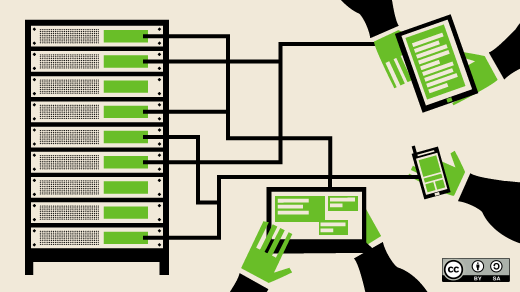
Applications run in what’s called user space, which has a lower level of privilege than the operating system kernel. If an application wants to do something like accessing a file, communicate using a network, create a file, or even find the time of day, it has to ask the kernel to do it on the application’s behalf. The kernel does it for you then hands control back to userspace. The programmatic interface that the userspace code uses to make these requests of the kernel is known as the system call or syscall interface.

As the name suggests, syscalls are system calls, and they’re the way that you can make requests from user space into the Linux kernel.

There is a common mechanism for making all system calls transition into the kernel, which is handled by the libc library. Userspace code sets up some registers including an ID of the system call it wants to make and any parameters it needs to pass to the system call. It triggers a “trap” to transition control to the kernel. That’s how userspace code makes requests of the kernel.

Linux also has pseudo filesystems that allow the kernel to communicate information to userspace. The contents look like ordinary directories and files.

The /proc directory is a great example. Look inside, and you’ll find all sorts of interesting information about the processes running on a machine. In some cases, like cgroups (control groups), user-space can configure parameters by writing into files under these pseudo filesystems.

It’s particularly interesting when you’re using containers because the host’s /proc holds information about all the containerized processes. This includes environment variables, which are also stored in the /proc pseudo-filesystem, meaning that your host machine has access to the environment for all your running containers. This potentially has security consequences if you’re passing secrets like certificates or database passwords into your containers through environment variables.

Many programmers working on normal applications may not feel that they’re using syscalls very often. Application developers rarely, if ever, need to worry about system calls directly, as they are usually wrapped in higher-level programming abstractions. The lowest-level abstraction you’re likely to come across as an app developer is the glibc library or the Golang syscall package.

In practice, however, we use syscalls a lot, because even everyday activities like making files or changing directories involve syscalls on Linux.

There are some 300+ different system calls, with the number varying according to the version of the Linux kernel. Here are a few examples:

  • read: read data from a file
  • write: write data to a file
  • open: open a file for subsequent reading or writing
  • execve: run an executable program
  • chown: change the owner of a file
  • clone: create a new process

Permissions

On Linux, any Linux system, whether you are using docker containers or not, you are using files. Everything is a file in Linux. Not only documents but also hardware like disks, keyboards, monitors, even network communications, are all exposed through the filesystem. And that is why permission is the cornerstone of security.
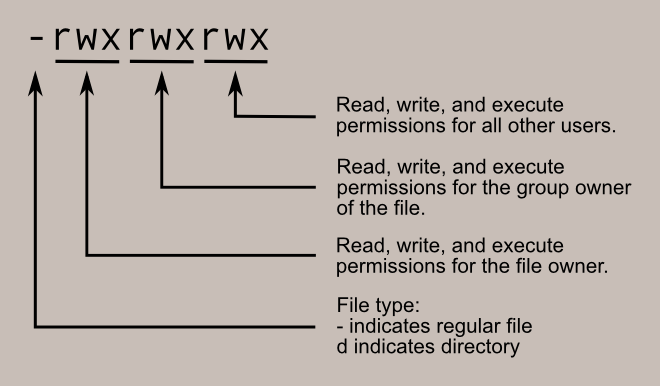
I won’t cover too much about regular file permissions because I assume everyone is familiar with it already. What is interesting, is setuid and setgid.

setuid

Normally, when you execute a file, the process that gets started inherits your user ID. If the file has the setuid bit set, the process will have the user ID of the file’s owner. Let’s do an experiment with the command sleep, but in order to not change the default sleep, let’s copy it first:

vagrant@vagrant ~ $ cp /bin/sleep ./my-sleep
vagrant@vagrant ~ $ ll ./my-sleep
-rwxr-xr-x 1 vagrant vagrant 35000 Jun  8 09:25 ./my-sleep*

As you can see, the my-sleep is owned by the vagrant user. But now let’s run it as the root user:

vagrant@vagrant ~ $ sudo ./my-sleep 100

In another terminal, you can see the running process:

In the bash shell, we started a sudo command, that is why it’s running as UID 0, and the my-sleep command itself is also running as UID 0.

Now let’s set the setuid bit for the my-sleep:

vagrant@vagrant ~ $ chmod +s ./my-sleep
vagrant@vagrant ~ $ ll ./my-sleep
-rwsr-sr-x 1 vagrant vagrant 35000 Jun  8 09:25 ./my-sleep*

The second bit “s” replaces “x”, meaning the setuid bit is set.

We do the same experiment by running:

vagrant@vagrant ~ $ sudo ./my-sleep 100

In another terminal, we see the running process again:

Now as you can see, the sudo is still running as UID 0 but the my-sleep command is running as UID 1000 which is the UID of the vagrant user, meaning the my-sleep command didn't start with the user who runs it but started with the file owner.

The most famous use case for this probably is the command ping.

vagrant@vagrant ~ $ ll /bin/ping
-rwsr-xr-x 1 root root 64424 Jun 28  2019 /bin/ping*

As you can see, the command ping’s owner is the root and it has the setuid bit set, and this is because, since ping performs network-related tasks, it calls network-related syscalls, which require escalated permission.

Let’s do an experiment by removing the setuid bit of it:

vagrant@vagrant ~ $ cp /bin/ping ./my-ping
vagrant@vagrant ~ $ ll my-ping
-rwxr-xr-x 1 vagrant vagrant 64424 Jun  8 09:33 my-ping*
vagrant@vagrant ~ $ ./my-ping google.com
ping: socket: Operation not permitted

As you can see above, your ping will not run because it is owned by the vagrant user, and it can’t create a socket. With sudo, you can run my-ping. If we change the owner to root user and give it setuid bit, it will run properly:

vagrant@vagrant ~ $ sudo chown root ./my-ping
vagrant@vagrant ~ $ sudo chmod +s ./my-ping
vagrant@vagrant ~ $ ll my-ping
-rwsr-sr-x 1 root vagrant 64424 Jun  8 09:36 my-ping*
vagrant@vagrant ~ $ ./my-ping google.com
PING google.com (216.58.207.78) 56(84) bytes of data.
64 bytes from fra16s25-in-f14.1e100.net (216.58.207.78): icmp_seq=1 ttl=63 time=25.4 ms

setgid works similarly except that the process’s effective group ID (GID) is changed to the group owner of the file, and a user is granted access based on permissions granted to that group. The most famous example would be the crontab:

vagrant@vagrant ~ $ ll /usr/bin/crontab
-rwxr-sr-x 1 root crontab 39352 Nov 16  2017 /usr/bin/crontab*

Capabilities

Photo by Марьян Блан | @marjanblan on Unsplash

For the purpose of performing permission checks, traditional UNIX implementations distinguish two categories of processes: privileged processes (whose effective user ID is 0, referred to as superuser or root), and unprivileged processes (whose effective UID is nonzero). Privileged processes bypass all kernel permission checks, while unprivileged processes are subject to full permission checking based on the process’s credentials (usually: effective UID, effective GID, and supplementary group list).

Starting with kernel 2.2, Linux divides the privileges traditionally associated with superuser into distinct units, known as capabilities, which can be independently enabled and disabled. Capabilities are a per-thread attribute.

From the man page of the capabilities.

History

So, what is before kernel 2.2?

Before capabilities, we only had the binary system of privileged and non-privileged processes, which means, either your process can do everything (admin level syscalls), or it was restricted like a normal user. to the subset of a standard user.

If you want to run some program (like we tested above, the ping) by normal users but it requires privileged syscalls, we must use the setuid bit. However, this literally grants our “my-ping” all privileged access. Since software has bugs, these executables that have setuid bit are the primary targets for hackers: if you can find a bug in ping, you can become root.

This wasn’t a great situation of course, and based on today’s modern cloud security situation, you would guess what came after that: that’s right, “RBAC”.

The idea is simple: split all the possible privileged kernel calls into smaller groups (roles), and only grant access to a certain thread when needed. This is the history of Linux capabilities.

Experiment

We do another experiment with the ping again:

vagrant@vagrant ~ $ cp /bin/ping myping
vagrant@vagrant ~ $ ll myping
-rwxr-xr-x 1 vagrant vagrant 64424 Jun  8 10:01 myping*
vagrant@vagrant ~ $ getcap ./myping
vagrant@vagrant ~ $

We did a copy, and it doesn’t have setuid bit, so you can’t use it as a normal non-root user. Here we also run a command getcap which shows all the capabilities the file has, which in this case, is none. After some googling, the ping actually needs the CAP_NET_RAW, which:

- Use RAW and PACKET sockets

- bind to any address for transparent proxying.

(again from the capabilities man page).

So let’s add it:

vagrant@vagrant ~ $ sudo setcap 'cap_net_raw+p' ./myping
vagrant@vagrant ~ $ getcap ./myping
./myping = cap_net_raw+p
vagrant@vagrant ~ $ ll myping
-rwxr-xr-x 1 vagrant vagrant 64424 Jun  8 10:01 myping*

As you can see, after adding the capability, it has it, and it doesn’t have setuid bit. Now we run it as a normal user:

vagrant@vagrant ~ $ ./myping google.com
PING google.com (216.58.207.78) 56(84) bytes of data.
64 bytes from fra16s25-in-f14.1e100.net (216.58.207.78): icmp_seq=1 ttl=63 time=26.6 ms

Success.

So, to sum up:

  • applications run in user space
  • userspace programs do syscalls to interact with kernel in order to do most of the tasks
  • programs can have setuid/setgid bit to do privileged syscalls
  • programs can use capabilities to achieve more fine-grained privilege controls

In the next article, we are going to talk about control groups.

Linux
Docker
Security
DevOps
Software Development
Recommended from ReadMedium