Docker is Revolutionizing PHP Development in 2024
How to use Docker with PHP
If you are not a member, you can access to full text here.
Hello everyone! I hope everything is okay. Today the wonderful lives of Docker go on a journey and we will learn step by step how to containerize our PHP storage.
Docker is a powerful tool that greatly simplifies the development and production processes, and you may be wondering how to go about it with a popular language like PHP. Don’t worry, this guide will tell you step by step how to containerize your PHP applications with Docker.
If you’re ready, let’s start!
Why Should We Use Docker?
So, let’s put together a few reasons to fall under the spell of Docker. First of all, I can say that Docker makes the development process a little more fun. Jokes aside, Docker really makes your job easier because it packages all the components of your application and brings them together in its own little world.
So problems like “my computer does this job but yours doesn’t” are a thing of the past. Also, thanks to Docker’s portability, moving your application from one place to another is no longer a tedious task. Just pick up the container, take it to another machine and that’s it!

And another great feature is Docker’s lightweight. Yes, it is really light. This means that Docker containers only take up a small amount of space and do not create unnecessary load. Moreover, Docker allows you to use resources much more efficiently. So, you can do more with fewer resources.
Finally, Docker speeds up your work. It automates your development process and simplifies deployment. This means less confusion and more productivity. That’s why we should use Docker, my friends. The way to implement your application faster, safer and easier is through Docker.
Docker Installation and Basics
After downloading and installing Docker on your computer, it is important to understand the working principles of Docker. Docker creates lightweight, portable, and self-capable environments called containers. These containers provide an isolated environment that contains all of your application’s dependencies (e.g. PHP version, web server, database, etc.).
You can download the docker via this url.
Creating Docker Files
As a first step, you should create a file called Dockerfile to create the Docker container of your PHP application. This file tells Docker step by step how to create the container.
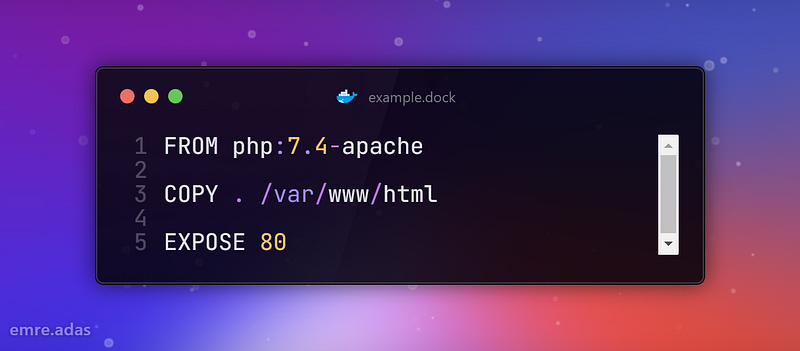
This Dockerfile is based on the official PHP Apache image, copies your application’s files to the container’s /var/www/html directory and exposes port 80 to the outside world.
Creating the Docker Image and Running the Container
After creating the Dockerfile, we need to create the Docker image using this file and then run this image. Images are like a copy of our main source. So it’s like creating a copy from the container and using it.
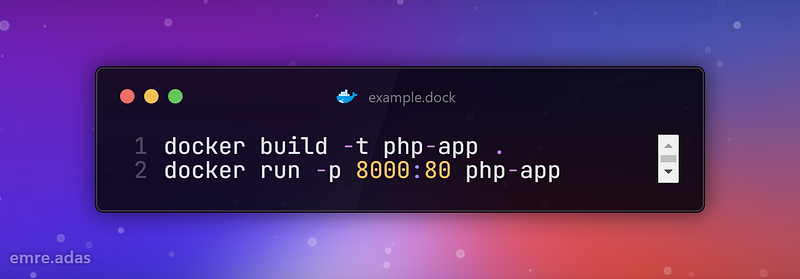
These commands create an image from the Dockerfile and run this image as a container. The container is exposed to port 8000 on your local machine, so you can view your PHP application by going to http://localhost:8000 from your browser.
Making Working with Docker-compose Easier
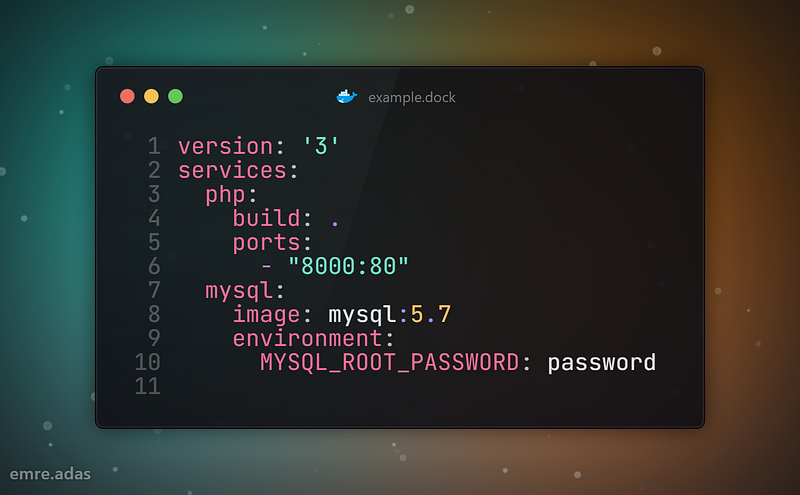
The next step is to build your application more easily using Docker-compose. Docker-compose allows us to define and manage multiple containers in a single file. For example, if you are using a MySQL database alongside your PHP application, you can launch them with a single command.
Conclusion
From what I’ve seen, working with Docker is a truly wonderful experience. Working with him not only makes my work easier, but also makes my development process more enjoyable. For me, Docker is more than just a tool, it’s like a business partner. With it, I can focus more on my projects and progress faster.
All in all, I am very happy to continue my journey with Docker. I look forward to doing many more great projects and discovering new things with him. Let’s step into the magical world of Docker together and continue this amazing journey together.
Happy containerization!
Thanks for coming this far 🎉
- 👏 Could you please clap the story to help spread the article? (50 applause).
You can reach me from the links below:
https://www.linkedin.com/in/yunus-emre-ada%C5%9F-212200174/
https://www.instagram.com/emreyadas/
To access my other articles:


