
Docker for Web Developers: A Practical Introduction to Containerization
Have you ever wished you could package your applications, with all their dependencies, into a single, self-contained unit that you can easily move around and deploy? Well, the secret’s out — Docker allows you to do just that.
Today, we’re going to take a deep dive into Docker, the leading containerization platform. We’ll cover the basics and explain why Docker is a must-know technology for every web developer, especially those just starting in the field. Let’s dive in, shall we?
What Is Docker, and Why Should You Care?
Picture this: You’ve been working on a web application for weeks, and everything runs perfectly on your machine. You deploy it to a production server, and suddenly, things start breaking left, right, and center. The server has different software versions, different libraries, different everything. Now you find yourself saying those dreaded words, “But it works on my machine!”
This is where Docker enters the scene, with its magic wand of ‘containerization.’ Docker allows you to bundle an application with all of its dependencies into a single object called a ‘container.’ This container can then be easily shipped and run anywhere Docker is installed, ensuring that your application will run the same, regardless of any differences in the underlying system.
Docker 101: Images and Containers
Before we delve into code, let’s clarify two key terms in the Docker world: images and containers.
Think of an image as a recipe and a container as a cake. The image is a lightweight, standalone, executable package that includes everything needed to run a piece of software, including the code, a runtime, libraries, environment variables, and config files. The container is a runtime instance of an image — what the image becomes in memory when executed.
So, you use the recipe (image) to bake a cake (container). Just as you can use the same recipe to bake many cakes, you can use a Docker image to create multiple containers.
Now, how can we create a Docker image? That’s where Dockerfiles come into play.
Dockerfiles: Your Recipe for Success
A Dockerfile is a text file that Docker reads to know what environment to set up and what application to run. Here’s a simple example of a Dockerfile for a Node.js application:
# Use an official Node.js runtime as the base image
FROM node:18

# Set the working directory in the Docker image
WORKDIR /usr/src/app

# Copy package.json and package-lock.json to the Docker image
COPY package*.json ./

# Install dependencies in the Docker image
RUN npm install

# Copy the rest of your app's source code to the Docker image
COPY . .

# Make port 8080 available for the app
EXPOSE 8080

# Define the command to run your app
CMD [ "node", "server.js" ]
This Dockerfile tells Docker to do the following:
- Use the official Node.js v18 image as the base.
- Set
/usr/src/appas the working directory. - Copy
package.jsonandpackage-lock.jsoninto the image. - Install the app dependencies using
npm install. - Copy the rest of your application into the image.
- Expose port 8080 (this is the port your app will be available on).
- Run the command
node server.jsto start the app.
With the Dockerfile in place, you can build an image using the docker build command:
docker build -t my-node-app:1.0 .The -t flag is used to tag the image with a name, and the . tells Docker to look for the Dockerfile in the current directory.
Once the image is built, you can run it as a container:
docker run -p 8080:8080 -d my-node-app:1.0The -p flag maps the host's port to the container's port, and the -d flag runs the container in detached mode (in the background).
Docker Compose: Orchestrating Your Containers
For complex applications, managing individual containers can become a tedious task. Enter Docker Compose, a tool for defining and running multi-container Docker applications. With a single file, you define your app’s services, and with a single command, you create and start all the services.
Here’s a basic docker-compose.yml file for a web app with a Node.js service and a Redis service:
services:
  web:
    build: .
    ports:
    - "8080:8080"
    depends_on:
    - redis
  redis:
    image: "redis:alpine"
This Docker Compose file tells Docker to do the following:
- Build the Dockerfile in the current directory for the
webservice. - Map the host’s port 8080 to the
webservice's port 8080. - Create a dependency link between the
webandredisservices. - Use the official Redis Alpine image for the
redisservice.
Now, to get your services up and running, you simply run:
docker compose up
And voila! Your multi-container app is running smoothly.
A Whale of a Time
Docker is like a genie in a bottle (or rather, a whale in a container) that helps you maintain the sanity of your applications across different environments. It provides an extra layer of abstraction and automation of operating-system-level virtualization. The power of Docker lies in its simplicity and speed, making it an essential tool in every web developer’s toolkit.
Remember, your journey into the world of Docker and containerization is not a sprint, but a marathon. There’s a lot more to explore, including Docker Volumes, Docker Networks, and more advanced Docker Compose configurations. But with the foundational understanding you’ve gained today, you’re well on your way to becoming a Docker aficionado.
A Note on Docker Compose Versions: Moving Beyond V1
If you’ve been in the Docker world for some time, you might have experienced or heard of Docker Compose V1. As with any technology, evolution is a constant, and Docker Compose is no exception.
Important Update: As of May 10, 2021, Docker Compose V1 was deprecated and hasn’t received any new releases since then. This means that from the end of June 2023, Compose V1 will officially no longer be supported.
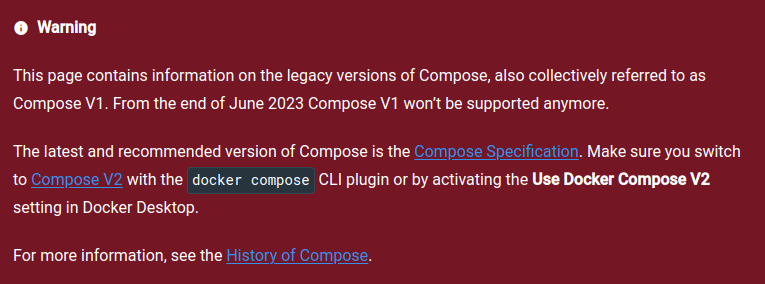
This is not cause for alarm but rather an exciting opportunity to move to newer, more efficient tools! The latest and recommended iteration of Docker Compose is the Compose Specification, commonly referred to as Compose V2.
Ready to Migrate?
For many, migration can seem daunting. However, with the right guidance, it becomes a breeze. If you’re keen to make the move from V1 to V2, Docker has provided a comprehensive migration guide that will walk you through every step.
I strongly encourage every reader to embrace Compose V2. It’s not just about keeping up with the times but ensuring that you’re equipped with the best tools to develop and deploy seamlessly. Remember, in the ever-evolving tech world, staying updated is not just a recommendation; it’s a necessity.
Conclusion: Full Steam Ahead
In the world of web development, Docker is not a passing trend — it’s the new standard. It’s transforming the way developers build, ship, and run applications, creating a unified, consistent environment that helps eliminate the “it works on my machine” conundrum.
Whether you’re a junior developer just starting your journey or a seasoned professional looking to stay ahead of the curve, understanding Docker and containerization is a crucial asset. It streamlines your workflow, boosts your productivity, and makes collaboration a breeze.
Remember, a great web developer never stops learning. So, go forth and conquer the seas of containerization. Full steam ahead!
Here are some resources to help you continue your journey with Docker:
- Docker’s Official Documentation — This is an essential resource that covers all the basics and dives into more advanced topics. Their “Get Started” guide is an excellent first step.
- Docker Hub — Docker Hub is the world’s largest public repository of image containers. You can explore a wide range of pre-built images and even share your own.
- Awesome Docker — A curated list of Docker resources and projects on GitHub. It’s a great place to discover new tools and libraries related to Docker.
- What Is a Dockerfile And How To Build It — Best Practices — This guide goes through what Dockerfiles are, how to create one, and some best practices you should follow.
Enjoyed the read? For more on Web Development, JavaScript, Next.js, Cybersecurity, and Blockchain, check out my other articles here:
If you have questions or feedback, don’t hesitate to reach out at [email protected] or in the comments section.
[Disclosure: Every article I pen is a fusion of my ideas and the supportive capabilities of artificial intelligence. While AI assists in refining and elaborating, the core thoughts and concepts stem from my perspective and knowledge. To know more about my creative process, read this article.]