
Docker — attach vs exec commands
In this article, we will explore the difference between docker attach and docker exec commands. Both are used to explore the running containers but there is a slight difference between these two.
clone the below repo for this article.
git clone https://github.com/bbachi/prod-ready-node-rest-api.gitBuild the docker image from Dockerfile.webpack with below command and tag it with the name node-rest-api. you can list the images with command docker images.
docker build -t node-rest-api -f Dockerfile.webpack .
Let’s instantiate the image in a interactive mode with the following command. bash command will override the CMD command in the dockerfile.
docker run -it -p 3090:3070 --name nodeapi node-rest-api bash
you can list all running containers with the following command. we can see container is up about a minute.
docker ps
Docker attach
This command to attach your terminal’s standard input, output, and error (or any combination of the three) to a running container using the container’s ID or name. attach the running container with the following command. you need to press enter once execute this command, docker is waiting for your input.
docker attach nodeapi
once attached, you can do all the cli commands like you can check the node version, run the bundle file, exit etc..
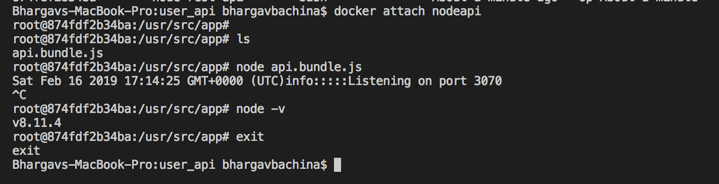
But the problem here once you exit out of this, your container is no logger in the up status. your container is also in exit status.

what if you want to do all this stuff without exiting the running container. that’s where docker exec command comes into picture.
Docker exec
The docker exec command runs a new command in a running container. execute the below command after restarting container nodeapi.
// start the container
docker start nodeapi
// execute the exec command
docker exec -it nodeapi bash
you can exit now and if you list the containers now we can see container is still running.

Conclusion
Both are used to explore the running container if you want to do that with the new command process or without exiting the running container use docker exec.


