avatarMarkfromBoston 🌻Ukraine

Free AI web copilot to create summaries, insights and extended knowledge, download it at here

2198

Abstract

Your Article to your Reading List <i>as soon as you start reading.</i></p><p id="7755"><b>Option #1 — Create the habit: Always Save when you start reading.</b></p><p id="2d56">Sounds easy but in my experience, I really thought the Recently Viewed Tab was on all the platforms. I <b>ass</b>umed! And you may forget, too.</p><p id="5128"><b>Option #2 — It is buried — but there is a path to your desktop Reading History.</b></p><p id="98b2"><b>If you look far right, about halfway down</b>, you will find between To Follow and Recently Saved, “See more suggestions.” It looks like this:</p><p id="d8f5"><b>To Follow</b></p><blockquote id="be9f"><p><b>S<a href="https://medium.com/me/following/suggestions?source=home----------------------------------------">ee more suggestions</a></b></p></blockquote><p id="730d"><b>Recently saved</b></p><p id="a5bc">Yes, <b>“See more suggestions”</b> is the magic door to your reading history. Click on it and you will enter this page with these <b>tabs:</b></p><p id="5f08"><a href="https://medium.com/me/following">Following</a></p><p id="6588"><a href="https://medium.com/me/readinghistory"><b>Reading history</b></a></p><p id="1479"><a href="https://medium.com/me/settings/mute">Muted</a></p><p id="f4e6"><a href="https://medium.com/me/following/suggestions">Suggestions</a></p><p id="48a2">Click on <b>Reading History</b> and you will see the stories that you just read.</p><h2 id="7b57">Not great UX design, but once you get used to it, maybe not too bad.</h2><p id="9da2">Thank you to my special follower, Richard Armstrong who pointed this out! <a href="undefined">Richard Armstrong</a></p><figure id="55e5"><img src="https://cdn-images-1.readmedium.com/v2/resize:fit:800/0*O2tYU1f9fwrICGVJ.png"><figcaption></figcaption></figure><p id="bb18">So for the first day of April, I wanted to save you a small frustration that really hurts your reading joy.</p><p id="c341">Check it out and let me know what you think! And if you have any other secret workaround, <b>please share it in the comments!</b></p><p id="9586">Have a great reading and writing weekend.</p><p id="7d00">Here’s one of my other tech stories you might enjoy.</p><div id="a81a" class="link-b

Options

lock"> <a href="https://readmedium.com/5-easy-steps-to-create-your-own-landing-page-in-30-minutes-or-less-547f37676ddb"> <div> <div> <h2>5 easy steps to create your own Landing Page in 30 minutes or less.</h2> <div><h3>How to quickly level up your marketing</h3></div> <div><p>medium.com</p></div> </div> <div> <div style="background-image: url(https://miro.readmedium.com/v2/resize:fit:320/0*Sqnxc6B0vMhq5-Af)"></div> </div> </div> </a> </div><p id="5ac5">Here is a super-duper most colorful writer who is always entertaining: <a href="undefined">Jan Sebastian</a>. She is from Hollywood and knows people!</p><div id="93ed" class="link-block"> <a href="https://jmacgallery.medium.com/celebrities-i-met-what-were-they-really-like-4e42c8d65120"> <div> <div> <h2>Celebrities I Met. What were they really like?</h2> <div><h3>Bruce Willis. Mr. T. Sean Aston. Kirk Cameron. Dudley Moore. Rodney Dangerfield. Robert Downey Jr., Margaret Colin. Ted…</h3></div> <div><p>jmacgallery.medium.com</p></div> </div> <div> <div style="background-image: url(https://miro.readmedium.com/v2/resize:fit:320/1*5tCaCFZmGHslhEMdoAms8g.jpeg)"></div> </div> </div> </a> </div><p id="e285">Happy weekend and please read <a href="undefined">WrittenMastery</a> <a href="undefined">Sreese</a> <a href="undefined">Justiss Goode</a> <a href="undefined">Robin Nemesszeghy</a> <a href="undefined">Ema Fulga</a> <a href="undefined">Rosa Diaz</a> <a href="undefined">Diana Meresc</a> <a href="undefined">Yana Bostongirl</a> <a href="undefined">Bonobos Technology</a> <a href="undefined">Burk</a> <a href="undefined">Sandra Jasionowska</a> <a href="undefined">Scot Butwell</a> <a href="undefined">Elizabeth Kasujja</a> <a href="undefined">Alex Rowe</a> <a href="undefined">Sahil Patel</a> <a href="undefined">Richard Armstrong</a> <a href="undefined">Louise Coghlan</a></p></article></body>

Do you know how to save pain when reading on Medium?

Medium Tip of the Day
Photo by 2Photo Pots on Unsplash

I love the Medium platform. I have so many great articles from so many great writers and have been thrilled by the experience.

I’m not a big complainer like some of my peers about how hard it is to use the Medium platform. I think the whole thing is better than sliced bread in general.

But have you ever been in the middle of reading a great article and then lost it?

You may have checked another page or checked your stats for a minute.

And Shazam it’s gone?

Ugh, the pain!

Then you go into a tizzy and “search and destroy” mission to find it. “Where is that great story?

Yes, this is one of the User Interface (UX) gotcha’s in the Medium desktop version. Not the cell phone version, of course. Just the desktop.

If you take out your cell phone right now, you will easily find the solution: The recently Viewed tab.

Just check the 3 tabs under Your Lists page:

You will see: Saved, Highlights, and Recently Viewed.

Click on Recently Viewed and you will quickly find your article.

Yay! Back to your story.

But, alas. Try the same thing on the laptop version and you will come up empty.

There is the Saved tab. There is a Highlight tab. But there is no Recently Viewed tab. Check below.
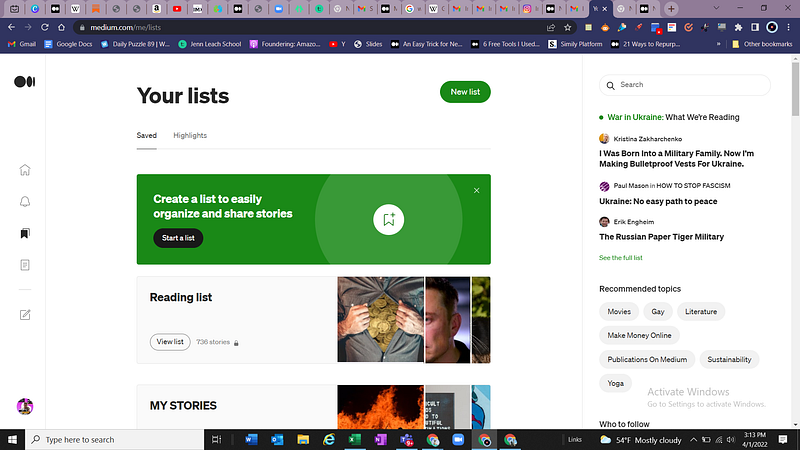
There are two options, the easiest solution now is to: Save Your Article to your Reading List as soon as you start reading.

Option #1 — Create the habit: Always Save when you start reading.

Sounds easy but in my experience, I really thought the Recently Viewed Tab was on all the platforms. I assumed! And you may forget, too.

Option #2 — It is buried — but there is a path to your desktop Reading History.

If you look far right, about halfway down, you will find between To Follow and Recently Saved, “See more suggestions.” It looks like this:

To Follow

See more suggestions

Recently saved

Yes, “See more suggestions” is the magic door to your reading history. Click on it and you will enter this page with these tabs:

Following

Reading history

Muted

Suggestions

Click on Reading History and you will see the stories that you just read.

Not great UX design, but once you get used to it, maybe not too bad.

Thank you to my special follower, Richard Armstrong who pointed this out! Richard Armstrong

So for the first day of April, I wanted to save you a small frustration that really hurts your reading joy.

Check it out and let me know what you think! And if you have any other secret workaround, please share it in the comments!

Have a great reading and writing weekend.

Here’s one of my other tech stories you might enjoy.

Here is a super-duper most colorful writer who is always entertaining: Jan Sebastian. She is from Hollywood and knows people!

Happy weekend and please read WrittenMastery Sreese Justiss Goode Robin Nemesszeghy Ema Fulga Rosa Diaz Diana Meresc Yana Bostongirl Bonobos Technology Burk Sandra Jasionowska Scot Butwell Elizabeth Kasujja Alex Rowe Sahil Patel Richard Armstrong Louise Coghlan

Medium
Writing Tips
Readers
Technews
Coffee Times Movement
Recommended from ReadMedium