


Do you know about GraphQL — The Query language for API s?
Hello everyone. We are going to see about an interesting technology called GraphQL, which is an open-source data query and manipulation language for APIs. GraphQL technology was developed by Facebook in 2012 for internal usage and it was publicly released in 2015. After being made open source, the GraphQL project was moved from Facebook to the newly-established GraphQL Foundation in 2018.

Let us understand some basics before we dive deep into the GraphQL
What is an API?
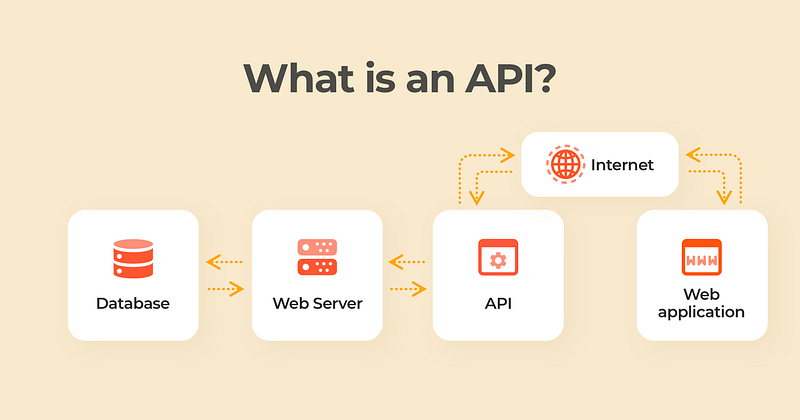
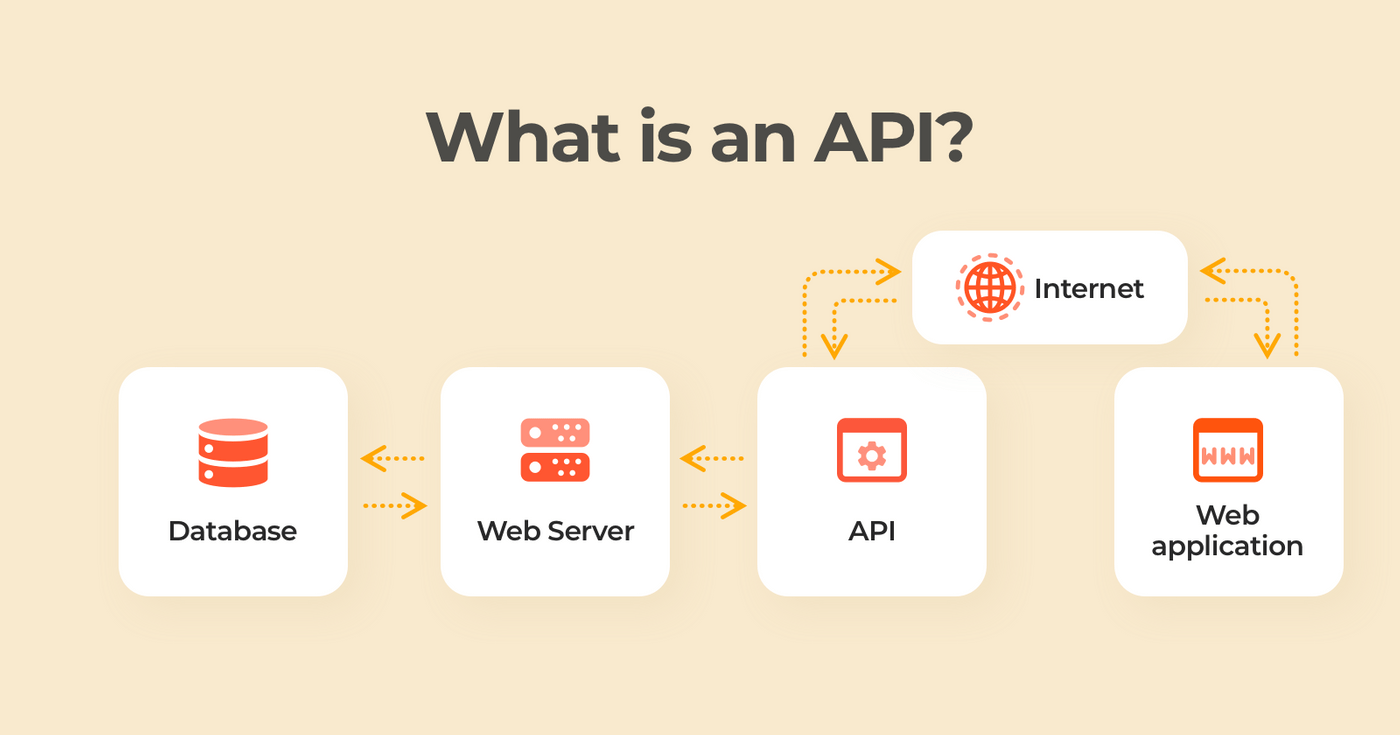
API stands for Application Programming Interface and is a way to communicate between different services. They let our product or service communicate with other products or services without knowing much about the implementation details. Eg: Google Maps API provides us the geographical information without us knowing about the implementation behind it.
APIs are also like contracts between 2 systems i.e an agreement between them on how to communicate specific requests or responses. APIs are also used to connect our infrastructure through cloud-native app development and to share data with customers and other external users.
What is a REST API?
When we think about APIs, the first thing that comes to our mind is REST API. The REST API is based on HTTP Protocol and it is stateless and is used to retrieve data from servers by URLs.
REST was developed in 2000 and it was considered an excellent fit for web applications as it provided many advantages over the famous SOAP APIs format which was based on XML.
Nowadays APIs have become more complex and data-driven which brings the following drawbacks to using REST APIs.
- Increased mobile usage brings the necessity to load the data efficiently.
- Nowadays there are different types of clients and it is difficult for REST APIs to satisfy satisfies their needs, as it returns a fixed data structure.
- REST makes it slower on the feature development of dynamic web and mobile applications.
What is GraphQL?
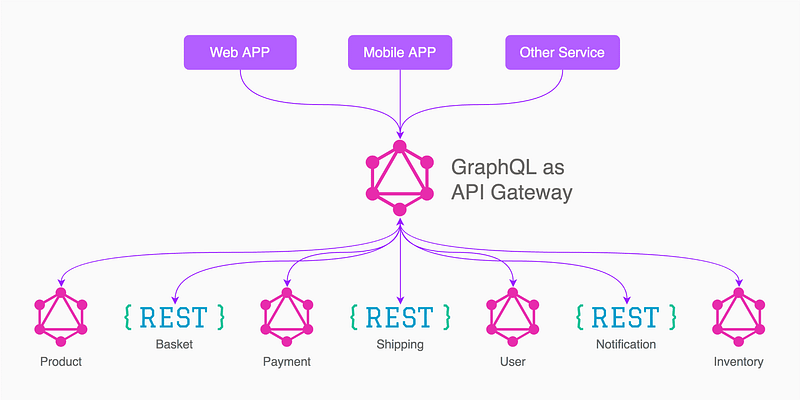
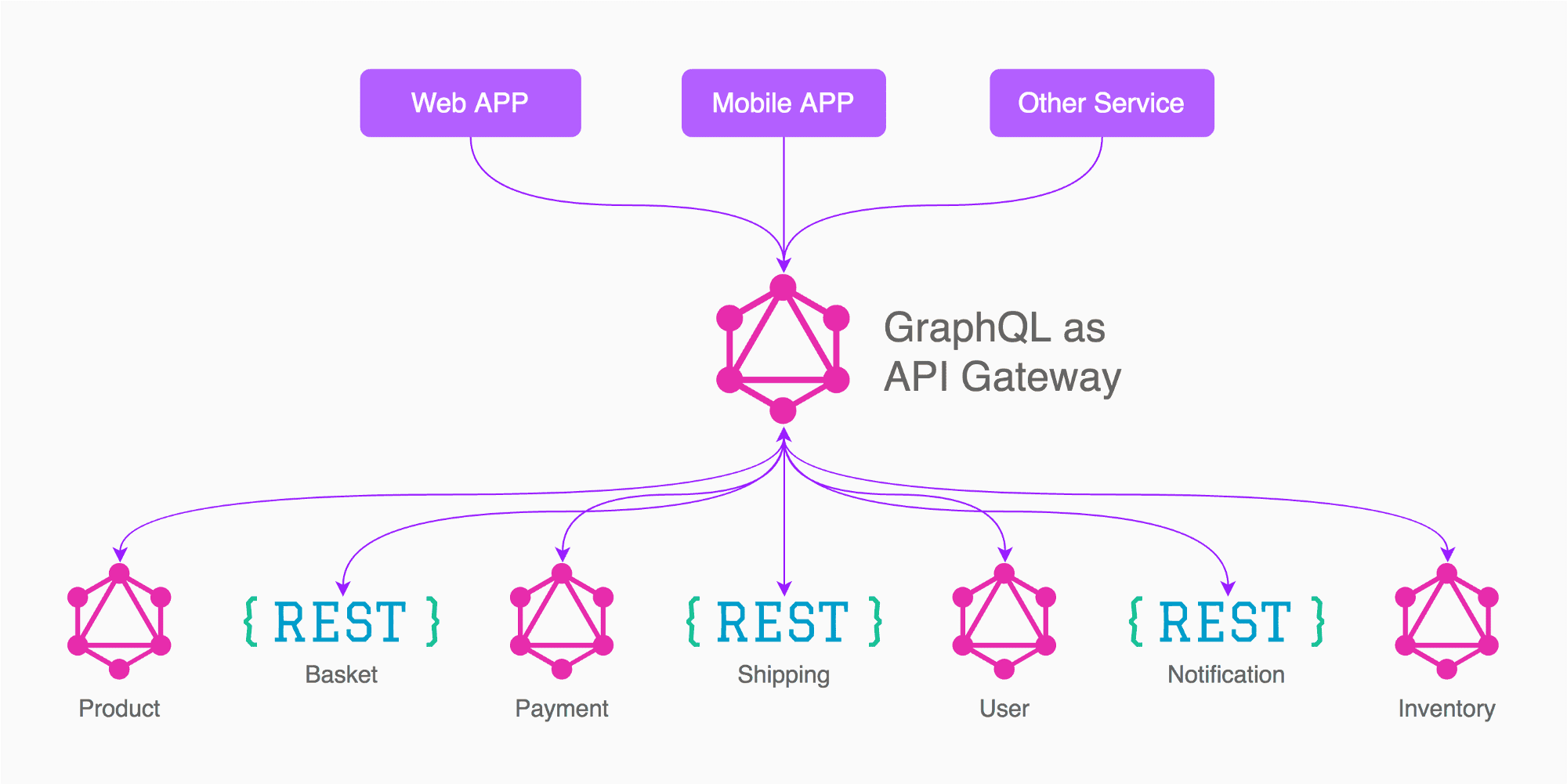
GraphQL is an open-source data query and manipulation language for APIs, and a runtime for fulfilling queries with existing data.
GraphQL stands for Graph Query Language, which is considered an alternative to the REST-based architecture by solving its drawbacks mentioned above. Unlike REST, GraphQL allows the client to ask only for specific fields instead of getting all the values in the response from the server.
When sending queries to your API, GraphQL returns a very predictable result, without any over-fetching or under-fetching, ensuring that apps using GraphQL are fast, stable, and scalable.
Imagine a scenario where an API always returns 100 fields and a client needs to use just 5 fields. We don't need the 95 fields in response but in REST API we don't have a choice but to receive all. Using GraphQL on top of REST API, a client can ask only 5 fields in the API response thereby saving network bandwidth and improving latency.
GraphQL also supports reading, writing, and subscribing to changes to data. GraphQL is provided for multiple languages including Haskell, JavaScript, Perl, Python, Ruby, Java, C++, C#, Scala, Go, Erlang, PHP, and R, which shows its popularity of it.
In a nutshell, using GraphQL
- Clients can specify exactly what data they need avoiding under-fetching or over fetching
- We can aggregate data from multiple sources
- GraphQL uses a type system to describe data rather than endpoints.
Client Server Communication in GraphQL
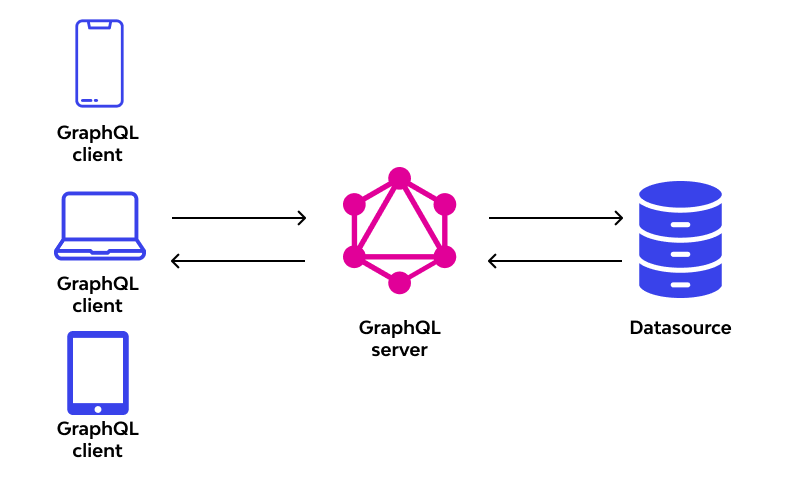
GraphQL requests can be sent through multiple protocols like HTTP, Websockets, etc but HTTP is the most popular choice. Let us see the steps needed for client-server communication using GraphQL
1. The client (Web, Mobile) sends a GraphQL operation using the HTTP Request.
2. When a client makes a request to send a GraphQL query to the server, it is sent as Query String and not JSON.
3. Once the server receives the request, it extracts the query string, processes it, and validates the GraphQL query.
4. The GraphQL API server makes calls to a database or other services to retrieve the data based on the query and sends the response in JSON format to the client
GraphQL Request and Response
Let us look at the operations performed in GraphQL and the request and response structure in this section
Root Operations in GraphQL
There are 3 root operation types that can be performed in a GraphQL request
1. Query:
Used to read data from the GraphQL API endpoint. The query is sent as a payload to the GraphQL server endpoint via POST request and the GraphQL engine parses the query, executes it against the resolver, and then sends them back to the client.
The following is the schema for the Student object created in the GraphQL server which is shared with the client
type Student {
  id: String
  name: String
  age: String
 }
A query looks like below
query { students { name age}
}
The request is a query for student data from the server. And we wanted to retrieve the name and ages of students even though the Student object has a lot of fields.
The response for the above query is in JSON format as below. It retrieves only the name and age of all the students in the database
{
  "data": {
    "students": [
      {
        "name": "xxxx",
        "age": 12
      },
      {
        "name": "yyyy",
        "price": 10
      },
      {
        "name": "zzzz",
        "price": 13
      }
    ]
  }
}
Let's say now another client can query like this with an extra field and the server would respond with 3 fields
query { students { name age id}
}
The response is as follows. Here the response contains the extra id field asked by the client. This is the real power of GraphQL where the Client can only get the fields they need.
{
  "data": {
    "students": [
      {
        "name": "xxxx",
        "age": 12,
        "id": 1
      },
      {
        "name": "yyyy",
        "age": 10,
        "id": 2
      },
      {
        "name": "zzzz",
        "age": 13,
        "id": 3
      }
    ]
  }
}
2. Mutation:
The mutation is used to add, edit or delete data from the server.
Instead of the Query keyword, we need to use the mutation keyword and there are 3 types of operations that can be performed using the mutation
- create a new record
- update existing record
- delete a record
As you can see these are exactly like the CRUD operations in the REST API calls. We pass the data needed as params and get the provided field values in response
The mutation to add a student will add the below record in the database and the JSON response is shown below
Requestmutation {
addStudent(id: 1, name: "xxx", age: 12) {
id
name
age
}
}Response{
"data": {
"addStudent": {
"id": 1
"name": "xxxx",
"age": 12
}
}
}Now let us use the update mutation to update the name of the student with id 1. The response provides the updated name
Requestmutation {
updateStudent(id: 1, name: "yyyy") {
id
name
}
}Response{
"data": {
"updateStudent": {
"id": 1
"name": "yyyy",
}
}
}Now let us delete the student record with a delete mutation. The student with 1 is deleted and the response is provided
mutation {
  deleteStudent(id: 6) {
    id
    name
  }
}
{
"data": {
"deleteStudent": {
"id": 1
"name": "yyyy",
}
}
}3. Subscription:
Subscriptions are similar to Queries to fetch data but it allows the client to receive real-time updates from the server using Socket.io by setting up real-time communication between the client and server. GraphQL has this inbuilt functionality.
GraphQL subscriptions allow clients to listen when data is created, updated, or deleted on the server. These events are pushed from the server to the subscribed clients.
Clients subscribe to a server-side event by using the subscription query:
subscription NewsFeed {

  newsCreated {

    title

    body

  }

}
This subscription will be for the newsCreated field.
The GraphQL Subscriptions use WebSocket for communication instead of the normal POST method which queries and mutations use. Subscriptions maintain an active connection to the server listening and waiting for the server to push updates to it.
You can try out the GraphQL Queries and Mutations in the below link
GraphQL Architectural Patterns
As seen in this article, GraphQL follows a typical client-server architectural pattern. The GraphQL server can be used in 3 different architecture styles as follows
1. GraphQL Server with Connected Database
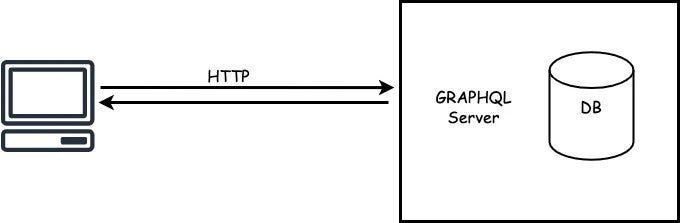
In this architecture, the GraphQL server is connected to the database and this architecture is good for new projects. The server receives the query from the client, fetches the data, and provides a response to the client. This is called Query resolution.
GraphQL server can connect to any type of database for eg: MySQL, MongoDB, AWS Aurora, etc.
The advantage of this pattern is the requests can be served with low latency as the data source is close to the GraphQL server.
2. GraphQL Server integrated with the Existing System
In this pattern, the GraphQL server is used to abstract the different services from the client
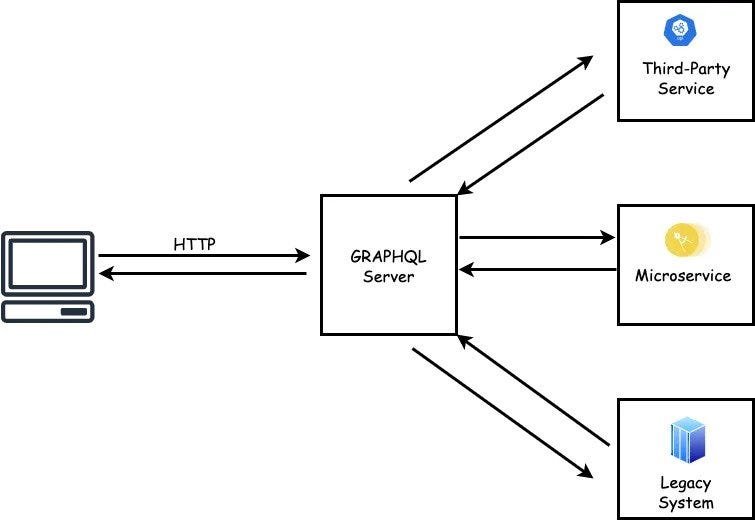
In larger organizations, there might be big projects that interact with different systems like Third Party services, some new microservices, and legacy systems. In this scenario, if we want to implement GraphQL, then this architecture is more suited as it hides the complexity of all the systems and the clients can call the GraphQL server to obtain data according to the client’s requirement thereby getting the benefits of GraphQL
3. Hybrid approach with connected database and integration of existing system
In this hybrid approach, the GraphQL server is connected to its own data source and also it will interact with the legacy systems.
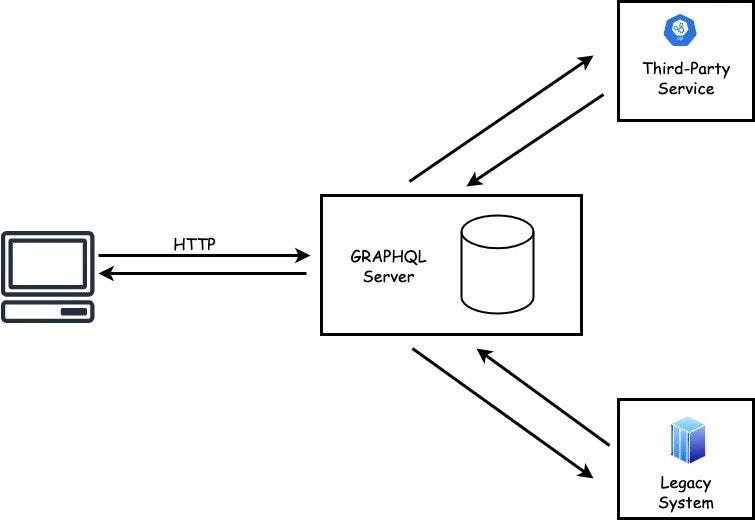
The GraphQL will try to look for the data in the database and if not found, it will get from the legacy systems. This approach is best used for incremental migration of legacy systems into the new GraphQL server. Once the migration is completed, then the whole architecture will be back to the “GraphQL server with the connected Database” pattern
REST vs GraphQL
Having seen in-depth GraphQL, let's compare it with REST.
In the REST architecture style, we have multiple endpoints and the client will call the relevant endpoints and these endpoints will be talking to the service layer.
The graph layer only exposes a single endpoint through GraphQL and it will connect to the service layer to retrieve the data.
REST is a type of architecture pattern while GraphQL is particularly a query language.
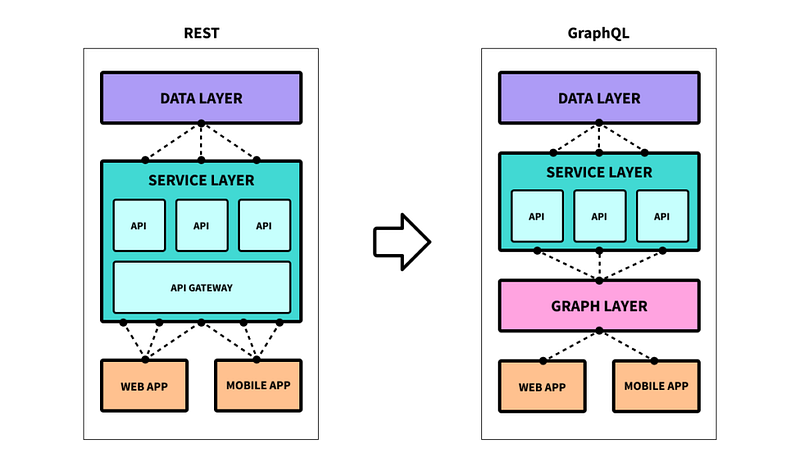
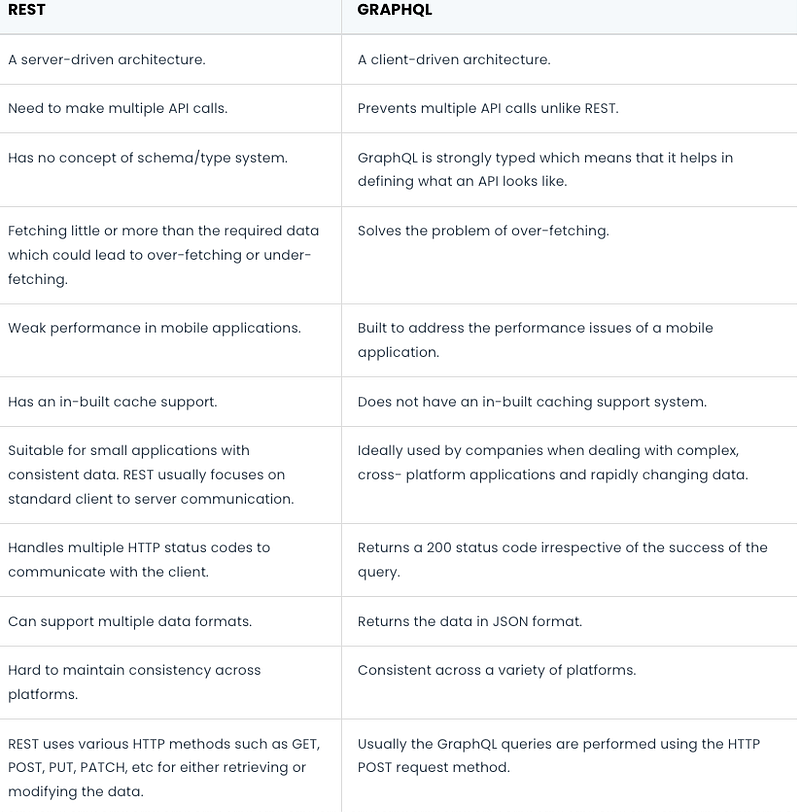
We need to consider a lot of factors as mentioned above when choosing between GraphQL vs REST. GraphQL would be ideal for mobile clients that need better performance. It is also useful in a system where there are a lot of data sources. If you are dealing with frequent changes in the data source, then GraphQL is suitable as you can swap the resolvers easily.
Summary
In this article, we started to understand what is an API and what is a REST API. Then we saw GraphQL and how the client-server communication happens in GraphQL. Later we saw the operations performed in GraphQL and also about the 3 architectural styles that can be used. Then we compared GraphQL with REST to conclude this article.
Please read my next article on GraphQL
Hope this was useful and thanks for reading this!!!
If you like to get more updates from me, please follow me on Medium and subscribe to email alert.If you are considering to buy a medium membership, please buy through my referral link https://dineshchandgr.medium.com/membership