avatarBrenda Mahler

Free AI web copilot to create summaries, insights and extended knowledge, download it at here

1418

Abstract

n them in a new window. When they are all open in different tabs, you can go back and follow the process on each one.</li><li>Open the tab so the complete article is on the screen. Click on the three dots in the top right corner.</li></ol><figure id="7899"><img src="https://cdn-images-1.readmedium.com/v2/resize:fit:800/1*yKeXEYOQa1WJdBFch6V8hQ.png"><figcaption>Image snipped from author’s Medium page.</figcaption></figure><p id="5999">3. From the drop-down menu, chose “edit story.”</p><figure id="2e31"><img src="https://cdn-images-1.readmedium.com/v2/resize:fit:800/1*E7y8tmjWH4r5_eyXRR-J6Q.png"><figcaption>Image snipped from author’s Medium page.</figcaption></figure><p id="f494">4. The dropdown menu will change. Click on “Manage meter setting.”</p><figure id="c280"><img src="https://cdn-images-1.readmedium.com/v2/resize:fit:800/1*YTRpiLklZ7uvgA39IHbnIA.png"><figcaption>Image snipped from author’s Medium page.</figcaption></figure><p id="7a6e">5. The next screen will display an unchecked box beside “Meter you story.” <b>Check it!</b> Best practice is to check this box before publishing but once you discover it was not checked, this is how to remedy the problem.</p><figure id="ec9b"><img src="https://cdn-images-1.readmedium.com/v2/resize:fit:800/1*EOB2DLNeuL10Qw2iCZH7Hg.png"><figcaption>Image snipped from author’s Medium page.</figcaption></figure><p id="8e11">6. Save! Save! Save!</p><figure id="6

Options

c14"><img src="https://cdn-images-1.readmedium.com/v2/resize:fit:800/1*1Md4xJroD8Ii8XU5X2sdcg.png"><figcaption>Image snipped from author’s Medium page.</figcaption></figure><p id="540c">Congratulations! Once each of these steps is complete, your story is eligible to earn money. Now, go through these steps for each unmetered story.</p><p id="68e1">I do not know if Medium is being difficult or if the mystery of technology is causing this problem but after publishing an article about my frustrations of not getting paid for the story, it became clear many other writers are encountering similar experiences.</p><div id="3641" class="link-block"> <a href="https://readmedium.com/medium-who-changed-my-stories-to-unmetered-2afdf101b06e"> <div> <div> <h2>Medium, Who Changed My Stories to Unmetered?</h2> <div><h3>I feel cheated! No, I was cheated!!</h3></div> <div><p>medium.com</p></div> </div> <div> <div style="background-image: url(https://miro.readmedium.com/v2/resize:fit:320/0*d-UE8cK7Xiv9UvQG)"></div> </div> </div> </a> </div><p id="b2a6">As writers and readers on this platform, we can share how to find success and eliminate confusion. If you have a tip, please let us know because together we can . . .do anything.</p></article></body>

Check if Your Stories are Metered to Earn Money on Medium

The star tells you if you are making money — or not
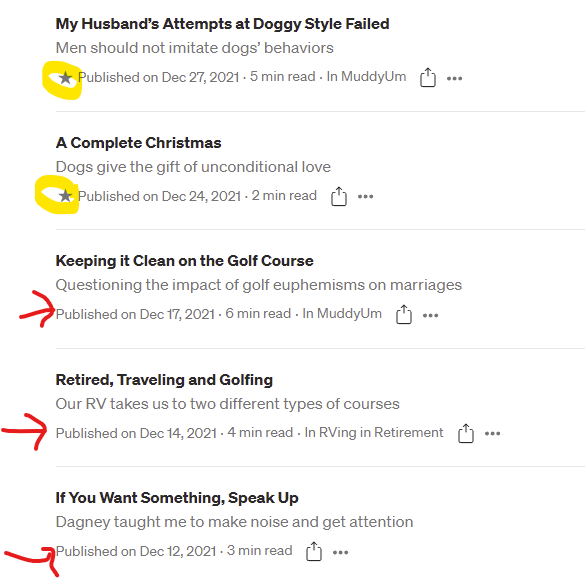
Image snipped from author’s Medium page.

See the highlighted star beside the word Published? It is the signal that a story is metered. My first two articles in the picture are metered; therefore, I make money based on the number of member readers on Medium and their interactions.

The three articles with the red arrows are not metered, no star, so my articles may obtain the same amount of readers but will earn no money. Well, for me this is a no-brainer. I want to make money. So something must be done.

Follow this tutorial to quickly learn how to turn on metering

Once you scroll through all published stories and find those that are not metered complete each of the following steps.

  1. The first time I did this, I began be scrolling through all my stories and discovered several were not metered. Each time I found an article missing a star, I changed the story from unmetered to metered. Note: This can be time-consuming and this quick trick will speed up the process. Right-click on the title of all unmetered stories and open them in a new window. When they are all open in different tabs, you can go back and follow the process on each one.
  2. Open the tab so the complete article is on the screen. Click on the three dots in the top right corner.
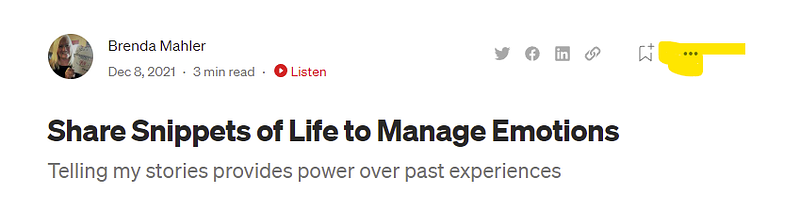
Image snipped from author’s Medium page.

3. From the drop-down menu, chose “edit story.”
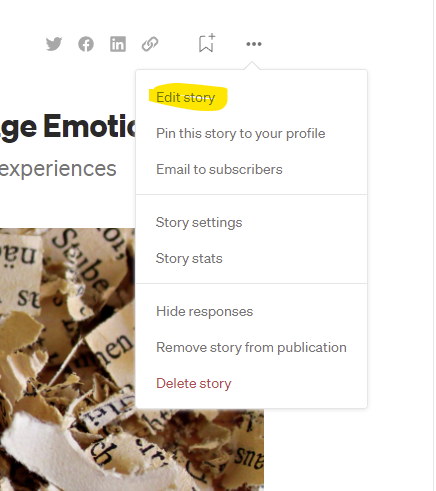
Image snipped from author’s Medium page.

4. The dropdown menu will change. Click on “Manage meter setting.”
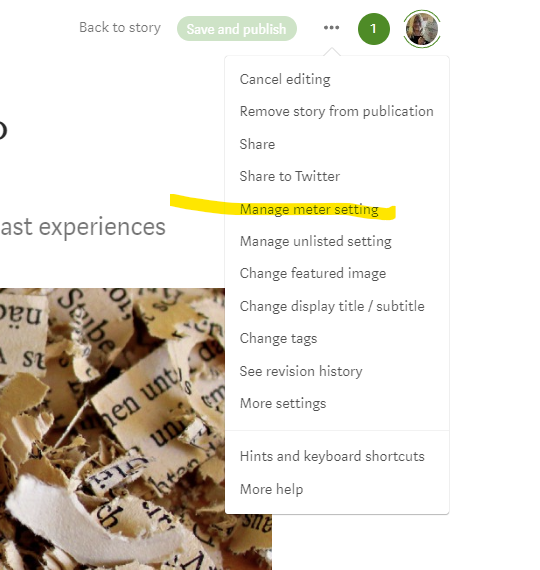
Image snipped from author’s Medium page.

5. The next screen will display an unchecked box beside “Meter you story.” Check it! Best practice is to check this box before publishing but once you discover it was not checked, this is how to remedy the problem.
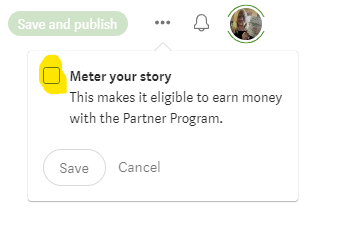
Image snipped from author’s Medium page.

6. Save! Save! Save!

Image snipped from author’s Medium page.

Congratulations! Once each of these steps is complete, your story is eligible to earn money. Now, go through these steps for each unmetered story.

I do not know if Medium is being difficult or if the mystery of technology is causing this problem but after publishing an article about my frustrations of not getting paid for the story, it became clear many other writers are encountering similar experiences.

As writers and readers on this platform, we can share how to find success and eliminate confusion. If you have a tip, please let us know because together we can . . .do anything.

Paywall
Medium
Earn Money Online
Writers On Writing
Writer
Recommended from ReadMedium