

Do Not Put Filtering Conditions In the “WHERE” Clause in Some Scenarios
Do you what happens if we put conditions after LEFT JOIN ON?
As long as you click into this article, I’m pretty sure you should understand SQL. You must also understand that we should put our conditions in the WHERE clause in a SELECT query. However, let me ask you a question and see if you can answer it immediately.
What will happen if we put a filter condition with LEFT JOIN … ON … clause?
SELECT *
FROM Employee e LEFT JOIN Department d
  ON e.dept_id = d.id
  AND e.name = 'Chris'
If you are unsure about the behaviour of the above query or think it is equivalent to the following one, please read my article and I’ll tell you why they are different.
SELECT *
FROM Employee e LEFT JOIN Department d
  ON e.dept_id = d.id
WHERE e.name = 'Chris'
1. Verify the Results

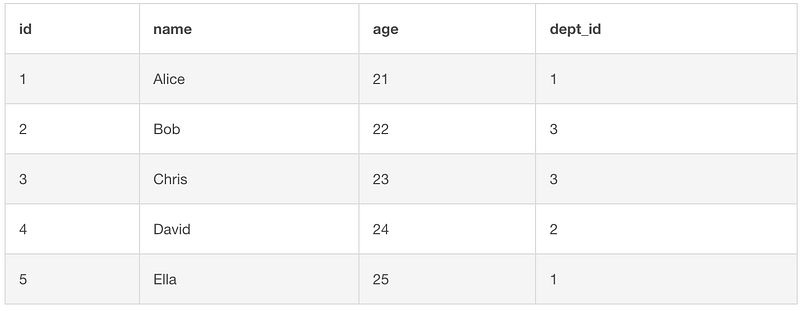
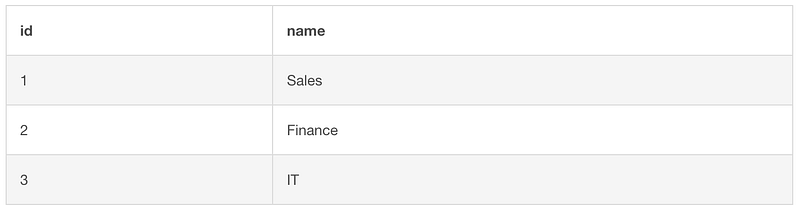
For demonstration purposes, I have created two tables with simple dummy data as follows.
The Employee Table
The Department Table
Now, let’s run the first query in the introduction. For your reference, I’ll put the query here again.
SELECT *
FROM Employee e LEFT JOIN Department d
  ON e.dept_id = d.id
  AND e.name = 'Chris'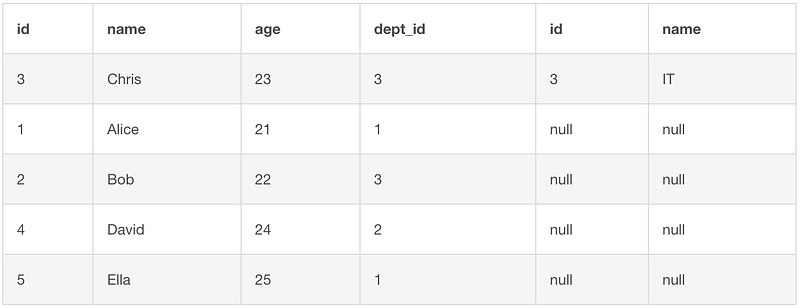
That was the answer. Were you right? :)
Just for comparison purposes, I’ll also put the 2nd query and its results here. Of course, there is nothing to be surprised about, the filter condition will filter the results eventually.
SELECT *
FROM Employee e LEFT JOIN Department d
  ON e.dept_id = d.id
WHERE e.name = 'Chris';
Why that’s the case? Let’s have a deep dive in the next section.
2. The Logic of Joins

Before we can understand why the behaviour is like that, we need to review what are LEFT JOIN and RIGHT JOIN exactly and to make sure we fully understand it.
Let me show you what RIGHT JOIN with condition looks like. The same query as above but using RIGHT JOIN leads to the following results.
SELECT *
FROM Employee e RIGHT JOIN Department d
  ON e.dept_id = d.id
  AND e.name = 'Chris'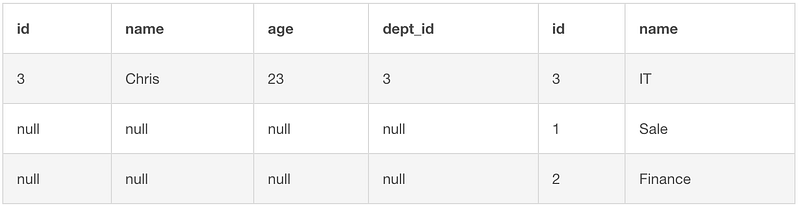
Now, let’s have a look at the workflow so we will understand why that happens.
LEFT JOIN with Conditions
The JOIN action in SQL is used to combine two tables, the left table and the right table. When we use LEFT JOIN, all the rows in the left table will be guaranteed to be retained. Only the right table will be filtered based on the joining conditions.
The following example is for the scenario that we only have e.dept_id = d.id as the joining condition.
SELECT *
FROM Employee e LEFT JOIN Department d
  ON e.dept_id = d.id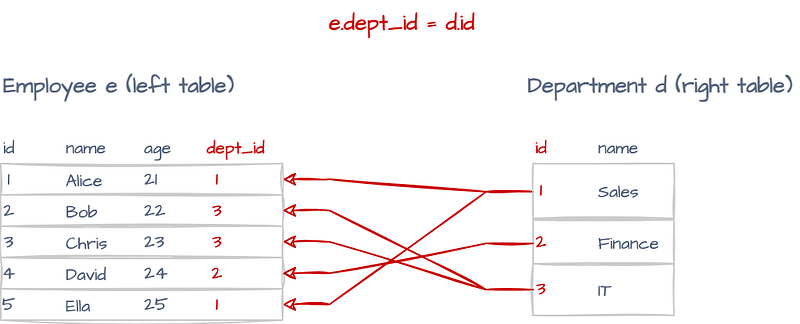
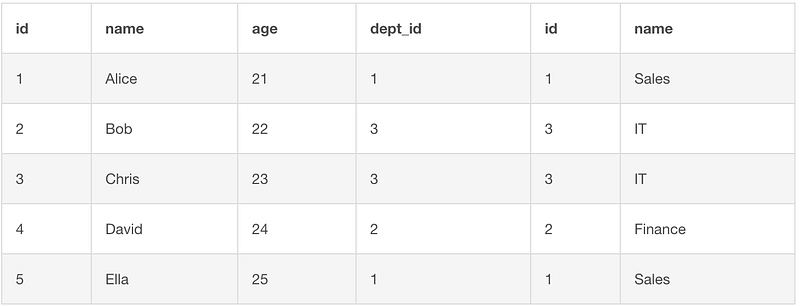
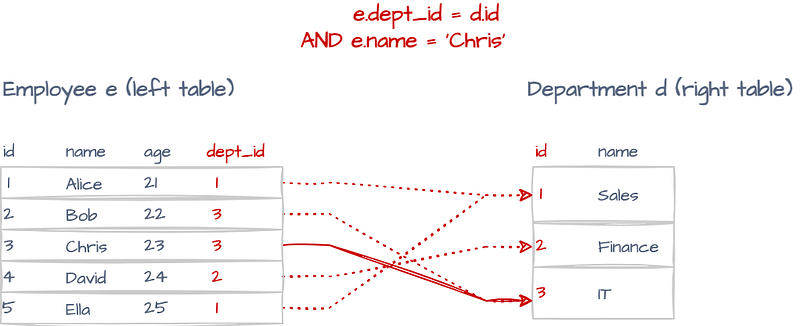
In the above query, we can think it like this. The left table Employee is written on the paper already, then we look at it row by row. For each row on the left table, we will loop the right table Department row by row, to see which row matches the condition. If it matches, we will write down the row on the right following the row on the left.
For example, when we look at “Alice”, the dept_id=1. The first row on the right “Sales” department has the same id. So, this row will be written following the “Alice” row on the left.
Now, let’s have a look at the query with the extra condition e.name = 'Chris'.
SELECT *
FROM Employee e LEFT JOIN Department d
  ON e.dept_id = d.id
  AND e.name = 'Chris'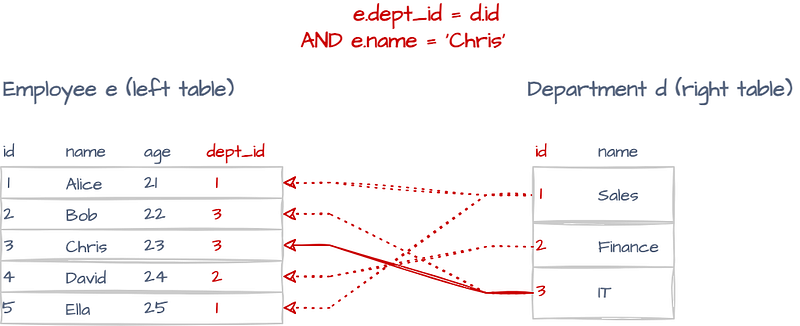
I still use the same arrows. However, this time the dashed lines indicate that only the first condition e.dept_id = d.id is met but not the second condition e.name = 'Chris'. For example, the figure below shows that although both the IDs are 1, the e.name is Alice, not Chris.
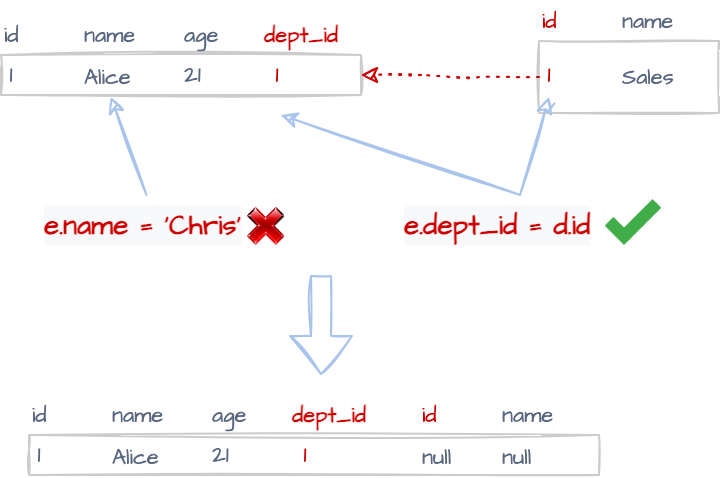
Of course, the other two rows on the right cannot satisfy the two conditions either. Therefore:
The row on the left will be retained and no row on the right will be selected to join with it.
The only matched pair in this example is as follows.
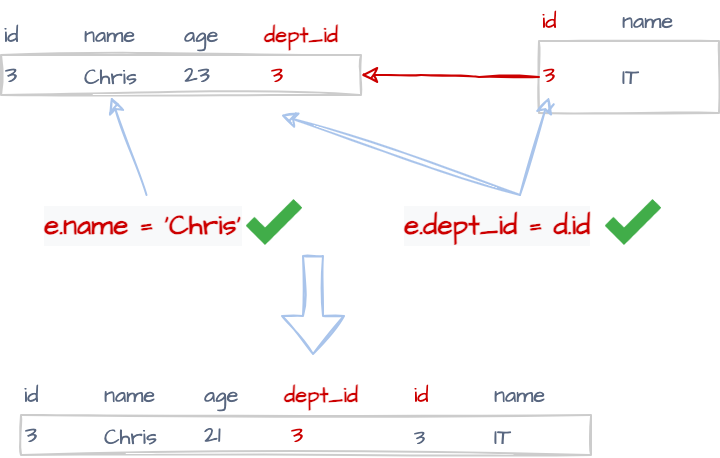
Therefore, we will see that only the row with “Chris” has a valid joined row from the right table. Because the id and name columns from the right tables are needed, all the other rows will show null values to fill the gaps in these two columns.
RIGHT JOIN with Conditions
Now, let’s have a look at the RIGHT JOIN scenario. It will be exactly the opposite. The right table will be guaranteed to be retained, and it will try to find the matched rows from the left table based on the conditions.
Therefore, the RIGHT JOIN with the above condition will be as follows.
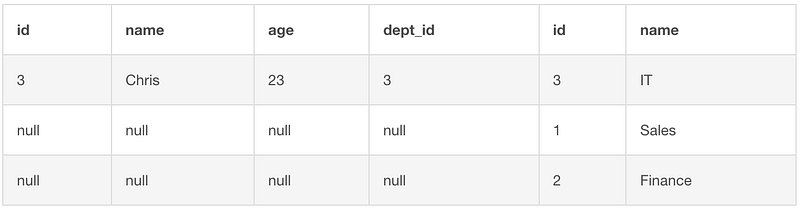
Since the only row on the left that satisfies both conditions is the “Chris” one, the result will be as follows.
3. When to Use It?

Basically, it will be rare cases that we want to put conditions in the ON clause because it doesn’t actually filter the results. However, that also means we can use it when we want to retain all the records from the left table (or right table) regardless of the conditions.
A Practical Use Case: Campaign Sales Report
Suppose we have two tables: Campaigns and Sales.
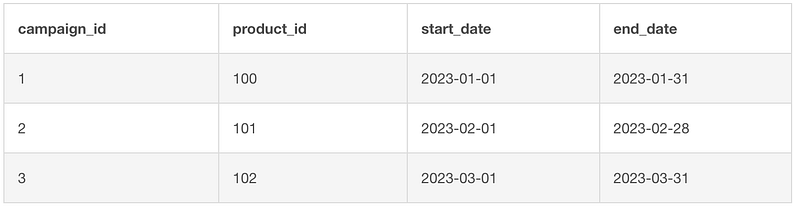
The Campaigns table has all the campaign activities and each campaign only has one product. Of course, each campaign also has start and end dates.
CREATE TABLE Campaigns (
    campaign_id INT PRIMARY KEY,
    product_id INT,
    start_date DATE,
    end_date DATE
);
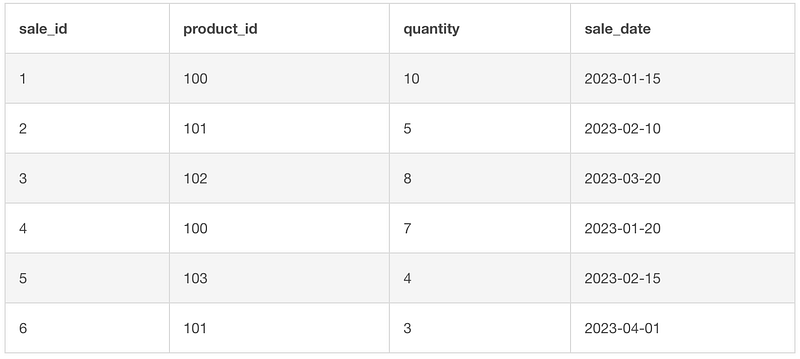
The Sales table has all the transactions. Each transaction has one or more products and along with a sale date.
CREATE TABLE Sales (
    sale_id INT,
    product_id INT,
    quantity INT,
    sale_date DATE,
    PRIMARY KEY (sale_id, product_id)
);
Now, the problem we need to resolve is to list all the campaign activities, as well as the number of products sold during these activities. Also, we don’t want to miss any campaigns because even if no product was sold during the activities, we still want to know it.
The SQL query is as follows. We can put the sale date filtering conditions into the LEFT JOIN … ON clause. This makes sure that the joining is valid, as well as we don’t lose any campaigns even if there was no product sold.
SELECT C.campaign_id,
       C.product_id,
       C.start_date,
       C.end_date,
       SUM(S.quantity) AS TotalCampaignSales
FROM Campaigns C LEFT JOIN Sales S
  ON C.product_id = S.product_id
  AND S.sale_date >= C.start_date
  AND S.sale_date <= C.end_date
GROUP BY C.campaign_id,
         C.product_id,
         C.start_date,
         C.end_date
ORDER BY SUM(S.quantity) DESC;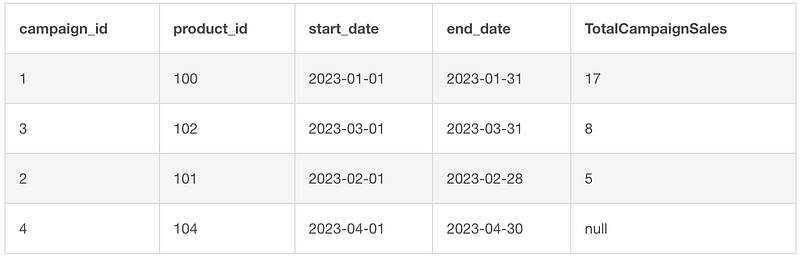
The result shows that the campaign #1 is the most successful one, while the campaign #4 was not effective at all.
What if we put the conditions in a WHERE clause?
The result is still valid, but we won’t be able to see the campaign #4.
SELECT C.campaign_id,
       C.product_id,
       C.start_date,
       C.end_date,
       SUM(S.quantity) AS TotalCampaignSales
FROM Campaigns C LEFT JOIN Sales S
  ON C.product_id = S.product_id
WHERE S.sale_date >= C.start_date
  AND S.sale_date <= C.end_date
GROUP BY C.campaign_id,
         C.product_id,
         C.start_date,
         C.end_date
ORDER BY SUM(S.quantity) DESC;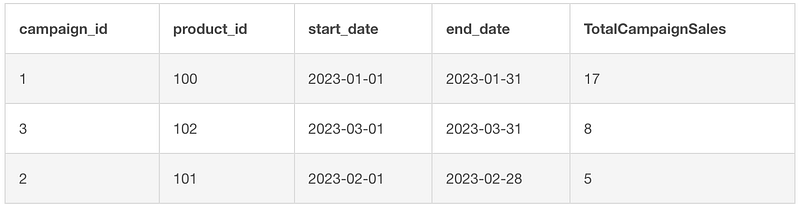
So, we won’t be able to see campaign #4 at all, because there was no product sold during the campaign. Suppose we have more columns in the Campaigns table such as the campaign budget, it will be even more useful if we can return all the campaigns. For example, how much budget have we wasted on campaigns that were not sold with any products?
Summary

In this article, I have focused on a very small syntax pitfall in SQL, which is the conditions in the LEFT/RIGHT JOIN … ON clause. Normally we will put the filter conditions in the WHERE clause. However, the conditions in the ON clause will not reduce the number of rows, but it affect if the table on the other side will be joined or not. If the conditions are not met, they will be left as null values.
I have explained this behaviour with my best efforts. Additionally, the practical use case was also given. Hope it will be helpful.
Unless otherwise noted all images are by the author


