
Do not fight anymore over code indentation
I have some experience reviewing code, and in the past, I used to have some very nice discussions with my team about code indentation. I realize that code indentation is a personal matter; like an artist, the programmer uses code indentation to showcase their style. When discussing personal style, it is difficult to assert that something is wrong, and it is nearly impossible to agree on a style that suits everyone.
I have already seen the code bellow indented in many different formats:
public void doSomething(
         String parameter1,
         int parameter2,
         double parameter3,
         List<String> letters)
{
  if(parameter2 == 5)
  {
    doSomethingElse(parameter1);
  }
  else {
    var returnValue = methodWithManyParameters(parameter1,parameter2,parameter3,"Hardcode string",getParameter5(),List.of(1,2,3,4,5));
  }

  Set<String> vowels = Set.of(
    "a",
    "e",
    "i",
    "o",
    "u"
  );

  List<Character> consonants = letters.stream()
                                      .filter(letter -> !vowels.contains(letter))
                                      .map(letter -> letter.charAt(0))
                                      .toList();

  if(parameter1.equals("medium") && (parameter2 == 20 || parameter2 == 40) && parameter3 > 0 && parameter3 < 100){
    doAnotherThing();
  }
}
Some years ago, I found a nice tool that helped us define rules on how to format our code, eliminating the need for lengthy discussions about whether to add a line break before the bracket.
I am referring to the Google Java Code Style, which contains a predefined set of rules for formatting your code.
The advantage of this approach is that you don’t need to debate whether to use tabs or spaces because Google has already defined it, along with many other rules.
We can use various tools to automatically apply the Google Java Code Style to our code, and I will show you some ways of doing that.
1. CLI application
You can use the google-java-format program to format your code using a CLI application. You need to download the program (which is also a java program) from https://github.com/google/google-java-format/releases and run the following command:
java -jar /path/to/google-java-format-${GJF_VERSION?}-all-deps.jar <options> [files...]

java -jar ./google-java-format-1.21.0-all-deps.jar --replace ./Main.java
When you run the command above, it will reformat the code of the Main class as follow:
public void doSomething(
    String parameter1, int parameter2, double parameter3, List<String> letters) {
  if (parameter2 == 5) {
    doSomethingElse(parameter1);
  } else {
    var returnValue =
        methodWithManyParameters(
            parameter1,
            parameter2,
            parameter3,
            "Hardcode string",
            getParameter5(),
            List.of(1, 2, 3, 4, 5));
  }

  Set<String> vowels = Set.of("a", "e", "i", "o", "u");

  List<Character> consonants =
      letters.stream()
          .filter(letter -> !vowels.contains(letter))
          .map(letter -> letter.charAt(0))
          .toList();

  if (parameter1.equals("medium")
      && (parameter2 == 20 || parameter2 == 40)
      && parameter3 > 0
      && parameter3 < 100) {
    doAnotherThing();
  }
}
2. Maven Plugin
You can use the fmt-maven-plugin in Maven, which can automatically format your code with every build you make. This means that even if you try to use your own code style, the build will reformat it.
To use it, you just have to add this plugin in your pom.xml file.
<build>
    <plugins>
        <plugin>
            <groupId>com.spotify.fmt</groupId>
            <artifactId>fmt-maven-plugin</artifactId>
            <version>VERSION</version>
            <executions>
                <execution>
                    <goals>
                        <goal>format</goal>
                    </goals>
                </execution>
            </executions>
        </plugin>
    </plugins>
</build>
When you build your code (for example, with the command mvn clean install), you receive the following log indicating how many files were formatted:
[INFO] --- fmt-maven-plugin:2.23:format (default) @ google-format ---
[info] Processed 1 files (1 reformatted).
3. GitHub Action
Another alternative to formatting your code is to use a GitHub action. There is a predefined action called Google Java Format that you can configure:
name: Format

on:
  push:
    branches: [ main ]

jobs:

  formatting:
    runs-on: ubuntu-latest
    steps:
      - uses: actions/checkout@v4 # v2 minimum required
      - uses: axel-op/googlejavaformat-action@v3
        with:
          args: "--skip-sorting-imports --replace"
          # Recommended if you use MacOS:
          # github-token: ${{ secrets.GITHUB_TOKEN }}
Every time you push to the main branch, GitHub runs this action, scans your repository, reformats your code, and automatically commits it.
This GitHub action has not been updated since 2022, and it does not support new versions of Java.
4. Intellij Plugin
Intellij also has a plugin that applies that Java Google Code Style to your code. This approach is very useful because your code gets formatted while you are writing it.
The mentioned plugin is google-java-format, and once you install it in IntelliJ, you have to enable it.
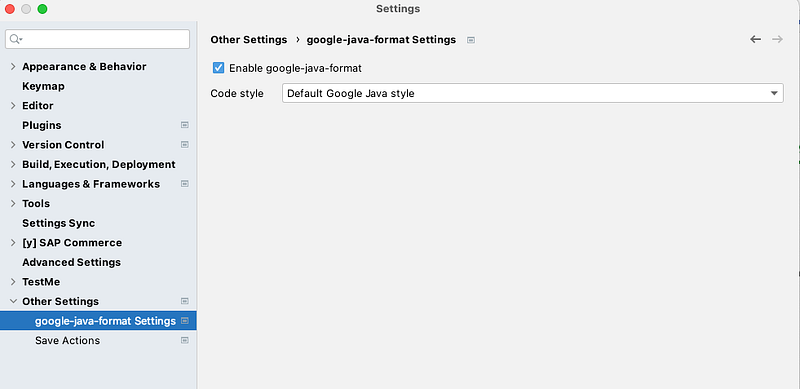
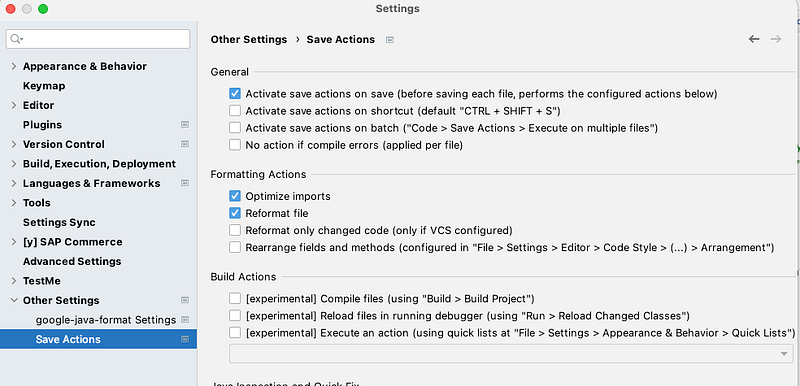
Making this configuration, your code is formatted with Google Style. Additionally, you can add the Save Actions plugin, which gives you another tool that applies the formatting after you save your code. With that in place, every time you save your code, it is automatically formatted, and you will never forget to do it.
After installing the Save Actions plugin, you have to configure it to reformat your code after you save it.
Conclusion
You may not agree with some of the formatting done by the tool, but you cannot argue with the fact that using the tool will establish a convention that is easily applicable in your project. An additional benefit is that your pull requests won’t be cluttered with formatting changes.


