Do Flutter apps dream of platform aware widgets?
Agnostic layout with platform specific widgets
Flutter is a new cross-platform app development framework which promises absolute freedom in creating user experiences regardless of the host platform. It achieves that by taking over the rendering pipeline and managing everything by itself, from laying out the components, to drawing them. Customising everything is the lifeblood of Flutter. Applications which use a heavy design branding language are an obvious target for this platform independence. Think of Netflix, it feels and looks the same regardless if it runs on your iPhone, Android or PlayStation.
But what about brands who would like to keep a platform-specific look and feel? Many companies embrace Material Design or iOS Human Interface language to keep their customer base in a familiar environment.
Flutter is equipped with packages which contain a healthy set of native widgets for iOS and Android called Cupertino and Material.
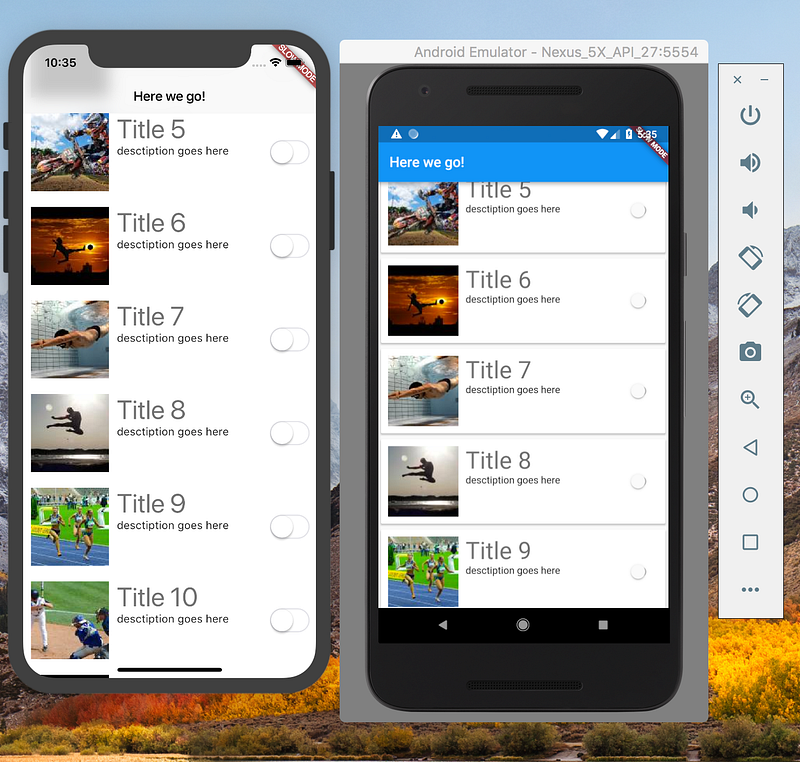
The framework is agnostic in its essence when it comes to UI. However, some widgets require an ancestor which belongs to the same “platform-specific” library, e.g. RaisedButton belongs to the Material package library and it requires a Material widget to be one of its ancestors. This presents developers with a problem in terms of reusability of the layout code.
One of the questions I get a lot from the business is — “but can we effectively build native-looking apps and still have reusable code?”
This is a valid question if we are looking for that native look and feel. My reaction to a question like that would be — yes, we can build two “native” layout trees, one for each host platform. Simple enough, right?
Well, not really. We are fooling ourselves into two implementations, exactly the opposite of what we aimed to achieve. Both trees are inherently different as both platforms have different needs in terms of dependencies and initialisation. Our holy grail of reusable code fades away.
I would like to propose an approach which allows building abstract UI and adjusts its look and behaviour depending on which platform it runs on.
Consider the following constructors for two widgets which provide a top app bar:
and
Both of the above play the same role, providing a top application bar in a Cupertino and Material style, but still they require some different properties. We need a solution which will abstract the way we are instantiating specific types and provide implementations based on the host platform. We will resort to the old trick of Factory method pattern.
In essence it is a *Platform-specific Widget Factory* using the framework’s **StatelessWidget** as an interface.
When implemented, the above class can provide a custom constructor (or a number of named constructors) which supports the needs of both concrete classes.
Note: The reason why I’ve chosen generics to return specific concrete classes is that sometimes the parent widget will need a specific type to be returned from the child widget.
Having this out of the way, we can implement our first platform aware widget.
Pretty simple, right?. Notice that we have full control on the contents of the application bar widgets and they way we instantiate them.
For the sake of time, let’s assume we’ve implemented a scaffold and a button as well.
Now we are ready to use (and reuse) our platform aware widgets.
And we’re done! The above code will render a native looking app bar on both platforms, and our PlatformScaffoldWidget is ready to be reused throughout the rest of the app without any hassle. Have a look and let me know what you think


